Goa Board Class 10 Question Paper 2025 Data Processing
Finished viewing? Save it for later —
Download Goa Board Class 10 Question Paper 2025 Data Processing (PDF · 8 pages)About Goa Board Class 10 Question Paper 2025 Data Processing
Goa Board Class 10 Question Paper 2025 Data Processing is available here for free download. Published by Goa Board for Class 10, this question paper can be viewed online or downloaded as a PDF (8 pages). Candidates preparing for Class 10 can use Goa Board Class 10 Question Paper 2025 Data Processing to understand the exam pattern, the type of questions asked, and the overall difficulty level.
Frequently Asked Questions
How can I download Goa Board Class 10 Question Paper 2025 Data Processing?
Open this page and click the Download button to save Goa Board Class 10 Question Paper 2025 Data Processing as a PDF. It is completely free on AglaSem Docs.
Is Goa Board Class 10 Question Paper 2025 Data Processing free to download?
Yes. Goa Board Class 10 Question Paper 2025 Data Processing can be viewed online and downloaded as a PDF free of cost on AglaSem Docs.
How many pages does Goa Board Class 10 Question Paper 2025 Data Processing have?
Goa Board Class 10 Question Paper 2025 Data Processing contains 8 pages, which you can read online or download together as a single PDF.
Where can I find more Class 10 study material?
You can find more Class 10 question papers, sample papers, syllabus, and answer keys on AglaSem Docs.
Goa Board Class 10 Question Paper 2025 Data Processing – Text
Read the full text of this question paper below — useful to quickly search, copy and reference the content online without downloading the PDF.
📄 View text version (8 pages)
Page 1
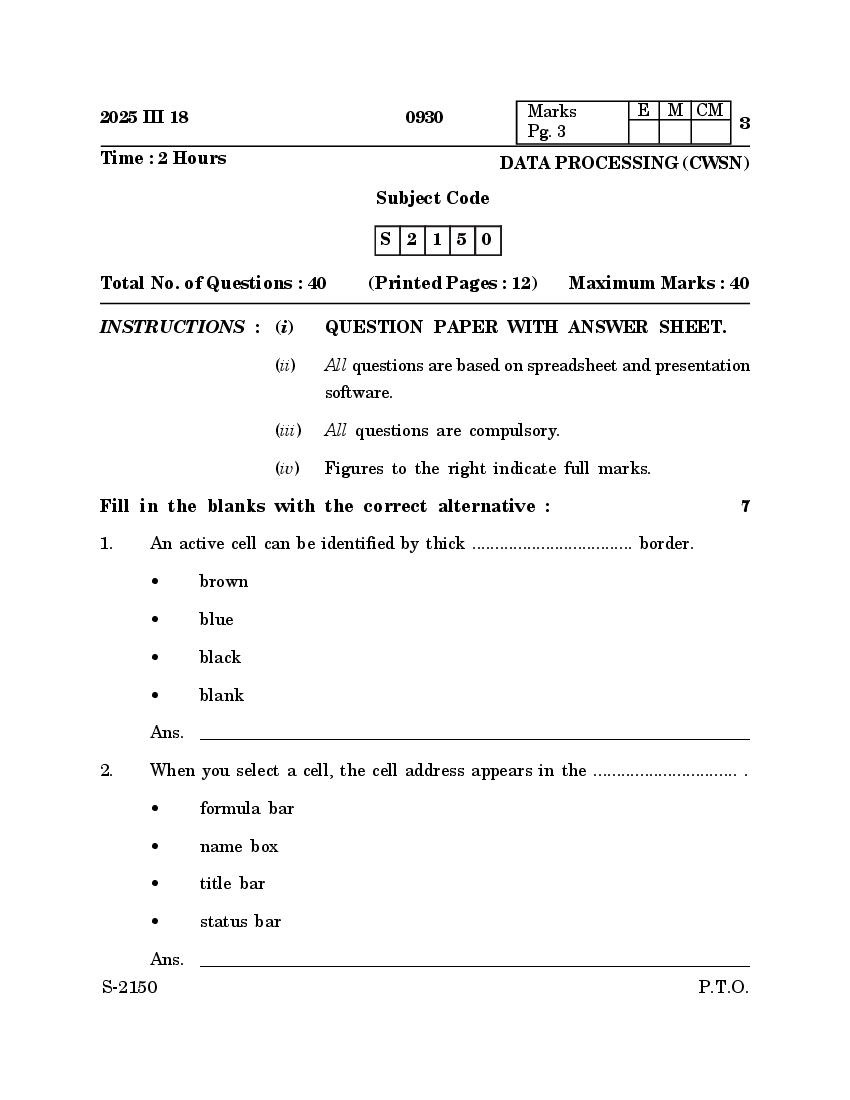
Pg. 3 3
Time : 2 Hours DATA PROCESSING (CWSN)
Subject Code
S 2 1 5 0
Total No. of Questions : 40 (Printed Pages : 12) Maximum Marks : 40
INSTRUCTIONS : (i) QUESTION PAPER WITH ANSWER SHEET.
(ii) All questions are based on spreadsheet and presentation
software.
(iii) All questions are compulsory.
(iv) Figures to the right indicate full marks.
Fill in the blanks with the correct alternative : 7
1. An active cell can be identified by thick ................................... border.
• brown
• blue
• black
• blank
Ans. __________________________________________________________________
2. When you select a cell, the cell address appears in the ............................... .
• formula bar
• name box
• title bar
• status bar
Ans. __________________________________________________________________
S-2150 P.T.O.
Page 2
3. An effect where the text has a line running beneath is ................................. .
• undermine
• understanding
• underline
• undertaker
Ans. __________________________________________________________________
4. The most common function in worksheet is ................................... function.
• count
• count blank
• sum
• sun
Ans. __________________________________________________________________
5. The view which helps to rearrange the slides easily and quickly
is ................................... .
• normal view
• slide show
• slide sorter
• review
Ans. __________________________________________________________________
Page 3
Pg. 4 & 5 5
6. Manual editing of slides can be done using ................................... formatting.
• autoformat
• hand
• customized
• style
Ans. __________________________________________________________________
7. An alignment that aligns both the sides of a sentence/paragraph in relation
to both margins is ................................... .
• left
• center
• right
• justify
Ans. __________________________________________________________________
State whether the following statements are True or False : 7
8. A worksheet cannot be renamed.
Ans. __________________________________________________________________
9. The Delete key is used to delete the entire contents of a cell.
Ans. __________________________________________________________________
S-2150 P.T.O.
Page 4
10. Number format has effect on how a number looks and also on the actual
value.
11. Charts are more attractive and appealing when compared to the text.
12. Outline and slides are available on left panel when you open a presentation.
13. Columns help to read text more easily because the line of text is shorter.
14. In presentation, by default text is left aligned.
Match the pairs : 7
Group ‘A’ Group ‘B’
15. Page setup • Largest Value
16. Paste • View
17. Orientation • Circular dots
18. Max • Vertical sections
19. Zoom • Page layout
20. Bullets • Ctrl+V
21. Columns • Text Rotation
Page 5
Pg. 6 & 7 7
Ans. Group ‘A’ Group ‘B’
15. Page setup • ...........................................
16. Paste • ...........................................
17. Orientation • ...........................................
18. Max • ...........................................
19. Zoom • ...........................................
20. Bullets • ...........................................
21. Columns • ...........................................
Answer the following questions in one word only : 7
22. What is the shortcut key for creating a new Spreadsheet ?
23. What is the shortcut key to cut text in worksheet ?
24. Which tab has the font options ?
25. Which function is used for counting blank cells in worksheet ?
26. What is the shortcut key for creating new slide in presentation ?
S-2150 P.T.O.
Page 6
27. Name the font effect with a horizontal line passing through the centre of
text.
28. What is the shortcut key for Redo in Spreadsheet ?
Name the following tools : 6
29.
30.
31.
32.
Page 7
Pg. 8 & 9 9
33.
34.
Identify the following effects : 6
35. Before After
.
.
36. Before After
S-2150 P.T.O.
Page 8
37. Before After
38. Before After
Mouse is an input Device Mouse is an input Device
39. Before After
40. Before After
Document Details
| Board / Org | Goa Board |
| Exam | Class 10 |
| Type | Question Paper |
| Pages | 8 |
| Updated | 24 Sep 2026 |