MBOSE Class 10 Question Paper 2019 for Computer Technique Paper IV
Finished viewing? Save it for later —
Download MBOSE Class 10 Question Paper 2019 for Computer Technique Paper IV (PDF · 9 pages)About MBOSE Class 10 Question Paper 2019 for Computer Technique Paper IV
MBOSE Class 10 Question Paper 2019 for Computer Technique Paper IV is available here for free download. Published by Meghalaya Board for Class 10, this question paper can be viewed online or downloaded as a PDF (9 pages). Candidates preparing for Class 10 can use MBOSE Class 10 Question Paper 2019 for Computer Technique Paper IV to understand the exam pattern, the type of questions asked, and the overall difficulty level.
Frequently Asked Questions
How can I download MBOSE Class 10 Question Paper 2019 for Computer Technique Paper IV?
Open this page and click the Download button to save MBOSE Class 10 Question Paper 2019 for Computer Technique Paper IV as a PDF. It is completely free on AglaSem Docs.
Is MBOSE Class 10 Question Paper 2019 for Computer Technique Paper IV free to download?
Yes. MBOSE Class 10 Question Paper 2019 for Computer Technique Paper IV can be viewed online and downloaded as a PDF free of cost on AglaSem Docs.
How many pages does MBOSE Class 10 Question Paper 2019 for Computer Technique Paper IV have?
MBOSE Class 10 Question Paper 2019 for Computer Technique Paper IV contains 9 pages, which you can read online or download together as a single PDF.
Where can I find more Class 10 study material?
You can find more Class 10 question papers, sample papers, syllabus, and answer keys on AglaSem Docs.
MBOSE Class 10 Question Paper 2019 for Computer Technique Paper IV – Text
Read the full text of this question paper below — useful to quickly search, copy and reference the content online without downloading the PDF.
📄 View text version (9 pages)
Page 1
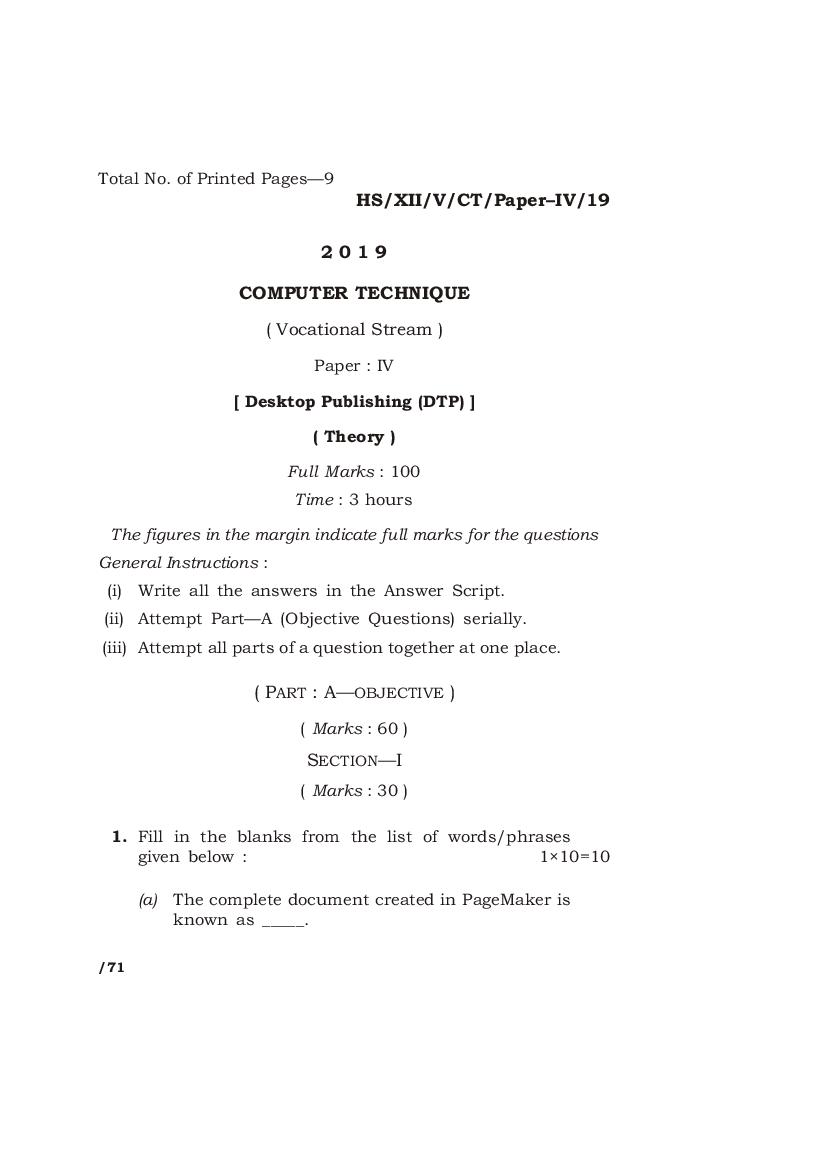
HS/XII/V/CT/Paper–IV/19
2019
COMPUTER TECHNIQUE
( Vocational Stream )
Paper : IV
[ Desktop Publishing (DTP) ]
( Theory )
Full Marks : 100
Time : 3 hours
The figures in the margin indicate full marks for the questions
General Instructions :
(i) Write all the answers in the Answer Script.
(ii) Attempt Part—A (Objective Questions) serially.
(iii) Attempt all parts of a question together at one place.
( PART : A—OBJECTIVE )
( Marks : 60 )
SECTION—I
( Marks : 30 )
1. Fill in the blanks from the list of words/phrases
given below : 1×10=10
(a) The complete document created in PageMaker is
known as _____.
/71
Page 2
(b) In CorelDRAW _____ are objects with both
magnitude (size) and direction (angles, curvature
and so on).
(c) _____ can be directly created within PageMaker
itself without importing them.
(d) MS-Paint which comes with Windows is a _____
program.
(e) One of the file formats supported by PageMaker
is _____.
(f) In CorelDRAW only graphics which are in
Drawing page are ______.
(g) The command for importing texts and graphics
in PageMaker is called as _____.
(h) The default title for a new Window in CorelDRAW
is called as _____.
(i) _____ controls the amount of space between lines
of selected text.
(j) When an object in CorelDRAW is selected black
boxes represent _____ appears.
List of words/phrases :
handles vectors
publication Leading
Graphic 1 Text
bitmap-based place
printable BMP
Page 3
2. State whether the following statements are True or
False : ½×10=5
(a) Vector graphics is used in PageMaker.
(b) It is possible to drop shadow in CorelDRAW.
(c) It is not possible to rotate text in PageMaker.
(d) Master Page is common to all pages comming
under it.
(e) In CorelDRAW it is possible to animate pictures.
(f) Fill option is in Element menu.
(g) In PageMaker the maximum number of column
is 20.
(h) In CorelDRAW a straight line cannot be
converted into a curve.
(i) In CorelDRAW a Docker Window cannot be
closed.
(j) In PageMaker text blocks cannot be linked.
Page 4
3. Select the most appropriate answer for each
statement from the given choices : 1×5=5
(a) The tool used to manipulate or edit a curve in
CorelDRAW is
(i) text tool
(ii) shape tool
(iii) pick tool
(b) In PageMaker arrange command is located in
(i) type menu
(ii) element menu
(iii) utilities menu
(c) In this formula x 2 , 2 is called as
(i) subscript
(ii) superscript
(iii) drop cap
(d) If equal amount of red and blue colors is mixed,
the resultant color is
(i) cyan
(ii) yellow
(iii) magenta
(e) Fills that fade from one color to another in
CorelDRAW is known as
(i) uniform fill
(ii) pattern fill
(iii) fountain fill
Page 5
4. Answer the following questions in 1 or 2 sentence(s)
each : 1×10=10
(a) What is a bitmap image?
(b) What is a vector image?
(c) Define cloning.
(d) What is auto-flow in PageMaker?
(e) Define Masking in PageMaker.
(f) How to change an object into a frame in
PageMaker?
(g) What is strokes in PageMaker?
(h) Which type of files requires more memory bitmap
or vector file and why?
(i) How to convert text into curve in CorelDRAW?
(j) Use of a knife tool in CorelDRAW.
Page 6
SECTION—II
( Marks : 30 )
5. Answer any six of the following in 2 to 3 sentences
each : 2×6=12
(a) Define Layers and its uses in PageMaker.
(b) What are color palettes and what are its uses
in PageMaker?
(c) Give the full form of CMYK. What is the bit-depth
of CMYK color model?
(d) Name four types of lenses in CorelDRAW. How
many lens effect can a single closed object has?
(e) How PowerClip’s content is edited in CorelDRAW?
(f) How many objects are required for blending?
Define blending.
(g) How do you mold artistic text to a shape in
CorelDRAW?
(h) What is the use stacking order and grouping of
objects in PageMaker?
Page 7
6. Answer any six of the following in 3 to 4 sentences
each : 3×6=18
(a) What are the uses of object manager in
CorelDRAW?
(b) How to place page number in PageMaker?
(c) What is field placeholder and where it is used
in PageMaker?
(d) What is the difference between importing and
copying objects in CorelDRAW?
(e) How to make objects in CorelDRAW as Web
compatible graphics?
(f) How to customize text wrap around a graphic?
(g) What is inline graphics and what is the
advantage of inline graphics in PageMaker?
(h) Explain continuation line in PageMaker.
Page 8
( PART : B—DESCRIPTIVE )
( Marks : 40 )
GROUP—I
Answer any five of the following questions : 4×5=20
7. How to assign outline and fill color, no-fill and
no-outline color to a selected object in CorelDRAW?
8. How can you define different radii for a rounded
corners in a single rectangle in CorelDRAW?
9. What is a scrapbook? What is the use of a scrapbook
docker window? How to open scrapbook docker
window in CorelDRAW?
10. Which color model is use for printing PageMaker
publication? How to make a color as process color?
11. What is guides in PageMaker?
12. What are the two graphic concepts PageMaker use
to handle text? What are the two main purposes of
a text tool?
13. Differentiate between snap to grid and snap to
objects in CorelDRAW.
Page 9
GROUP—II
Answer any four of the following questions : 5×4=20
14. What are nodes? How to add or delete nodes from
curves in CorelDRAW? Can artistic text be converted
into curve?
15. Define index entries in PageMaker. How an index can
be created in PageMaker?
16. How a book publication list is created in PageMaker?
17. What is trapping? How it is done in PageMaker?
18. What is eye-dropper tool? How it is used in
CorelDRAW?
HHH
HS/XII/V/CT/Paper–IV/19/71 K9—70
Document Details
| Board / Org | Meghalaya Board |
| Exam | Class 10 |
| Type | Question Paper |
| Pages | 9 |
| Updated | 30 Apr 2026 |