Goa Board Class 12 Question Paper Mar 2019 Computer Application
Finished viewing? Save it for later —
Download Goa Board Class 12 Question Paper Mar 2019 Computer Application (PDF · 3 pages)About Goa Board Class 12 Question Paper Mar 2019 Computer Application
Goa Board Class 12 Question Paper Mar 2019 Computer Application is available here for free download. Published by Goa Board for Class 12, this question paper can be viewed online or downloaded as a PDF (3 pages). Candidates preparing for Class 12 can use Goa Board Class 12 Question Paper Mar 2019 Computer Application to understand the exam pattern, the type of questions asked, and the overall difficulty level.
Frequently Asked Questions
How can I download Goa Board Class 12 Question Paper Mar 2019 Computer Application?
Open this page and click the Download button to save Goa Board Class 12 Question Paper Mar 2019 Computer Application as a PDF. It is completely free on AglaSem Docs.
Is Goa Board Class 12 Question Paper Mar 2019 Computer Application free to download?
Yes. Goa Board Class 12 Question Paper Mar 2019 Computer Application can be viewed online and downloaded as a PDF free of cost on AglaSem Docs.
How many pages does Goa Board Class 12 Question Paper Mar 2019 Computer Application have?
Goa Board Class 12 Question Paper Mar 2019 Computer Application contains 3 pages, which you can read online or download together as a single PDF.
Where can I find more Class 12 study material?
You can find more Class 12 question papers, sample papers, syllabus, and answer keys on AglaSem Docs.
Goa Board Class 12 Question Paper Mar 2019 Computer Application – Text
Read the full text of this question paper below — useful to quickly search, copy and reference the content online without downloading the PDF.
📄 View text version (3 pages)
Page 1
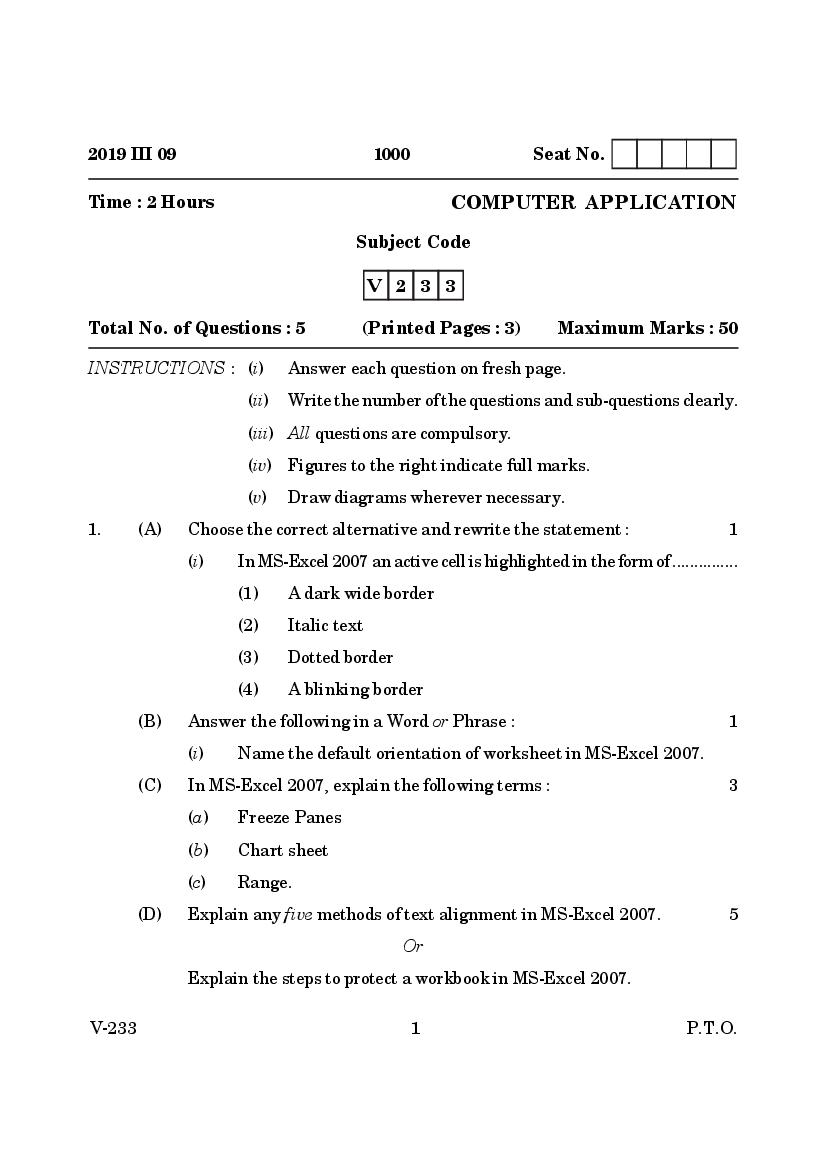
Time : 2 Hours COMPUTER APPLICATION
Subject Code
V 2 3 3
Total No. of Questions : 5 (Printed Pages : 3) Maximum Marks : 50
INSTRUCTIONS : (i) Answer each question on fresh page.
(ii) Write the number of the questions and sub-questions clearly.
(iii) All questions are compulsory.
(iv) Figures to the right indicate full marks.
(v) Draw diagrams wherever necessary.
1. (A) Choose the correct alternative and rewrite the statement : 1
(i) In MS-Excel 2007 an active cell is highlighted in the form of ...............
(1) A dark wide border
(2) Italic text
(3) Dotted border
(4) A blinking border
(B) Answer the following in a Word or Phrase : 1
(i) Name the default orientation of worksheet in MS-Excel 2007.
(C) In MS-Excel 2007, explain the following terms : 3
(a) Freeze Panes
(b) Chart sheet
(c) Range.
(D) Explain any five methods of text alignment in MS-Excel 2007. 5
Or
Explain the steps to protect a workbook in MS-Excel 2007.
V-233 1 P.T.O.
Page 2
(i) The shortcut key used in MS-PowerPoint 2007 to insert a new slide
in the current presentation is ................
(1) Ctrl + M
(2) Ctrl + C
(3) Ctrl + V
(4) Ctrl + P
(B) Answer the following in a Word or Phrase : 1
(i) In MS-Access 2007 what does this ‘‘< >’’ operator for validation rule
refers to.
(C) Write down the steps to change the Orientation while printing the slide
in MS-PowerPoint ? 3
(D) Name and explain the different kinds of views available in
MS-PowerPoint 2007 ? 5
3. (A) Choose the correct alternative and rewrite the statement : 1
(i) The building blocks of rational database design in MS-Access 2007
are .............
(1) Entities
(2) Relation
(3) Forms
(4) Attributes
(B) Answer the following in a Word or Phrase : 1
(i) In the web address http://www.gbhsse.gov.in identify the domain
name from the given web address.
(C) Explain any three advantages of tally. 3
(D) Write down the steps in detail to create new company in Tally. 5
Or
Write down the steps to create a Voucher entry in Tally.
V-233 2
Page 3
(i) What is ‘‘Nominal Account’’ in Tally ?
(B) Write down the procedure to change the Row height in MS-Excel 2007. 2
(C) Write the difference between Merge cell and Split cell in MS-Excel 2007 ?
2
(D) Mention the steps to rename a worksheet in MS-Excel 2007. 2
(E) What is form in MS-Access 2007 ? Give the steps to create a form. 3
5. (A) Answer the following in one sentence : 1
(i) Which is the shortcut key to display company information in
Tally ?
(B) State any four Primary groups in Tally. 2
(C) Mention the steps to display a detailed Profit & Loss A/c in Tally. 2
(D) Explain the following field types in MS-Access 2007 : 2
(i) Text
(ii) Memo
(E) As a customer what are the precautions to be taken while shopping on
online portals. 3
V-233 3 P.T.O.
Document Details
| Board / Org | Goa Board |
| Exam | Class 12 |
| Type | Question Paper |
| Pages | 3 |
| Updated | 22 Jul 2026 |