Goa Board Class 12 Question Paper 2025 Computer Application
Finished viewing? Save it for later —
Download Goa Board Class 12 Question Paper 2025 Computer Application (PDF · 3 pages)About Goa Board Class 12 Question Paper 2025 Computer Application
Goa Board Class 12 Question Paper 2025 Computer Application is available here for free download. Published by Goa Board for Class 12, this question paper can be viewed online or downloaded as a PDF (3 pages). Candidates preparing for Class 12 can use Goa Board Class 12 Question Paper 2025 Computer Application to understand the exam pattern, the type of questions asked, and the overall difficulty level.
Frequently Asked Questions
How can I download Goa Board Class 12 Question Paper 2025 Computer Application?
Open this page and click the Download button to save Goa Board Class 12 Question Paper 2025 Computer Application as a PDF. It is completely free on AglaSem Docs.
Is Goa Board Class 12 Question Paper 2025 Computer Application free to download?
Yes. Goa Board Class 12 Question Paper 2025 Computer Application can be viewed online and downloaded as a PDF free of cost on AglaSem Docs.
How many pages does Goa Board Class 12 Question Paper 2025 Computer Application have?
Goa Board Class 12 Question Paper 2025 Computer Application contains 3 pages, which you can read online or download together as a single PDF.
Where can I find more Class 12 study material?
You can find more Class 12 question papers, sample papers, syllabus, and answer keys on AglaSem Docs.
Goa Board Class 12 Question Paper 2025 Computer Application – Text
Read the full text of this question paper below — useful to quickly search, copy and reference the content online without downloading the PDF.
📄 View text version (3 pages)
Page 1
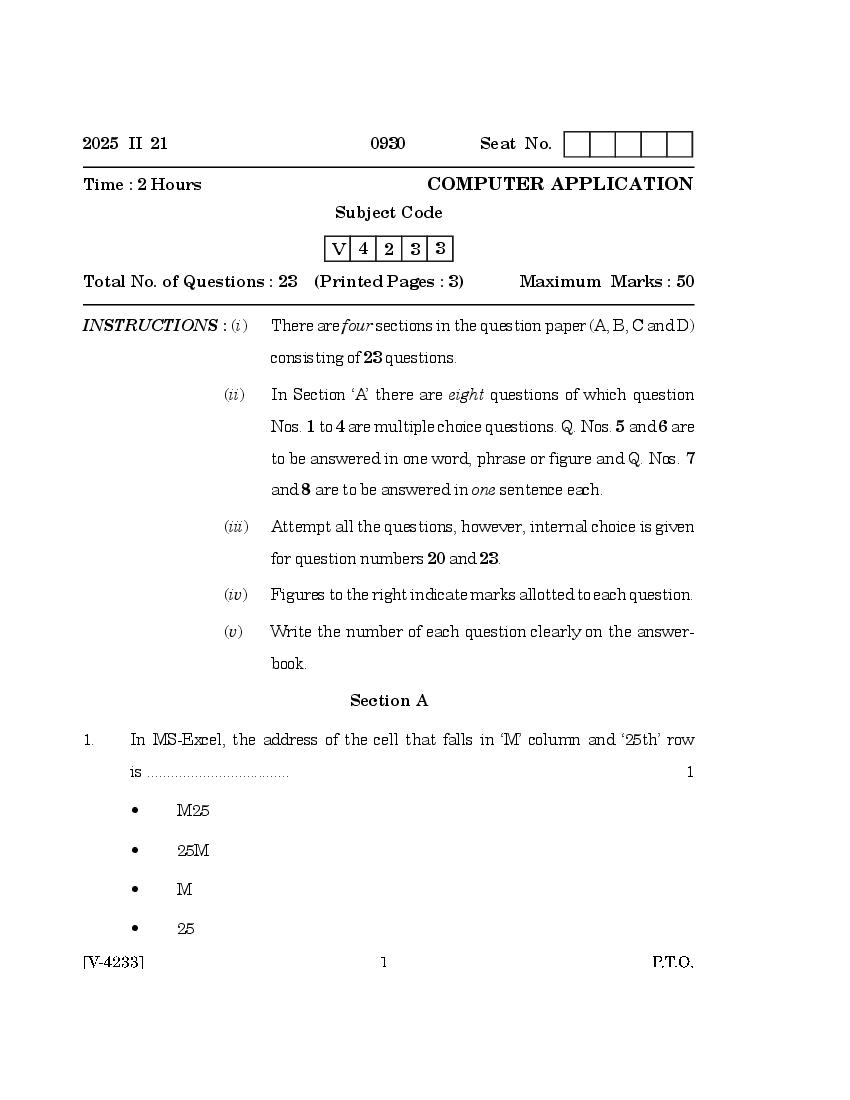
Time : 2 Hours COMPUTER APPLICATION
Subject Code
V 4 2 3 3
Total No. of Questions : 23 (Printed Pages : 3) Maximum Marks : 50
INSTRUCTIONS : (i) There are four sections in the question paper (A, B, C and D)
consisting of 23 questions.
(ii) In Section ‘A’ there are eight questions of which question
Nos. 1 to 4 are multiple choice questions. Q. Nos. 5 and 6 are
to be answered in one word, phrase or figure and Q. Nos. 7
and 8 are to be answered in one sentence each.
(iii) Attempt all the questions, however, internal choice is given
for question numbers 20 and 23.
(iv) Figures to the right indicate marks allotted to each question.
(v) Write the number of each question clearly on the answer-
book.
Section A
1. In MS-Excel, the address of the cell that falls in ‘M’ column and ‘25th’ row
is .................................... 1
• M25
• 25M
• M
• 25
Page 2
• One placeholder
• Two placeholders
• Three placeholders
• Four placeholders
3. The type of E-commerce, where consumers are dealing with each other
is ............................ 1
• B2B
• B2C
• C2C
• B2A
4. Full form of IGST is ...................................... 1
• Integrated Goods and Sales Tax
• Integrated Goods and Stock Tax
• Integrated Goods and Services Tax
• Integrated Goods and Supply Tax
5. Name the function key used to enter Journal Voucher in Tally. 1
6. Name the view that shows slides in a thumbnail form in MS-PowerPoint. 1
7. What is Worksheet in MS-Excel ? 1
8. Write any two options available under ‘Company Info’ menu in Tally. 1
Section B
9. Write the steps to change Page Orientation in Ms-Excel. 2
10. Mention the steps to increase the column width in MS-Excel. 2
Page 3
12. State any four advantages of Online Shopping. 2
13. Explain any two E-Commerce business models. 2
14. Write the steps to view GSTR-1 report in Tally. 2
Section C
15. Write the steps to Insert Picture in MS-PowerPoint presentation. 3
16. Explain the components of GST that are applicable on Interstate and
Intrastate supply of goods. 3
17. Explain the following functions supported in MS-Excel : 3
(a) =Sum( )
(b) =Product( )
(c) =Average( )
18. Mention the steps to Freeze Pane in MS-Excel. 3
19. Write the procedure to create ledger ‘Salary A/c’ in Tally. 3
20. Mention the steps to alter voucher in Tally. 3
Or
Write the ‘Journal Entry’ and ‘Voucher Type’ to enter the following
transactions in Tally :
(1) Withdrawn ` 10,000/- from Canara Bank.
(2) Purchased goods from ‘Aaditya Enterprises’ on credit ` 30,000/-
Section D
21. Mention the steps to apply Custom Animation effect in MS-PowerPoint. 4
22. Write the procedure to create company in Tally. 4
23. Mention the steps to Unprotect Workbook in MS-Excel. 4
Or
Write the procedure to sort the database in descending order of ‘Employee
Name’ in MS-Excel.
Document Details
| Board / Org | Goa Board |
| Exam | Class 12 |
| Type | Question Paper |
| Pages | 3 |
| Updated | 24 Sep 2026 |