Kerala Plus Two Answer Key 2025 Computer Application Humanities
Finished viewing? Save it for later —
Download Kerala Plus Two Answer Key 2025 Computer Application Humanities (PDF · 4 pages)About Kerala Plus Two Answer Key 2025 Computer Application Humanities
Kerala Plus Two Answer Key 2025 Computer Application Humanities is available here for free download. Published by Kerala Board for Class 12, this answer key can be viewed online or downloaded as a PDF (4 pages). Candidates preparing for Class 12 can use Kerala Plus Two Answer Key 2025 Computer Application Humanities to understand the exam pattern, the type of questions asked, and the overall difficulty level.
Frequently Asked Questions
How can I download Kerala Plus Two Answer Key 2025 Computer Application Humanities?
Open this page and click the Download button to save Kerala Plus Two Answer Key 2025 Computer Application Humanities as a PDF. It is completely free on AglaSem Docs.
Is Kerala Plus Two Answer Key 2025 Computer Application Humanities free to download?
Yes. Kerala Plus Two Answer Key 2025 Computer Application Humanities can be viewed online and downloaded as a PDF free of cost on AglaSem Docs.
How many pages does Kerala Plus Two Answer Key 2025 Computer Application Humanities have?
Kerala Plus Two Answer Key 2025 Computer Application Humanities contains 4 pages, which you can read online or download together as a single PDF.
Where can I find more Class 12 study material?
You can find more Class 12 question papers, sample papers, syllabus, and answer keys on AglaSem Docs.
Kerala Plus Two Answer Key 2025 Computer Application Humanities – Text
Read the full text of this answer key below — useful to quickly search, copy and reference the content online without downloading the PDF.
📄 View text version (4 pages)
Page 1
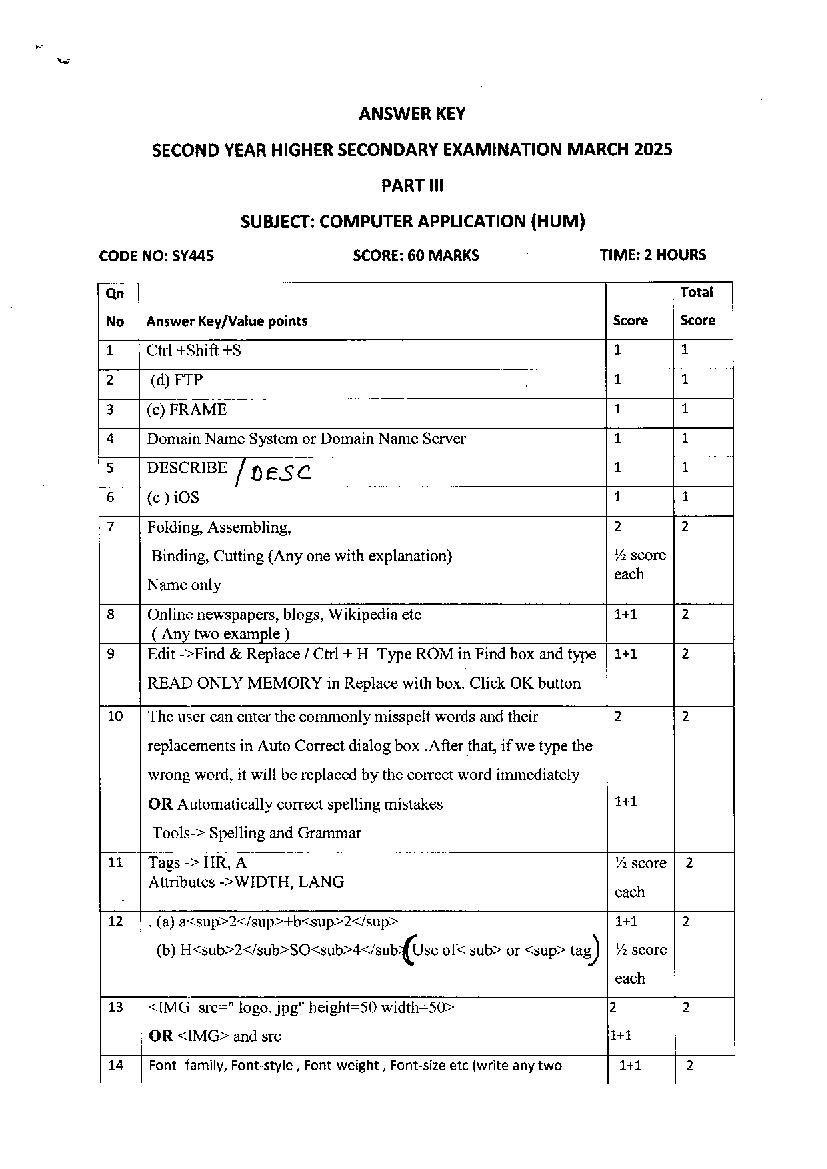
ANSWER KEY
SECOND YEAR HIGHER SECONDARY EXAMINATION MARCH 2025
PART III
SUBJECT: COMPUTER APPLICATION (HUM)
CODE NO: SYtt45 SCORE:60 MARKS TIME:2 HOURS
Qn Total
No Answer Key/Value points Score Score
1 Ctrl +Shift +S 1 1
2 (d) FrP L 1
3 (c) FRAME 1 L
4 DomainName System or DomainName Server L t
5 DESCRIBE
I oese L L
6 (c ) ioS L 1
7 Folding, Assembling, 2 2
Binding, Cutting (Any one with explanation) Yz scnre
Name only
8 Online newspapers, blogs, Wikipedia etc 1+1 2
( Anv two example )
,9
Edit ->Find & Replace / Chl + H Type ROM in Findbox and type 1+1 2
READ ONLY MEMORY in Replace with box. Click OK button
10 The user can enter the commonly misspelt words and their 2 2
replacements in Auto Correct dialog box .After that, if we type the
wrong word, it will be replaced by the correct word immediately
OR Automatically correct spelling mistakes 1+1
Tools-> Spelling and Grammar
LL Tags -> HR, A Yz soote 2
Attributes ->WIDTH, LANG
12 . (a) a<sup>2</sup>+b<sup>2</sup> 1+1 2
(b) H Use of< sub> or <sup> ."s) Yz scnre
13 <IMG src:" logo. jpg" height:50 width--5O> 2 2
OR <IMG> and src 1+1
L4 Font- family, Font-style , Font-weight , Font-size etc (write any two 1+1 2
Page 2
15 Jhoomla, Drupal, Word press or other CMS soft wares (write any 1+l 2
two names )
16 ( a ) Pool of values for a column heading 1+1 2
(b ) Number of rows or tuples
!7 Integer or int, Decimal or dec I+I 2
18 Short Message Service (SMS):- It allows transferring short text l+1 2
messages containing up to 160 characters betwee,n mobile phones
Multimedia Messaging Service (MMS):-It allows sending
multimedia content (text, picture, audio and video file) using
mobile phones Yz sCote
full forms or expansions each
19 Line, Shape, Space, Colour, Tlpography ( Any 3 elements with 1+1+1 3
Yz score
single line explanation).
Names only
20 a)Header - cofllmon text appearing on the top of every page 1+l 3
Footer -corlmon text appearing at the bottom of every page
b) Insert->Header and Insert->Footer I
OR Select header and footer Tab in Page Style Dialog box
2L Quickness, Word wrapping, Editing features, Drawing and l+1+1 3
graphics, Formatting, Tables, OLE, Spell check and grammar
checking, Mail merging,Index and table of content, Templates
( Any 3 features with single line explanation) Yz Score
Names only each
22 (a) Light coloured text or logo appearing in the background of a I 3
document. 1+l
( b ) File ->Export as PDF
Tlpe Water mark.
Click Export
23 Client side scripting Server side scripting 1+1+1 3
Executed in the client browser. Executed in the web server.
Used for validation of client data. Used to connect to databases.
Users can block. Users cannot block.
Page 3
Browser dependent Not browser dependent
(Any 3 comparisons)
24 Easy to change layout, Reduce the size of a web page, Reduction 1+1+l 3
in bandwidth, Consistency in web pages, Viewing options, Saves
time (Any 3 points )
25 Shared- Many websites sharing single web server, RAM and CpU. 1+1+1 3
Merits: - Cheaper, easy to use. Demerits:- shared bandwidth slow
the service. Dedicated- A web server and its resources exclusively
for a website. Characteristics:- good perfornance, expensive
(Any 3 comparisons)
26 Controlling Data redundancy, Data consistenc5 Efficient Data l+1+1 3
access, Data Integrity, Data security, Sharing of data, Enforcement
of standards, Crash recovery(Any 3 advantages)
27 Table with correct code 3 3
Table without rowspan, colspan 2
Yz scote
Tags -> <TABLE>,<TR><TD><TH> each
28 Primary key, NOT NULL, auto increment, unique, default 1+l+l 3
Any 3 points with a single line explanation
/z scote
Names only / examples each
29 Credit card fraud, internet time theft, intellectual property theft, 1+1+1 3
Cyber terrorism,Website defacement, Attack against e- governance
Websites Any 3 points with a single line explanation Yz Score
Names only each
30 a) TOC indicates the main contents of the document orbook. I 5
b) Steps to create the TOC Entries 2+2
1. Choose Insert->Indexes and Tables->Index Entry
2.Set Index as Table of Contents 3.Insert main headings and
subheadings into the entry box and select the level 4.Click on
Insert. Steps to create the TOC Page
l.Click on the fresh page
2.Choose lnsert->Indexes and Tables->Indexes and Tables
3.Click the index/Table Tab.4.Select Table of Contents in Type
Box.5.Click OK Button.
Page 4
Tables->Indexes and Tables each
31 a)Ordered list, Unordered list, Definition list (Name any two) Y2+Y2 5
b)Correct source code 4
Tags <UL>,<OL>,<LI>,Type Yz scote
Source code without nesting
2
32 a) SELECT, PROJECT, UNION, INTERSECTION, SET Yz scnre 5
DIFFERENCE, CARTESIAN PRODUCT each
b) i ) CoLLEGE U HOSTEL ii) COLLEGE - HOSTEL l%+l%
ROLL NAME ROLL NAME
20 ARUN 2I BIBIN
2I BIBIN
22 CHETHANA
24 DILIITH
fi. ' so e.HA N/+ MhRl J
/"1c v l-lSs hltooka"e
?qq ctsse?"
Document Details
| Board / Org | Kerala Board |
| Exam | Class 12 |
| Type | Answer Key |
| Pages | 4 |
| Updated | 22 Jul 2026 |