CBSE Class 11 Sample Paper 2022 for Typography and Computer Application Term 1
Finished viewing? Save it for later —
Download CBSE Class 11 Sample Paper 2022 for Typography and Computer Application Term 1 (PDF · 6 pages)About CBSE Class 11 Sample Paper 2022 for Typography and Computer Application Term 1
CBSE Class 11 Sample Paper 2022 for Typography and Computer Application Term 1 is available here for free download. Published by CBSE for Class 11, this sample paper can be viewed online or downloaded as a PDF (6 pages). Candidates preparing for Class 11 can use CBSE Class 11 Sample Paper 2022 for Typography and Computer Application Term 1 to understand the exam pattern, the type of questions asked, and the overall difficulty level.
Frequently Asked Questions
How can I download CBSE Class 11 Sample Paper 2022 for Typography and Computer Application Term 1?
Open this page and click the Download button to save CBSE Class 11 Sample Paper 2022 for Typography and Computer Application Term 1 as a PDF. It is completely free on AglaSem Docs.
Is CBSE Class 11 Sample Paper 2022 for Typography and Computer Application Term 1 free to download?
Yes. CBSE Class 11 Sample Paper 2022 for Typography and Computer Application Term 1 can be viewed online and downloaded as a PDF free of cost on AglaSem Docs.
How many pages does CBSE Class 11 Sample Paper 2022 for Typography and Computer Application Term 1 have?
CBSE Class 11 Sample Paper 2022 for Typography and Computer Application Term 1 contains 6 pages, which you can read online or download together as a single PDF.
Where can I find more Class 11 study material?
You can find more Class 11 question papers, sample papers, syllabus, and answer keys on AglaSem Docs.
CBSE Class 11 Sample Paper 2022 for Typography and Computer Application Term 1 – Text
Read the full text of this sample paper below — useful to quickly search, copy and reference the content online without downloading the PDF.
📄 View text version (6 pages)
Page 1
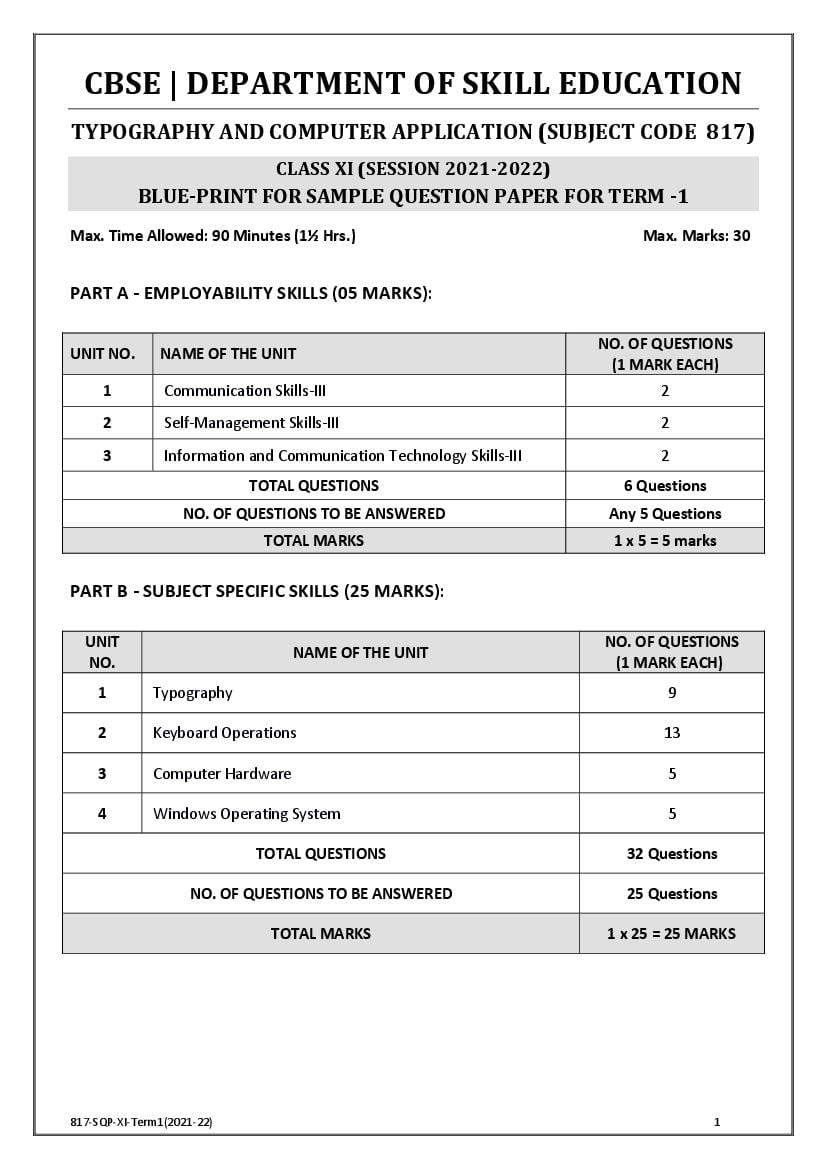
TYPOGRAPHY AND COMPUTER APPLICATION (SUBJECT CODE 817)
CLASS XI (SESSION 2021-2022)
BLUE-PRINT FOR SAMPLE QUESTION PAPER FOR TERM -1
Max. Time Allowed: 90 Minutes (1½ Hrs.) Max. Marks: 30
PART A - EMPLOYABILITY SKILLS (05 MARKS):
NO. OF QUESTIONS
UNIT NO. NAME OF THE UNIT
(1 MARK EACH)
1 Communication Skills-III 2
2 Self-Management Skills-III 2
3 Information and Communication Technology Skills-III 2
TOTAL QUESTIONS 6 Questions
NO. OF QUESTIONS TO BE ANSWERED Any 5 Questions
TOTAL MARKS 1 x 5 = 5 marks
PART B - SUBJECT SPECIFIC SKILLS (25 MARKS):
UNIT NO. OF QUESTIONS
NAME OF THE UNIT
NO. (1 MARK EACH)
1 Typography 9
2 Keyboard Operations 13
3 Computer Hardware 5
4 Windows Operating System 5
TOTAL QUESTIONS 32 Questions
NO. OF QUESTIONS TO BE ANSWERED 25 Questions
TOTAL MARKS 1 x 25 = 25 MARKS
817-SQP-XI-Term1(2021-22) 1
Page 2
TYPOGRAPHY AND COMPUTER APPLICATION (SUBJECT CODE 817)
CLASS XI (SESSION 2021-2022)
SAMPLE QUESTION PAPER FOR TERM -1
Max. Time Allowed: 90 Minutes (1½ Hrs.) Max. Marks: 30
General Instructions:
1. Please read the instructions carefully
2. This Question Paper is divided into 03 sections, viz., Section A, Section B and Section C.
3. Section A is of 05 marks and has 06 questions on Employability Skills.
4. Section B is of 20 marks and has 25 questions on Subject Specific Skills.
5. Section C is of 05 marks and has 07 competency-based questions.
6. Do as per the instructions given in the respective sections.
7. Marks allotted are mentioned against each section/question.
8. All questions must be attempted in the correct order
SECTION A
Answer any 5 questions out of the given 6 questions on Employability Skills (1 x 5 = 5 marks)
1. First step of active listening. 1
A- Receiving
B- Understanding
C- Remembering
D- Evaluating
2. Which skill is also known as people skill. 1
A- Communication
B- Writing
C- Active listening
D- Soft skill
3. One of the following is not the example of team work. 1
A- Cricket Team
B- Committee
C- Doctors Team
D- Team of Nurses
4. Students may feel ______ stress if they are unable to submit their assignment 1
A- Physical
B- Financial
C- Mental
D- Sociological
817-SQP-XI-Term1(2021-22) 2
Page 3
A- Uniform Resource Locator
B- Uniform Resource Link
C- Uniform Registered Link
D- Resource Link
6. 1
What is the use of the icon
A- To open the document
B- To save the document
C- To be used as ‘save as’
D- To Print the document
SECTION B
Answer any 20 questions out of the given 25 questions (1 x 20 = 20 marks)
7. Typography is not related to one of them 1
A- Computer
B- Photocopier
C- Typewriter
D- Laptop
8. Inventor and father of the typewriter. 1
A- Henry mill
B- Carlos Glidden
C- Samuel Soule
D- Christopher Lantham
9. Sight method of typing can be done by 1
A- 3 fingers
B- 2 fingers
C- 5 fingers
D- 10 fingers
E-
10. Touch method of typewriting created a revolution in the history of the typewriter 1
by
A- W.A. Burt
B- Samuel Soule
C- Christopher Lantham
D- Charles Mcgurin
11. ___________is an improved version of electric typewriter. 1
A- Standard Typewriter
B- Electronic Typewriter
C- Portable Typewriter
D- Noiseless Typewriter
817-SQP-XI-Term1(2021-22) 3
Page 4
A- Sight method
B- Touch method
C- Braille system
D- Fingers system
13. Noiseless typewriter works on the principle of _________. 1
A- Sight printing
B- Touch printing
C- Pressure Printing
D- Stencil Printing
14. Hardware represent the ________ component of the computer 1
A- Mechanical
B- Technical
C- Physical
D- Analytical
15. Keys of letter are not positioned __________ on the keyboard. 1
A- Numerically
B- Serial wise
C- Alphabetically
D- Technically
16. While typing keep your hands in position of 1
A- Claw
B- Paw
C- Upward direction
D- Downward direction
17. Key have been designed in 4 Rows, each row having __________ letter keys 1
A- 10
B- 10-11
C- 11
D- 9
18. The keyboard layout of computer and typewriter is popularly known as 1
A- Universal
B- QWERTY
C- standard
D- Structured
19. In universal typewriter _________ character keys include signs 1
A- 92
B- 46
C- 82
D- 108
20. Other name of cursor key is 1
A- Modifier key
B- Navigation key
C- Letter key
D- Character key
817-SQP-XI-Term1(2021-22) 4
Page 5
A- Front
B- Center
C- Side
D- Below
22. Allotment of keys to all the fingers is done in this method 1
A- Sight
B- Search and pack
C- Touch
D- Hunt
23. Numeral and special signs typed easily and conveniently by ___________ 1
A- Modify key
B- Character key
C- Navigation key
D- Numeric keypad
24. Space bar is pressed by _________ 1
A- Index finger
B- Little finger
C- Right hand thumb
D- Middle finger
25. Which row of the keyboard is called Home Row 1
A- First row
B- Top row
C- Bottom row
D- Middle row
26. It is physical component of the computer 1
A- Software
B- Hardware
C- Liveware
D- Firmware
27. Tiny Storage device free from scratch and dust __________ 1
A- Input device
B- Output device
C- Floppy disk
D- Pen drive
28. ___________ is the most common pointing device 1
A- Keyboard
B- Mouse
C- Monitor
D- Scanner
29. ____________ Are used to connect external devices to the computer 1
A- Mouse
B- Keyboard
C- USB
D- Ports
30. Printer, Mouse and digital camera can connect through this ___________ port 1
A- Parallel Port
B- Serial port
C- USB
D- AGP
817-SQP-XI-Term1(2021-22) 5
Page 6
A- Output Character Recorder
B- Output Character Recognition
C- Optical Character Recorder
D- Optical Character Recognition
SECTION C
(COMPETENCY BASED QUESTIONS)
Answer any 5 questions out of the given 6 questions (1 x 5 = 5 marks)
32. It acts as an interface between user and hardware 1
A- WOS
B- OCR
C- USB
D- CPU
33. Name the first company which started manufacturing typewriter 1
A- Remington
B- Underwood
C- Godrej
D- None of these
34. Deleted files or folders are temporarily stored in____ 1
A- Hard Disk
B- Floppy Drive
C- Recycle Bin
D- Desktop
35. Typing material should be kept on____ side of the typist 1
A- Left hand
B- Right hand
C- Top
D- Bottom
36. There are _____ categories of typewriters 1
A- 4
B- 5
C- 6
D- 7
37. 1
button is used for
A- Minimize Window
B- Maximize Window
C- Close Window
D- Stop Window
38. Window displays various options to shut down. which is at the end 1
A- Shut down
B- Restart
C- Sleep
D- Hibernate
817-SQP-XI-Term1(2021-22) 6
Document Details
| Board / Org | CBSE |
| Exam | Class 11 |
| Type | Sample Paper |
| Pages | 6 |
| Updated | 30 Apr 2026 |