Goa Board Class 12 Question Paper 2025 Software Application
Finished viewing? Save it for later —
Download Goa Board Class 12 Question Paper 2025 Software Application (PDF · 3 pages)About Goa Board Class 12 Question Paper 2025 Software Application
Goa Board Class 12 Question Paper 2025 Software Application is available here for free download. Published by Goa Board for Class 12, this question paper can be viewed online or downloaded as a PDF (3 pages). Candidates preparing for Class 12 can use Goa Board Class 12 Question Paper 2025 Software Application to understand the exam pattern, the type of questions asked, and the overall difficulty level.
Frequently Asked Questions
How can I download Goa Board Class 12 Question Paper 2025 Software Application?
Open this page and click the Download button to save Goa Board Class 12 Question Paper 2025 Software Application as a PDF. It is completely free on AglaSem Docs.
Is Goa Board Class 12 Question Paper 2025 Software Application free to download?
Yes. Goa Board Class 12 Question Paper 2025 Software Application can be viewed online and downloaded as a PDF free of cost on AglaSem Docs.
How many pages does Goa Board Class 12 Question Paper 2025 Software Application have?
Goa Board Class 12 Question Paper 2025 Software Application contains 3 pages, which you can read online or download together as a single PDF.
Where can I find more Class 12 study material?
You can find more Class 12 question papers, sample papers, syllabus, and answer keys on AglaSem Docs.
Goa Board Class 12 Question Paper 2025 Software Application – Text
Read the full text of this question paper below — useful to quickly search, copy and reference the content online without downloading the PDF.
📄 View text version (3 pages)
Page 1
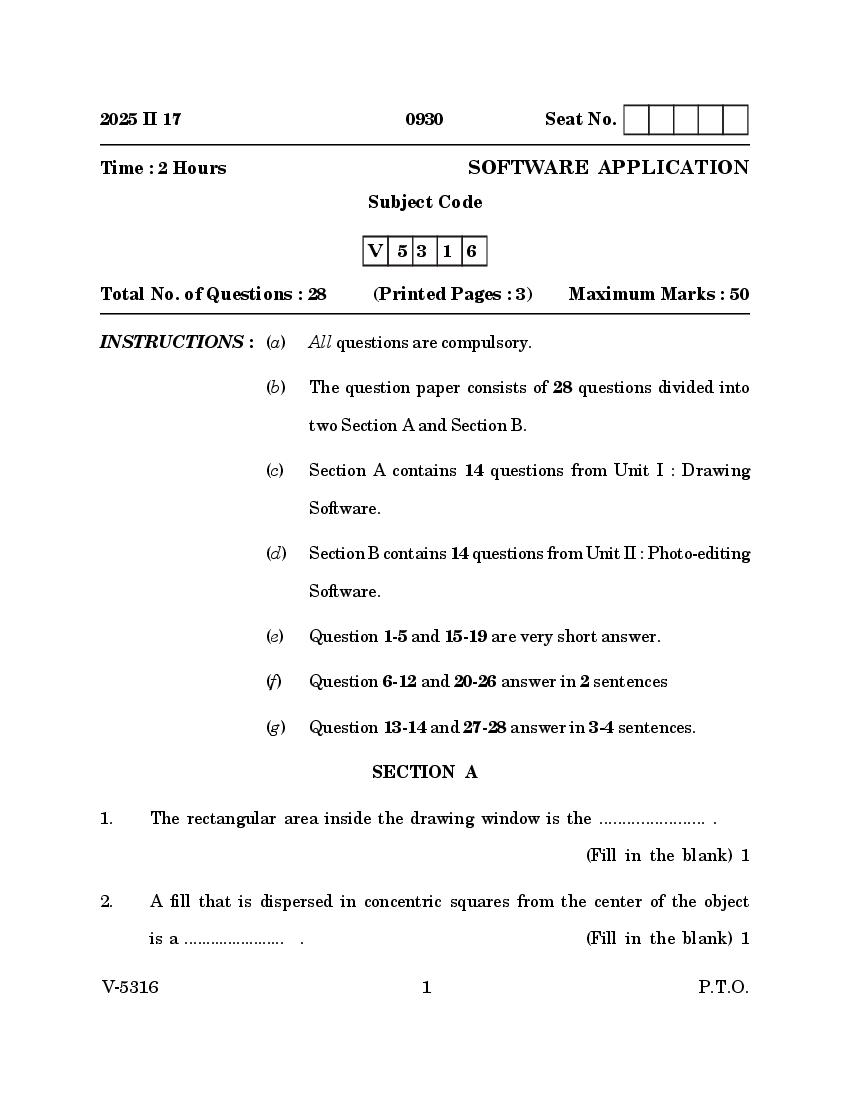
Time : 2 Hours SOFTWARE APPLICATION
Subject Code
V 5 3 1 6
Total No. of Questions : 28 (Printed Pages : 3) Maximum Marks : 50
INSTRUCTIONS : (a) All questions are compulsory.
(b) The question paper consists of 28 questions divided into
two Section A and Section B.
(c) Section A contains 14 questions from Unit I : Drawing
Software.
(d) Section B contains 14 questions from Unit II : Photo-editing
Software.
(e) Question 1-5 and 15-19 are very short answer.
(f) Question 6-12 and 20-26 answer in 2 sentences
(g) Question 13-14 and 27-28 answer in 3-4 sentences.
SECTION A
1. The rectangular area inside the drawing window is the ....................... .
2. A fill that is dispersed in concentric squares from the center of the object
is a ....................... . (Fill in the blank) 1
V-5316 1 P.T.O.
Page 2
rate of the brightness and darkness is the ....................... lens
4. The keyboard shortcut to group two or more objects is ....................... .
(fill in the blank) 1
5. Draw the PAN tool. 1
6. Differentiate between ARTISTIC TEXT and PARAGRAPH TEXT tools. 2
7. What is BLENDING ? Illustrate with a drawing. 2
8. What happens when you LOCK objects ? 2
9. Explain INTERSECTING objects with illustrations. 2
10. What is the use of CROP tool and KNIFE tool ? 2
11. Explain ENVELOPE STRAIGHT LINE mode with an illustration. 2
12. Explain SIZING and SCALING object transformations. 2
13. What is NUDGING, MICRO-NUDGING and SUPER-NUDGING ? 3
14. Explain the CUSP, SMOOTH and SYMMETRICAL nodes. 3
SECTION B
15. The ....................... tool allows you to select a rectangular or circular area of
a layer to change or delete. (Fill in blank) 1
16. The ....................... tool is best selected when you need to select an abnormally
shaped image in a layer. (Fill in the blank) 1
V-5316 2
Page 3
18. When deleting detailed areas of your image by hand, the ....................... tool
is the best option. (Fill in the blank) 1
19. Draw the RED EYE tool. 1
20. What is a SCANNER ? State its types. 2
21. Explain how the ERASER works on a regular layer and on a Background
layer. 2
22. What does FEATHERING do to selections ? 2
23. Differentiate between PAINTING and DRAWING. 2
24. What are the five key decisions involved in creating a new image ? 2
25. Explain the use of BLUR and SHARPEN tools. 2
26. Write the use of MOVE tool and LASSO tool. 2
27. Mention various IMAGE ADJUSTMENT TECHNIQUES. What are the
advantages of using ADJUSTMENT LAYERS ? 3
28. What are the various ways of entering TYPE in Photoshop ? 3
V-5316 3 P.T.O.
Document Details
| Board / Org | Goa Board |
| Exam | Class 12 |
| Type | Question Paper |
| Pages | 3 |
| Updated | 24 Sep 2026 |