CREST Cyber Olympiad (CCO) Class 4 Sample Paper
Finished viewing? Save it for later —
Download CREST Cyber Olympiad (CCO) Class 4 Sample Paper (PDF · 4 pages)About CREST Cyber Olympiad (CCO) Class 4 Sample Paper
CREST Cyber Olympiad (CCO) Class 4 Sample Paper is available here for free download. Published by CREST Olympiads for CREST Olympiads, this sample paper can be viewed online or downloaded as a PDF (4 pages). Candidates preparing for CREST Olympiads can use CREST Cyber Olympiad (CCO) Class 4 Sample Paper to understand the exam pattern, the type of questions asked, and the overall difficulty level.
Frequently Asked Questions
How can I download CREST Cyber Olympiad (CCO) Class 4 Sample Paper?
Open this page and click the Download button to save CREST Cyber Olympiad (CCO) Class 4 Sample Paper as a PDF. It is completely free on AglaSem Docs.
Is CREST Cyber Olympiad (CCO) Class 4 Sample Paper free to download?
Yes. CREST Cyber Olympiad (CCO) Class 4 Sample Paper can be viewed online and downloaded as a PDF free of cost on AglaSem Docs.
How many pages does CREST Cyber Olympiad (CCO) Class 4 Sample Paper have?
CREST Cyber Olympiad (CCO) Class 4 Sample Paper contains 4 pages, which you can read online or download together as a single PDF.
Where can I find more CREST Olympiads study material?
You can find more CREST Olympiads question papers, sample papers, syllabus, and answer keys on AglaSem Docs.
CREST Cyber Olympiad (CCO) Class 4 Sample Paper – Text
Read the full text of this sample paper below — useful to quickly search, copy and reference the content online without downloading the PDF.
📄 View text version (4 pages)
Page 1
4
SAMPLE PAPER
CREST Cyber Olympiad (CCO)
Syllabus for CCO is available at https://www.crestolympiads.com/cco-syllabus
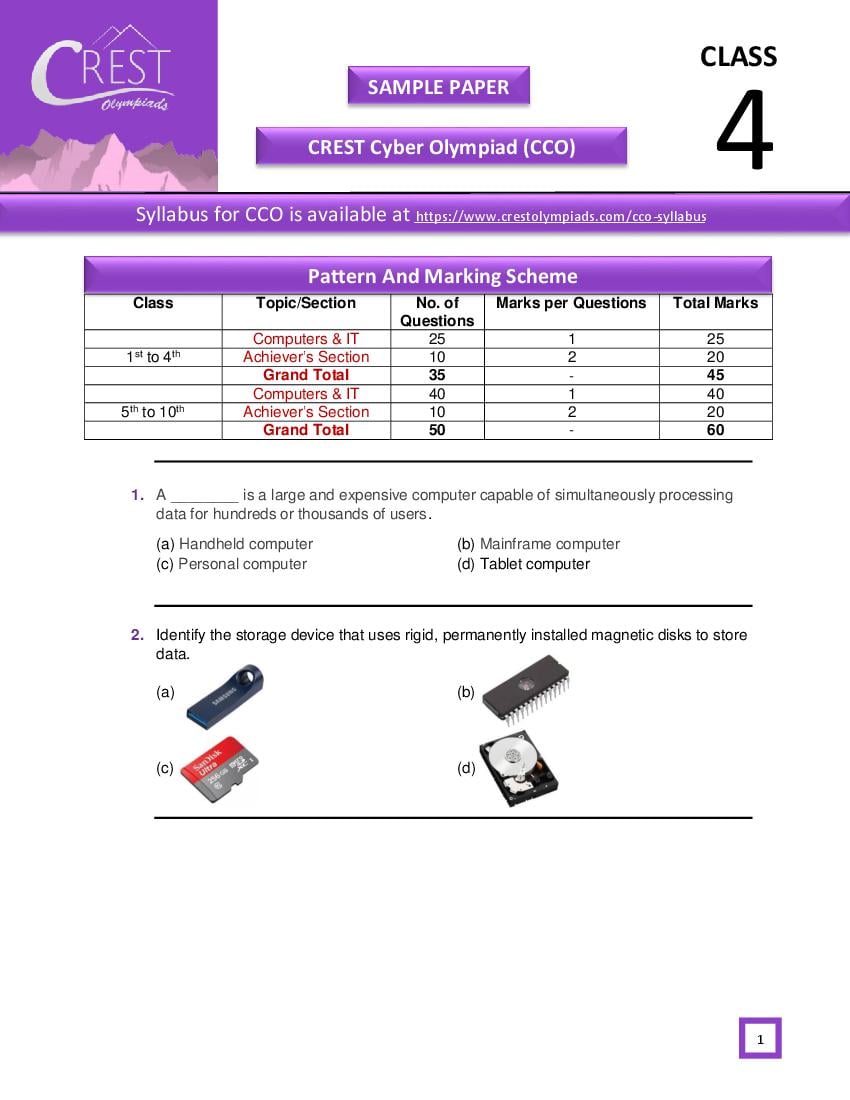
Pattern And Marking Scheme
Class Topic/Section No. of Marks per Questions Total Marks
Questions
Computers & IT 25 1 25
st th
1 to 4 Achiever’s Section 10 2 20
Grand Total 35 - 45
Computers & IT 40 1 40
5th to 10th Achiever’s Section 10 2 20
Grand Total 50 - 60
1. A ________ is a large and expensive computer capable of simultaneously processing
data for hundreds or thousands of users.
(a) Handheld computer (b) Mainframe computer
(c) Personal computer (d) Tablet computer
2. Identify the storage device that uses rigid, permanently installed magnetic disks to store
data.
(a) (b)
(c) (d)
1
Page 2
(i) Processed result will be displayed
(ii) Enter data or commands into a computer
(iii) The CPU works on the data
(a) (i) (iii) (ii) (b) (i) (ii) (iii)
(c) (ii) (iii) (i) (d) (iii) (ii) (i)
4. Programs designed specifically to address special-purpose applications are called
_________.
(a) Operating System (b) Application Software
(c) System Software (d) Management Information Systems
5. Which was the important invention that began the development of the second
generation computers, which no longer required vacuum tubes, and were much more
efficient and less expensive?
(a) Vacuum Tube (b) Transistor
(c) Silicon chip (d) Integrated Circuit
2
Page 3
(a) Hyperlink (b) Hypertext
(c) Website (d) Keyboard
7. Identify the input and output devices from the following and complete the sentence
given below:
There are ____ input and ____ output devices.
(a) 11, 9 (b) 10, 8
(c) 11, 7 (d) 10, 9
8. In Windows 7, the graphical background of the desktop is called ______.
(a) Aero Image (b) Screen Saver
(c) Wallpaper (d) Aero Screen
3
Page 4
9. Which of the following statement is correct in context with MS-Paint?
Statement 1: Magnifier is used to adjust the size of images.
Statement 2: Drawing space is nothing but a workspace.
Statement 3: Colour palette is available on the right side of MS-Paint window.
(a) Statement 2 and Statement 3 are correct
(b) Statement 1 and Statement 3 are correct
(c) Statement 1 and Statement 2 are correct
(d) All the statements are correct
10. Pasting text in Microsoft Word provides a multitude of options. Match these options with
their functionality:
(1) Keep source formatting (i) This option preserves the look of the original text.
(2) Keep text only (ii) So that it matches the text that surrounds it.
(3) Merge formatting (iii) This option removes all the original formatting from the
text.
(a) (1) - (i), (2) - (iii), (3) - (ii) (b) (1) - (i), (2) - (iii), (3) - (ii)
(c) (1) - (i), (2) - (iii), (3) - (ii) (d) (1) - (i), (2) - (iii), (3) - (ii)
Answers
1. (b) 2. (d) 3. (c) 4. (b) 5. (b) 6. (d) 7. (a) 8. (c) 9. (c) 10. (a)
4
Document Details
| Board / Org | CREST Olympiads |
| Exam | CREST Olympiads |
| Type | Sample Paper |
| Pages | 4 |
| Language | english |
| Updated | 23 Oct 2026 |