CBSE Class 10 Term Wise Syllabus 2021-22 Computer Applications
Finished viewing? Save it for later —
Download CBSE Class 10 Term Wise Syllabus 2021-22 Computer Applications (PDF · 7 pages)About CBSE Class 10 Term Wise Syllabus 2021-22 Computer Applications
CBSE Class 10 Term Wise Syllabus 2021-22 Computer Applications is available here for free download. Published by CBSE for Class 10, this syllabus can be viewed online or downloaded as a PDF (7 pages). Candidates preparing for Class 10 can use CBSE Class 10 Term Wise Syllabus 2021-22 Computer Applications to understand the exam pattern, the type of questions asked, and the overall difficulty level.
Frequently Asked Questions
How can I download CBSE Class 10 Term Wise Syllabus 2021-22 Computer Applications?
Open this page and click the Download button to save CBSE Class 10 Term Wise Syllabus 2021-22 Computer Applications as a PDF. It is completely free on AglaSem Docs.
Is CBSE Class 10 Term Wise Syllabus 2021-22 Computer Applications free to download?
Yes. CBSE Class 10 Term Wise Syllabus 2021-22 Computer Applications can be viewed online and downloaded as a PDF free of cost on AglaSem Docs.
How many pages does CBSE Class 10 Term Wise Syllabus 2021-22 Computer Applications have?
CBSE Class 10 Term Wise Syllabus 2021-22 Computer Applications contains 7 pages, which you can read online or download together as a single PDF.
Where can I find more Class 10 study material?
You can find more Class 10 question papers, sample papers, syllabus, and answer keys on AglaSem Docs.
CBSE Class 10 Term Wise Syllabus 2021-22 Computer Applications – Text
Read the full text of this syllabus below — useful to quickly search, copy and reference the content online without downloading the PDF.
📄 View text version (7 pages)
Page 1
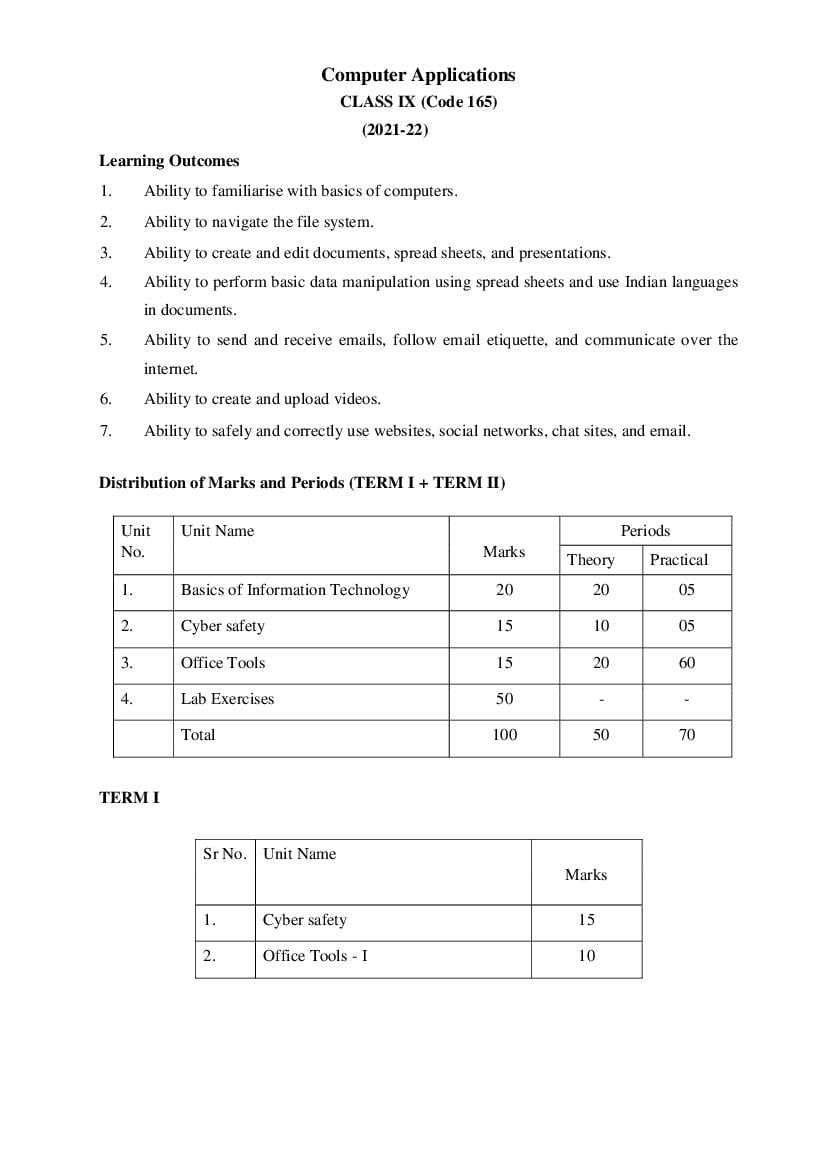
CLASS IX (Code 165)
(2021-22)
Learning Outcomes
1. Ability to familiarise with basics of computers.
2. Ability to navigate the file system.
3. Ability to create and edit documents, spread sheets, and presentations.
4. Ability to perform basic data manipulation using spread sheets and use Indian languages
in documents.
5. Ability to send and receive emails, follow email etiquette, and communicate over the
internet.
6. Ability to create and upload videos.
7. Ability to safely and correctly use websites, social networks, chat sites, and email.
Distribution of Marks and Periods (TERM I + TERM II)
Unit Unit Name Periods
No. Marks
Theory Practical
1. Basics of Information Technology 20 20 05
2. Cyber safety 15 10 05
3. Office Tools 15 20 60
4. Lab Exercises 50 - -
Total 100 50 70
TERM I
Sr No. Unit Name
Marks
1. Cyber safety 15
2. Office Tools - I 10
Page 2
• Safely browsing the web and using social networks: identity protection, proper usage of
passwords, privacy, confidentiality of information, cyber stalking, reporting cybercrimes
• Safely accessing websites: viruses and malware , adware
Unit 3: Office tools -1
• Introduction to a word processor: create and save a document.
• Edit and format text: text style (B, I, U), font type, font size, text colour, alignment of
text. Format paragraphs with line and/or paragraph spacing. Add headers and footers,
numbering pages, grammar and spell check utilities, subscript and superscript, insert
symbols, use print preview, and print a document.
• Insert pictures, change the page setting, add bullets and numbering, borders and shading,
and insert tables – insert/delete rows and columns, merge and split cells.
• Use auto-format, track changes, review comments, use of drawing tools, shapes and
mathematical symbols.
• Presentation tool: understand the concept of slide shows, basic elements of a slide,
different types of slide layouts, create and save a presentation, and learn about the
different views of a slide set – normal view, slide sorter view and hand-outs.
TERM II
Unit Unit Name
No. Marks
1. Basics of Information Technology 20
2. Office Tools - II 5
Unit 1: Basics of Information Technology
• Computer Systems: characteristics of a computer, components of a computer system –
CPU, memory, storage devices and I/O devices
• Memory: primary (RAM and ROM) and secondary memory
• Storage devices: hard disk, CD ROM, DVD, pen/flash drive, memory stick
• I/O devices: keyboard, mouse, monitor, printer, scanner, web camera
Page 3
software including mobile applications
• Computer networking: Type of networks: PAN, LAN, MAN, WAN, wired/wireless
communication, Wi-Fi, Bluetooth, cloud computers (private/public)
• Multimedia: images, audio, video, animation
Unit 3: Office Tools – II
Presentation tool
• Edit and format a slide: add titles, subtitles, text, background, and watermark, headers
and footers, and slide numbers.
• Insert pictures from files, create animations, add sound effects, and rehearse timings.
Spreadsheets
• Spreadsheets: concept of a worksheet and a workbook, create and save a worksheet.
• Working with a spreadsheet: enter numbers, text, date/time, series using auto fill; edit and
format a worksheet including changing the colour, size, font, alignment of text; insert and
delete cells, rows and columns. Enter a formula using the operators (+,-,*, /), refer to cells,
and print a worksheet.
• Use simple statistical functions: SUM (), AVERAGE (), MAX (), MIN (), IF () (without
compound statements); embed charts of various types: line, pie, scatter, bar and area in a
worksheet.
Suggested Lab Exercises
• Browser settings for a secure connection
• Working with the operating system: Navigation of the file system using a mouse and
keyboard.
• Word processing: create a text document; create a letter, report, and greeting card.
• Create a text document with figures in it. It should describe a concept taught in another
course.
• Discuss the following in a text document about the basic organisation of a computer:
CPU, memory, input/output devices, hard disk.
• Create a text document in an Indian language other than English.
• Create a presentation.
• Create a presentation with animation.
Page 4
• Animate pictures and text with sound effects in a presentation
• Create a simple spreadsheet and perform the following operations: min, max, sum, and
average.
• Create different types of charts using a spreadsheet: line, bar, area and pie.
Breakup of marks for the Practicals:
S.No. Unit Name Total Term-1 Term-2
Marks Marks Marks
1. Lab Test
(30 marks)
Word processing 10 10 -
Handling spreadsheets 10 - 10
Creating presentations 10 5 5
2. Report File + viva
(10 marks)
Report file: 6 3 3
• Term-I : Two documents each with
a word processor and presentation tool
• Term-II : Two documents each with
a spreadsheet and presentation tool
Viva voce (based on the report file) 4 2 2
3. Project (that uses most of the concepts that have 10 5 5
been learnt)
Total Marks 50 25 25
Page 5
CLASS X (Code 165)
(2021-22)
Learning Outcomes
1. Ability to create a simple website
2. Ability to embed images, audio and video in an HTML page
3. Ability to use style sheets to beautify the web pages.
4. Ability to Interface a web site with a web server and record the details of a user's request.
5. Ability to follow basic cyber ethics
6. Ability to familiarize with network concepts.
Distribution of Marks and Periods TERM I + TERM II
Unit Unit Name Marks Periods
No.
Theory Practical
1. Networking 15 17 05
2. HTML 25 30 50
3. Cyber ethics 10 08 10
4. Practicals 50 - -
Total 100 55 65
TERM I
Sr Unit Name Marks
No.
1. Cyber ethics 10
2 HTML 15
Page 6
• Netiquettes.
• Software licenses and the open source software movement.
• Intellectual property rights, plagiarism and digital property rights.
• Freedom of information and the digital divide.
• E-commerce: Privacy, fraud, secure data transmission.
Unit 2: HTML - I
• Introduction to web page designing using HTML: create and save an HTML document,
access a web page using a web browser.
• HTML tags: html, head, title, body, (attributes: text, background, bgcolor, link, vlink,
alink), br (break), hr(horizontal rule), inserting comments, h1..h6 (heading), p
(paragraph), b (bold), i (italics), u (underline), ul (unordered list), ol (ordered list), and li
(list item). Description lists: dl, dt and dd. Attributes of ol (start, type), ul (type).
• Font tags (attributes: face, size, color).
• Insert images: img (attributes: src, width, height, alt), sup (super script), sub (subscript).
• HTML Forms: Textbox, radio buttons, checkbox, password, list, combobox.
TERM II
Unit Unit Name Marks
No.
1. Networking 15
2. HTML 10
Unit 1: Networking
• Internet: World Wide Web, web servers, web clients, web sites, web pages, web browsers,
blogs, news groups, HTML, web address, e-mail address, downloading and uploading
files from a remote site. Internet protocols: TCP/IP, SMTP, POP3, HTTP, HTTPS.
Remote login and file transfer protocols: SSH, SFTP, FTP, SCP, TELNET, SMTP,
TCP/IP.
• Services available on the internet: information retrieval, locating sites using search
engines and finding people on the net;
• Web services: chat, email, video conferencing, e-Learning, e-Banking, eShopping, e-
Reservation, e-Governance, e-Groups, social networking.
Page 7
Unit 2: HTML - II
• Embed audio and video in a HTML page.
• Create a table using the tags: table, tr, th, td, rowspan, colspan
• Links: significance of linking, anchor element (attributes: href, mailto), targets.
• Cascading style sheets: colour, background-colour, border-style, margin, height, width,
outline, font (family, style, size), align, float
Suggested Lab Exercises
• Create static web pages.
• Use style sheets to enforce a format in an HTML page (CSS).
• Embed pictures, audio and videos in an HTML page.
• Add tables and frames in an HTML page.
• Decorate web pages using graphical elements.
• Create a website using several webpages. Students may use any open source or
proprietary tool.
• Work with HTML forms: text box, radio buttons, checkbox, password, list, combo box.
• Write a blog using HTML pages discussing viruses, malware, spam and antiviruses
• Create a web page discussing plagiarism. List some reported cases of plagiarism and the
consequent punishment meted out. Explain the nature of the punishment in different
countries as per their IP laws.
Breakup of marks for the practicals:
Total Term-1 Term-2
S.No. Unit Name
Marks Marks Marks
Lab Test (20 marks)
1 HTML (design one web page
20 10 10
based on a diagram)
2 Report File + viva (20 marks)
Report file: At least 10
HTML pages. (Term-1 : At
14 7 7
Least 5 HTML Pages, Term-2 :
At least 5 HTML Pages)
Viva voce (based on the report
6 3 3
file)
Project (that uses most of the
3 10 5 5
concepts that have been learnt)
Total Marks 50 25 25
Document Details
| Board / Org | CBSE |
| Exam | Class 10 |
| Type | Syllabus |
| Pages | 7 |
| Language | english |
| Updated | 22 Jul 2026 |