CBSE Class 10 Computer Applications Syllabus 2021-22
Finished viewing? Save it for later —
Download CBSE Class 10 Computer Applications Syllabus 2021-22 (PDF · 4 pages)About CBSE Class 10 Computer Applications Syllabus 2021-22
CBSE Class 10 Computer Applications Syllabus 2021-22 is available here for free download. Published by CBSE for Class 10, this syllabus can be viewed online or downloaded as a PDF (4 pages). Candidates preparing for Class 10 can use CBSE Class 10 Computer Applications Syllabus 2021-22 to understand the exam pattern, the type of questions asked, and the overall difficulty level.
Frequently Asked Questions
How can I download CBSE Class 10 Computer Applications Syllabus 2021-22?
Open this page and click the Download button to save CBSE Class 10 Computer Applications Syllabus 2021-22 as a PDF. It is completely free on AglaSem Docs.
Is CBSE Class 10 Computer Applications Syllabus 2021-22 free to download?
Yes. CBSE Class 10 Computer Applications Syllabus 2021-22 can be viewed online and downloaded as a PDF free of cost on AglaSem Docs.
How many pages does CBSE Class 10 Computer Applications Syllabus 2021-22 have?
CBSE Class 10 Computer Applications Syllabus 2021-22 contains 4 pages, which you can read online or download together as a single PDF.
Where can I find more Class 10 study material?
You can find more Class 10 question papers, sample papers, syllabus, and answer keys on AglaSem Docs.
CBSE Class 10 Computer Applications Syllabus 2021-22 – Text
Read the full text of this syllabus below — useful to quickly search, copy and reference the content online without downloading the PDF.
📄 View text version (4 pages)
Page 1
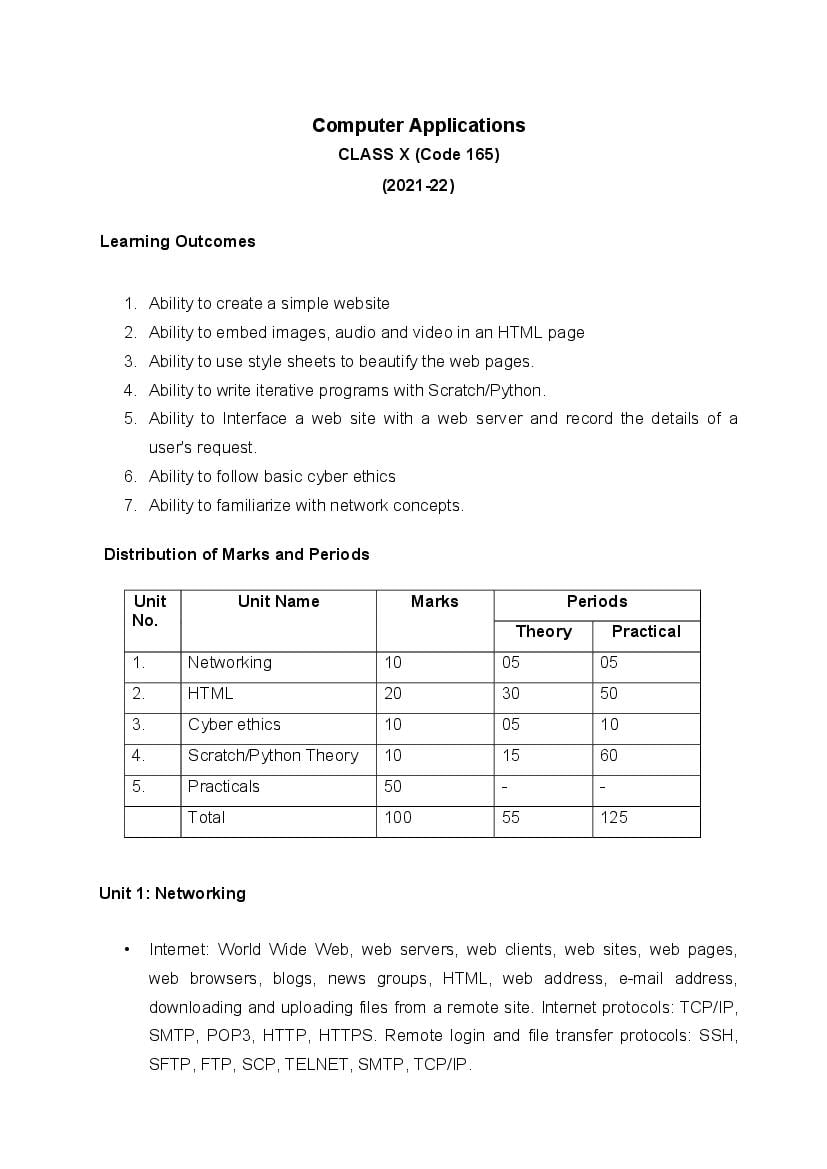
CLASS X (Code 165)
(2021-22)
Learning Outcomes
1. Ability to create a simple website
2. Ability to embed images, audio and video in an HTML page
3. Ability to use style sheets to beautify the web pages.
4. Ability to write iterative programs with Scratch/Python.
5. Ability to Interface a web site with a web server and record the details of a
user's request.
6. Ability to follow basic cyber ethics
7. Ability to familiarize with network concepts.
Distribution of Marks and Periods
Unit Unit Name Marks Periods
No.
Theory Practical
1. Networking 10 05 05
2. HTML 20 30 50
3. Cyber ethics 10 05 10
4. Scratch/Python Theory 10 15 60
5. Practicals 50 - -
Total 100 55 125
Unit 1: Networking
• Internet: World Wide Web, web servers, web clients, web sites, web pages,
web browsers, blogs, news groups, HTML, web address, e-mail address,
downloading and uploading files from a remote site. Internet protocols: TCP/IP,
SMTP, POP3, HTTP, HTTPS. Remote login and file transfer protocols: SSH,
SFTP, FTP, SCP, TELNET, SMTP, TCP/IP.
Page 2
search engines and finding people on the net;
• Web services: chat, email, video conferencing, e-Learning, e-Banking,
eShopping, e-Reservation, e-Governance, e-Groups, social networking.
• Mobile technologies: SMS, MMS, 3G, 4G.
Unit 2: HTML
• Introduction to web page designing using HTML: create and save an HTML
document, access a web page using a web browser.
• HTML tags: html, head, title, body, (attributes: text, background, bgcolor, link,
vlink, alink), br (break), hr(horizontal rule), inserting comments, h1..h6
(heading), p (paragraph), b (bold), i (italics), u (underline), ul (unordered list), ol
(ordered list), and li (list item). Description lists: dl, dt and dd. Attributes of ol
(start, type), ul (type).
• Font tags (attributes: face, size, color).
• Insert images: img (attributes: src, width, height, alt), sup (super script), sub
(subscript).
• HTML Forms: Textbox, radio buttons, checkbox, password, list, combobox.
• Embed audio and video in a HTML page.
• Create a table using the tags: table, tr, th, td, rowspan, colspan
• Links: significance of linking, anchor element (attributes: href, mailto), targets.
• Cascading style sheets: colour, background-colour, border-style, margin,
height, width, outline, font (family, style, size), align, float.
Unit 3: Cyber ethics
• Netiquettes.
• Software licenses and the open source software movement.
• Intellectual property rights, plagiarism and digital property rights.
• Freedom of information and the digital divide.
• E-commerce: Privacy, fraud, secure data transmission.
Page 3
Alternative 1: Scratch
• Revision of the basics of Scratch
• Sprite, tempo, variables, and events
• Coordinates and conditionals
• Drawing with iteration
• Update variables repeatedly, iterative development, ask and answer blocks
• Create games, animated images, stories and songs
OR
Alternative 2: Python
• Revision of Python basics
• Conditionals: if, if-else statements
• Loops: for, while (e.g., sum of first 10 natural numbers)
• Practice simple programs
5. Lab Exercises
• Create static web pages.
• Use style sheets to enforce a format in an HTML page (CSS).
• Embed pictures, audio and videos in an HTML page.
• Add tables and frames in an HTML page.
• Decorate web pages using graphical elements.
• Create a website using several webpages. Students may use any open source
or proprietary tool.
• Work with HTML forms: text box, radio buttons, checkbox, password, list,
combo box.
• Write a blog using HTML pages discussing viruses, malware, spam and
antiviruses
• Create a web page discussing plagiarism. List some reported cases of
plagiarism and the consequent punishment meted out. Explain the nature of the
punishment in different countries as per their IP laws.
• Create simple stories with Scratch (involving at least two objects/characters)
and iteration OR write programs for finding the sum/product of first n natural
numbers using Python
Page 4
S.No. Unit Name Marks
1. Lab Test
(30 marks)
HTML (design one web page based on a diagram) 15
Scratch or Python (write one program) 15
2. Report File + viva
(10 marks)
Report file: At least 10 HTML pages, and at least 5
Scratch/Python programs. 8
Viva voce (based on the report file)
2
3. Project (that uses most of the concepts that have been learnt)
(10 marks)
Total (50 marks)
Document Details
| Board / Org | CBSE |
| Exam | Class 10 |
| Type | Syllabus |
| Pages | 4 |
| Updated | 22 Jul 2026 |