MBOSE Class 12 Question Paper 2020 for Computer Technique Paper IV
Finished viewing? Save it for later —
Download MBOSE Class 12 Question Paper 2020 for Computer Technique Paper IV (PDF · 8 pages)About MBOSE Class 12 Question Paper 2020 for Computer Technique Paper IV
MBOSE Class 12 Question Paper 2020 for Computer Technique Paper IV is available here for free download. Published by Meghalaya Board for Class 12, this question paper can be viewed online or downloaded as a PDF (8 pages). Candidates preparing for Class 12 can use MBOSE Class 12 Question Paper 2020 for Computer Technique Paper IV to understand the exam pattern, the type of questions asked, and the overall difficulty level.
Frequently Asked Questions
How can I download MBOSE Class 12 Question Paper 2020 for Computer Technique Paper IV?
Open this page and click the Download button to save MBOSE Class 12 Question Paper 2020 for Computer Technique Paper IV as a PDF. It is completely free on AglaSem Docs.
Is MBOSE Class 12 Question Paper 2020 for Computer Technique Paper IV free to download?
Yes. MBOSE Class 12 Question Paper 2020 for Computer Technique Paper IV can be viewed online and downloaded as a PDF free of cost on AglaSem Docs.
How many pages does MBOSE Class 12 Question Paper 2020 for Computer Technique Paper IV have?
MBOSE Class 12 Question Paper 2020 for Computer Technique Paper IV contains 8 pages, which you can read online or download together as a single PDF.
Where can I find more Class 12 study material?
You can find more Class 12 question papers, sample papers, syllabus, and answer keys on AglaSem Docs.
MBOSE Class 12 Question Paper 2020 for Computer Technique Paper IV – Text
Read the full text of this question paper below — useful to quickly search, copy and reference the content online without downloading the PDF.
📄 View text version (8 pages)
Page 1
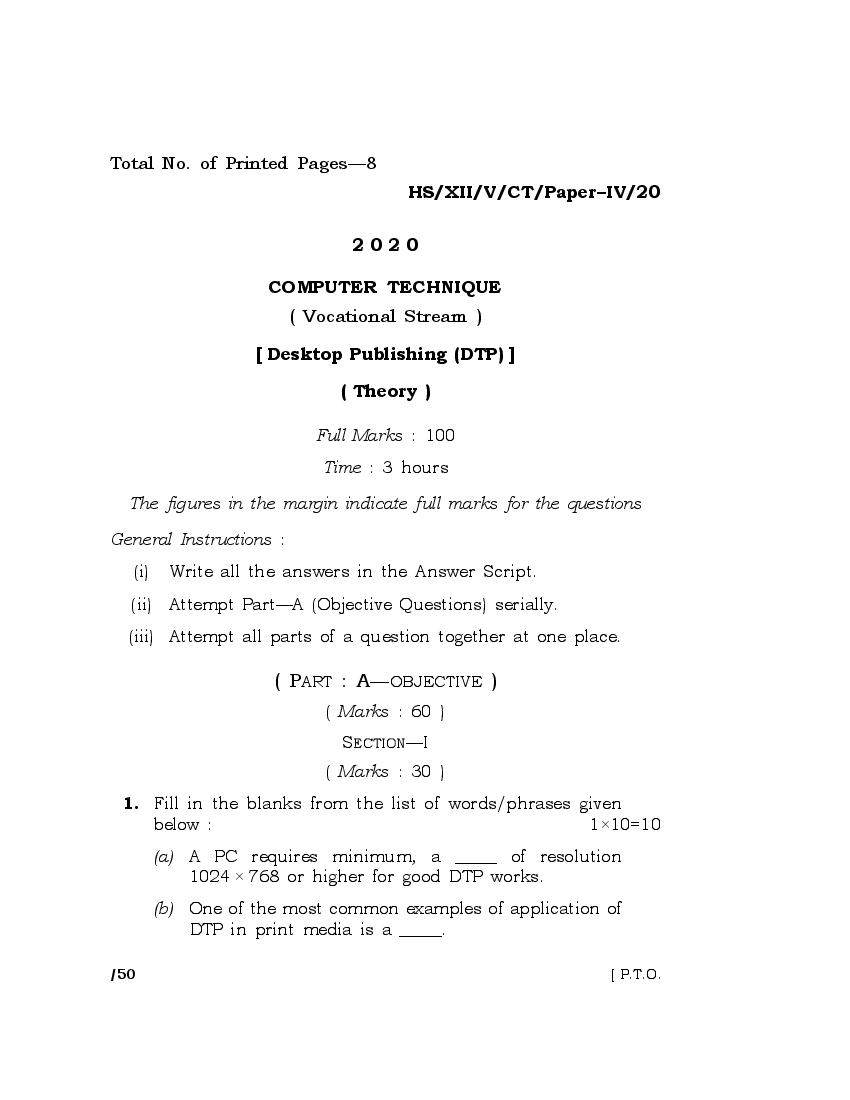
HS/XII/V/CT/Paper–IV/20
2020
COMPUTER TECHNIQUE
( Vocational Stream )
[ Desktop Publishing (DTP) ]
( Theory )
Full Marks : 100
Time : 3 hours
The figures in the margin indicate full marks for the questions
General Instructions :
(i) Write all the answers in the Answer Script.
(ii) Attempt Part—A (Objective Questions) serially.
(iii) Attempt all parts of a question together at one place.
( PART : A—OBJECTIVE )
( Marks : 60 )
SECTION—I
( Marks : 30 )
1. Fill in the blanks from the list of words/phrases given
below : 1×10=10
(a) A PC requires minimum, a _____ of resolution
1024 × 768 or higher for good DTP works.
(b) One of the most common examples of application of
DTP in print media is a _____.
/50 [ P.T.O.
Page 2
(c) Vinyl banners are a form of outdoor _____.
(d) In DTP, basically there are two types of pages,
electronic pages and _____ to be printed on physical
paper pages.
(e) One of the parameters in page setup in DTP is _____.
(f) Process of placing text, graphics, pictures and other
elements of a document to be printed is known
as _____.
(g) QuarkXPress 2018 is a _____ software.
(h) The main purpose of DTP is _____ of ideas and
information presented through page layouting and
printing.
( i ) _____ means removing mistakes from a draft
document.
( j) The better the _____ of a PC (Personal Computer), the
better and smoother an image can be produced.
List of words/phrases
Page layout Advertising
DTP Virtual paper pages
Proofreading Communication
Graphic card Monitor
Newspaper Page orientation
2. State whether the following statements are True or
False : ½×10=5
(a) CorelDRAW is a powerful image design software.
(b) PageMaker is a page layout software.
HS/XII/V/CT/Paper–IV/20/50 [ Contd.
Page 3
(c) Vectors image can also be designed using PageMaker.
(d) Drop Shadows can be done in CorelDRAW.
(e) Insert page is in a layout menu.
(f) The space between two columns is called as the
gutter width.
(g) In CorelDRAW to change a straight line into a curve,
a pick tool is used.
(h) JPEG is a video format.
( i ) Blending object is possible in CorelDRAW.
( j) In PageMaker ‘column guides’ option is in layout
menu.
3. Select the most correct answer from the given choices for
each statement : 1×5=5
(a) Which type of graphic size increases without
affecting the quality?
(i) Print graphic
(ii) Vector graphic
(iii) Raster graphic
(iv) None of the above
(b) Which of the following is done through DTP?
(i) Advertising designing
(ii) Block designing
(iii) Pamphlet designing
(iv) All of the above
HS/XII/V/CT/Paper–IV/20/50 [ P.T.O.
Page 4
(c) The hardware requirement for DTP is
(i) printer
(ii) PC
(iii) scanner
(iv) All of the above
(d) Which of the following types of printing is the
highest quality printing system?
(i) Letterpress printing
(ii) Gravure printing
(iii) Offset printing
(iv) Screen printing
(e) If equal amount of blue and green colors is
thoroughly mixed, then the resultant color is
(i) yellow
(ii) cyan
(iii) black
(iv) magenta
4. Answer each of the following questions in 1 or
2 sentence(s) : 1×10=10
(a) Define a drawing Window in CorelDRAW.
(b) Give five examples of image formats supported by
PageMaker.
(c) What is the use of insert object command in
PageMaker?
HS/XII/V/CT/Paper–IV/20/50 [ Contd.
Page 5
(d) What is the variant of shape tools in CorelDraw?
(e) Define snap to object in CorelDRAW.
(f) How to create closed object in CorelDRAW?
(g) What is the use of mask command in PageMaker?
(h) What is the difference between expert kerning and
expert tracking?
( i) What happens when text is converted into curve in
CorelDRAW?
( j) What is autoflow in PageMaker?
SECTION—II
( Marks : 30 )
5. Answer any six of the following questions in 2 to
3 sentences each : 2×6=12
(a) Differentiate between DTP and word processing.
(b) Give the steps for changing fill and stroke at the
same time in PageMaker.
(c) How can a figure drawn in CorelDRAW be imported
to a PageMaker?
(d) Differentiate between Window shades and Frame in
PageMaker.
(e) What is the difference between paragraph text and
artistic text? How is artistic text created?
HS/XII/V/CT/Paper–IV/20/50 [ P.T.O.
Page 6
(f) In CorelDRAW, if there are three objects of different
colors arranging one on top of another, and the
bottom one is to be brought to the top of the other
two, then how is it done and by which command?
(g) How are empty frames linked in PageMaker?
(h) How can text be exported to PDF file in PageMaker?
6. Answer any six of the following questions in 3 to
4 sentences each : 3×6=18
(a) Which command is used to search for text in
PageMaker? How can text be searched from a
current publication and story?
(b) What palette is always available, floating on top of
work area of PageMaker? Name at least five
commands coming with that palette.
(c) How is text fitted into a curve in CorelDRAW?
(d) How Pan tool and Zoom tool look like in PageMaker
and what are their functions?
(e) Define character scaling in PageMaker. How is
horizontal scale applied to character in a text?
(f) Define tab leaders in PageMaker. How are tab
leaders created?
(g) How is a new style defined in PageMaker?
(h) Differentiate between grouping and combining
objects in CorelDRAW.
HS/XII/V/CT/Paper–IV/20/50 [ Contd.
Page 7
( PART : B—DESCRIPTIVE )
( Marks : 40 )
GROUP—I
Answer any five of the following questions : 4×5=20
7. What are the different commands available with free
transform? How is skew-transform applied to an object
in CorelDRAW?
8. Give the bit depths of RGB, Greyscale and CMYK image.
What are the different types of color models?
9. How do you remove a background from an imported
image in CorelDRAW?
10. What are the different types of lenses in CorelDRAW?
Give one example of how lens can be applied to an
object.
11. What is text wrap around an image in PageMaker? How
the customization of wrap around graphic is done?
12. How to create a color tint in PageMaker?
13. How can table be inserted in PageMaker?
HS/XII/V/CT/Paper–IV/20/50 [ P.T.O.
Page 8
GROUP—II
Answer any four of the following questions : 5×4=20
14. Define container in CorelDRAW. How is a PowerClip
inserted into an artistic text?
15. What does a blend tool do? How do you define a line
thickness of lines generated by the contour effect?
16. Differentiate between lock position and lock layer in
PageMaker. How can layers be shuffled?
17. Explain how a merged publication is created in
PageMaker.
18. What is the use of a link manager dialog box? How to
relink the missing graphic back to the publication?
HS/XII/V/CT/Paper–IV/20/50 20K
Document Details
| Board / Org | Meghalaya Board |
| Exam | Class 12 |
| Type | Question Paper |
| Pages | 8 |
| Updated | 01 May 2026 |