MP Police Constable 2017 Question Paper 16 Sep Shift 2
Finished viewing? Save it for later —
Download MP Police Constable 2017 Question Paper 16 Sep Shift 2 (PDF · 37 pages)About MP Police Constable 2017 Question Paper 16 Sep Shift 2
MP Police Constable 2017 Question Paper 16 Sep Shift 2 is available here for free download. Published by MPESB for MP Police Constable, this question paper can be viewed online or downloaded as a PDF (37 pages). Candidates preparing for MP Police Constable can use MP Police Constable 2017 Question Paper 16 Sep Shift 2 to understand the exam pattern, the type of questions asked, and the overall difficulty level.
Frequently Asked Questions
How can I download MP Police Constable 2017 Question Paper 16 Sep Shift 2?
Open this page and click the Download button to save MP Police Constable 2017 Question Paper 16 Sep Shift 2 as a PDF. It is completely free on AglaSem Docs.
Is MP Police Constable 2017 Question Paper 16 Sep Shift 2 free to download?
Yes. MP Police Constable 2017 Question Paper 16 Sep Shift 2 can be viewed online and downloaded as a PDF free of cost on AglaSem Docs.
How many pages does MP Police Constable 2017 Question Paper 16 Sep Shift 2 have?
MP Police Constable 2017 Question Paper 16 Sep Shift 2 contains 37 pages, which you can read online or download together as a single PDF.
Where can I find more MP Police Constable study material?
You can find more MP Police Constable question papers, sample papers, syllabus, and answer keys on AglaSem Docs.
MP Police Constable 2017 Question Paper 16 Sep Shift 2 – Text
Read the full text of this question paper below — useful to quickly search, copy and reference the content online without downloading the PDF.
📄 View text version (37 pages)
Page 1
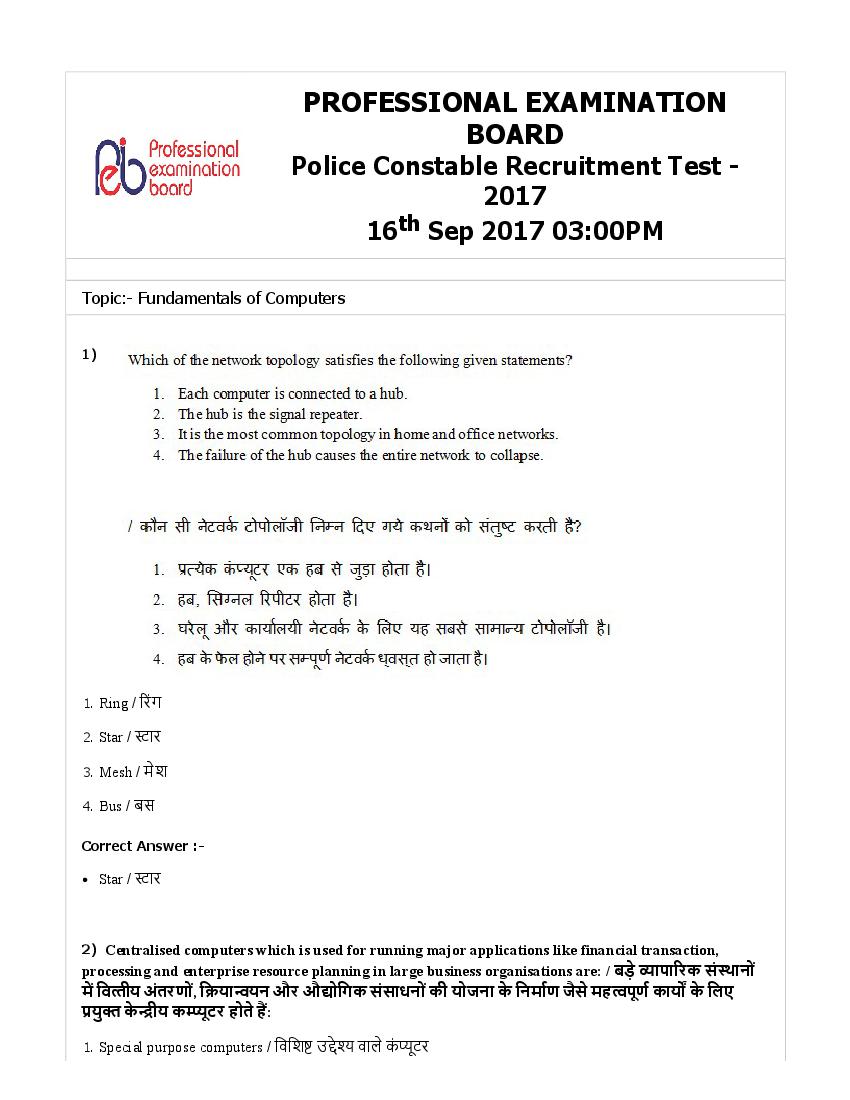
BOARD
Police Constable Recruitment Test -
2017
16th Sep 2017 03:00PM
Topic:- Fundamentals of Computers
1)
1. Ring / रं ग
2. Star / ार
3. Mesh / मे श
4. Bus / बस
Star / ार
2) Centralised computers which is used for running major applications like financial transaction,
processing and enterprise resource planning in large business organisations are: / बड़े ापा रक सं थानों
म िव तीय अंतरणों, ि या यन और औ ोिगक संसाधनों की योजना के िनमाण जैसे मह पूण काय के िलए
यु के ीय क ूटर होते ह:
1. Special purpose computers / िविश उ े वाले कं ूटर
Mainframe computers / मेन े म कं ूटर
Page 2
3. Supercomputers / सु पर कं ूटर
4. Hybrid computers / हाइि ड कं ूटर
Mainframe computers / मेन े म कं ूटर
3) Which of the layers of OSI Reference model is NOT present as a separate layer in the TCP/IP
Reference model for communication networks? / संचार नेटवक के िलए TCP/IP रे फरस मॉडल म OSI रे फरस
मॉडल का कौन सा र एक अलग र के प म दिशत नही ं होता है ?
1. Network / ने टवक
2. Transport / टां सपोट
3. Session / से शन
4. Application / ए ीकेशन
Session / सेशन
4) How will binary number 111111 be represented in decimal, hex and octal formats? / िकस कार
बाइनरी सं ा 111111 को दशमलव, हे और ऑ े ल म िन िपत िकया जाएगा?
1. 62; 4F; 57
2. 63; 3F; 77
3. 65; 5F; 87
4. 64; 2F; 67
63; 3F; 77
5) In 8-bit ASCII, what is the number of values that ASCII has the ability to store? / 8-िबट ASCII म,
ASCII ारा मानों की िकतनी सं या को टोर करने की मता होती है ?
1. 255
2. 127
3. 256
4. 128
Page 3
6) Machine language is also called as: / मशीन भाषा को यह भी कहा जाता है :
1. High level programming language / उ रीय ो ािमंग भाषा
2. First generation language / थम जे नरे शन भाषा
3. Opcode / ऑपकोड
4. Compiler / अनु भाषक
First generation language / थम जेनरे शन भाषा
7) The scheduling algorithm where the CPU executes the process for a specific time slice or time
quantum is called ____________. / वह शे ूिलंग ऐ ो र म जहां CPU िकसी ख़ास समय म िकसी एक ण
अथवा ल े समय के िलए अिभि याओं का संचालन करता है , ___________ कहलाता है ।
1. Shortest Job First Scheduling Algorithm / शॉट जॉब फ शे ूिलंग ऐ ोर म
2. Round Robin Scheduling Algorithm / राउं ड रॉिबन शे ूिलंग ऐ ोर म
3. Priority Scheduling Algorithm / ाइयो रटी शे ूिलंग ऐ ोर म
4. First Come First Served Scheduling Algorithm / फ कम फ स ड, शे ूिलंग ऐ ोर म
Round Robin Scheduling Algorithm / राउं ड रॉिबन शे ूिलंग ऐ ोर म
8) A high speed memory location for holding intermediate results produced by Arithmetic and Logic
Units in a processor is called ____________. / एक ोसेसर म अथमेिटक और लॉिजक यूिनट ारा उ प न
म यवत प रणामों को रखने के िलए हाई पीड मेमोरी लोकेशन ___________ कहलाती है ।
1. Memory Buffer Register / मे मोरी बफ़र रिज र
2. Memory Data Register / मे मोरी डे टा रिज र
3. Accumulator / ए यु यु लेटर
4. Program Counter / ो ाम काउं टर
Accumulator / ए यु युलेटर
Page 4
1. Low cost, high speed and high capacity / िन लागत, उ गित और उ मता
2. Low cost, slow speed and high capacity / कम लागत, धीमी गित और उ मता
3. Medium cost, medium speed and medium capacity / म म लागत, म म गित और म म मता
4. High cost, high speed and low capacity / उ लागत, उ गित और िन मता
High cost, high speed and low capacity / उ लागत, उ गित और िन मता
10) PDP-8 belongs to which one of the following generation of computers? / PDP-8, क ूटर की िकस
जेनरे शन से स ंिधत है ?
1. Third generation / तृ तीय जे नरे शन
2. Mechanical generation / यां ि क जे नरे शन
3. Second generation / ि तीय जे नरे शन
4. First generation / थम जे नरे शन
Second generation / ि तीय जेनरे शन
11) An example of a utility software is: / यू िटिलटी सॉ वेयर का एक उदाहरण है :
1. Assembler / कोडां तरक
2. Disk Defragmenter / िड िड ै टर
3. Windows 7 / िवं डोज़़ 7
4. n-Vidia Graphics Driver / एन-वीिडया ािफ़क डाइवर
Disk Defragmenter / िड िड ै टर
12) ____________ is a unidirectional bus that is used for transferring memory locations from processor
to memory. / ____________ एक एकिदशीय बस है िजसका उपयोग मेमोरी की थित को ोसेसर से मेमोरी म
थानांतरण के िलए िकया जाता है ।
1. Control bus / कंटोल बस
2. Information bus / इ फॉमशन बस
Data bus / डे टा बस
Page 5
4. Address bus / एडे स बस
Address bus / एडे स बस
13) Malware that threatens to publish sensitive data and/or blocks access to the system until money is
paid is called ___________. / मालवेयर, जोिक जब तक पैसों का भुगतान न कर िदया जाए, आव क डे टा को
न करने अथवा ि याओं के संचालन को बंद करने की चेतावनी दिशत करता रहता है , _________कहलाता है ।
1. Worm / वॉम
2. Trojan Horse / टोजन हॉस
3. Ransomware / रसमवे यर
4. Virus / वायरस
Ransomware / रसमवेयर
14) Storage systems that use Curie temperature for phase transition of magnetic to paramagnetic
material for recording data are called __________. / टोरे ज िस टम जो डे टा रकॉड करने के िलए चु कीय
पदाथ की पराचु कीय पदाथ म ाव था सं मण के िलए ूरी तापमान का योग करते ह, ________ कहलाते
ह।
1. Solid state storage devices / ठोस थित की ोरे ज िडवाइस
2. Magnetic disks / चु कीय िड
3. Magneto-optical disks / चुं बक- काशीय िड
4. Optical disks / काशीय िड
Magneto-optical disks / चुंबक- काशीय िड
15) The problem of unused and unallocated memory blocks which are too small and not
contiguous to accommodate a segment can be resolved by dividing memory into blocks of
equal size is called _______________. / अ यु तथा अनएलोकेटे ड मेमोरी के टु कड़ों की सम ा का
समाधान, जो िक ब त छोटे ह और से ट समायोजन के यो नही ं है , मेमोरी को समान आकार के टु कड़ों म
िवभािजत करके िकया जा सकता है , यह ि या ____________ कहलाती है ।
1. Memory paging / मे मोरी पे िजं ग
2. Memory swapping / मे मोरी ैिपंग
Memory partition / मेमोरी िवभाजन
Page 6
4. Memory fragmentation / मे मोरी े टे शन
Memory paging / मेमोरी पेिजंग
Topic:- Operating System
1) In Windows 7 (and above), what are the long running executable applications that operate in the
background in their own Windows sessions, which can be automatically started when the computer boots,
paused and restarted and do not show any User Interface? / िवंडोज़ 7 (और इससे ऊपर की िवंडोज़) म, वे
कौन से लंबे समय तक रन करने वाले ए यूट करने वाले ए लीकेशन ह जो अपने वयं के िवंडोज़ सेशंस म
बैक ाउं ड म ऑपरे ट करते ह जो क यूटर के बूट होने, पॉज होने या र ाट होने के समय, वत: टाट हो सकते ह
और कोई यूज़र इं टरफेस नही ं दिशत करते ह?
1. Resource Monitor / रसोस मॉिनटर
2. Services / सिवसे ज़
3. Task Manager / टा मैनेजर
4. User Account Manager / यू ज़र अकाउं ट मै नेजर
Services / सिवसेज़
2) In Windows 7, what is the rich text editor that comes as one of the ‘Windows accessories’ tool where
you can format and print text? / िवंडोज़ 7 म, िवंडोज़ ए ेसरीज़ म शािमल वह मह पूण टे एिडटर कौन
सा है िजसके ारा आप टे को फॉमट या ि ंट कर सकते ह?
1. MS Word / एमएस-वड
2. Notepad++ / नोटपै ड++
3. Notepad / नोटपै ड
4. WordPad / वडपै ड
WordPad / वडपैड
3) In Windows OS, how do you change the resolution of the display? / िवं डोज़-ओएस म, आप िड े के
रज़ो यूशन को कैसे बदलगे?
Page 7
2.
3.
Page 8
4) In Windows OS (version 7 and above), which option gives the ability to use assistive technologies to
enable people with disabilities to interact with the system and perform regular computing tasks? / िवंडोज़
ओएस (वज़न 7 और उससे बाद) म, कौन सा िवक ऐसी सहायक तकनीक इ ेमाल करने की मता दे ता है , जो
िद ांग जनों को िस टम से इं टरै ट करने तथा कं ूटर पर िनयिमत प से काम करने म स म बनाती ह?
1. Network Firewall / ने टवक फ़ायरवॉल
2. Windows Defender / िवं डोज़ िडफडर
3. Ease of Access Center / सु गम ए ेस सटर
4. User Account Control / यू ज़र अकाउं ट कंटोल
Ease of Access Center / सुगम ए ेस सटर
Page 9
script? / लाइन म वह कौन सा िविश वै रएबल (चर) है जो िकसी म स लाई िकए गए आ युमट की
सं ा को दशाता है ?
1. $0
2. $*
3. $$
4. $#
$#
6) Which of the following is NOT a default folder in Windows OS 7? / िवं डोज़-ओएस 7 म, िन म से कौन
सा एक िडफॉ फो र नही ं होता है ?
1. Trash / टै श
2. Downloads / डाउनलोड् स
3. Desktop / डे टॉप
4. My Documents / माई डॉ ूमट
Trash / टै श
7) What is the first process that the computer undergoes when booting? / बू िटं ग के समय कं ूटर म घिटत
होने वाली पहली ि या या है ?
1. Kernel Loading process / कनल लोिडं ग ि या
2. Power On Self-Test (POST) / पॉवर ऑन से -टे (पो )
3. Start-up Process / ाट-अप ि या
4. Logon Process / लॉग ऑन ि या
Power On Self-Test (POST) / पॉवर ऑन से -टे (पो )
8) In Linux – Bash, which operator is used to join the standard output of the first command to the
standard input of the second command? / िलन - बैश म, पहली कमांड का टडड आउटपुट, दू सरी कमांड
के टडड इनपुट से जोड़ने के िलए िकस ऑपरे टर का उपयोग होता है ?
Page 10
2. |
3. $
4. %
|
9) In Linux – Bash,which command sends a signal (software interrupt) to processes? / िलन -बैश म
कौन सी कमांड ि याओं को एक िस ल (सॉ वेयर इं टर ट) भेजती है ?
1. ‘interrupt’
2. ‘kill’
3. ‘proc’
4. ‘signal’
‘kill’
10) In MS-DOS, what does the command XCOPY do? / MS-DOS म कमां ड XCOPY का काय ा है ?
1. Copies multiple files, directories, or drives from one location to another. / कई फाइलों, सू िचयों अथवा डाइवरों
को एक साथ एक जगह से दू सरी जगह पर कॉपी करना।
2. Cuts the files from one folder and pastes it to another. / िकसी फो र से फाइल को कट करके दू सरी जगह पे ट
करना।
3. It is the command used to copy admin files. / यह एडिमन फाइलों को कॉपी करने के िलए यु होने वाली कमां ड
है ।
4. Clears the files in the destination folder and pastes the copied files or folders. / डे नेशन फो र से फाइ
को हटाकर कॉपी की गयी फाइलों अथवा फो रों को यहाँ पे करना।
Copies multiple files, directories, or drives from one location to another. / कई फाइलों, सूिचयों अथवा डाइवरों
को एक साथ एक जगह से दू सरी जगह पर कॉपी करना।
11) In MS DOS, which of the following is used to display the contents of a text file? / MS-DOS म, एक
टे ट फाइल की साम ी को दिशत करने के िलए िन म से िकसका उपयोग होता है ?
1. TYPE / टाइप
HELP / हे
Page 11
3. DISPLAY / िड े
4. READ / रीड
TYPE / टाइप
12) _______________ is a type of operating system that guarantees a certain capability within a specified
time constraint or deadline, i.e., the OS is designed to respond accurately in a timely manner. /
______________ एक कार का ऑपरे िटं ग िस टम है जो िनिद ट समय यवरोध या डे डलाइन के अंतगत िनि त
मता की गारं टी दे ता है , अथात ऑपरे िटं ग िस टम समयब तरीके से प रशु प से काय करने के िलए िनिद ट
होता है ।
1. Batch Operating System / बै च ऑपरे िटं ग िस म
2. Network Operating System / ने टवक ऑपरे िटं ग िस म
3. Interactive Operating System / इं टरै व ऑपरे िटं ग िस म
4. Real-time Operating System / रयल-टाइम ऑपरे िटं ग िस म
Real-time Operating System / रयल-टाइम ऑपरे िटं ग िस म
13) A locking mechanism that allows multiple program threads to share the same resource, such as file
़ जो अनेक ो ाम ेडों को
access, but not simultaneously is called ______________. / वह लॉिकंग मेकैिन म
समान साधन जैसे िक फाइल ए सेस दान करता है , लेिकन एक साथ नही ं, _____________ कहलाता है ।
1. Semaphore / से माफोर
2. Mutex / ूटे
3. Race condition / रे स कंडीशन
4. Deadlock / डे डलॉक
Mutex / ूटे
14) In MS-DOS, __________contains the default MS-DOS device drivers and the DOS
initialisation program. / MS-DOS म, िडफा MS-DOS िडवाइस डाइवर और DOS इिनिशयलाइज़ेशन ो ाम
________ म िनिहत होते ह।
1. MSDOS.SYS
Page 12
3. IOS.SYS
4. CONFIG.SYS
IOS.SYS
15) In the Linux distribution structure, which directory is specific to each user and contains
log, lock, spool, mail and temp files? / िलन की िवतरण संरचना म, ेक यूज़र से जुड़ी वह िविश सूची
(डायरे टी) कौन सी है िजसम लॉग, लॉक, ूल, मेल और टे फाइल शािमल होती ह?
1. /etc/
2. /bin/
3. /log/
4. /var/
/var/
Topic:- Application Program
1) In MS Word (all versions), what is the shortcut key used to copy and paste formatting from text (i.e.
copy font type, size, colour, etc.)? / एमएस वड (सभी वज़न) म, िकसी टे से फॉमिटं ग (जैसे- कॉपी, फॉ का
आकर, कार और रं ग इ ािद) को कॉपी व पे करने के िलए कौन सी शॉटकट-की का उपयोग िकया जाता है ?
1. Ctrl+C; Ctrl+V
2. Ctrl+Shift+C; Ctrl+Shift+V
3. Shift+C; Shift+V
4. Alt+C; Alt+V
Ctrl+Shift+C; Ctrl+Shift+V
2) Which of the following is NOT available in the ‘Text’ Group of ‘Insert’ Tab in MS Word (version 2007
onward)? / एमएस वड (2007 और उसके बाद के वजन) म, इ ट टै ब के ‘टे ’ ुप म िन म से ा उपल ध
नही ं होता है ?
1. ‘WordArt’ with Layout options / ले आउट िवक के साथ ‘वडआट’
‘Textbox’ to control position of a block of text / ॉक के टे की पोज़ीशन के िनयं ण हे तु ‘टे बॉ ’
Page 13
3. Title Entrance ‘Animation’ effects / टाइिटल ए टस ‘एनीमे शन’ इफे ट
4. ‘Quick parts’ to store and re-use content / कंटट के भं डारण और पु नः- योग के िलए ‘ क पाट’
Title Entrance ‘Animation’ effects / टाइिटल ए टस ‘एनीमेशन’ इफे ट
3) Which one of the options is available for creating Headers in MS Word (version 2007 onwards)? /
एमएस वड (2007 और उसके आगे के वजन) म हे डस ि एट करने के िलए िन म से कौन सा िवक उपल
होता है ?
1. Different headers for odd and even pages / सम और िवषम पृ ों के िलए अलग-अलग हे डर
2. Different headers for different MS Word views / अलग-अलग कार के एमएस वड ू के िलए अलग हे डस
3. Fade In/Out transitions for headers / हे डस के िलए फेड इन/आउट टां िजशन
4. Animated headers / एिनमेटेड हे डर
Different headers for odd and even pages / सम और िवषम पृ ों के िलए अलग-अलग हे डर
4) Which one of the following options is NOT available in the ‘Paragraph’ group of the ‘Home’ tab in
MS Word (version 2007 onwards)? / एमएस वड (2007 वज़न तथा उसके बाद) के ‘होम’ टै ब के ‘पैरा ाफ’ ुप
म िन म से कौन सा िवक उपल नही ं होता है ?
1. Pictures and Shapes / िप चर एवं शे स
2. Create Table / तािलका का िनमाण
3. Create bulleted list / बु लेटेड िल ट का िनमाण
4. Line and Paragraph spacing / लाइन और पै रा ाफ पे िसं ग
Pictures and Shapes / िप चर एवं शे स
5) Which one of the following features is present in MS Word (version 2007 onwards)? / िन म से कौन
सा एक फ़ीचर एमएस- वड (वज़न 2007 और उसके बाद) म पाया जाता है ?
1. Compare two versions of a word document / िक ीं दो वड डा ूमट् स की तुलना करना
2. Create pivot charts / िपवट चाट का िनमाण
3. Create transitions / टां िजशन का िनमाण
Store indexed data / सूचीब डे टा को टोर करना
Page 14
Compare two versions of a word document / िक ीं दो वड डा ूमट् स की तुलना करना
6) Special effects like Fade In, Fly In, Expand, Grow and Turn are examples of: / फेड इन, ाई इन,
ए सपड, ो तथा टन जैसे पेशल इफे ट िन न का उदाहरण ह:
1. Exit effect / एि़ ट इफे ट
2. Motion path / मोशन पाथ
3. Emphasis effect / ए फेिसस इफे ट
4. Entrance effect / ए टस इफे ट
Entrance effect / ए टस इफे ट
7) Which function gives the count of cells within a range which meets particular criterion MS Excel? /
एमएस ए सेल म, कौन सा फं न िकसी िवशेष उ े से िनधा रत सेलों की सं ा को बताता है ?
1. COUNTIF / काउं टइफ
2. COUNT / काउं ट
3. INDEX / इं डे
4. MODE / मोड
COUNTIF / काउं टइफ
8) Which feature makes the PivotTable interactive? / कौन सा फ़ीचर िपवट टे बल को इं टरै व बनाता है ?
1. They can be printed with the interactive controls / उ ह इं टरै व कंटो स के साथ ि ंट िकया जा सकता है
2. Mail Merge option can be used on the data / डे टा पर मे ल मज का िवक उपयोग िकया जा सकता है
3. Columns and rows can be filtered, sorted and analysed / कॉलमों तथा पं ों को िफ टर, सॉट तथा एनालाइज़
िकया जा सकता है
4. Data can be dynamically added to the table / डे टा को ती गित से तािलका म शािमल िकया जा सकता है
Columns and rows can be filtered, sorted and analysed / कॉलमों तथा पं ों को िफ टर, सॉट तथा एनालाइज़
िकया जा सकता है
Page 15
पेज ेक होता है , उसे पाने म कौन सा ू यूज़र के िलए सहायक होता है ?
1. Print Preview/ ि ं ट ी- ू
2. Print Layout/ ि ं ट ले आउट
3. Normal View/ नामल ू
4. Page Break View/ पे ज े क ू
Page Break View/ पेज ेक ू
10) Which one of the following statements is TRUE for ‘Define Names’ feature in MS Excel? / एमएस
ए सेल म ‘िडफाइन नेम’ के िलए िन म से कौन सा कथन स है ?
1. It maintains names of cell ranges or features within the scope of a worksheet or workbook. / यह से ल रजों के
नामों या िवशेषताओं को वकशीट अथवा वकबुक के कोप की अंतगत अनुरि त करता है
2. It maintains all titles and names across the workbook. / यह वकबु क के सभी शीषकों और नामों को अनु रि त
करता है
3. It maintains title names of all worksheets. / सभी वकशीटों के शीषकों के नामों को अनु रि त करता है
4. It maintains a list of names of all charts and graphs. / सभी चाट और ाफों के नामों की सू ची को अनु रि त करता
है
It maintains names of cell ranges or features within the scope of a worksheet or workbook. / यह सेल रजों के
नामों या िवशेषताओं को वकशीट अथवा वकबुक के कोप की अंतगत अनुरि त करता है
11) Which one of the following statement is TRUE about Print feature in MS Excel (version 2007
onwards)? / एमएस ए सेल (2007 और उसके बाद के वज़न) के ि ंट फ़ीचर के बारे म िन म से कौन सा कथन
सही है ?
1. Print area cannot be restricted to specific table or cell range only; the entire page will be displayed. / ि ं ट
ए रया को केवल िविश ट टे बल या सेल रज तक सीिमत नहीं िकया जा सकता है , पूरा पेज दिशत होगा।
2. Row and column headings cannot be turned OFF for display and printing. / िड े और ि ंिटं ग के िलए पं
और कॉलमों की हे िडं ग को टन ऑफ नहीं िकया जा सकता।
3. If an excel sheet spreads beyond the margins of a page, the print cannot be made to fit to one page. / यिद
ए ल शीट का सार पेज के मािजन से ादा हो जाता है , तो ि ंट एक पेज पर नहीं आएगा।
4. A printout of an excel sheet with no data will not print the gridlines, even if Show Gridlines while Printing
option is checked. / िबना िकसी डे टा वाली ए सल शीट के ि ंट म ि डलाइ स भी ि ंट नहीं होंगी, यहां तक िक तब भी
नहीं यिद ‘शो ि डलाइ स हाइल ि ंिटं ग’ िवक प का उपयोग िकया गया है ।
Page 16
A printout of an excel sheet with no data will not print the gridlines, even if Show Gridlines while Printing
option is checked. / िबना िकसी डे टा वाली ए सल शीट के ि ंट म ि डलाइ स भी ि ंट नहीं होंगी, यहां तक िक तब भी
नहीं यिद ‘शो ि डलाइ स हाइल ि ंिटं ग’ िवक प का उपयोग िकया गया है ।
12) Which one of the following indents is used in MS Word (all versions)? / एमएस वड (सभी वज़न) म
िकस कार के इ डे ट का उपयोग होता है ?
1. Top Indent / टॉप इ डे ट
2. Hanging Indent / हिगं ग इ डे ट
3. Bottom Indent / बॉटम इ डे ट
4. Split Indent / ट इ डे ट
Hanging Indent / हिगंग इ डे ट
13) Which of the following is defined as a ‘Start Condition’ for an animation in MS PowerPoint? /
एमएस पॉवरपॉइं ट म िन म से िकसे एनीमेशन के िलए ‘ ाट कंडीशन’ के प म प रभािषत िकया जाता है ?
1. Criteria / ाइटे रया
2. Event / इवट
3. Rule / ल
4. Trigger / िटगर
Trigger / िटगर
14) Which of the following statement is TRUE forHeaders and Footers in MS Excel (version 2007
onwards)? / एमएस ए सेल (2007 और बाद के वज़न) म, हे डस और फूटस के बारे म िन म से कौन सा िवक
सही है ?
1. All pages can have only the same header and footer. / सभी पृ ों पर एकसमान हे डर और फूटर ही हो सकते ह।
2. Headers and Footers have 3 sections each, i.e., left, center and right. / हे डस और फूटस म येक म तीन भाग,
अथात- बायाँ , के ीय और दायाँ , होते ह।
3. Headers and Footers appear in all Excel Views. / हे डस और फूटस ए ल के ेक ू म दशाए जा सकते ह।
Page 17
डॉ ूमट की वकशीट म, हे डस और फूटस केवल तािलका से पुन: ा त िकए जा सकते ह।
Headers and Footers have 3 sections each, i.e., left, center and right. / हे डस और फूटस म येक म तीन भाग,
अथात- बायाँ , के ीय और दायाँ , होते ह।
15) Which of the following is TRUE about Header and Footer option in MS PowerPoint? / एमएस
पॉवरपॉइं ट म हे डर और फूटर िवक के बारे म िन म से कौन सा कथन स है ?
1. Headers and Footers can be different in odd and even pages of the PowerPoint. / पॉवरपॉइं ट म सम और िवषम
पृ ों पर हे डर और फूटर िभ -िभ हो सकते ह।
2. It does not have a built-in feature for Header. / इसम हे डर के िलए कोई िब ट-इन फ़ीचर उपल नहीं होता है ।
3. It does not have built-in feature for Footer. / इसम फूटर के िलए कोई िब ट-इन फ़ीचर उपल नहीं हे ाता है ।
4. It does not have option for Header and Footer in the notes and handout page. / नोट् स और हडआउट पे ज म
हे डर और फूटर का कोई िवक नहीं होता है
It does not have a built-in feature for Header. / इसम हे डर के िलए कोई िब ट-इन फ़ीचर उपल नहीं होता है ।
16) What is a PowerPoint picture presentation? / पॉवरपॉइं ट िप र ेजटे शन ा है ?
1. It is another name for a slide show. / यह ाइड शो का एक अ नाम है ।
2. It is Microsoft’s PowerPoint version for MacOS. / यह मै कओएस के िलए माइ ोसॉ पॉवरपॉइं ट का एक वजन
है ।
3. It is a PowerPoint presentation format that is used to display personal or business photographs like a photo
album. / यह एक पॉवरपॉइं ट ज़टे शन का फॉमट है िजसका उपयोग गत अथवा ापार स ी फ़ोटो ाफों को
ए म की भां ित दिशत िकया जाता है ।
4. It is an Open Source version of presentation software. / यह ज़टे शन सॉ वेर का एक ओपन सोस वज़न है ।
It is a PowerPoint presentation format that is used to display personal or business photographs like a photo
album. / यह एक पॉवरपॉइं ट ज़टे शन का फॉमट है िजसका उपयोग गत अथवा ापार स ी फ़ोटो ाफों को
ए म की भां ित दिशत िकया जाता है ।
17) What is the function of Proofing feature of MS Word (version 2007 onwards)? / एमएस वड (2007 और
उसके बाद के वज़न) म ूिफंग फ़ीचर का ा काय होता है ?
1. To correct grammatical errors and spelling mistakes / वतनी और ाकरिणक गलितयों को दू र करना
To write comments for the author to review / लेखक के िलए समी ा प िट णी िलखना
Page 18
3. To translate to specific language / िकसी िविश भाषा म अनु वाद
4. To protect the document from certain users/readers / अ िनयत यूजर/रीडर से डॉ ूमट की सुर ा
To correct grammatical errors and spelling mistakes / वतनी और ाकरिणक गलितयों को दू र करना
18) What is the best data summarization tool to condense large datasets of sales data and provide an
informative summary of regional comparisons between brand sales in MS Excel (version 2007 onwards)?
/ एमएस ए ल (2007 और उसके बाद के वज़न) म, से डे टा के बड़े डे टा सेटों को संि त करने तथा ांड से
और े ीय तुलनाओं का सूचक सारांश दान के िलए कौन सा सव े ठ डे टा संि तीकरण टू ल है ?
1. Create Pivot tables / िपवट टे ब स का िनमाण
2. Create a data mart / डे टा माट का िनमाण
3. Create a data cube / डे टा ूब का िनमाण
4. Create a dimension table / डाइमशन टे बल का िनमाण
Create Pivot tables / िपवट टे ब स का िनमाण
19) What is the extension of a MS PowerPoint (ver. 2010) template file? / एमएस पॉवरपॉइं ट (2010 वज़न)
टे लेट फाइल का ए टशन ा है ?
1. .pott
2. .pptx
3. .potx
4. .pptt
.potx
20) What feature enables drawing decorative text with graphical effects such as skewing, shadowing,
rotating, stretching in a variety of shapes and colors with three-dimensional effect in a MS – Word
document (Ver. 2007 onwards)? / एमएस वड (2007 और उसके बाद के वज़न) म, टे को ािफकल इफे ट् स
के ारा सजाने जैसे िक अ रों को ितरछा करना, शेड दान करना, घुमाना, िविभ आकृितयों और रं गों म टे िचंग
करना, ि िवमीय प म ुत करने के िलए यु फ़ीचर ा कहलाता है ?
1. Font effects / फॉ इफ़े
Smart Art / ाट आट
Page 19
3. Clip Art / प आट
4. Word Art / वड आट
Word Art / वड आट
21) What is the purpose of ‘Top 10 items’ under ‘Top/Bottom Rules’ of ‘Conditional Formatting’ menu
in MS Excel (version 2007 onwards)? / एमएस ए ल (2007 और उसके बाद के वज़न) म ‘कंडीशनल
फॉमिटं ग’ मेनू के ‘टॉप/बॉटम स’ के अंतगत ‘टॉप 10 आइटमों’ का उ े ा है ?
1. It shows only the first 10 columns in the sheet / यह शीट के केवल थम 10 कॉलम ही दशाता है ।
2. It shows only the top rows of the sheet / यह शीट की केवल शीष पं यों को ही दिशत करता है ।
3. It highlights top 10 items that are higher in value than the rest of the numeric values in the specified column /
यह िनिद ट कॉलमों के अंकीय मानों की तुलना म केवल शीष 10 मानों को ही रे खां िकत करता है ।
4. It sorts the column’s numeric values in descending order / यह कॉलम के अं कीय मानों को अवरोही म म कर
दे ता है ।
It highlights top 10 items that are higher in value than the rest of the numeric values in the specified column /
यह िनिद ट कॉलमों के अंकीय मानों की तुलना म केवल शीष 10 मानों को ही रे खां िकत करता है ।
22) What is the purpose of ‘Orientation’ in the ‘Alignment’ group of Home tab in MS Excel?/ एमएस
ए ल म, ‘होम’ टै ब के ‘एलाइनमट’ ुप म ‘ओ रएं टे शन’ का उ े ा होता है ?
1. It rotates text in a cell to vertical, text up or down. / यह िकसी से ल म टे को ऊपर अथवा नीचे के मम
ल वत कर दे ता है ।
2. It switches the rows and columns of the worksheet. / यह वकशीट के पं यों और कॉलमों की अदला-बदली कर
दे ता है ।
3. It switches the rows and columns of a table or selected range./ यह तािलका या से ले ट की गई रज की पं यों
और कॉलमों की अदला-बदली कर दे ता है ।
4. It changes the page layout from portrait to landscape. / यह पे ज के ले -आउट को पोटट से लड केप म प रवितत
कर दे ता है ।
It rotates text in a cell to vertical, text up or down. / यह िकसी सेल म टे को ऊपर अथवा नीचे के मम
ल वत कर दे ता है ।
What is the purpose of menu item ‘Existing Connections’ in MS Excel? / एमएस ए सेल के मेनू म
Page 20
थत ‘ए ं ग कने ’ का ाउ े होता है ?
1. It lists the name of charts and graphs and the table from which the chart is derived. / यह उन चाट और ाफों
और तािलका की सूची बनाता है जहाँ से चाट मूलतः आयाितत होता है ।
2. It lists the connection data files i.e., information string that defines how the excel should connect to an
external data source. / यह कने शन डे टा फाइलों की सूची बनाता है , अथात इ फॉमशन ं ग को सूचीब करता है
जो यह बताता है िक ए ल को कैसे िकसी वा डे टा ोत से जोड़ा जाए।
3. It highlights the cells or cell ranges that have been referenced from other workbooks or within the workbook.
/ यह वकबुक के अंतगत अथवा िकसी अ वकबुकों से संदिभत की जाने वाली सेलों अथवा रजों को रे खां िकत करता है I
4. It indicates the links of cells from one excel worksheet to another within the workbook. / यह वकबु क म एक
ए सेल वकशीट से सेलों के िलंकों को दू सरी वकशीट म संकेितक करता है ।
It lists the connection data files i.e., information string that defines how the excel should connect to an
external data source. / यह कने शन डे टा फाइलों की सूची बनाता है , अथात इ फॉमशन ं ग को सूचीब करता है
जो यह बताता है िक ए ल को कैसे िकसी वा डे टा ोत से जोड़ा जाए।
24) What are Notes in MS PowerPoint? / एमएस पॉवरपॉइं ट म नोट् स ा ह?
1. Notes are handed out to the audience as printouts / ि ं टआउट के प म दशकों को दी जाने वाली िववरिणका
2. Notes are comments that are written by reviewer of the presentation / े जटे शन के समी क ारा िलखी गयी
िट िणयां
3. Notes are footnotes and endnotes that appear at the end of the slide and presentation, respectively / ाइड
और ेजटे शन के अंत म िदखने वाले मशः फुटनोट और एं डनोट
4. Notes are speaker transcripts that are visible to the presenter, in the Presenter view during the slide show /
ाइड शो के दौरान तुतकता के यू म तुतकता को िदख सकने वाले उद् घोषक के टां सि ट् स
Notes are speaker transcripts that are visible to the presenter, in the Presenter view during the slide show /
ाइड शो के दौरान तुतकता के यू म तुतकता को िदख सकने वाले उद् घोषक के टां सि ट् स
25) In an Excel worksheet, how are rows and columns identified? / एक ए ल वकशीट म पं और
कॉलम की पहचान कैसे की जाती है ?
1. Rows are identified by alphabets and columns by numbers / पं को वणमाला के आधार पर और कॉलम को
सं ा के आधार पर पहचाना जाता है
2. Rows are identified by numbers and columns by alphabets / पं को सं ा के आधार पर और कॉलम को
वणमाला के आधार पर पहचाना जाता है
3. Rows and columns are both identified by alphabets / पं और कॉलम दोनों को वणमाला के आधार पर पहचाना
जाता है
Rows and columns are both identified by numbers / पं और कॉलम दोनों की पहचान सं ा के आधार पर होती
Page 21
है
Rows are identified by numbers and columns by alphabets / पं को सं ा के आधार पर और कॉलम को
वणमाला के आधार पर पहचाना जाता है
26) How are ‘Rules’ used in Mail Merge feature of MS Word (version 2007 onward)? / एमएस वड (2007
और उसके बाद के वज़न) म, मेल मज फ़ीचर म ‘ ’ िकस कार यु होते ह?
1. To enable mail merge option in the Word document based on specific criteria / िविश मापदं ड पर आधा रत वड
डॉ ूमट म मेल मज िवक को इनेबल करने के िलए
2. To map custom fields to columns in the recipient list / ा कता सूची के कॉलमों म क म फी के मापन के
िलए
3. To choose recipients from different sources of recipient lists based on criteria / मानदं ड आधा रत ा कता सूची
के िविभ ोतों से ा कताओं के चयन के िलए
4. To send different content for recipients that satisfy specific criteria / िकसी िविश मापदं ड को पू रा करने वाले
िभ कंटट को ा कता तक भेजने के िलए
To send different content for recipients that satisfy specific criteria / िकसी िविश मापदं ड को पूरा करने वाले
िभ कंटट को ा कता तक भेजने के िलए
27) How is a cell from a worksheet referred in another worksheet in an Excel document? / ए ल
डॉ ूमट म एक सेल को एक वकशीट से दू सरी वकशीट म कैसे संदिभत िकया जाता है -
1. Sheet 1, Row 1, Column 1 = ![Sheet 1]AA / शीट 1, पं 1, तंभ 1=![शीट 1] AA
2. Sheet 1, Row 1, Column 1 = {Sheet 1}&1A / शीट 1 पं 1, तंभ 1={शीट1}&1A
3. Sheet 1, Row 1, column 1 = &(Sheet 1)11 / शीट 1, पं 1, तंभ 1 = &( शीट 1) 11
4. Sheet 1, Row 1, column 1 = ‘Sheet 1’!A1 / शीट 1, पं 1, तंभ 1=*शीट*!A1
Sheet 1, Row 1, column 1 = ‘Sheet 1’!A1 / शीट 1, पं 1, तंभ 1=*शीट*!A1
28) How is the Tracking feature of MS Word (all versions) used? / एमएस वड (सभी वज़न) म टै िकंग फ़ीचर
का उपयोग िकस कार होता है ?
1. Tracking is used to protect the document from editing by certain users / टै िकंग का उपयोग अ यूज़स ारा
डॉ ूमट की एिडिटं ग से सुर ा के िलए होता है
Tracking is used to follow up on comments, insertion and deletions in the document / टै िकंग का उपयोग
Page 22
िट िणयों, ेषणों और अपमाजनों को जां चने म होता है
3. Tracking is used to check the document for grammatical errors and spelling mistakes / टै िकंग का उपयोग वतनी
और ाकरिणक अशु यों को जां चने म होता है
4. Tracking is used to Compare and Merge documents / टै िकंग का उपयोग डॉ यू मट् स की तु लना करने और उनको
आपस म जोड़ने म होता है
Tracking is used to follow up on comments, insertion and deletions in the document / टै िकंग का उपयोग
िट िणयों, ेषणों और अपमाजनों को जां चने म होता है
29) How is a macro created in MS Excel? / एमएस ए से ल म मै ो कैसे िनिमत होता है ?
1. Macro is a Windows service created using software development tools / मै ो एक िवंडोज़ सिवस है िजसका
िनमाण सॉ वेर िवकिसत करने वाले टू के उपयोग ारा िकया जाता है
2. Macro is created by using a macro recorder / मै ो का िनमाण मै ो रकॉडर के उपयोग ारा िकया जाता है
3. Macro is created as a web service/ मै ो का िनमाण एक वेब सेवा के प म होता है
4. Macro is created as a stored procedure from an Access database and referenced in Excel / मै ो का िनमाण
ए लमए ेस डे टाबेस तथा संदिभत से टोर की गई ि या के प म होता है
Macro is created by using a macro recorder / मै ो का िनमाण मै ो रकॉडर के उपयोग ारा िकया जाता है
30) How is a formula entered in MS Excel? / एमएस ए से ल म कोई फामू ला कैसे िव ट िकया जा सकता है ?
1. By typing ‘@’ sign in the cell/ से ल म ‘@’ िच टाइप करके
2. By typing ‘।’ sign in the cell/ से ल म ‘।’ िच टाइप करके
3. By typing ‘=’ sign in the cell/ से ल म ‘=’ िच टाइप करके
4. By typing ‘&’ sign in the cell/ से ल म ‘&’ िच टाइप करके
By typing ‘=’ sign in the cell/ सेल म ‘=’ िच टाइप करके
31) In MS Excel (version 2007 onwards), which of the sort options are not available? / एमएस ए ल
(2007 और उसके बाद के वज़न) म िन म से कौन सा सॉट िवक मौजूद नही ं है ?
1. Put selected cell colour on top / चयिनत रं गीन से ल को शीष पर करना
2. Put selected text orientation on top / चयिनत टे ओ रएं टे शन को शीष पर रखना
Put selected font colour on top / चयिनत रं गीन फॉ को शीष पर रखना
Page 23
4. Sort ‘Largest to Smallest’ and ‘Smallest to Largest’/ ‘लाज टू ाले ’ और ‘ ाले टू लाज ’ िवक
Put selected text orientation on top / चयिनत टे ओ रएं टे शन को शीष पर रखना
32) In MS Word (version 2007 and above), which of the following is NOT a valid data source for
obtaining the recipients list? / एमएस वड (2007 और उसके बाद के वज़न) म, िन म से या ा कता सूची
ा करने के िलए वैध डे टा ोत नही ं है ?
1. MS Access / एमएस ए ेस
2. MS Word / एमएस वड
3. MS Excel / एमएस ए ल
4. MS PowerPoint / एमएस पॉवरपॉइं ट
MS PowerPoint / एमएस पॉवरपॉइं ट
33) In MS Word (version 2007 onwards), how to show the same document in 2 windows to work
simultaneously in different places at the same time? / एमएस वड (2007 और उसके बाद के वज़न) म, दो
अलग-अलग थानों पर एक ही समय पर काय करने के िलए एक ही डॉ ूमट को दो िवंडोज़ म िकस कार दशाया
जाता है ?
1. Arrange All / अरज ऑल
2. Multiple Pages / म ीपल पेज
3. New Window / यू िवं डोज़
4. Split Windows / ट िवंडोज़
New Window / यू िवंडोज़
34) In MS Word (version 2007 onwards), how to control alignment of a decimal number, such that the
decimal points of all numbers arranged one below the other are aligned to the location that is set in the
ruler? / एमएस वड (2007 और उसके बाद के वज़न) म, दशमलव सं या के एलाइनमट को िकस कार िनयंि त
िकया जाए िक सभी सं याओं के दशमलव एक के नीचे दू सरा िव यािसत हों और लर म सेट लोकेशन के साथ
एलाइ ड हों?
1. Provide decimal Tab Stop before typing the numbers / सं याएं टाइप करने से पू व दशमलव टै ब टॉप दान करना
2. Provide center indent before typing the numbers / सं याएं टाइप करने से पू व सटर इ डे ट दान करना
Provide center alignment for the selected numbers / सेले ट की गई सं याओं के िलए सटर एलाइनमट दान करना
Page 24
4. Provide a text box with centered option for the numbers / सं याओं के िलए सटड ऑ शन के साथ टे ट बॉ स
दान करना
Provide decimal Tab Stop before typing the numbers / सं याएं टाइप करने से पूव दशमलव टै ब टॉप दान करना
35) In MS Word (version 2007 onwards), which of the following views show just text in the document
and is useful for editing as headers and footers will not be displayed in that view? / एमएस वड (2007 और
उसके बाद के वजन) म िन म से कौन सा ू डॉ यूमट म केवल टे को दशाता है और एिडिटं ग(संपादन) म
उपयोगी होता है ोंिक उस ू म हे डस और फूटस िड े नही ं होंगे?
1. Outline View / आउटलाइन ू
2. Draft View / डा ू
3. Print Layout / ि ं ट ले आउट
4. Web Layout / वे ब ले आउट
Draft View / डा ू
36) In MS Word (all versions), what is defined as a reference note that credits a source of information
such as book, journal, etc., in a particular format and style? / एमएस वड (सभी वज़न) म, िकसी ख़ास फामट
या शैली म िलखा आ रे फरस नोट जो िकसी पु क या पि का के ोत की जानकारी दे ता हो, या कहलाता है ?
1. Citation / साइटे शन
2. Comment / कमट
3. Endnote / एं डनोट
4. Footnote / फूटनोट
Citation / साइटे शन
37) In MS Word (all versions), which one of the following statements describes a footnote? / एमएस वड
(सभी वज़न) म, िन म से कौन सा कथन फुटनोट को प रभािषत करता है ?
1. Comments by reviewers / समी कों की िट िणयां
2. Contents written in the footer section / फुटर भाग म िलखी ई साम ी
3. Notes at the end of the document / डा ूमट् स के अंत म िलखे ए नोट् स
Notes at the bottom of the page / पेज के नीचे िलखे ए नोट् स
Page 25
Notes at the bottom of the page / पेज के नीचे िलखे ए नोट् स
38) In MS Word (all versions), how is the page layout changed from Portrait to Landscape? / एमएस वड
(सभी वज़न) म, पेज लेआउट को पोटट से लड केप म म िकस कार प रवितत िकया जाता है ?
1. Select ‘Orientation’ in ‘Page Layout’ and change to preferred layout / ‘पे ज ले -आउट’ म ‘ओ रएं टे शन’ िवक
का चयन करके िनधा रत ले-आउट म प रवितत करना
2. Change ‘Size’ under ‘Page Layout’ from A4 to A3 / ‘पे ज ले -आउट’ के ‘साइज़’ िवक से A4 आकार के पेज को
A3 म बदलना
3. Create a text box with required size/ िनधा रत आकार का एक टे बॉ बनाकर
4. Increase margins of the document from ‘Margins’ of ‘Page Layout’/ ‘पे ज ले -आउट’ के ‘मािजन’ िवक से
डॉ ूमट के मािजन को बढ़ाना
Select ‘Orientation’ in ‘Page Layout’ and change to preferred layout / ‘पेज ले-आउट’ म ‘ओ रएं टे शन’ िवक
का चयन करके िनधा रत ले-आउट म प रवितत करना
39) In MS Excel charts and graphs, where can a user set data source, legend entries and data series? /
एमएस ए ल चाट् स एवं ा स म, एक यूज़र डे टा सोस, लीजड एं टी और डे टा सीरीज़ को कहाँ पर सेट कर सकता
है ?
1. Source table or data cell range / सोस टे बल अथवा डे टा से ल रज म
2. Worksheet properties / वकशीट ॉपट ज म
3. Format Chart Area / फॉमट चाट ए रया म
4. ‘Select data’ option / ‘से ले डे टा’ िवक म
‘Select data’ option / ‘सेले डे टा’ िवक म
40) In MS Excel, which one of the following ways does NOT insert multiple columns? / एमएस ए ल म,
कई कॉलम एकसाथ जोड़ने के िलए कौन सा तरीका नही ं अपनाया जाता है ?
Page 26
2.
3.
4.
41) In MS PowerPoint, which view displays the entire presentation as thumbnails, so that the presenter
can re-arrange and organise them? / एमएस पॉवरपॉइं ट म वह ू कौन सा है िजसम तुतकता ारा स ूण
तुितकरण को सं ेप म दिशत िकया जाता है िजससे वह उ पुनः बंिधत और दिशत कर सके?
1. Outline View / आउटलाइन ू
2. Reading View / रीिडं ग ू
3. Notes Page View / नोट् स पे ज ू
Slide Sorter View / ाइड सॉटर ू
Page 27
Slide Sorter View / ाइड सॉटर ू
42) In MS Word, what is a Table of Figures? / एमएस वड म ‘टे बल ऑफ़ फ़ीगर’ ा है ?
1. It is the table of titles and headers of each section. / ेक भाग के शीषकों और हे डस की तािलका
2. It is the table of all figures which have been captioned in the document. / डॉ ूमट म दशाए गए सभी िच ों की
तािलका
3. It is the table of all references cited in the document. / डॉ ूमट म िदए गए सभी स भ की तािलका
4. It is the table of all bookmarks in the document. / डॉ ूमट के सभी बुकमा की तािलका
It is the table of all figures which have been captioned in the document. / डॉ ूमट म दशाए गए सभी िच ों की
तािलका
43) A macro-enabled document template is stored in _________ format. / एक मै ो एनेब डॉ ूमट
टे लेट को _________ फॉमट म टोर िकया जाता है ।
1. *.dotx
2. *.dotm
3. *.docx
4. *.docm
*.dotm
44) _________ tool ensures that the presenter is able to match his or her narration with the slide timings
during a slide show of an MS PowerPoint presentation, by recording the time needed for each slide. /
_________ टू ल सुिनि त करता है िक तुतकता एमएस पॉवरपॉइं ट की पॉवरपॉइं ट ुितकरण के दौरान येक
लाइड के िलए आव यक समय की रकॉिडग के ारा अपने कथन को लाइट की टाइिमंग से िमलान करने म
स म हो।
1. Rehearse Timings / रहस टाइिमं ग
2. Transition Duration / टां िजशन ूरेशन
3. Setup Slide show / से ट-अप ाइड शो
4. Slider Timings / ाइडर टाइिमंग
Page 28
45) In the ‘Number’ group of the ‘Home’ tab in MS Excel (version 2007 onwards), what does ‘Percent
Symbol’ menu do? / एमएस ए ल (2007 और उसके बाद के वज़न) म ‘होम’ टै ब के ‘नंबर’ ुप म थत % िच
का ा काम होता है ?
1. Calculates the percentage as a difference between 2 numbers stored in 2 columns, divides the result by the
denominator in the 1st column and multiplies by 100 / दो कॉलम म थत दो सं ाओं के अंतर के ितशत की
गणना करता है और ा प रणाम को थम कॉलम के हर से भाग करता है और 100 से गुणा कर दे ता है
2. Multiplies the existing cell value by 100 and displays the result with a percent symbol / यह मौजू दा से लों की
सं ा को 100 से गुणा करके प रणाम को % के िच के साथ दिशत करता है ।
3. Displays the percentage symbol in charts and graphs / चाट और ाफ म % के िच को दिशत करता है ।
4. Displays the cell value with a percentage symbol / से ल के मान को % के िच के साथ दिशत करता है ।
Multiplies the existing cell value by 100 and displays the result with a percent symbol / यह मौजूदा सेलों की
सं ा को 100 से गुणा करके प रणाम को % के िच के साथ दिशत करता है ।
46) How should an MS PowerPoint presentation be customised to change slide order or show only
specific slides for specific audiences? / एमएस पॉवरपॉइं ट ज़टे शन को लाइड के म को बदलने या िविश ट
दशकों को केवल चुिनंदा िविश ट ़ िकया चाना चािहए?
ाइड् स िदखाने के िलए कैसे क टमाइ ड
1. New sections should be created for each slide show / ेक ाइड शो के िलए नया से न बनाया जाना चािहए
2. Custom slide show option should be used / क टम ाइड शो िवक का उपयोग िकया जाना चािहए
3. New views should be created for different audiences / िभ न-िभ न दशकों के िलए नए ू िनिमत िकए जाने चािहए
4. Different presentations should be created, and the common slides should be copied / िभ न-िभ न ज़टे शन
िनिमत िकए जाने चािहए, और उभयिन ठ लाइड कॉपी की जानी चािहए
Custom slide show option should be used / क टम ाइड शो िवक का उपयोग िकया जाना चािहए
47) How can non-unique rows be eliminated from tables in MS Excel (version 2007 onwards)? / एमएस
ए सेल (2007 और बाद के वज़न) म, तािलका से अिविश ट पं यों को कैसे हटाया जा सकता है ?
1. ‘Group/Ungroup’ data / डे टा को ‘ ु प/अन ु प’ करके
2. ‘Consolidate’ summarised data to another table / सं ि डे टा को िकसी दू सरी तािलका म ‘कंसॉिलडे ट’ करके
3. Use ‘Advanced Filter’ / ‘एडवां स िफ़ र’ के उपयोग ारा
Use ‘Remove duplicates’ option in Data tools / डे टा टू ल म ‘ रमूव डु केट् स’ िवक के उपयोग ारा
Page 29
Use ‘Remove duplicates’ option in Data tools / डे टा टू ल म ‘ रमूव डु केट् स’ िवक के उपयोग ारा
48) Which of the following statement is TRUE about Freeze/Unfreeze panes in MS Excel
(version 2007 onwards)? / एमएस ए सेल(2007 और उसके बाद के वज़न) म ीज/अन ीज पेन के बारे म
िन म से कौन सा कथन स है ?
1. To freeze more than one row and column, select the rows and the columns simultaneously and click on
‘Freeze panes’ option. / एक से अिधक पं या कॉलम को लॉक करने के िलए पं और कॉलम को एकसाथ
सेले करके ‘ ीज़ पेन’ िवक पर क करना चािहए।
2. ‘Freeze first column’ option used along with the ‘Freeze top row’ locks both the top row and the first
column. / ‘ ीज़ फ कॉलम’ और ‘ ीज़ टॉप रो’ िवक ों को एकसाथ यु करने पर यह शीष पं और थम
कॉलम को लॉक कर दे ता है ।
3. ‘Freeze top row’ menu locks the topmost row, but unfreezes when ‘Freeze first column’ is clicked. / ‘ ीज़
टॉप रो’ मेनू शीष पं को लॉक कर दे ता है लेिकन ‘ ीज़ फ कॉलम’ को क करने पर यह अन ीज़ हो जाता है ।
4. Freeze/unfreeze option works independently in all 4 windows of a ‘Split’ worksheet. / ीज़/अन ीज़ िवक
‘ ट’ वकशीट की सभी 4 िवंडोज़ म मु प से काय करता है ।
‘Freeze top row’ menu locks the topmost row, but unfreezes when ‘Freeze first column’ is clicked. / ‘ ीज़
टॉप रो’ मेनू शीष पं को लॉक कर दे ता है लेिकन ‘ ीज़ फ कॉलम’ को क करने पर यह अन ीज़ हो जाता है ।
49) Which one of the following methods CANNOT be used to enter data in a cell? / सेल म डे टा
िव ट करने के िलए िन म से कौन सी िविध काम म नही ं लाई जा सकती है ?
1. Press ‘Arrow’ to move to left, right, up or bottom cells / दाय, बाएं , ऊपर या नीचे की से ल म जाने के िलए ‘एरो’
को दबाना
2. Press ‘Shift’ to move to previous column / िपछले कॉलम म जाने के िलए ‘िश ’ बटन को दबाना
3. Press ‘Tab’ to move to next column / अगले कॉलम म जाने के िलए ‘टै ब’ बटन को दबाना
4. Press ‘Enter’ to move to next row / अगली पं म जाने के िलए ‘इं टर’ बटन दबाना
Press ‘Shift’ to move to previous column / िपछले कॉलम म जाने के िलए ‘िश ’ बटन को दबाना
50) How to create Newsletter columns in MS Word (version 2007 onwards)? / एमएस वड
(2007 और उससे आगे के वजन) म ूज़लेटर कॉलम कैसे बनाये जाते ह?
1. Add 2 text boxes side by side and hide the margins / एक साथ दो टे बॉ जोड़कर और मािजनों को छु पाकर
Page 30
‘पेज लेआउट’ टै ब के ‘पेजसेटअप’ ुप से ‘कॉलम’ िवक का चयन करके
3. Select the text and choose ‘Column’ option in ‘Paragraph’ group of ‘Home’ tab / टे को सेले ट करके ‘होम’ टै ब
के ‘पैरा ाफ’ ुप से ‘कॉलम’ िवक का चयन करके
4. Create a table with columns and hide the borders / कॉल के साथ एक टे बल बनाकर उसके बॉडर को िमटाकर
Select the text and choose ‘Column’ option in ‘Page Setup’ group of ‘Page Layout’ tab / टे को सेले ट करके
‘पेज लेआउट’ टै ब के ‘पेजसेटअप’ ुप से ‘कॉलम’ िवक का चयन करके
Topic:- Internet and Web Page Designing
1) Which one of the following error codes indicates “Internal Server Error - The request was not
completed. The server met an unexpected condition.” / िन म से कौन सा ुिट कोड यह दशाता है िक
“आतं रक सवर सम ा-सवर म असा थितयों के कारण आपका अनुरोध पूरा नही ं िकया गया।”
1. HTTP 504
2. HTTP 500
3. HTTP 403
4. HTTP 501
HTTP 500
2) Which one of the following HTTP requests is used to retrieve meta-information without the response
body, particularly to check if a URL is serviceable or if a file exists? / िन म से कौन सी एक HTTP र े
िबना रे पॉ स बॉडी के मेटा-इ फॉमशन की पुन: ा के िलए यु होती है , िवशेष प से यह चेक करने के िलए
िक या URL सिवस यो य है अथवा या फाइल अ म है ?
1. PUT
2. POST
3. HEAD
4. GET
HEAD
3) Which one of the following is a new HTML5 element? / िन न म से या एक नया HTML5 एलीमट है ?
Page 31
कमां ड/मेनू को प रभािषत करता है िजसका उपयोग यो ता पॉप-अप मेनू के साथ कर सकता है
2. <ul> - Defines an unordered list / <ul>- एक म रिहत सूची को प रभािषत करता है
3. <nav> - Defines a container for navigation links / <nav>- ने िवगे शन िलं कों के िलए कंटे नर को प रभािषत करता है
4. <span>-Defines a section in a document (inline) / <span>-डॉ ूमट (inline) के एक से शन को प रभािषत करता
है
<menuitem>-Defines a command/menu item that the user can invoke from a popup menu / <menuitem>- उस
कमां ड/मेनू को प रभािषत करता है िजसका उपयोग यो ता पॉप-अप मेनू के साथ कर सकता है
4) Which one of the following statements is TRUE about CSS? / CSS के बारे म िन म से कौन सा कथन
स है ?
1. CSS is cached style sheets. / CSS कै ड टाइल शीटे है ।
2. CSS contains the data that is to be displayed in the web page. / CSS म वे ब पे ज पर दिशत िकया जाने वाला डे टा
होता है ।
3. CSS does not work with any other markup language except HTML. / CSS HTML को छोड़कर िकसी अ य
माकअप भाषा के साथ काय नहीं करता है ।
4. CSS rule-set consists of a selector and a declaration block. The selector points to the HTML element, and
declaration block contains the property name and value. / CSS ल-सेट म एक सेले र और एक िड ेरेशन
ॉक होता है । सेले र HTML एलीमट को पॉइं ट करता है और िड ेरेशन ॉक म ॉपट नेम और मान होते ह।
CSS rule-set consists of a selector and a declaration block. The selector points to the HTML element, and
declaration block contains the property name and value. / CSS ल-सेट म एक सेले र और एक िड ेरेशन
ॉक होता है । सेले र HTML एलीमट को पॉइं ट करता है और िड ेरेशन ॉक म ॉपट नेम और मान होते ह।
5) In HTML,<col> is a _________tag. / HTML म <col> एक _________टै ग है ।
1. Formatting / फॉमिटं ग
2. Table / टे बल
3. Frame / े म
4. List / िल
Table / टे बल
Page 32
assigned to a machine over the network. / ___________िकसी नेटवक पर िकसी मशीन को आवंिटत नेटवक
घटक अथवा हो घटक के प म एक यूिनक लॉिजकल एडे स है ।
1. Absolute URL / अ ो ूट यूआरएल
2. IP Address / आई पी एडे स
3. Domain Name / डोमे न ने म
4. Relative URL / रले िटव यु आरएल
IP Address / आई पी एडे स
7) _________is a standard protocol for accessing e-mail from the local server by receiving and holding it
in the Internet server till it is requested to be downloaded. This protocol allows simultaneous access by
multiple e-mail clients and usually uses port 143. / _________एक टडड ोटोकॉल है िजसम िकसी थानीय
सवर से ा िकसी मेल को इ रनेट सवर म तब तक रोका जाता है जब तक यह सफलतापूवक डाउनलोड न हो
जाए। यह ोटोकॉल उसी समय म िविभ उपयोगकताओं को ए ेस की इजाजत दे ता है और सामा तः 143 पोट
का उपयोग करता है ।
1. Post Office Protocol 3 (POP3) / पो ऑिफस ोटोकॉल 3 (POP 3)
2. Simple Mail Transfer Protocol (SMTP) / िसं पल मे ल टां सफर ोटोकॉल (SMTP)
3. HyperText Transfer Protocol (HTTP) / हाइपर टे टां सफर ोटोकॉल (HTTP)
4. Internet Message Access Protocol (IMAP) / इं टरने ट मै सेज ए ेस ोटोकॉल (IMAP)
Internet Message Access Protocol (IMAP) / इं टरनेट मैसेज ए ेस ोटोकॉल (IMAP)
8) __________ is a broadband internet access that uses coaxial cable which is capable of transferring
data at much higher speed than common telephone line. / __________ एक ॉडबड इं टरनेट ए ेस है िजसम
डे टा थानांतरण गित को अ िधक ती करने के िलए सामा टे लीफोन तारों की अपे ा कोए यल केबल का
उपयोग होता है ?
1. Cellular Internet connection / से यु लर इ रने ट कने न
2. Satellite Internet Service / सै टेलाइट इ रने ट सिवस
3. Cable Internet Connection / केबल इ रने ट कने न
4. Digital Subscriber Line / िडिजटल स ाइबर लाइन
Cable Internet Connection / केबल इ रनेट कने न
Page 33
client and cooperates with a mail relay for delivery of the mail. / _____________ एक कं ूटर ो ाम अथवा
सॉ वेर एजट है जो एक मेल ाइं ट से ई-मेल मैसेज ा करता है और मेल की िडिलवरी के िलए मेल रले के
साथ को-ऑपरे ट करता है ।
1. Mail Submission Agent (MSA) / मे ल स मशन एजट(MSA)
2. Mail User Agent (MUA) / मे ल यू ज़र एजट(MUA)
3. Message Transfer Agent (MTA) / मै सेज टां सफर एजट (MTA)
4. Message Delivery Agent (MDA) / मै सेज िडिलवरी एजट(MDA)
Mail Submission Agent (MSA) / मेल स मशन एजट(MSA)
10) ____________ is a cross-platform Java compliant web server designed for medium and large
business applications, and was previously called Sun Java System Web Server. / ____________ म म और
बड़े यावसाियक अनु योगों के िलए िडज़ाइन िकया गया ॉस- लेटफॉम जावा कॉ एं ट वेब सवर है , िजसे पहले
सन जावा िस म वेब सवर कहा जाता था।
1. Google Web Server / गू गल वे ब सवर
2. Apache HTTP Server / अपाचे HTTP सवर
3. Internet Information Server / इं टरने ट इ फॉमशन सवर
4. Oracle iPlanet Web Server / ओरै कल आई- ैनेट वेब सवर
Oracle iPlanet Web Server / ओरै कल आई- ैनेट वेब सवर
Topic:- Programming Language
1) A user defined data type in C which is mainly used to assign names to integral constants to make a
program easy to read and maintain is called _________. / C म एक यूज़र िडफाइ ड डे टा टाइप िजसका मु य
प से उपयोग एक ो ाम को पढ़ने तथा अनुर ण म आसान बनाने के िलए पूणाक थरांकों को नाम आवंिटत
करने के िलए िकया जाता है , _________कहलाता है ।
1. Enum / एनम
2. Typedef / टाइपडे फ़
3. Structure / र
4. Union / यू िनयन
Page 34
2) Which of the following is a control statement that allows a variable to be tested for equality against a
series of different cases and changes control of execution more efficiently? / िन न म से एक कंटोल
े टमट(िनयं क अनुदेश) कौन सा है जो िकसी वै रएबल(चर) को िविभ न केसों की सीरीज़ के िव समानता के
िलए टे ट करने की सुिवधा दान करता है तथा ए यूशन के कंटोल को अिधक कुशलता के साथ प रवितत
करता है ?
1. Switch … Case statement
2. While loop
3. Do …. While loop
4. If… else statement
Switch … Case statement
3) Which of the following is a logical operator that returns a Boolean value true if both the operands are
non-zero? / यिद दोनों ऑपरड शू नही ं ह तो िन म से कौन सा लॉिजकल ऑपरे टर सही बुिलयन मान दे ता है ?
1. +=
2. ==
3. >>
4. &&
&&
4) Which of the following is used to write a character into a file? / िकसी फाइल म कोई अ र िलखने के
िलए िन म से िकसका उपयोग िकया जाता है ?
1. Putchar()
2. Puts()
3. Putc()
4. Fputs()
Page 35
5) Which of the following is TRUE for malloc()? / िन म से malloc() के बारे म कौन सा कथन स है ?
1. Malloc() deallocates the old objects and returns pointer to new object / Malloc() पु रानी व तु ओं को िडलोकेट
करता है और पॉइं टर को नयी व ु की ओर लौटाता है
2. Malloc() takes 2 arguments – Number of blocks to be allocated and size of blocks / Malloc() दो आ यु मट् स
लेता है – एलोकेट िकए जाने वाले लॉ स की सं या तथा लॉ स का आकार
3. Malloc() does not initialise the memory and contains garbage values / Malloc() मे मोरी को इिनिशयलाइज़ नहीं
करता है और इसम गाबज वै ूज़ होती ह
4. Malloc() does not return any value after successful initialisation / Malloc() सफल इिनिशयलाइज़े शन के बाद
कोई वै यू वापस नहीं करता है
Malloc() does not initialise the memory and contains garbage values / Malloc() मेमोरी को इिनिशयलाइज़ नहीं
करता है और इसम गाबज वै ूज़ होती ह
6) Which of the following is a file handling function which is used to find the end of file? / िन
म से कौन
सा फं शन िकसी फाइल के अंत म प ं चने के िलए इ तेमाल िकया जाने वाला फाइल हडिलंग फं शन है ?
1. fseek()
2. remove()
3. fflush()
4. feof()
feof()
7) What happens during the pre-processing phase in a build process of a source code (<filename>.c) file?
/ सोस कोड (<filename>.c) फाइल के िब ड ॉसेस म ी- ॉसेस फेज़ के दौरान या होता है ?
1. Pre-processing removes comments and expands header files and macros. / ी- ॉसे िसं ग कमट् स को िमटा दे ती है
और हे डर फाइ स और मै ोज़ का िव तार कर दे ती है ।
2. Pre-processing links function calls with their definitions. / ी- ॉसे िसं ग िलं स फं न अपनी प रभाषाओं के साथ
कॉल करता है ।
3. Code is converted to assembly language. / कोड कोडां तरण भाषा म पां त रत हो जाता है ।
4. There is no pre-processing stage. / इसम कोई ी- ॉसे िसं ग टे ज नहीं होती।
Pre-processing removes comments and expands header files and macros. / ी- ॉसेिसंग कमट् स को िमटा दे ती है
Page 36
और हे डर फाइ स और मै ोज़ का िव तार कर दे ती है ।
8) Memory allocation function that is used to allocate multiple blocks of memory, initialised to zero,
during runtime pointing to the first byte of allocated memory is called ______. / वह मेमोरी एलोकेशन
फं शन िजसका उपयोग रनटाइम के दौरान शू म इिनिशयलाइ ड ़ , मेमोरी के अनेक लॉकों को एलोकेट करने
के िलए िकया जाता है , जो एलोकेटे ड मेमोरी के फ ट बाइट को पॉइं ट करता है , ______ कहलाता है ।
1. Malloc()
2. Realloc()
3. Calloc()
4. Dealloc()
Calloc()
9) A variable defined within a function or block belongs to ________ storage class if no storage class is
mentioned. The scope is local and life is within the function only. / यिद िकसी टोरे ज लास का उ लेख नही ं
है तो िकसी फं शन या लॉक के भीतर प रभािषत वै रएबल________ टोरे ज लास से संबंिधत होता है । कोप
लोकल होता है और लाइफ केवल फं शन के भीतर होती है ।
1. External / ए टनल
2. Automatic / ऑटोमे िटक
3. Static / ै िटक
4. Register / रिज र
Automatic / ऑटोमेिटक
10) A variable whose value is the address of another variable, i.e., direct address of the memory location
is called a ___________. / एक ऐसा वै रएबल िजसका मान एक अ वै रएबल का एडे स होता है , उदाहरण के
िलए, मेमोरी लोकेशन का डाएरे एडे स ( ाथिमक पता), ___________ कहलाता है ।
1. Pointer / पॉइं टर
2. Double Pointer / डबल पॉइं टर
3. Parameter / पै रामीटर
4. Addressof / एडे सऑफ़
Page 37
Document Details
| Board / Org | MPESB |
| Exam | MP Police Constable |
| Type | Question Paper |
| Pages | 37 |
| Updated | 23 Oct 2026 |