TN 12th Question Paper 2022 Computer Technology
Finished viewing? Save it for later —
Download TN 12th Question Paper 2022 Computer Technology (PDF · 7 pages)About TN 12th Question Paper 2022 Computer Technology
TN 12th Question Paper 2022 Computer Technology is available here for free download. Published by Tamil Nadu Board for Class 12, this question paper can be viewed online or downloaded as a PDF (7 pages). Candidates preparing for Class 12 can use TN 12th Question Paper 2022 Computer Technology to understand the exam pattern, the type of questions asked, and the overall difficulty level.
Frequently Asked Questions
How can I download TN 12th Question Paper 2022 Computer Technology?
Open this page and click the Download button to save TN 12th Question Paper 2022 Computer Technology as a PDF. It is completely free on AglaSem Docs.
Is TN 12th Question Paper 2022 Computer Technology free to download?
Yes. TN 12th Question Paper 2022 Computer Technology can be viewed online and downloaded as a PDF free of cost on AglaSem Docs.
How many pages does TN 12th Question Paper 2022 Computer Technology have?
TN 12th Question Paper 2022 Computer Technology contains 7 pages, which you can read online or download together as a single PDF.
Where can I find more Class 12 study material?
You can find more Class 12 question papers, sample papers, syllabus, and answer keys on AglaSem Docs.
TN 12th Question Paper 2022 Computer Technology – Text
Read the full text of this question paper below — useful to quickly search, copy and reference the content online without downloading the PDF.
📄 View text version (7 pages)
Page 1
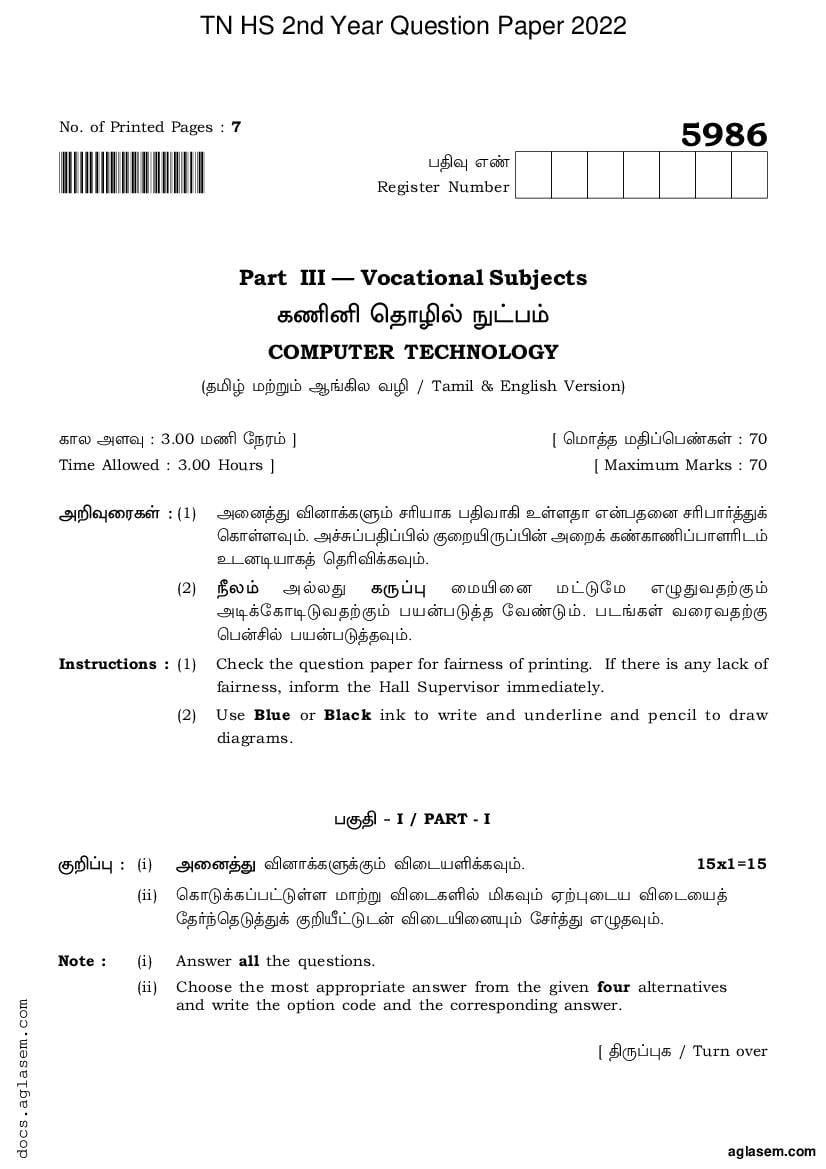
5986
!5986CompTech! £vÄ Gs
Register Number
Part III — Vocational Subjects
PoÛ öuõÈÀ ~m£®
COMPUTER TECHNOLOGY
(uªÌ ©ØÖ® B[Q» ÁÈ / Tamil & English Version)
Põ» AÍÄ : 3.00 ©o ÷|µ® ] [ ö©õzu ©v¨ö£sPÒ : 70
Time Allowed : 3.00 Hours ] [ Maximum Marks : 70
AÔÄøµPÒ : (1) AøÚzx ÂÚõUPЮ \›¯õP £vÁõQ EÒÍuõ GߣuøÚ \›£õºzxU
öPõÒÍÄ®. Aa_¨£v¨¤À SøÓ°¸¨¤ß AøÓU PsPõo¨£õÍ›h®
EhÚi¯õPz öu›ÂUPÄ®.
(2) }»® AÀ»x P¸¨¦ ø©°øÚ ©mk÷© GÊxÁuØS®
AiU÷PõikÁuØS® £¯ß£kzu ÷Ásk®. £h[PÒ ÁøµÁuØS
ö£ß]À £¯ß£kzuÄ®.
Instructions : (1) Check the question paper for fairness of printing. If there is any lack of
fairness, inform the Hall Supervisor immediately.
(2) Use Blue or Black ink to write and underline and pencil to draw
diagrams.
£Sv & I / PART - I
SÔ¨¦ : (i) AøÚzx ÂÚõUPÐUS® Âøh¯ÎUPÄ®. 15x1=15
(ii) öPõkUP¨£mkÒÍ ©õØÖ ÂøhPÎÀ ªPÄ® Hئøh¯ Âøhø¯z
÷uº¢öukzxU SÔ±mkhß Âøh°øÚ²® ÷\ºzx GÊuÄ®.
Note : (i) Answer all the questions.
(ii) Choose the most appropriate answer from the given four alternatives
and write the option code and the corresponding answer.
Page 2
1. __________ Gߣx J¸ DTP ö©ßö£õ¸ÍõS®.
(A) Maya (B) Lotus 1-2-3 (C) Flash (D) PageMaker
__________ is a DTP Software.
(a) Maya (b) Lotus 1-2-3 (c) Flash (d) PageMaker
2. G¢u £mi¯¼À New PmhøÍ Ch® ö£ØÖÒÍx ?
(A) Layout Menu (B) File Menu (C) Type Menu (D) Edit Menu
Which menu contains the New Option ?
(a) Layout Menu (b) File Menu (c) Type Menu (d) Edit Menu
3. __________ P¸Â BÁnzvß J¸ £Svø¯ ö£›uõUQ¨ £õºUP £¯ß£kQÓx.
(A) Zoom Tool (B) Text Tool (C) Hand Tool (D) Line Tool
__________ tool is used for magnifying the particular portion of the area.
(a) Zoom Tool (b) Text Tool (c) Hand Tool (d) Line Tool
4. £UPzvß Cµsk ö|kÁ›ø\PÐUS Cøh¨£mh £Sv __________.
(A) öÁØÖ¨ £µ¨¦ (B) Gutter
(C) EkPÒ (D) öÁØÔh®
The space between columns on a page is called __________.
(a) Empty area (b) Gutter
(c) Interstellar (d) Vacuum
5. InDesign &À BÁnzøua _ØÔ²ÒÍ £Sv __________.
(A) öÁØÖ¨ £µ¨¦ (B) Jmk¨£»øP
(C) öÁØÔh® (D) öÁÒøͨ £Sv
The area surrounding the document is called in InDesign.
(a) Empty area (b) Pasteboard
(c) Vacuum (d) White space
6. öÁUhõº ÁøµPø»¯õÚx __________ öPõsk E¸ÁõUP¨£kQßÓx.
(A) £h¨¦ÒÎ (B) ÷PõkPÒ ©ØÖ® ÁøÍÄPÒ
(C) ÁøÍÄPÒ ©mk® (D) ÷PõkPÒ ©mk®
Vector graphics are made of __________.
(a) Pixels (b) Lines and curves
(c) Only curves (d) Only lines
Page 3
7. ö\¢uµ P¸Â¨£møhUS (Standard Toolbar) Akzx C¸¨£x __________.
(A) £mi¨ £møh (B) £s¦¨ £møh
(C) {ø»ø©¨ £møh (D) uø»¨¦¨ £møh
__________ is next to standard tool bar.
(a) Menu bar (b) Property bar
(c) Status bar (d) Title bar
8. __________ \õ¯õÚx Freehand P¸Â°øÚ ÷uºÄ ö\´¯ EuÄQßÓx.
(A) F4 (B) F2 (C) F5 (D) F3
__________ key is used to select the freehand tool.
(a) F4 (b) F2 (c) F5 (d) F3
9. CorelDraw &À GzuøÚ ÁøP _¸ÒPÒ EÒÍÚ ?
(A) 2 (B) 5 (C) 7 (D) 3
How many types of spirals are there in CorelDraw ?
(a) 2 (b) 5 (c) 7 (d) 3
10. RTF ÷Põ¨¦ ÁiÁzøu AÔ•P¨£kzv¯x __________.
(A) Apple (B) TCS (C) IBM (D) Microsoft
RTF file format was introduced by __________.
(a) Apple (b) TCS (c) IBM (d) Microsoft
11. Flash £o°h ø©¯zvß |kÂÀ EÒÍ ö£›¯ öÁÒøÍ ö\ÆÁP ÁiÁ®
__________ .
(A) vøµ (B) ÷©øh (C) £s¦PÒ (D) Põ»U÷Põk
The __________ is the large white rectangle in the center of flash’s workspace.
(a) Screen (b) Stage (c) Properties (d) Timeline
12. Adobe Flash &{µÀ ‰»® }[PÒ GuøÚ E¸ÁõUP •i²® ?
(A) Áø» £¯ß£õkPÒ (B) Âøͯõmk
(C) AÛ÷©åßPÒ (D) ÷©÷» EÒÍ AøÚzx®
What can you create with the Adobe Flash Program ?
(a) Web applications (b) Games
(c) Animations (d) All of the above
Page 4
13. Bm÷hõ÷Pm 2016 &I E¸ÁõUQ ÂØ£øÚ ö\´²® {ÖÁÚ® __________.
(A) Autodesk, Inc (B) Microsoft Corporation
(C) Sun microsystems, Inc. (D) Adobe Inc.
AutoCAD 2016 is developed and marketed by __________.
(a) Autodesk, Inc. (b) Microsoft Corporation
(c) Sun microsystems, Inc. (d) Adobe Inc.
14. Pmh[PøÍ (grid) Põs¤UPÄ® ©øÓUPÄ® (ON or OFF) Âø\¨ £»øP°À G¢u
ö\¯À£õmk Âø\ø¯ AÊzu ÷Ásk® ?
(A) F3 (B) F1 (C) F7 (D) F2
The __________ function key can be used to turn the grid display on or off.
(a) F3 (b) F1 (c) F7 (d) F2
15. GIF £¯ß£kzx® Ásn÷uhÀ AmhÁøn __________.
(A) 8 MB (B) 8 ¤m (C) 8 GB (D) 8 KB
GIF use __________ color look up table.
(a) 8 MB (b) 8 bit (c) 8 GB (d) 8 KB
£Sv & II / PART - II
SÔ¨¦ : GøÁ÷¯Ý® BÖ ÂÚõUPÐUS Âøh¯ÎUPÄ®. ÂÚõ Gs 24 &US
Pmhõ¯©õP Âøh¯ÎUPÄ®. 6x2=12
Note : Write any six questions. Question No. 24 is Compulsory.
16. DTP ö©ßö£õ¸ÒPÐUS GkzxUPõmkPÒ u¸P.
Give examples of DTP Software.
17. ÷£ä÷©UPº ö©ßö£õ¸ÎÀ J¸ BÁnzøu GÆÁõÖ vÓUP»õ® ?
How do you create a new document in PageMaker ?
18. Adobe InDesign &À £o¨£Sv GßÓõÀ GßÚ ?
What is a Workspace in Adobe InDesign ?
19. InDesign &À pasteboard Gߣx GßÚ ?
What is a pasteboard in InDesign ?
20. £À¿hP E¸ÁõUP SÊ EÖ¨¤ÚºPøͨ £mi¯¼kP.
List out Multimedia production team members.
Page 5
21. Flash Gߣx GßÚ ?
What is Flash ?
22. Põ»U÷Põmiß (Timeline) ÷uøÁ GßÚ ?
What is the purpose of Timeline ?
23. LINE PmhøÍ°À EÒÍ Undo ÷uºÂß £¯ßPøÍ GÊxP.
Write the uses of the LINE undo option.
24. ¤Íõè \ßÚÀ vøµ°ß TÖPÒ ¯õøÁ ?
What are the components in Adobe Flash ?
£Sv & III / PART - III
SÔ¨¦ : GøÁ÷¯Ý® BÖ ÂÚõUPÐUS Âøh¯ÎUPÄ®. ÂÚõ Gs 33 &US
Pmhõ¯©õP Âøh¯ÎUPÄ®. 6x3=18
Note : Answer any six questions. Question No. 33 is Compulsory.
25. ÷£ä÷©UP›À EÒÍ H÷uÝ® ‰ßÖ P¸ÂPøͲ® Auß Âø\¨£»øP SÖUS
ÁÈPøͲ® TÖP.
Mention three tools in PageMaker and write their keyboard shortcuts.
26. A÷hõ¨ Cßiø\ÛÀ P¸Â £»PzvÀ (Tools Panel) EÒÍ H÷uÝ® 3 P¸ÂPøͨ
£ØÔ GÊxP.
Write about any 3 tools found in the tools panel in Adobe InDesign.
27. P¸Â £»Pzv¾ÒÍ Áøµ£h \mh[PÒ GzuøÚ ? AøÁ ¯õøÁ ?
How many graphic frames are found in tools panel ? What are they ?
28. öÁUhõº ÁøµPø» &US® ¤m÷©¨ì (Bit Maps) &US® Cøh÷¯ EÒÍ
÷ÁÖ£õkPÒ ¯õøÁ ?
What are the differences between vector graphics and bitmaps ?
Page 6
29. £À¿hPzvß {ÇØ£h ÁiÁ[PÒ H÷uÝ® ‰ßÔøÚ GÊxP.
Write any 3 Image File Format in Multimedia.
30. £À¿hPzvÀ EÒÍ £À÷ÁÖ ÷Põ¨¦ ÁiÁ[PÒ £ØÔ ÂÁ›UPÄ®.
Describe the various file format in Multimedia.
31. Põ»U÷Põk – ]Ö SÔ¨¦ ÁøµP.
Write short note on Timeline.
32. ]Ö SÔ¨¦ ÁøµP :
(A) Line P¸Â (B) Rectangle P¸Â (C) Oval P¸Â
Write short note on :
(a) Line Tool (b) Rectangle Tool (c) Oval Tool
33. Bm÷hõ÷Pm&À EÒÍ H÷uÝ® BÖ ö\¯À£õmk Âø\PøÍ (Function Keys)
Auß ö\¯À£õkPÐhß GÊxP.
Write any 6 keys with its function in AutoCAD.
£Sv & IV / PART - IV
SÔ¨¦ : AøÚzx ÂÚõUPÐUS® Âøh¯ÎUPÄ®. 5x5=25
Note : Answer all the questions.
34. (A) ÷£ä÷©UPº P¸Â¨ ö£mi°À EÒÍ P¸ÂPøͨ £ØÔ ÂÁ›UPÄ®.
AÀ»x
(B) Eøµ EÒÍ \mh[PÐUS GÆÁõÖ Cøn¨ø£ HØ£kzxÁõ´ GßÖ
ÂÁ›UPÄ®.
(a) Explain the tools in PageMaker Toolbox.
OR
(b) Explain Linking Frames containing text.
35. (A) ÁøµPø» \mhzvÀ GÆÁõÖ £hzøu ÷\º¨£õ´ ? £i{ø»PøÍ GÊxP.
AÀ»x
(B) _¸ÎøÚ (Spiral) Áøµ¯ £i{ø»PøÍ GÊxP.
(a) How can you insert picture in a graphic frame ? Write its steps.
OR
(b) Write the steps to draw a spiral.
Page 7
36. (A) £õøu°À Eøµ°øÚ ö£õ¸zxuÀ £ØÔ Â›ÁõP GÊxP.
AÀ»x
(B) £À¿hPzøu E¸ÁõUS® £i{ø»PøÍ ÂÁ›UPÄ®.
(a) Explain about fitting text to a path.
OR
(b) Explain the steps involved in Multimedia production.
37. (A) £À¿hPzvØPõÚ ÷Põ¨¦ ÁiÁ[PøÍ ÂÁ›UPÄ®.
AÀ»x
(B) Adobe Flash CS6&À EÒÍ Tools £»PzvÀ Põn¨£k® P¸ÂPÒ GøÁ÷¯Ý®
£zvøÚ ÂÁ›UPÄ®.
(a) Explain different types of file formats for Multimedia.
OR
(b) Describe ten tools displayed in Tools Panel in Adobe Flash CS6.
38. (A) Adobe Flash CS6 ÷©øh°À ö£õ¸øÍ ÷uº¢öukUS® •øÓPøÍ ÂÁ›UPÄ®.
AÀ»x
(B) Bm÷hõ÷PiÀ ö\ÆÁP® ÁøµÁuØPõÚ ÁÈ•øÓPøÍU TÖP.
(a) Explain the types to select objects in Adobe Flash CS6.
OR
(b) Write the steps to draw a rectangle in AutoCAD.
-o0o-
Document Details
| Board / Org | Tamil Nadu Board |
| Exam | Class 12 |
| Type | Question Paper |
| Pages | 7 |
| Updated | 01 May 2026 |