HP Board Class 9 Syllabus 2023 Computer Science
Finished viewing? Save it for later —
Download HP Board Class 9 Syllabus 2023 Computer Science (PDF · 4 pages)About HP Board Class 9 Syllabus 2023 Computer Science
HP Board Class 9 Syllabus 2023 Computer Science is available here for free download. Published by Himachal Pradesh Board for Class 9, this syllabus can be viewed online or downloaded as a PDF (4 pages). Candidates preparing for Class 9 can use HP Board Class 9 Syllabus 2023 Computer Science to understand the exam pattern, the type of questions asked, and the overall difficulty level.
Frequently Asked Questions
How can I download HP Board Class 9 Syllabus 2023 Computer Science?
Open this page and click the Download button to save HP Board Class 9 Syllabus 2023 Computer Science as a PDF. It is completely free on AglaSem Docs.
Is HP Board Class 9 Syllabus 2023 Computer Science free to download?
Yes. HP Board Class 9 Syllabus 2023 Computer Science can be viewed online and downloaded as a PDF free of cost on AglaSem Docs.
How many pages does HP Board Class 9 Syllabus 2023 Computer Science have?
HP Board Class 9 Syllabus 2023 Computer Science contains 4 pages, which you can read online or download together as a single PDF.
Where can I find more Class 9 study material?
You can find more Class 9 question papers, sample papers, syllabus, and answer keys on AglaSem Docs.
HP Board Class 9 Syllabus 2023 Computer Science – Text
Read the full text of this syllabus below — useful to quickly search, copy and reference the content online without downloading the PDF.
📄 View text version (4 pages)
Page 1
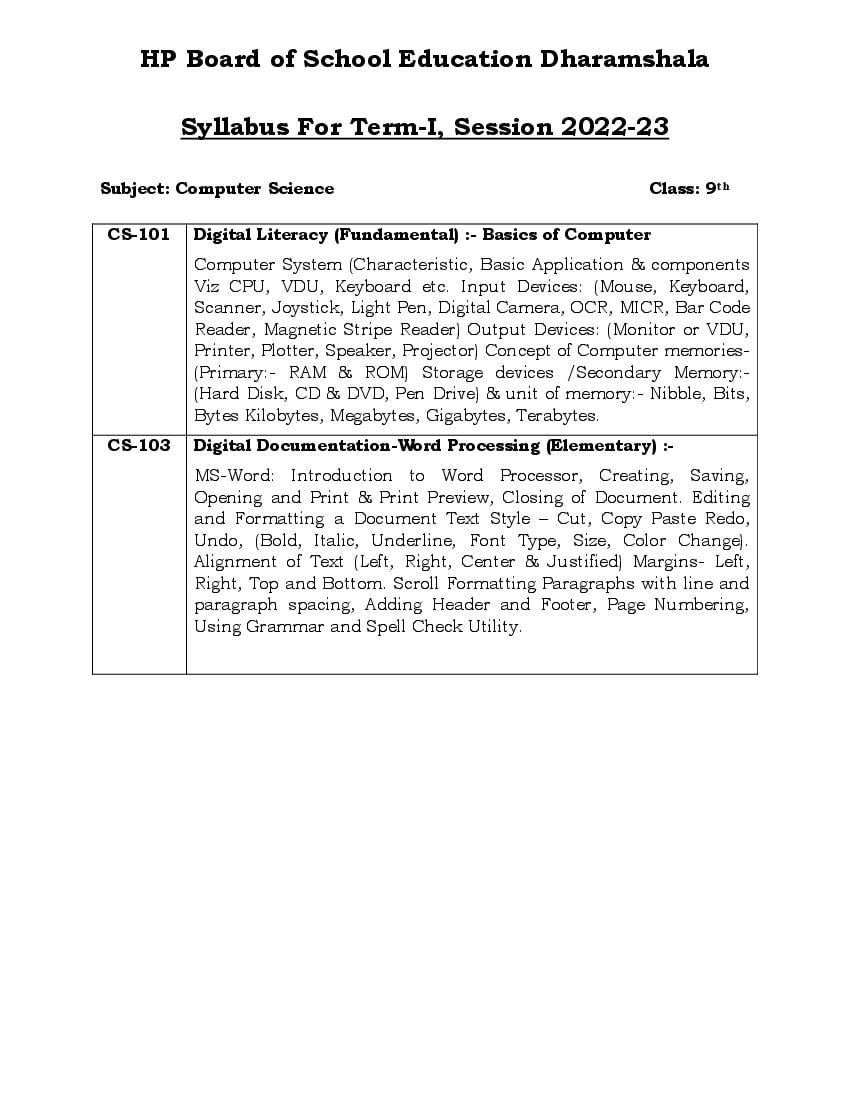
Subject: Computer Science Class: 9th
CS-101 Digital Literacy (Fundamental) :- Basics of Computer
Computer System (Characteristic, Basic Application & components
Viz CPU, VDU, Keyboard etc. Input Devices: (Mouse, Keyboard,
Scanner, Joystick, Light Pen, Digital Camera, OCR, MICR, Bar Code
Reader, Magnetic Stripe Reader) Output Devices: (Monitor or VDU,
Printer, Plotter, Speaker, Projector) Concept of Computer memories-
(Primary:- RAM & ROM) Storage devices /Secondary Memory:-
(Hard Disk, CD & DVD, Pen Drive) & unit of memory:- Nibble, Bits,
Bytes Kilobytes, Megabytes, Gigabytes, Terabytes.
CS-103 Digital Documentation-Word Processing (Elementary) :-
MS-Word: Introduction to Word Processor, Creating, Saving,
Opening and Print & Print Preview, Closing of Document. Editing
and Formatting a Document Text Style – Cut, Copy Paste Redo,
Undo, (Bold, Italic, Underline, Font Type, Size, Color Change).
Alignment of Text (Left, Right, Center & Justified) Margins- Left,
Right, Top and Bottom. Scroll Formatting Paragraphs with line and
paragraph spacing, Adding Header and Footer, Page Numbering,
Using Grammar and Spell Check Utility.
Page 2
Unit Name of Unit Theory Practical INA
CS – 101 Digital Literacy 20 05 ---
(Fundamental)
CS – 103 Digital Documentation 30 11 ---
Word Processing
(Elementary)
CS -- 02 --
Viva Voce -- -- 02 --
INA -- -- -- 10
TOTAL -- 50 20 10
Page 3
Subject: Computer Science Class: 9th
CS-102 Basic concepts of Operating System:-
Introduction of MS –Window, Basic concepts of Operating system &
its functions:- Desktop, Icons on the Desktop (My Computer,
Recycle Bin, Task Bar, Start Menu and Menu selection using
mouse) Running an Application, Setting system date and Time,
Window Explorer to view File, Folders, Directories, Creating
,Renaming and Deleting of Files &Folders, Opening and closing of
Window, Minimize and Maximize form of a window. Basic Window
Accessories: Notepad, WordPad, Paint, Calculator, Documents,
Music, Pictures, Control Panel. Mouse Button functions (Left, Right,
Scroll Button).
CS-104 Digital Presentation-Power Point:-
MS-Power Point: Introduction to Power Point, Creating, Saving,
Opening Presentation.
Concept of Slide Show, Basic Element of Slide, Different Elements
of Slide Layout, Different Types of View of a Slide (Normal, Slide
Sorter and Slide Show). Editing and Formatting of Slide, Adding
Title and Sub Titles, Text, Backgrounds, Water Mark, Header and
Footer & Numbering of Slides. Inserting Pictures in Slide, Design
Templates, Animations, Sound & Transition Effects
Page 4
Unit Name of Unit Theory Practical INA
CS – 102 Basic Concepts of 24 06 ---
Operating System
CS – 104 Digital Presentation-Power 26 10 ---
Point
CS -- 02 --
Viva Voce -- -- 02 --
INA -- -- -- 10
TOTAL -- 50 20 10
Document Details
| Board / Org | Himachal Pradesh Board |
| Exam | Class 9 |
| Type | Syllabus |
| Pages | 4 |
| Updated | 22 Jul 2026 |