PSEB 10th Class Syllabus 2027 Computer Science
Finished viewing? Save it for later —
Download PSEB 10th Class Syllabus 2027 Computer Science (PDF · 10 pages)About PSEB 10th Class Syllabus 2027 Computer Science
PSEB 10th Class Syllabus 2027 Computer Science is available here for free download. Published by Punjab Board for Class 10, this syllabus can be viewed online or downloaded as a PDF (10 pages). Candidates preparing for Class 10 can use PSEB 10th Class Syllabus 2027 Computer Science to understand the exam pattern, the type of questions asked, and the overall difficulty level.
Frequently Asked Questions
How can I download PSEB 10th Class Syllabus 2027 Computer Science?
Open this page and click the Download button to save PSEB 10th Class Syllabus 2027 Computer Science as a PDF. It is completely free on AglaSem Docs.
Is PSEB 10th Class Syllabus 2027 Computer Science free to download?
Yes. PSEB 10th Class Syllabus 2027 Computer Science can be viewed online and downloaded as a PDF free of cost on AglaSem Docs.
How many pages does PSEB 10th Class Syllabus 2027 Computer Science have?
PSEB 10th Class Syllabus 2027 Computer Science contains 10 pages, which you can read online or download together as a single PDF.
Where can I find more Class 10 study material?
You can find more Class 10 question papers, sample papers, syllabus, and answer keys on AglaSem Docs.
PSEB 10th Class Syllabus 2027 Computer Science – Text
Read the full text of this syllabus below — useful to quickly search, copy and reference the content online without downloading the PDF.
📄 View text version (11 pages)
Page 1
PSEB 10th Class
Syllabus 2027
Computer Science
EXAM YEAR TYPE SUBJECT
Punjab Class 10 2027 Syllabus Computer Science
Notes · Sample Papers · Previous Year Papers · Mock Tests
Page 2
m .co
m .co s e m
se g l a
a
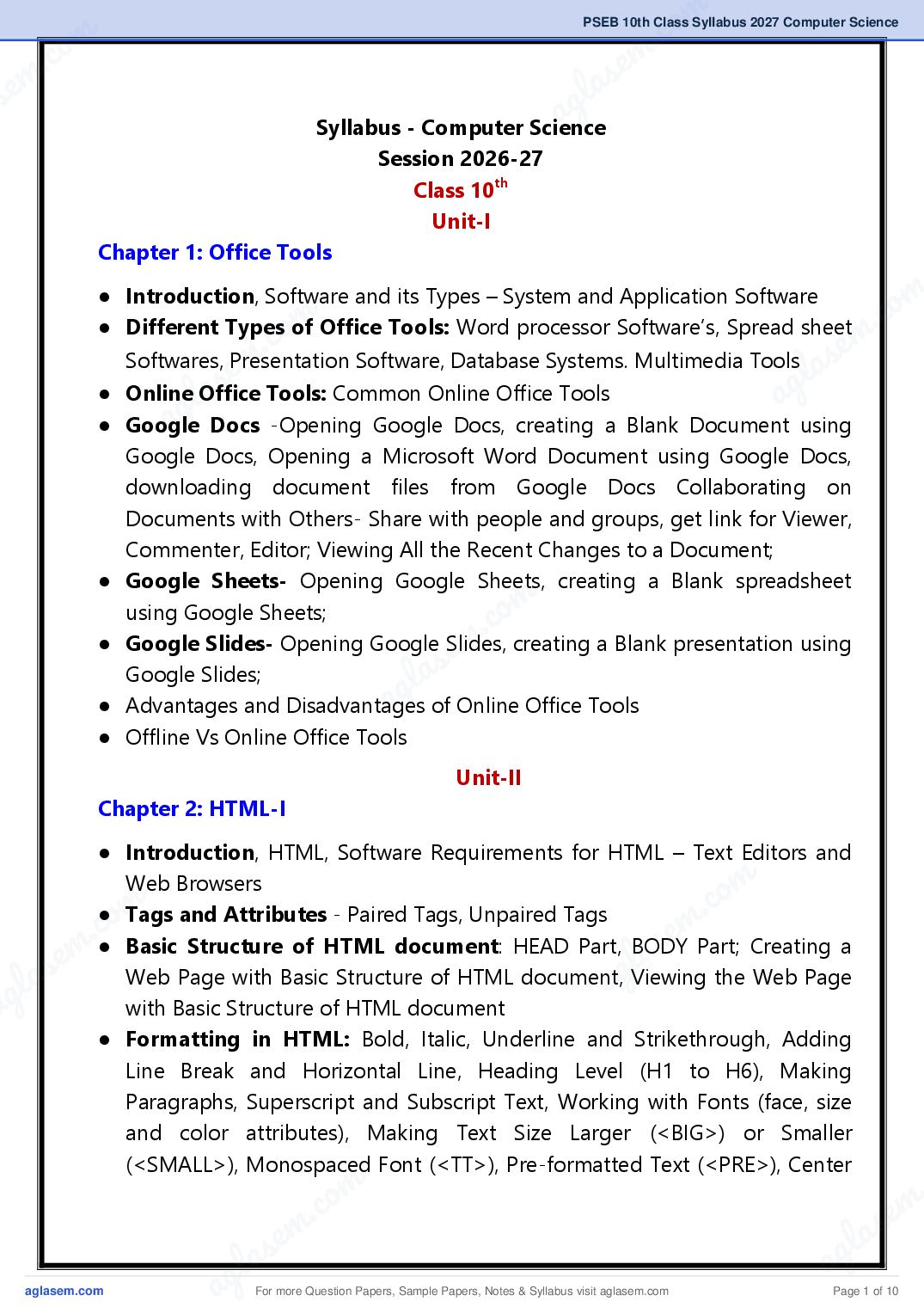
Syllabus - Computer Science
Session 2026-27
Class 10th
Unit-I
Chapter 1: Office Tools
● Introduction, Software and its Types – System and Application Software m
m .co
.co
● Different Types of Office Tools: Word processor Software’s, Spread sheet
e m
Software, Database Systems. Multimedia Tools as
em
Softwares, Presentation
s g l
a
● Online lOffice
g
Tools: Common Online Office Tools a
a Docs -Opening Google Docs, creating a Blank Document using
Google Docs, Opening a Microsoft Word Document using Google Docs,
downloading document files from Google Docs Collaborating on
Documents with Others- Share with people and groups, get link for Viewer,
Commenter, Editor; Viewing All the Recent Changes to a Document;
● Google Sheets- Opening Google Sheets, creating a Blank spreadsheet
m
using Google Sheets;
m .co
e
● Google Slides- Opening Google Slides, creating a Blank presentation using
s
Google Slides;
g la
a
● Advantages and Disadvantages of Online Office Tools
● Offline Vs Online Office Tools
Unit-II
Chapter 2: HTML-I
● Introduction, HTML, Software Requirements for HTML – Text Editors and
m
.co
Web Browsers
m
.co
● Tags and Attributes - Paired Tags, Unpaired Tags
e m
e m ● Basic Structure of HTML document: HEAD Part, BODY Part; Creating a
l as
las Web Page with Basic Structure of HTML document, Viewing the Web Page ag
ag with Basic Structure of HTML document
● Formatting in HTML: Bold, Italic, Underline and Strikethrough, Adding
Line Break and Horizontal Line, Heading Level (H1 to H6), Making
Paragraphs, Superscript and Subscript Text, Working with Fonts (face, size
and color attributes), Making Text Size Larger (<BIG>) or Smaller
(<SMALL>), Monospaced Font (<TT>), Pre-formatted Text (<PRE>), Center
m .
.co s e m
s em l a
g la ag
a For more Question Papers, Sample Papers, Notes & Syllabus visit Page 1 of 10
Page 3
(<MARQUEE> with Behaviour, Bgcolor, Direction, Height, Loop,
Scrollamount, Width attributes, Formatting Body of HTML document (using
Background, Bgcolor, Link, Text attributes)
Chapter 3: HTML-II
● Working with Lists: Unordered List, type attribute of Unordered List;
Ordered List, type and start attributes of Ordered List; Definition List;
Nesting of Lists
● Working with Tables: Using <TABLE>, <TH>, <TD>, <TR>, <CAPTION>
tags; Working with attributes of table: Setting Table Height and Width,
Setting Table Border and Border Color, Setting Table Backgrounds (Bgcolor,
Background attributes), Setting Cell Padding and Cell Spacing, Merging
Cells using rowspan and colspan attributes; Changing the Alignment of a
Table or Cell Value-Setting Horizontal Alignment (using align attribute),
Setting Vertical Alignment (using valign attributes)
Chapter 4: HTML-III
● URLs and Their Types: Absolute URL, Relative URL-Relative File Path
Delimiters
● Working with Images: Working with Attributes of <IMG> tag-Setting
Alternate Text for the Image, Setting Width and Height of the Image,
Setting Image Alignment
● Working with Hyperlinks: Different states of links (unvisited, visited,
active) Attributes of Anchor Tag: Setting Titles for Links, Setting Target
Window; Linking with Images; Link to an Email Address; Named Anchors or
Creating Bookmarks
● Working with Forms: <FORM> Tag; Action and Method attributes of
form; Elements or Controls for the HTML Form-Textbox Control, Text Area
Control, Password Field Control, Checkbox Control, Radio button Control,
Selection List Control, File Selection Control, Button Control, Submit Button,
Reset Button
● Phases of Web Development: Information Gathering, Planning, Design &
Layout, Development, Testing & Launch, Maintenance
For more Question Papers, Sample Papers, Notes & Syllabus visit Page 2 of 10
Page 4
m .co
m .co s e m
se g l a
a
Unit-III
Chapter 5: Operating System
● Introduction, Operating System, Services provided by operating System-
User Interface, Program execution, I/O operations, File System
m
m
manipulation, Communication, Error Detection, Resource Allocation,
.co
Protection;
m .co s e m
e
● Types of Operating Systems: Batch Operating System, Multi-
s l a
g l a
Programming Operating System, Time-Sharing Operating Systems, Multi- ag
a
Processing Operating System, Network Operating System, Real Time
Operating System, Single-User and Multi-User Operating Systems
● Computer Security: CIA Triads-Confidentiality, Integrity, Availability;
Computer Security Threats: Malware, Phishing, Rootkit, Key logger; How Do
We Secure Our Computer: Latest Anti-Malware software, Password
protection, Apply Latest Updates & Patches, Firewall etc.
m
m .co
s eUnit-IV
g la
a
Chapter 6: Desktop Publishing
● Desktop Publishing: Definition, Features of Desktop Publishing
● Desktop –Publishing Software: Introduction of Microsoft Publisher,
Adobe Photoshop, Corel Draw. QuarkXPress, Adobe Dreamweaver, GIMP
● Word Processing vs. Desktop Publishing: Similarities between Word
Processing and Desktop Publishing, Differences between Word Processing
m
m
and Desktop Publishing
.co
m .co
● WYSIWYG Feature; Graphics: 2D Graphics (Raster or Bitmap Graphics,
s e m
s e Vector Graphics) 3D Graphics
g l a
g la ● Margins, Gutter Margin, Fonts, Frames and Layers a
a ● Printers: Impact printers-Dot-Matrix Printers, Daisy-wheel Printers, Line
Printers; Non-Impact Printers-Ink-jet printers, Laser printers; Difference
between Impact Printer and Non-Impact Printer; Difference between Inkjet
Printer and Laser Printer
m .
.co s e m
s em l a
g la ag
a For more Question Papers, Sample Papers, Notes & Syllabus visit Page 3 of 10
Page 5
● What is Publisher?, How to start publisher
● Components of the Publisher Window: The Quick Access Toolbar, Ribbon
and Tabs, File Window,
● Creating a Publication: Creating a publication using Blank Layout,
Creating a Publication using Templates (Installed Templates, Online
Templates, My Templates) Customizing Templates
● Advertisements: Brochures-Creating Brochures using MS-Publisher;
Newsletters-Creating Newsletters using MS-Publisher, Banners-Creating
Banners using MS-Publisher; Business Cards-Creating Business Card in
Publisher;
● Award Certificates, Greeting Cards / Invitation Cards / Compliment Cards,
Envelops, Letterhead-Creating Letterhead in Publisher, Resumes-Creating
Resumes in MS Publisher, Curriculum Vitae (CV); Signs
● Saving Publication, Printing Publication
Practical Activities
10th Class (Computer Science)
1. Open Google Docs using Google Chrome web browser and prepare a
leave application for urgent Work in it. After preparing the application
download it in DOCS and PDF format.
2. Open Google Sheets using Google Chrome web browser and prepare
the result of 5 students of your class in it. After preparing the result,
share the sheet with other students of your class so that they can enter
the results of 5 other students in that sheet. Now again open the same
sheet on your computer and check the results of students entered by
other students.
3. Open NOTEPAD++ and create a simple web page using simple HTML
structure. Then save it as a webpage with the name MYWEBPAGE and
open it in any web browser.
For more Question Papers, Sample Papers, Notes & Syllabus visit Page 4 of 10
Page 6
m .co
m .co s em
se g la
a to HTML, as shown in the
4. Create a web page showing an introduction
example below. Set the background color of the body of this web page
to skyblue. Save the file as “project0.html” and view the output in a
web-browser.
m
m .co
m .co s e m
s e l a
g l a ag
a
m
.co
5. Create the following webpage using the basic HTML tags that you
learned in your syllabus:
e m
las
ag
m
m .co
m .co s e m
s e g l a
g la a
a
6. Create a web-page using HTML that displays the output as shown in
the web-browser below.
m .
.co s e m
s em l a
g la ag
a For more Question Papers, Sample Papers, Notes & Syllabus visit Page 5 of 10
Page 7
using HTML as shown below:
For more Question Papers, Sample Papers, Notes & Syllabus visit Page 6 of 10
Page 8
m .co
m .co s em
se g la
8. Create a table in a web page using HTMLaas per the web page shown
below. Use ROWSPAN and COLSPAN attributes to merge table cells
and ALIGN and VALIGN attributes to align data in cells.
m
m .co
m .co s e m
s e l a
g l a ag
a
o m
c
. in the figure below and save it
9. m
escrolling text using the MARQUEE tag
Create your school web page as shown
la
as “myschool.html”. Show the s
and download any image
g
a from the internet depicting the school
building that you can use in your webpage.
m
m .co
m .co s e m
s e g l a
g la a
a
m .
.co s e m
s em l a
g la ag
a For more Question Papers, Sample Papers, Notes & Syllabus visit Page 7 of 10
Page 9
resources, as shown below:
Generate links as below:
Link "My School" to the local web page that we created in Activity
9 (“./myschool.html”).
Link "Punjab School Education Board" to its official website
“http://www.pseb.ac.in/”.
Link "ePunjabSchool" to its official website
“https://www.epunjabschool.gov.in/”.
Link "Ashirwad Portal for Scholarships" to its official website
“http://scholarships.punjab.gov.in/”.
11. Create an "Entry Form" using HTML-Form as shown below. This form
uses the controls used in HTML forms like Textboxes, Textareas,
Selection Lists, Checkboxes and Buttons etc.
For more Question Papers, Sample Papers, Notes & Syllabus visit Page 8 of 10
Page 10
m .co
m .co s e m
se g la
a shown below. You can
12. Generate the web page using HTML as
download images from the internet and use them in the table
accordingly and create hyperlinks to the respective websites in the
"Favourite Websites" column.
m
m .co
m .co s e m
s e l a
g l a ag
a
m
m .co
s e
la
13. Create a web-form using tables in HTML as shown below
ag
m
m .co
m .co s e m
s e g l a
g la a
a
14. Create an advertising publication for your school with the help of
templates in MS Publisher.
15. Prepare Business Cards and Award Certificates for yourself in the MS
Publisher.
m .
.co s e m
s em l a
g la ag
a For more Question Papers, Sample Papers, Notes & Syllabus visit Page 9 of 10
Page 11
• Prepare charts/models illustrating different Types of Software.
• Create charts/models showing the functions of various Tags and
Attributes related to Tables in HTML.
• Prepare charts/models related to different Types of Operating
Systems.
• Create a chart/model showing the difference between Raster (Bitmap)
Graphics and Vector Graphics.
• Create a chart/model showing the Different Components of the MS
Publisher Window.
For more Question Papers, Sample Papers, Notes & Syllabus visit Page 10 of 10
Document Details
| Board / Org | Punjab Board |
| Exam | Class 10 |
| Type | Syllabus |
| Pages | 10 |
| Updated | 04 Nov 2026 |