HBSE Class 10 Sample Paper 2027 Computer Science Marking Scheme
Finished viewing? Save it for later —
Download HBSE Class 10 Sample Paper 2027 Computer Science Marking Scheme (PDF · 18 pages)About HBSE Class 10 Sample Paper 2027 Computer Science Marking Scheme
HBSE Class 10 Sample Paper 2027 Computer Science Marking Scheme is available here for free download. Published by Haryana Board for Class 10, this answer key can be viewed online or downloaded as a PDF (18 pages). Candidates preparing for Class 10 can use HBSE Class 10 Sample Paper 2027 Computer Science Marking Scheme to understand the exam pattern, the type of questions asked, and the overall difficulty level.
Frequently Asked Questions
How can I download HBSE Class 10 Sample Paper 2027 Computer Science Marking Scheme?
Open this page and click the Download button to save HBSE Class 10 Sample Paper 2027 Computer Science Marking Scheme as a PDF. It is completely free on AglaSem Docs.
Is HBSE Class 10 Sample Paper 2027 Computer Science Marking Scheme free to download?
Yes. HBSE Class 10 Sample Paper 2027 Computer Science Marking Scheme can be viewed online and downloaded as a PDF free of cost on AglaSem Docs.
How many pages does HBSE Class 10 Sample Paper 2027 Computer Science Marking Scheme have?
HBSE Class 10 Sample Paper 2027 Computer Science Marking Scheme contains 18 pages, which you can read online or download together as a single PDF.
Where can I find more Class 10 study material?
You can find more Class 10 question papers, sample papers, syllabus, and answer keys on AglaSem Docs.
HBSE Class 10 Sample Paper 2027 Computer Science Marking Scheme – Text
Read the full text of this answer key below — useful to quickly search, copy and reference the content online without downloading the PDF.
📄 View text version (19 pages)
Page 1
HBSE Class 10 Sample
Paper 2027 Computer
Science Marking
Scheme
EXAM YEAR TYPE SUBJECT
Haryana Class 10 2027 Answer Key Computer Science
Notes · Sample Papers · Previous Year Papers · Mock Tests
Page 2
.co s e m
s em l a
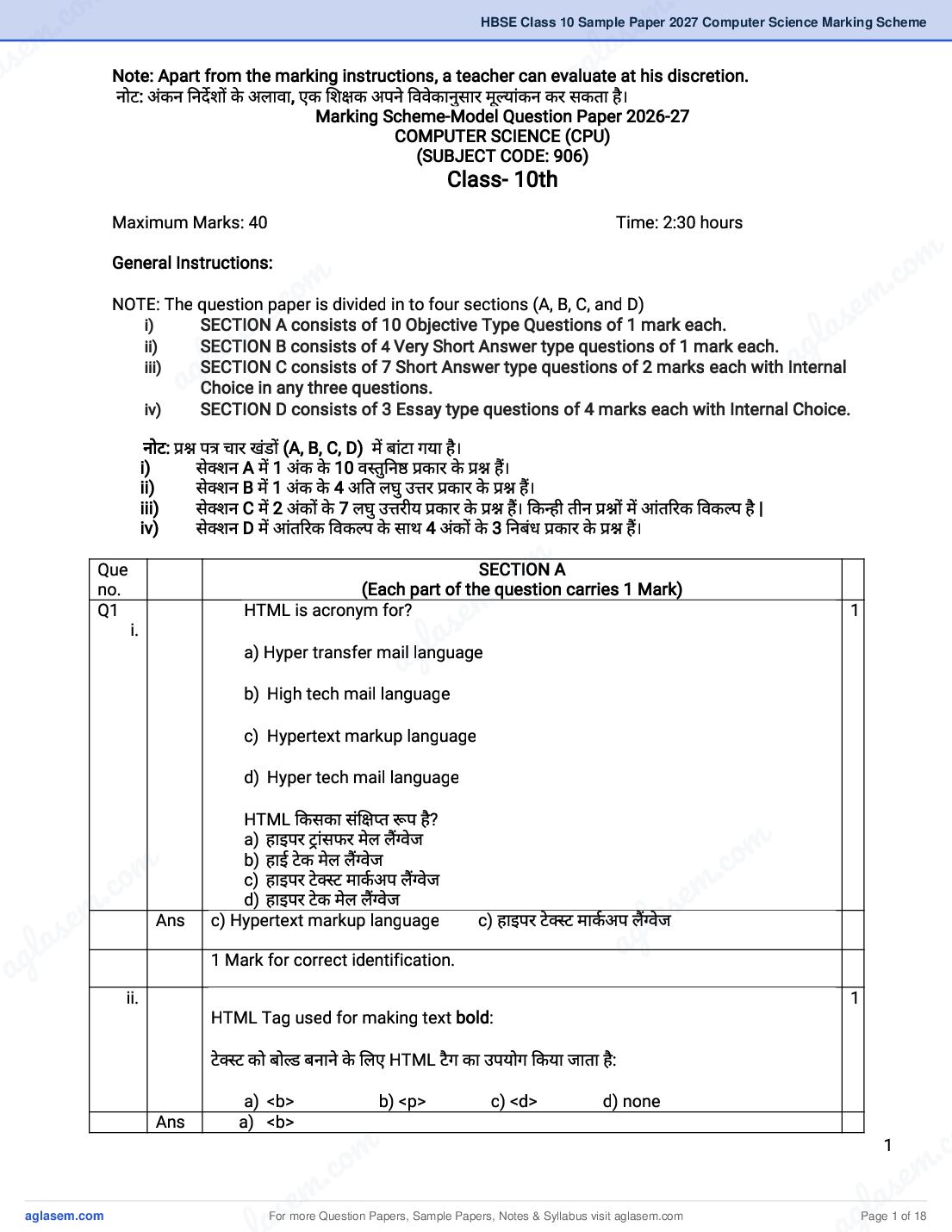
a Note: Apart from the marking instructions, a teacher can evaluate at his discretion.
नोट: अंकन नदश के अलावा, एक श क अपने ववेकानुसार मू यांकन कर सकता है।
ag
Marking Scheme-Model Question Paper 2026-27
COMPUTER SCIENCE (CPU)
(SUBJECT CODE: 906)
Class- 10th
Maximum Marks: 40 Time: 2:30 hours
m
General Instructions:
om . co
. c e m
e m
NOTE: The question paper is divided in to four sections (A, B, C, and D)
l as
s
i) SECTION A consists of 10 Objective Type Questions of 1 mark each.
ii)
l a
SECTION B consists of 4 Very Short Answer type questions of 1 mark each.
ag
iii)
ag SECTION C consists of 7 Short Answer type questions of 2 marks each with Internal
Choice in any three questions.
iv) SECTION D consists of 3 Essay type questions of 4 marks each with Internal Choice.
नोट: प चार खंड (A, B, C, D) म बांटा गया है।
i) से न A म 1 अंक के 10 व तु न कार के ह।
ii) से न B म 1 अंक के 4 अ त लघु उ र कार के ह।
iii) से न C म 2 अंक के 7 लघु उ रीय कार के ह। क ही तीन म आंत रक वक प है |
iv) से न D म आंत रक वक प के साथ 4 अंक के 3 नबंध कार के ह।
m
.co
Que SECTION A
m
no. (Each part of the question carries 1 Mark)
Q1 HTML is acronym for?
s e 1
i.
l a
ag
a) Hyper transfer mail language
b) High tech mail language
c) Hypertext markup language
d) Hyper tech mail language
HTML कसका सं त प है?
m
.co
a) हाइपर ांसफर मेल ल वेज
m
.co
b) हाई टे क मेल ल वेज
c) हाइपर टे ट माकअप ल वेज
e m
e m d) हाइपर टे क मेल ल वेज
las
las Ans c) Hypertext markup language c) हाइपर टे
g
ट माकअप ल वेज
a
ag 1 Mark for correct identification.
ii. 1
HTML Tag used for making text bold:
टे ट को बो बनाने के लए HTML टै ग का उपयोग कया जाता है:
a) <b> b) <p> c) <d> d) none
Ans a) <b>
m . c
c. o
1
e m
em as
s
For more Question Papers, Sample Papers, Notes & Syllabus visit
gl Page 1 of 18
Page 3
iii. Tag used in HTML for creating Hyperlinks: 1
हाइपर लक बनाने के लए HTML म यु टै ग:
a) <A> b) <H> c) <U> d) <L>
Ans a) <A>
1 Mark for correct answer.
iv. Sandeep has to send an email to Nitin. He also wants to send the same email to 1
Anil but does not want nitin to know about it. Which option should Sandeep use to
enter the email address of Anil?
स द प ने न तन को एक ईमेल भेजना है। वह वही ईमेल अ नल को भी भेजना चाहता है ले कन नह
चाहता क न तन को इसके बारे म पता चले। अ नल का ईमेल पता दज करने के लए स द प को कस
वक प का उपयोग करना चा हए?
a) C(copy) b) CC (carbon copy) c) BCC (blind carbon copy) d) none
Ans c) BCC (blind carbon copy)
1 Mark to identify the correct option.
v In MS Access the ________________ view allows you to define the field names, data 1
types & other properties of a table.
एमएस ए सेस म ________________ ू आपको टे बल के फ़ नाम, डेटा कार और अ य गुण को
प रभा षत करने क अनुम त दे ता है।
Ans Design View
1 Mark for writing the correct answer.
vi. To use identity of someone for illegal activity is __________type of cyber-crime. 1
अवैध ग त व ध के लए कसी क पहचान का उपयोग करना __________ कार का साइबर-अपराध है।
Ans Identity theft
1 Mark for correct fill in the blank
vii. Ransomware is a type of malware that encrypts files and demands a ransom for 1
their release. (T/F)
रैनसमवेयर एक कार का मैलवेयर है जो फ़ाइल को ए ट करता है और उ ह रलीज़ करने के लए
फरौती क मांग करता है। (स य/ अस य)
Ans True स य
1 Mark for correct Answer.
viii A web server is a computer program that stores & serves web pages to clients 1
upon request. (T/F)
वेब सवर एक कं यूटर ो ाम है जो ाहक के अनुरोध पर वेब पेज को सं हीत और सेवा दान करता है।
(स य/अस य)
Ans True स य
1 Mark for correct Answer.
Direction for questions ix & x: In the questions given below, there are two
statements marked as Assertion (A) and Reason (R). Choose the correct option
out of the choices given below in each question:
ix एवं x के लए नदश: नीचे दए गए म, कथन (A) और कारण (R) के प म च त दो कथन
ह। येक म नीचे दए गए वक प म से सही वक प का चयन क जए:
a) Both (A) and (R) are correct and (R) is correct explanation of (A).
b) Both (A) and (R) are correct and (R) is not the correct explanation of (A).
2
For more Question Papers, Sample Papers, Notes & Syllabus visit Page 2 of 18
Page 4
.co s e m
s em l a
a c)
d)
(A) is true but (R) is false.
(A) is false but (R) is true.
ag
a) (A)और (R) दोन सही ह और (R), (A) क सही ा या है।
b) (A) और (R) दोन सही ह और (R), (A) क सही ा या नह है।
c) (A) स य है ले कन (R) अस य है।
d) (A) अस य है ले कन (R) स य है।
ix Assertion: MS Access allows users to create tables in both Datasheet and design 1
m
view.
co
Reason: Datasheet view provides a grid like interface for entering data directly,
c om
while design view allows users to define field names, data types and other
m .
m:. s e
properties.
अ भकथन a
s e एमएस ए सेस उपयोगकता को डेटाशीट और डज़ाइन य दोन म टे बल बनाने क
g l
g a
lकारण
अनुम त दे ता है।
: डेटाशीट a
a
य सीधे डेटा दज करने के लए ड जैसा इंटरफ़ेस दान करता है, जब क डज़ाइन य
उपयोगकता को फ़ नाम, डेटा कार और अ य गुण को प रभा षत करने क अनुम त दे ता है।
Ans a) Both (A) and (R) are correct and (R) is correct explanation of (A).
a) (A)और (R) दोन सही ह और (R), (A) क सही ा या है।
1 Mark for correct identification.
x Assertion: The ul element is used to create an ordered list in HTML. 1
“ ”
Reason: the ul element stands for unordered list and is used to create a bulleted
list in HTML.
अ भकथन ul : त व का उपयोग HTML म एक मब सूची बनाने के लए कया जाता है।
कारण ul त व का अथ " "अ
m
त सूची" है और इसका उपयोग HTML म बुलेटेड सूची बनाने के
.co
: व
लए कया जाता है।
Ans d) (A) is false but (R) is true.
e m
d) (A) अस य है ले कन (R) स य है।
l as
ag
1 Mark for correct identification.
SECTION B
(Each question carries 1 mark)
Q2 Write the tag for superscript in HTML. 1
HTML म सुपर ट के लए टै ग लख।
Ans The tag used for superscript in HTML is <sup> tag.
HTML म सुपर ट के लए यु टै ग <sup> टै ग है।
1 Mark for any correct Answer
m
.co
Or
m
.co m
Write the tag for subscript in HTML.
m
HTML म सब ट के लए टै ग लख।
s e
s e g la
g la Ans The tag used for subscript in HTML is <sub> tag.
a
a HTML म सब ट के लए यु टै ग <sub> टै ग है।
Q3 Give an example of Primary Key we can use in database. 1
ाथ मक कुंजी का एक उदाहरण द जए जसका उपयोग हम डेटाबेस म कर सकते ह।
Ans AADHAR NO.
m . c
c. o
3
e m
em as
s
For more Question Papers, Sample Papers, Notes & Syllabus visit
gl Page 3 of 18
Page 5
कसी भी सही उदाहरण के लए 1 अंक.
Q4 Write names of any 2 Antiviruses we use. 1
हमारे ारा उपयोग कये जाने वाले क ह दो एंट वायरस के नाम ल खए।
Ans Kaspersky, McAfee
1 Mark for any correct Names of antivirus.
एंट वायरस के कसी भी सही नाम के लए 1 अंक
Q5 Define cybersecurity. साइबर सुर ा को प रभा षत कर. 1
Ans The practice of protecting systems, networks, and programs from digital
attacks. स टम, नेटवक और ो ाम को ड जटल हमल से बचाने का अ यास |
1 Mark for any correct Answer कसी भी सही उ र के लए 1 अंक
Or
What is the term for a tool used to detect and prevent unauthorized access to a
network?
कसी नेटवक पर अना धकृत प च
ं का पता लगाने और उसे रोकने के लए उपयोग कए जाने वाले
उपकरण को या कहते ह?
Ans Firewall is the term for a tool used to detect and prevent unauthorized access to a
network.
फ़ायरवॉल कसी नेटवक पर अना धकृत प ंच का पता लगाने और उसे रोकने के लए उपयोग कए जाने
वाले उपकरण है |
1 Mark for any correct Answer. कसी भी सही उ र के लए 1 अंक
SECTION C
(Each question carries 2 marks)
Q6 How comments can be inserted in HTML? 2
HTML म ट प णयाँ कैसे डाली जा सकती ह?
Ans The comment tag is used to insert comments in the source code. Comments are
not displayed in the browsers.
Example:
<!--This is a comment.-->
ट पणी टै ग का उपयोग ोत कोड म ट प णयाँ स म लत करने के लए कया जाता है। ट प णयाँ ाउज़र
म द शत नह होती ह. उदाहरण:
<!--यह एक ट पणी है.-->
2 Marks for any correct explanation of comments in HTML.¬
Q7 What do you mean by <hr> tag in HTML? 2
HTML म <hr> टै ग से आपका या ता पय है?
Ans The <hr> tag in HTML stands for horizontal rule and is used to insert a horizontal
rule in an HTML page to divide or separate document sections.
The <hr> tag is an empty tag, and it does not require an end tag.
Example:
<p>There is a horizontal rule below this paragraph.</p>
<hr>
<p>This is a horizontal rule above this paragraph.</p>
HTML म <hr> टै ग ै तज नयम के लए है और द तावेज़ अनुभाग को वभा जत या अलग करने के
लए HTML पृ म ै तज लाइन डालने के लए उपयोग कया जाता है। <hr> टै ग एक खाली टै ग है, और
इसे अं तम टै ग क आव यकता नह है।
4
For more Question Papers, Sample Papers, Notes & Syllabus visit Page 4 of 18
Page 6
.co s e m
s em l a
a उदाहरण:
<p>इस अनु े द के नीचे एक ै तज लाइन है।</p>
ag
<hr>
<p>यह इस अनु े द के ऊपर एक ै तज लाइन है।</p>
2 Marks for any correct explanation of <hr> tag in HTML.
OR
Q8 List different types of heading tags in HTML.
HTML म व भ कार के शीषक टै ग क सूची बनाएं।
m
co
Ans HTML headings are defined with the <h1> to <h6> tags.
om .
<h1> defines the most important heading. <h6> defines the least important
heading.
. c e m
e m
HTML शीषक को <h1> से <h6> टै ग के साथ प रभा षत कया गया है।
l as
s g
<h1> सबसे मह वपूण शीषक को प रभा षत करता है। <h6> सबसे कम मह वपूण शीषक को प रभा षत
g l a
करता है।
a
a
Example: Output
Heading no. 1
1. <h1>Heading no. 1</h1>
Heading no. 2
2. <h2>Heading no. 2</h2>
3. <h3>Heading no. 3</h3> Heading no. 3
4. <h4>Heading no. 4</h4> Heading no. 4
Heading no. 5
<h5>Heading no. 5</h5>
m
5.
c. o
Heading no. 6
6. <h6>Heading no. 6</h6>
e m
l as
2 Marks for all correct HTML heading tags.
ag
सभी सही HTML शीषक टै ग के लए 2 अंक।
Q9 What is Primary key? What are its characteristics? 2
ाथ मक कुंजी या है? इसक वशेषताएँ या ह?
Ans PRIMARY KEY: It is a field or collection of fields which identifies every record
uniquely.
Characteristics of a Primary Key:
o A relation can contain only one primary key.
o Primary key field could not contain NULL value.
m
.co
o It could not have same value in different records.
m
.co
For example: Aadhar no., enrollment no., employee id, etc.
m
ाथ मक कुं जी: यह एक फ़
ाथ मक कुं जी क वशेषताएँ:
या फ़ का सं ह है जो येक रकॉड को व श
s em प से पहचानता है।
s e g la
la a
o कसी संबंध म केवल एक ाथ मक कुंजी हो सकती है।
ag o ाथ मक कुंजी फ़
o व भ
म शू य मान नह हो सकता।
रकाड् स म इसका मान समान नह हो सकता।
1 mark for any correct definition of primary key.
1 mark for characteristics of primary key.
Deduct 1 mark for not writing characteristics of primary key.
Q10 Write short note on Bluetooth technology. 2
लूटूथ तकनीक पर सं त ट पणी लख।
Ans
Bluetooth:
m . c
c. o
5
e m
em as
s
For more Question Papers, Sample Papers, Notes & Syllabus visit
gl Page 5 of 18
Page 7
devices over short distances. It was invented by Ericsson in 1994 and has since
become a common feature in many devices like smartphones, laptops,
headphones, and speakers.
Bluetooth can transfer various types of data such as files, music, and even
internet connections (tethering). The range of Bluetooth typically extends up to 10
meters, although newer versions can have longer ranges.
While Bluetooth is suitable for transferring small files and streaming music, it may
not be as fast as other data transfer methods for large files.
लूटूथ:
लूटूथ एक वायरलेस तकनीक है जसका उपयोग कम री पर इले ॉ नक उपकरण के बीच डेटा के
आदान- दान के लए कया जाता है। इसका आ व कार 1994 म ए र सन ारा कया गया था और तब से
यह माटफोन, लैपटॉप, हेडफ़ोन और ीकर जैसे कई उपकरण म एक आम सु वधा बन गई है।
लूटूथ व भ कार के डेटा जैसे फ़ाइल, संगीत और यहां तक क इंटरनेट कने न (टे द रग) ानांत रत
कर सकता है। लूटूथ क रज आमतौर पर 10 मीटर तक फैली होती है, हालां क नए सं करण क रज लंबी
हो सकती है। जब क लूटूथ छोट फ़ाइल को ानांत रत करने और संगीत म करने के लए उपयु है,
यह बड़ी फ़ाइल के लए अ य डेटा ानांतरण व धय जतना तेज़ नह हो सकता है।
2 Marks for any correct explanation of Bluetooth.
लूटूथ क कसी भी सही ा या के लए 2 अंक।
Or
Write short note on Wi-Fi.
वाई-फ़ाई पर सं त ट पणी लख।
Ans Wi-Fi is a popular wireless networking technology. Wi-Fi stands for “wireless
”
fidelity . Wi-Fi was invented by NCR Corporation/AT&T in the Netherlands in 1991.
By using this technology, we can exchange information between two or more
devices. Wi-Fi has been developed for mobile computing devices, such as laptops,
but it is now extensively using for mobile applications and consumer electronics
like televisions, DVD players, and digital cameras. It is commonly called a wireless
LAN (local area network).
वाई-फ़ाई एक लोक य वायरलेस नेटव कग तकनीक है। वायफाय का अथ है वायरलैस फडे लट "। वाई-
फाई का आ व कार 1991 म नीदरलड म NCR Corporation/AT&T ारा कया गया था। इस
तकनीक का उपयोग करके हम दो या दो से अ धक उपकरण के बीच सूचना का आदान- दान कर
सकते ह। वाई-फाई को लैपटॉप जैसे मोबाइल कं यू टग उपकरण के लए वक सत कया गया है, ले कन
अब इसका उपयोग बड़े पैमाने पर मोबाइल ए लकेशन और टे ली वजन, डीवीडी लेयर और ड जटल कैमरे
जैसे उपभो ा इले ॉ न स के लए कया जा रहा है। इसे आमतौर पर वायरलेस LAN (लोकल ए रया
नेटवक) कहा जाता है।
2 Marks for any correct explanation of Wi-Fi.
वाई-फाई क कसी भी सही ा या के लए 2 अंक।
Q11 How one can ensure proper usage of password. 2
कोई पासवड का उ चत उपयोग कैसे सु न त कर सकता है?
Ans A password is a secret word or phrase that identifies a user and grants access to
a device or website.
Using a strong password is essential because it helps protect your personal and
sensitive information from unauthorized access.
Some best practices to deal with passwords are:
6
For more Question Papers, Sample Papers, Notes & Syllabus visit Page 6 of 18
Page 8
.co s e m
s em l a
a 1. ag
Never use personal information such as your name, birthday, user name, or
email address. This type of information is often publicly available, which
makes it easier for someone to guess your password.
2. Make your password at least 12 characters long.
3. Use a mix of uppercase and lowercase letters, numbers, and special
characters.
4. Don't reuse passwords or use the same password for multiple accounts.
5. Don't use words from the dictionary or commonly used passwords.
6. Change passwords every 30, 60, or 90 days
m
7.
om
Never reveal your passwords to others
. co
8.
. c
Use a Password Manager.
e m
e m
पासवड एक गु त श द या वा यांश है जो उपयोगकता क पहचान करता है और कसी डवाइस या
l as
s
वेबसाइट तक प च
ं दान करता है।
l a
एक मजबूत पासवड का उपयोग करना आव यक है य क यह आपक गत और संवेदनशील
ag
ag जानकारी को अन धकृत प ंच से बचाने म मदद करता है।
पासवड से नपटने के लए कुछ सव म उपाय ह:
1. कभी भी अपना नाम, ज म दन, उपयोगकता नाम या ईमेल पता जैसी गत जानकारी का उपयोग न
कर। इस कार क जानकारी अ सर सावज नक प से उपल होती है, जससे कसी के लए आपके
पासवड का अनुमान लगाना आसान हो जाता है।
2. अपना पासवड कम से कम 12 अ र लंबा बनाएं।
3. अपरकेस और लोअरकेस अ र , सं या और वशेष वण के म ण का उपयोग कर।
4. पासवड का पुन: उपयोग न कर या एका धक खात के लए एक ही पासवड का उपयोग न कर।
5. श दकोश के श द या आमतौर पर उपयोग कए जाने वाले पासवड का उपयोग न कर।
m
6. हर 30, 60 या 90 दन म पासवड बदल
.co
7. कभी भी अपना पासवड सर को न बताएं
m
8. पासवड मैनेजर का उपयोग कर.
s e
2 marks for writing best practices to deal with passwords.
l a Or 2
ag
What is computer virus?
कं यूटर वायरस या है?
Ans. A computer virus is a type of malicious software program ("malware") that, when
executed, replicates itself by modifying other computer programs and inserting its
code. Viruses can spread to other computers and files when the software or
documents they are attached to are transferred from one computer to another
using a network, or through infected email attachments.
कं यूटर वायरस एक कार का भावनापूण सॉ टवेयर ो ाम ("मैलवेयर") है, जो न पा दत होने पर, अ य
m
कं यूटर ो ाम को संशो धत करके और अपना कोड डालकर खुद क नकल करता है। वायरस सरे
.co
कं यूटर और फ़ाइल म तब फैल सकते ह जब वे जस सॉ टवेयर या द तावेज़ से जुड़े होते ह, उ ह नेटवक
m
c. o
का उपयोग करके या सं मत ईमेल अटै चमट के मा यम से एक कं यूटर से सरे कं यूटर म ानांत रत
e m
s
कया जाता है।
e m la
las 2 marks for writing correct answer.
ag
g
Q12 Explain POP3.
a Ans
POP3 को प रभा षत कर |
POP3 (Post Office Protocol 3) is a protocol that allows email clients to retrieve
emails from a mail server. It's a one-way protocol, meaning it only downloads
emails from the server to the client. This older protocol is often used for offline
email access,
POP3 (पो ट ऑ फस ोटोकॉल 3) एक ोटोकॉल है जो ईमेल लाइंट को मेल सवर से ईमेल ा त करने
क अनुम त दे ता है। यह एकतरफा ोटोकॉल है, जसका अथ है क यह केवल सवर से लाइंट तक ईमेल
डाउनलोड करता है। इस पुराने ोटोकॉल का उपयोग अ सर ऑफ़लाइन ईमेल ए सेस के लए कया जाता
है |
m . c
c. o
7
e m
em as
s
For more Question Papers, Sample Papers, Notes & Syllabus visit
gl Page 7 of 18
Page 9
Or
Write some advantages of Email facility.
ईमेल सु वधा के कुछ लाभ ल खए।
Ans 1. Easy and Fast – Composing an email is very simple and one of the fastest
ways to communicate. We can send an email in a minute by just clicking
the mouse.
2. Environment-Friendly – ’
It s paperless and there is no requirement for
pages, pens, or cardboard boxes.
3. Multimedia Emails – Photos, videos, and various types of files can be
shared easily with multiple people through a single email and are delivered
instantly.
1. आसान और तेज़ - ईमेल लखना ब त सरल है और संचार करने के सबसे तेज़ तरीक म से एक
है। हम केवल माउस लक करके एक मनट म ईमेल भेज सकते ह।
2. पयावरण के अनुकूल - यह कागज र हत है और इसम पेज, पेन या काडबोड बॉ स क कोई
आव यकता नह है।
3. म ट मी डया ईमेल - फ़ोटो, वी डयो और व भ कार क फ़ाइल एक ही ईमेल के मा यम से कई
लोग के साथ आसानी से साझा क जा सकती ह और तुरंत वत रत क जाती ह।
2 Marks for any two correct advantages of E-mail facility.
SECTION D
(Each question carries 4 Marks)
Q13 Explain different types of Networks (LAN, MAN, WAN).
व भ कार के नेटवक (LAN, MAN, WAN) क ा या कर।
Ans LAN (Local area network): A local area network (LAN) is a computer network that
interconnects computers within a limited area such as a residence, school,
laboratory, university campus or office.
Characteristics of LAN:
1. The coverage area is generally a few kilometers.
2. we can run multiple devices to share a transmission medium.
3. we can use the different topologies, mainly bus and ring, in LAN.
4. The communication quality is better IN LAN, and the transmission error
rate is low compared to WAN.
5. It has usually had low cost, installation, expansion, and maintenance.
MAN (Metropolitan Area Network): A Metropolitan Area Network (MAN) is a type
of network that covers a larger geographical area than a local area network (LAN)
but is smaller than a wide area network (WAN). MANs typically cover a city or a
large campus. They connect multiple LANs within a specific geographic area,
which gives high-speed connectivity.
Characteristics of MAN:
1. MAN cover a larger geographical area, such as a city.
2. MAN gives high-speed data transfer within the defined geographic area.
3. MAN are created with multiple LANs.
WAN (Wide Area Network): A Wide Area Network (WAN) is a type of network that
covers a very large geographical area, such as cities, countries, or even
continents. WANs connect multiple LANs and MANs, enabling communication
over long distances.
8
For more Question Papers, Sample Papers, Notes & Syllabus visit Page 8 of 18
Page 10
.co s e m
s em l a
a Characteristics of WAN:
1. WANs cover a large geographical area, connecting networks over very large
ag
distances.
2. WAN facilitate communication between devices and networks that are far
apart.
3. WAN use various technologies, including satellite links, and internet
connections, to establish communication over wide distances.
m
LAN (लोकल ए रया नेटवक): लोकल ए रया नेटवक (LAN) एक कं यूटर नेटवक है जो एक सी मत े
co
जैसे नवास, कूल, योगशाला, व व ालय प रसर या कायालय म कं यूटर को आपस म जोड़ता है।
. c om em .
s
LAN क वशेषताएँ:
e m l a
l as
1. कवरेज े आम तौर पर कुछ कलोमीटर होता है।
ag
ag 2. हम एक
3. हम LAN म व भ
ांस मशन मा यम को साझा करने के लए कई डवाइस चला सकते ह।
टोपोलॉजी, मु य प से बस और रग का उपयोग कर सकते ह।
4. LAN म संचार गुणव ा बेहतर होती है, और WAN क तुलना म ांस मशन ु ट दर कम होती है।
5. इसम आमतौर पर कम लागत, ापना, व तार और रखरखाव होता है।
MAN (मे ोपॉ लटन ए रया नेटवक): एक मे ोपॉ लटन ए रया नेटवक (एमएएन) एक कार का नेटवक है
जो ानीय े नेटवक (लैन) क तुलना म एक बड़े भौगो लक े को कवर करता है ले कन एक वाइड
ए रया नेटवक (ड यूएएन) से छोटा है। एमएएन आमतौर पर एक शहर या एक बड़े प रसर को कवर करते
m
ह। वे एक व श भौगो लक े के भीतर कई लैन को जोड़ते ह, जो उ ग त कने ट वट दे ता है।
MAN क वशेषताएं:
m .co
1. MAN एक बड़े भौगो लक े
s e
को कवर करता है, जैसे क एक शहर।
2. MAN प रभा षत भौगो लक े
l a
के भीतर उ ग त डेटा ह तांतरण दे ता है।
ag
3. MAN कई LAN के साथ बनाए जाते ह।
WAN (वाइड ए रया नेटवक): एक वाइड ए रया नेटवक (WAN) एक कार का नेटवक है जो शहर , दे श
या यहां तक क महा प जैसे ब त बड़े भौगो लक े को कवर करता है। ड यूएएन कई लैन और
एमएएन को जोड़ते ह, जससे लंबी री पर संचार स म होता है।
WAN क वशेषताएं:
1. WAN एक बड़े भौगो लक े को कवर करते ह, जो ब त बड़ी री पर नेटवक को जोड़ते ह।
2. WAN उन उपकरण और नेटवक के बीच संचार क सु वधा दान करता है जो ब त
m
र ह।
m .co
3. WAN ापक री पर संचार ा पत करने के लए उप ह लक और इंटरनेट कने न स हत व भ
.co m
तकनीक का उपयोग करता है।
m
1 mark for writing correct full forms.
s e
s e 1 marks for each correct definition of LAN/ MAN / WAN.
g la
la a
Deduct ½ marks for writing incorrect full forms.
ag What is Cloud Computing? Explain its types.
Or
लाऊड क यू टग या है? इसके कार बताइये।
Ans Cloud computing refers to the delivery of computing services, including storage,
servers, databases software and analytics over the internet. It allows users to
access these resources on-demand, pay only for what they use, and scale their
infrastructure based on their needs.
Types of Cloud:
m . c
c. o
9
e m
em as
s
For more Question Papers, Sample Papers, Notes & Syllabus visit
gl
Page 9 of 18
Page 11
2. Private cloud
3. Hybrid cloud
Public Cloud:
Public clouds are managed by third parties which provide cloud services over the
internet to the public, these services are available as pay-as-you-go billing models.
They offer solutions for minimizing IT infrastructure costs and become a good
option for handling peak loads on the local infrastructure. Public clouds are the go
-to option for small enterprises, which can start their businesses without large
upfront investments by completely relying on public infrastructure for their IT
needs.
The fundamental characteristics of public clouds are multitenancy. A public cloud
is meant to serve multiple users, not a single customer. A user requires a virtual
computing environment that is separated, and most likely isolated, from other
users.
Advantages of using a public cloud are:
1. High Scalability
2. Cost Reduction
3. Reliability and flexibility
4. Disaster Recovery
Disadvantages of using a Public cloud are:
1. Loss of control over data
2. Data security and privacy
3. Limited Visibility
4. Unpredictable cost
Private cloud:
Private clouds are distributed systems that work on private infrastructure and
provide the users with dynamic provisioning of computing resources. Instead of a
pay-as-you-go model in private clouds, there could be other schemes that manage
the usage of the cloud and proportionally billing of the different departments or
sections of an enterprise. Private cloud providers are HP Data Centers, Ubuntu,
Elastic-Private cloud, Microsoft, etc.
The advantages of using a private cloud are as follows:
1. Customer information protection: In the private cloud security concerns
are less since customer data and other sensitive information do not flow out of
private infrastructure.
2. Compliance with standard procedures and operations: Specific procedures
have to be put in place when deploying and executing applications according to
third-party compliance standards. This is not possible in the case of the public
cloud.
Disadvantages of using a private cloud are:
1. The restricted area of operations: Private cloud is accessible within a
particular area. So the area of accessibility is restricted.
2. Expertise requires: In the private cloud security concerns are less since
customer data and other sensitive information do not flow out of private
infrastructure. Hence skilled people are required to manage & operate cloud
services.
Hybrid cloud:
A hybrid cloud is a heterogeneous distributed system formed by combining
facilities of the public cloud and private cloud. For this reason, they are also called
10
For more Question Papers, Sample Papers, Notes & Syllabus visit Page 10 of 18
Page 12
.co s e m
s em l a
a heterogeneous clouds. ag
A major drawback of private deployments is the inability to scale on-demand and
efficiently address peak loads. Here public clouds are needed. Hence, a hybrid
cloud takes advantage of both public and private clouds.
Advantages of using a Hybrid cloud are:
1) Cost: Available at a cheap cost than other clouds because it is formed by a
distributed system.
m
2) Speed: It is efficiently fast with lower cost, It reduces the latency of the data
co
transfer process.
om m .
3) Security: Most important thing is security. A hybrid cloud is totally safe and
. c
secure because it works on the distributed system network.
s e
e ’ m
Disadvantages of using a Hybrid cloud are:
l a
1.
l as It s possible that businesses lack the internal knowledge necessary to
ag
ag create such a hybrid environment. Managing security may also be more
challenging.
2. Managing a hybrid cloud may be more difficult.
लाउड कं यू टग से ता पय इंटरनेट पर टोरेज, सवर, डेटाबेस सॉ टवेयर और एना ल ट स स हत
कं यू टग सेवा क डलीवरी से है। यह उपयोगकता को इन संसाधन तक ऑन- डमांड प च
ं ने, केवल
उनके उपयोग के लए भुगतान करने और उनक आव यकता के आधार पर उनके बु नयाद ढांचे को
केल करने क अनुम त दे ता है।
लाउड के कार:
1. सावज नक लाउड
m
.co
2. नजी लाउड
3. हाइ ड लाउड
सावज नक लाउड:
e m
सावज नक लाउड का बंधन तीसरे प
l as ारा कया जाता है जो जनता को इंटरनेट पर लाउड सेवाएँ
ag
दान करते ह, ये सेवाएँ भुगतान-एज़-यू-गो ब लग मॉडल के प म उपल ह।
वे आईट बु नयाद ढांचे क लागत को कम करने के लए समाधान दान करते ह और ानीय बु नयाद
ढांचे पर चरम भार को संभालने के लए एक अ ा वक प बन जाते ह। सावज नक लाउड छोटे उ म
के लए एक पसंद दा वक प है, जो अपनी आईट ज रत के लए सावज नक बु नयाद ढांचे पर पूरी तरह
से भरोसा करके बड़े अ म नवेश के बना अपना वसाय शु कर सकते ह।
सावज नक लाउड क मूलभूत वशेषताएँ ब - करायेदारी ह। सावज नक लाउड का उ े य एक ही
ाहक को नह , ब क कई उपयोगकता को सेवा दान करना है। एक उपयोगकता को एक वचुअल
कं यू टग वातावरण क आव यकता होती है जो अ य उपयोगकता से अलग हो, और संभवतः अलग-
थलग हो।
m
.co
सावज नक लाउड का उपयोग करने के लाभ ह:
m
.co
1. उ केले ब लट
2. लागत म कमी
e m
e m 3. व सनीयता और लचीलापन
las
las 4. आपदा पुन ा त
ag
g
सावज नक लाउड का उपयोग करने के नुकसान ह:
a 1. डेटा पर नयं
2. डेटा सुर
ण का नुकसान
ा और गोपनीयता
3. सी मत यता
4. अ या शत लागत
नजी लाउड:
नजी लाउड वत रत स टम ह जो नजी बु नयाद ढांचे पर काम करते ह और उपयोगकता को
कं यू टग संसाधन क ग तशील ावधान दान करते ह। नजी लाउड म 'पे-एज़-यू-गो' मॉडल के बजाय,
ऐसी अ य योजनाएं हो सकती ह जो लाउड के उपयोग और कसी उ म के व भ वभाग या अनुभाग
क आनुपा तक ब लग का बंधन करती ह। नजी लाउड दाता एचपी डेटा सटर, उबंटू, इला टक-
m . c
c. o
11
e m
em as
s
For more Question Papers, Sample Papers, Notes & Syllabus visit
gl
Page 11 of 18
Page 13
नजी लाउड का उपयोग करने के लाभ इस कार ह:
1. ाहक सूचना सुर ा: नजी लाउड म सुर ा संबध
ं ी चताएँ कम होती ह य क ाहक डेटा और अ य
संवेदनशील जानकारी नजी बु नयाद ढांचे से बाहर नह जाती ह।
2. मानक या और संचालन का अनुपालन: तृतीय-प अनुपालन मानक के अनुसार अनु योग को
तैनात और न पा दत करते समय व श याएं अपनाई जानी चा हए। सावज नक लाउड के मामले म
यह संभव नह है।
नजी लाउड का उपयोग करने के नुकसान ह:
1. संचालन का तबं धत े : नजी लाउड एक वशेष े के भीतर प ंच यो य है। इस लए प ंच का
े तबं धत है।
2. वशेष ता क आव यकता: नजी लाउड म सुर ा संबंधी चताएं कम होती ह य क ाहक डेटा और
अ य संवेदनशील जानकारी नजी बु नयाद ढांचे से बाहर नह जाती है। इस लए लाउड सेवा के बंधन
और संचालन के लए कुशल लोग क आव यकता होती है।
हाइ ड लाउड:
हाइ ड लाउड एक वषम वत रत णाली है जो सावज नक लाउड और नजी लाउड क सु वधा
को मलाकर बनाई जाती है। इसी कारण इ ह वषमांगी बादल भी कहा जाता है।
नजी तैनाती का एक बड़ा दोष ऑन- डमांड केल करने और पीक लोड को कुशलतापूवक संबो धत करने
म असमथता है। यहां सावज नक बादल क ज रत है. इस लए, एक हाइ ड लाउड सावज नक और
नजी दोन लाउड का लाभ उठाता है।
हाइ ड लाउड का उपयोग करने के लाभ ह:
1) लागत: अ य लाउड क तुलना म स ती क मत पर उपल है य क यह एक वत रत णाली ारा
बनता है।
2) ग त: यह कम लागत के साथ कुशलतापूवक तेज़ है, यह डेटा ांसफर या क वलंबता को कम
करता है।
3) सुर ा: सबसे मह वपूण चीज है सुर ा. हाइ ड लाउड पूरी तरह से सुर त है य क यह वत रत
स टम नेटवक पर काम करता है।
हाइ ड लाउड का उपयोग करने के नुकसान ह:
1. यह संभव है क वसाय के पास ऐसा म त वातावरण बनाने के लए आव यक आंत रक ान का
अभाव हो। सुर ा का बंधन करना भी अ धक चुनौतीपूण हो सकता है.
2. हाइ ड लाउड को बं धत करना अ धक क ठन हो सकता है।
1 mark for writing correct definition of cloud computing.
1 marks for each correct explanation of types of cloud computing.
Q14 Explain the tag with attributes for inserting table in HTML. 4
HTML म टे बल डालने के लए टै ग को वशेषता स हत समझाइए।
Ans HTML tables allow us to arrange data into rows and columns on the web page.
We use the <table> tag, to create table in HTML. A table consist of rows and
columns. Table heading, row and column and table data can be set using one or
more <th>, <tr>, and <td> elements.
A table row is defined by the <tr> tag. Each table row starts with a <tr> ....</tr> tag.
To set table header, we use <th> tag. Data inside the <th> are the headings of the
column of a table.
To insert data in table cell, use the <td> tag. Data inside the <td> tag are the
content of the table rows and columns.
Attribute Description Syntax & Example
Border used to specify border around the table &
cells
border="2"
12
For more Question Papers, Sample Papers, Notes & Syllabus visit Page 12 of 18
Page 14
.co s e m
s em l a
a Cell ag cell
specify amount of spacing between
Padding border and cell content.
cellpadding="5"
Cell specify amount of spacing between two
Spacing adjacent cells.
cellspacing="3"
Width used to set the width of the table. width="80%"
m
co
align used to set the alignment of table
om horizontally. .
align="centre"
. c used to set the background color of the e m
em table.
bgcolor
l as
s g
bgcolor="blue"
g labackgroun a
a d used to set image in the table background. background="image.jp
g"
HTML टे बल हम वेब पेज पर डेटा को पं य और तंभ म व त करने क अनुम त दे ती ह।
HTML म टे बल बनाने के लए हम <table> टै ग का उपयोग करते ह। एक टे बल पं य और तंभ से
बनी होती है। टे बल शीषक, पं और तंभ और टे बल डेटा को एक या अ धक <th>, <tr>, और <td>
त व का उपयोग करके सेट कया जा सकता है।
एक ता लका पं को <tr> टै ग ारा प रभा षत कया गया है। येक टे बल पं एक <tr> ....</tr> टै ग
m
से शु होती है।
.co
टे बल हेडर सेट करने के लए हम <th> टै ग का उपयोग करते ह। <th> के अंदर का डेटा कसी ता लका के
m
कॉलम के शीषक ह।
s e
टे बल सेल म डेटा डालने के लए <td> टै ग का उपयोग कर। <td> टै ग के अंदर का डेटा टे बल पं य और
तंभ क साम ी है।
l a
ag
Example of inserting Table in HTML:
<html>
<head>
<title> Table Attributes </title>
</head>
<body>
<table width="80%" border="2" bgcolor="skyblue" align="center" cellspacing="3"
cellpadding="5">
m
<tr>
.co
<th>Name</th>
m
.co m
<th>City</th>
m
<th>Phone</th>
s e
e la
</tr>
las <tr>
ag
ag <td>SANDEEP</td>
<td>HARYANA</td>
<td>9991606900</td>
</tr>
<tr>
<td>NIDHI</td>
<td>UP</td>
<td>9123456789</td>
</tr>
m . c
c. o
13
e m
em as
s
For more Question Papers, Sample Papers, Notes & Syllabus visit
gl
Page 13 of 18
Page 15
</body>
</html>
OUTPUT:
1 mark for any correct definition of Table tag.
3 marks for writing correct Tags & Attributes of Table Tag.
Give full marks if Example is written mentioning attributes of table tag.
Ignore any spelling mistakes in Hindi as well as in English if the meaning of the
word is understood.
Or
Explain Ordered & Unordered lists in HTML.
HTML म मत और अ व त सू चय क ा या कर।
Ans ORDERED LIST:
In HTML, an ordered list is a list of items where the order matters. The list items
are numbered by default, using Arabic numbers, letters, or Roman numerals. For
example, an ordered list can start with number 1, and continue through 2, 3, 4, and
so on. An ordered list is also called a number list.
An HTML ordered list starts with the <ol> tag and ends with the </ol> tag. The list
items start with the <li> tag and end with </li> tag.
The list items will be marked with numbers by default:
type="1" The list items will be numbered with numbers (default)
type="A" The list items will be numbered with uppercase letters
type="a" The list items will be numbered with lowercase letters
type="I" The list items will be numbered with uppercase roman numbers
type="i" The list items will be numbered with lowercase roman numbers
HTML म, एक ऑडर सूची उन व तु क एक सूची है जहां ऑडर मायने रखता है। सूची आइटम को
डफ़ॉ ट प से अरबी सं या , अ र या रोमन अंक का उपयोग करके मां कत कया जाता है।
उदाहरण के लए, एक मब सूची सं या 1 से शु हो सकती है, और 2, 3, 4, इ या द तक जारी रह
सकती है। मब सूची को सं या सूची भी कहा जाता है।
एक HTML ऑडर क गई सूची <ol> टै ग से शु होती है और </ol> टै ग के साथ समा त होती है। सूची
आइटम <li> टै ग से शु होते ह और </li> टै ग पर समा त होते ह।
सूची आइटम को डफ़ॉ ट प से सं या से च त कया जाता है
type='1' सूची आइटम को सं या से मां कत कया जाएगा ( डफ़ॉ ट)
type='A' सूची आइटम को बड़े अ र म मां कत कया जाएगा
type='a' सूची आइटम को छोटे अ र से मां कत कया जाएगा
type='I' सूची आइटम को अपरकेस रोमन सं या के साथ मां कत कया जाएगा
type='i' सूची आइटम को लोअरकेस रोमन सं या के साथ मां कत कया जाएगा
Example:
Ordered list code output
<html>
Ordered List with Letters
<body>
<h2>Ordered List with Letters</h2>
A. Coffee
<ol type="A">
<li>Coffee</li>
14
For more Question Papers, Sample Papers, Notes & Syllabus visit Page 14 of 18
Page 16
.co s e m
s em l a
a <li>Tea</li>
<li>Milk</li>
ag
B. Tea
</ol>
C. Milk
</body>
</html>
UNORDERED LIST:
In HTML unordered list, the list items have no specific order or sequence. An
m
co
unordered list is also called a Bulleted list, as the items are marked with bullets. It
om .
begins with the <ul> tag and and closes with a </ul> tag. The list items begin with
. c
the <li> tag and end with </li> tag.
e m
e m
The list items will be marked with bullets (small black circles) by default.
l as
l as ag
g
HTML अ व त सूची म, सूची आइटम का कोई व श म या अनु म नह होता है। एक
a अ व त सूची को बुलेटेड सूची भी कहा जाता है,
यह <ul> टै ग से शु
य क आइटम को बुलेट से च त कया जाता है।
होता है और </ul> टै ग के साथ बंद होता है। सूची आइटम <li> टै ग से शु होते ह
और </li> टै ग पर समा त होते ह।
सूची आइटम को डफ़ॉ ट प से गो लय (छोटे काले घेरे) से च त कया जाएगा।
Source code in html Output
<html>
An unordered HTML list
<body>
<h2>An unordered HTML list</h2>
om
Coffee
<ul>
<li>Coffee</li>
. c
<li>Tea</li>
e m Tea
<li>Milk</li>
l as
ag
</ul>
Milk
</body>
</html>
1 mark for any correct definition of ORDERED LIST.
1 mark for any correct definition of UNORDERED LIST.
1 mark for example of ordered list.
1 mark for example of unordered list.
Do not deduct any marks if explained correctly and no definition is given
Q15 Define E-mail. Explain structure of email. 4
m
.co
ई-मेल को प रभा षत कर. ईमेल क संरचना समझाइये।
m
.co
Ans. E-MAIL (ELECTRONIC MAIL):
E-Mail or Electronic Mail is a paperless method of sending messages, letters,
e m
e m la
video and graphics from one person to another or many people at the same time
s
las g
via Internet. E-mail is very fast, easy and much cheaper, takes only a few seconds
a
g
to arrive at the destination. It works 24 /7 i.e., 24 hours a day and seven days a
a week.
There are many free web-based e-mail services also available on the Internet.
YAHOO! Mail (http://www.mail.yahoo.com),
Gmail (http://www.gmail.com) ,
Rediffmail (http://www.rediffmail.com) , etc.
Components of an E-Mail Address:
Internet e-mail addresses have two main parts:
c
[email protected]
m .
c. o
15
e m
em as
s
For more Question Papers, Sample Papers, Notes & Syllabus visit
gl
Page 15 of 18
Page 17
User ID (xyz.abc) that refers to the recipient s mailbox.
2. Symbol @ (read it as “ ”
at the rate ).
3. Host name (gmail.com), also called the domain name.
Sending an email message:
Click on Compose button
“To:” field: Type the e-mail address of the recipient in the. For more than
one person, e-mail id should separate by commas.
“Subject:” field: Type subject of your message.
“cc:” field: CC stands for "carbon copy". It allows someone other than the
primary recipient to receive a copy of an email.
“Bcc:” field: BCC stands for "blind carbon copy". It's an email function that
sends a copy of an email to multiple recipients without revealing their
email addresses to other recipients.
Click on Attach files for attaching file(s) and Insert Photos
Click on send button to send the message.
ई-मेल (इले ॉ नक मेल):
ई-मेल या इले ॉ नक मेल इंटरनेट के मा यम से एक से सरे या एक ही समय म कई लोग
को संदेश, प , वी डयो और ा फ स भेजने क एक कागज र हत व ध है। ई-मेल ब त तेज़, आसान और
ब त स ता है, गंत तक प च
ं ने म केवल कुछ सेकंड लगते ह। यह 24/7 यानी दन के 24 घंटे और
स ताह के सात दन काम करता है।
इंटरनेट पर कई नःशु क वेब-आधा रत ई-मेल सेवाएँ भी उपल ह।
या ! मेल (http://www.mail.yahoo.com),
जीमेल (http://www.gmail.com),
रे डफ़मेल (http://www.rediffmail.com) आ द।
ई-मेल पते के घटक:
इंटरनेट ई-मेल पते के दो मु य भाग ह:
[email protected]
1. उपयोगकता आईडी (xyz.abc) जो ा तकता के मेलबॉ स को संद भत करती है।
2. तीक @ (इसे "दर पर" के प म पढ़)।
3. हो ट नाम (gmail.com), जसे डोमेन नाम भी कहा जाता है।
एक ईमेल संदेश भेजना:
• कंपोज़ बटन पर लक कर
• त फ़
" :" ा तकता का ई मेल पता टाइप कर। एक से अ धक
: - य के लए ई-मेल आईडी को
अ प वराम से अलग कया जाना चा हए।
• वषय फ़
" :" : अपने संदेश का वषय टाइप कर।
• सीसी फ़
" :" : सीसी का मतलब "काबन कॉपी" है। यह ाथ मक ा तकता के अलावा कसी अ य
को ईमेल क एक त ा त करने क अनुम त दे ता है।
• गु त
" त:" फ़ : BCC का अथ " लाइंड काबन कॉपी" है। यह एक ईमेल फ़ं न है जो अ य
ा तकता को उनके ईमेल पते बताए बना कई ा तकता को ईमेल क एक त भेजता है।
• फ़ाइल संल न करने और फ़ोटो स म लत करने के लए फ़ाइल संल न कर पर लक कर
16
For more Question Papers, Sample Papers, Notes & Syllabus visit Page 16 of 18
Page 18
.co s e m
s em l a
a • संदेश भेजने के लए सड बटन पर लक कर।
1 mark for writing correct definition of Email.
ag
1 mark for Components of an E-Mail Address.
2 marks for correct steps for Sending an email message:
OR
Explain following protocols: i) FTP ii) HTTP
न न ल खत ोटोकॉल समझाएं: i) FTP ii) HTTP
Ans.
i) FTP (File Transfer Protocol):
m
om . co
. c
FTP is a standard network protocol used to transfer files from one
em
e mhost to another over internet.
l as
as
l
It allows for the uploading and downloading of files between a client
ag
ag and a server.
FTP operates in two modes: the command mode for sending
commands to the server and the data transfer mode for transferring
files.
It supports two types of data transfer modes: ASCII and binary.
ASCII mode is suitable for text files, while binary mode is used for
non-text files like images or executables.
m
m .co
s e
l a
ag
ii) HTTP:
o HTTP stands for Hypertext Transfer Protocol.
m
.co
o It is a protocol used to access the data on the World Wide Web
m (www).
m .co o The HTTP protocol can be used to transfer the data in the form of
s e m
e la
plain text, hypertext, audio, video, and so on.
las o
g
HTTP is similar to the FTP as it also transfers the files from one
a
ag host to another host. But, HTTP is simpler than FTP as HTTP uses
only one connection, i.e., no control connection to transfer the files.
o HTTP is used to carry the data in the form of MIME-like format.
o HTTP is similar to SMTP as the data is transferred between client
and server. The HTTP differs from the SMTP in the way the
messages are sent from the client to the server and from server to
the client. SMTP messages are stored and forwarded while HTTP
messages are delivered immediately.
m . c
c. o
17
e m
em as
s
For more Question Papers, Sample Papers, Notes & Syllabus visit
gl
Page 17 of 18
Page 19
1. Connectionless protocol
2. Media independent
3. Stateless Protocol
एफ़ट पी (फ़ाइल ांसफर ोटोकॉल):
• एफ़ट पी एक मानक नेटवक ोटोकॉल है जसका उपयोग इंटरनेट पर फ़ाइल को एक
हो ट से सरे हो ट म ानांत रत करने के लए कया जाता है।
• यह लाइंट और सवर के बीच फ़ाइल को अपलोड और डाउनलोड करने क अनुम त
दे ता है।
• एफ़ट पी दो मोड म काम करता है: सवर पर कमांड भेजने के लए कमांड मोड और
फ़ाइल को ानांत रत करने के लए डेटा ांसफर मोड।
• यह दो कार के डेटा ांसफर मोड का समथन करता है: ASCII और बाइनरी। ASCII
मोड टे ट फ़ाइल के लए उपयु है, जब क बाइनरी मोड का उपयोग छ वय या
न पादन यो य जैसी गैर-टे ट फ़ाइल के लए कया जाता है।
ii) HTTP:
o HTTP का मतलब हाइपरटे ट ांसफर ोटोकॉल है।
o यह एक ोटोकॉल है जसका उपयोग व वाइड वेब (www) पर डेटा तक प ंचने के लए कया जाता
है।
o HTTP ोटोकॉल का उपयोग डेटा को सादे टे ट, हाइपरटे ट, ऑ डयो, वी डयो आ द के प म
ानांत रत करने के लए कया जा सकता है।
o HTTP FTP के समान है य क यह फ़ाइल को एक हो ट से सरे हो ट म ानांत रत भी करता है।
ले कन, HTTP FTP से अ धक सरल है य क HTTP केवल एक कने न का उपयोग करता है, यानी,
फ़ाइल को ानांत रत करने के लए कोई नयं ण कने न नह है।
o HTTP का उपयोग डेटा को MIME जैसे ा प म ले जाने के लए कया जाता है।
o HTTP SMTP के समान है य क डेटा लाइंट और सवर के बीच ानांत रत कया जाता है। लाइंट
से सवर और सवर से लाइंट तक संदेश भेजने के तरीके म HTTP SMTP से भ होता है। एसएमट पी
संदेश सं हीत और अ े षत कए जाते ह जब क HTTP संदेश तुरंत वत रत कए जाते ह।
HTTP क वशेषताएं:
1. कने न र हत ोटोकॉल
2. मी डया वतं
3. टे टलेस ोटोकॉल
2 marks for any correct explanation of FTP.
2 marks for any correct explanation of HTTP.
18
For more Question Papers, Sample Papers, Notes & Syllabus visit Page 18 of 18
Document Details
| Board / Org | Haryana Board |
| Exam | Class 10 |
| Type | Answer Key |
| Pages | 18 |
| Updated | 03 Nov 2026 |