TBSE Class 11 Syllabus 2021 Computer
Finished viewing? Save it for later —
Download TBSE Class 11 Syllabus 2021 Computer (PDF · 3 pages)About TBSE Class 11 Syllabus 2021 Computer
TBSE Class 11 Syllabus 2021 Computer is available here for free download. Published by Tripura Board for Class 11, this syllabus can be viewed online or downloaded as a PDF (3 pages). Candidates preparing for Class 11 can use TBSE Class 11 Syllabus 2021 Computer to understand the exam pattern, the type of questions asked, and the overall difficulty level.
Frequently Asked Questions
How can I download TBSE Class 11 Syllabus 2021 Computer?
Open this page and click the Download button to save TBSE Class 11 Syllabus 2021 Computer as a PDF. It is completely free on AglaSem Docs.
Is TBSE Class 11 Syllabus 2021 Computer free to download?
Yes. TBSE Class 11 Syllabus 2021 Computer can be viewed online and downloaded as a PDF free of cost on AglaSem Docs.
How many pages does TBSE Class 11 Syllabus 2021 Computer have?
TBSE Class 11 Syllabus 2021 Computer contains 3 pages, which you can read online or download together as a single PDF.
Where can I find more Class 11 study material?
You can find more Class 11 question papers, sample papers, syllabus, and answer keys on AglaSem Docs.
TBSE Class 11 Syllabus 2021 Computer – Text
Read the full text of this syllabus below — useful to quickly search, copy and reference the content online without downloading the PDF.
📄 View text version (3 pages)
Page 1
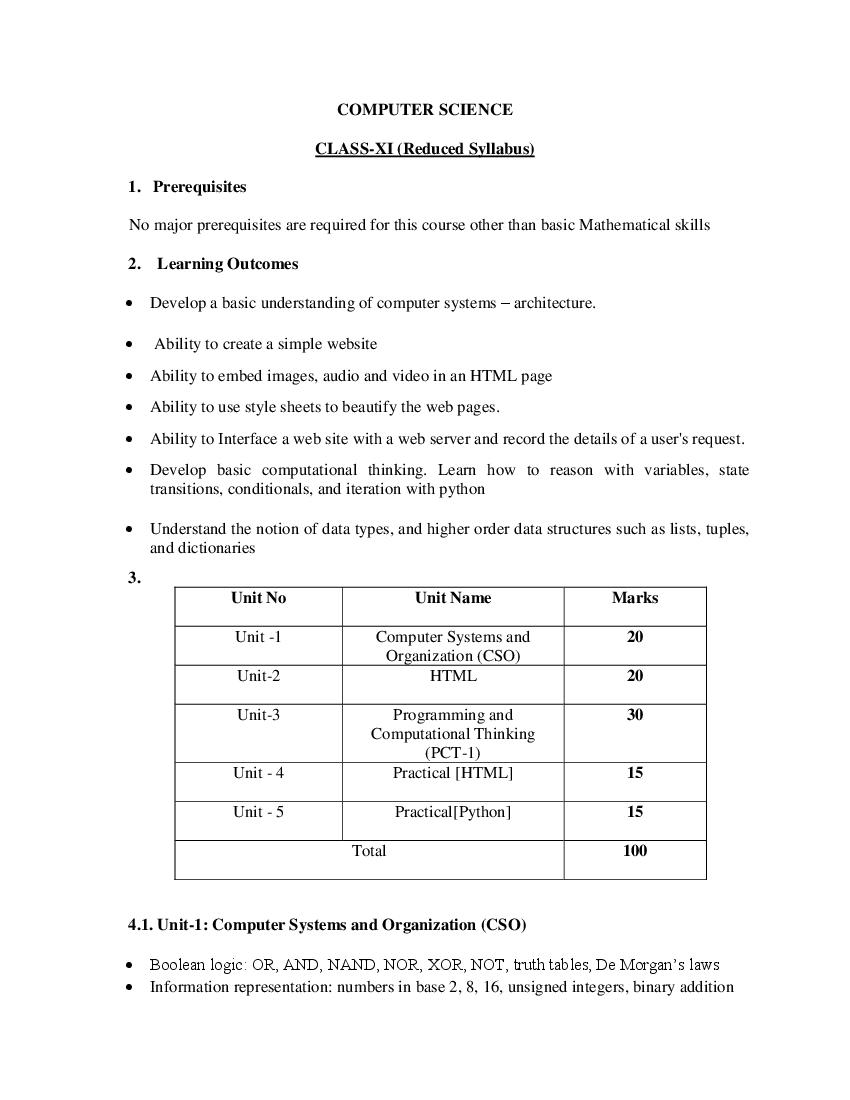
CLASS-XI (Reduced Syllabus)
1. Prerequisites
No major prerequisites are required for this course other than basic Mathematical skills
2. Learning Outcomes
Develop a basic understanding of computer systems – architecture.
Ability to create a simple website
Ability to embed images, audio and video in an HTML page
Ability to use style sheets to beautify the web pages.
Ability to Interface a web site with a web server and record the details of a user's request.
Develop basic computational thinking. Learn how to reason with variables, state
transitions, conditionals, and iteration with python
Understand the notion of data types, and higher order data structures such as lists, tuples,
and dictionaries
3.
Unit No Unit Name Marks
Unit -1 Computer Systems and 20
Organization (CSO)
Unit-2 HTML 20
Unit-3 Programming and 30
Computational Thinking
(PCT-1)
Unit - 4 Practical [HTML] 15
Unit - 5 Practical[Python] 15
Total 100
4.1. Unit-1: Computer Systems and Organization (CSO)
Boolean logic: OR, AND, NAND, NOR, XOR, NOT, truth tables, De Morgan’s laws
Information representation: numbers in base 2, 8, 16, unsigned integers, binary addition
Page 2
Interpreters (process one line at a time), difference between a compiler and an interpreter
4.2.Unit 2: HTML
Introduction to web page designing using HTML: create and save an HTML document,
access a web page using a web browser.
HTML tags: html, head, title, body, (attributes: text, background, bgcolor, link, vlink,
alink), br (break), hr(horizontal rule), inserting comments, h1..h6 (heading), p
(paragraph), b (bold), i (italics), u (underline), ul (unordered list), ol (ordered list), and li
(list item). Description lists: dl, dt and dd. Attributes of ol (start, type), ul (type).
Font tags (attributes: face, size, color).
Insert images: img (attributes: src, width, height, alt), sup (super script), sub (subscript).
HTML Forms: Textbox, radio buttons, checkbox, password, list, combobox.
Embed audio and video in a HTML page.
Create a table using the tags: table, tr, th, td, rowspan, colspan
Links: significance of linking, anchor element (attributes: href, mailto), targets.
4.3. Unit 3: Programming and Computational Thinking (PCT-1)
Familiarization with the basics of Python programming: a simple “hello world" program,
process of writing a program, running it, and print statements; simple data-types: integer,
float, string
Introduce the notion of a variable, and methods to manipulate it (concept of L-value and
R-value even if not taught explicitly)
Knowledge of data types and operators: accepting input from the console, assignment
statement, expressions, operators and their precedence.
Conditional statements: if, if-else, if-elif-else; simple programs: e.g.: absolute value, sort
3 numbers, and divisibility.
Notion of iterative computation and control flow: for, while, flowcharts, decision trees
and pseudo code; write a lot of programs: interest calculation, primarily testing, and
factorials.
Idea of debugging: errors and exceptions; debugging: pdb, break points.
Lists, tuples and dictionary: finding the maximum, minimum, mean; linear search on
list/tuple of numbers, and counting the frequency of elements in a list using a dictionary.
Introduce the notion of accessing elements in a collection using numbers and names.
Page 3
diagrams
5.1. Unit-4: HTML Lab
Create static web pages.
Use style sheets to enforce a format in an HTML page (CSS).
Embed pictures, audio and videos in an HTML page.
Add tables and frames in an HTML page.
Decorate web pages using graphical elements.
Work with HTML forms: text box, radio buttons, checkbox, password, list, combo box.
5.2. Unit-5: Programming in Python
At least the following Python concepts should be covered in the lab
Sessions: expressions, conditionals, loops, list, dictionary, and strings. The following are
some representative lab assignments.
Find the largest and smallest numbers in a list.
Find the third largest number in a list.
Test for primarily.
Find whether a string is a palindrome or not.
Given two integers x and n, compute xn.
Compute the greatest common divisor and the least common multiple of two integers.
Test if a number is equal to the sum of the cubes of its digits. Find the smallest and largest
such numb.
Reference Books:-
1. Computer Science with Python ( class xi) by Sumita Arora , Dhanpat Rai Publication
2. Textbook of Computer Science with Python for Class- XI (Two Colours) 1st Edition 2020
by Bhasin, Harsh , New Age International (P) Ltd Publishers
3. Progress in Computer Science with Python ( class xi) by Sumita Arora , Dhanpat Rai
Publication