aglasem.com
Schools Admission Mock Test Playground
ClassChoose class
StateSelect state

SilverZone iiO Sample Paper Class 3
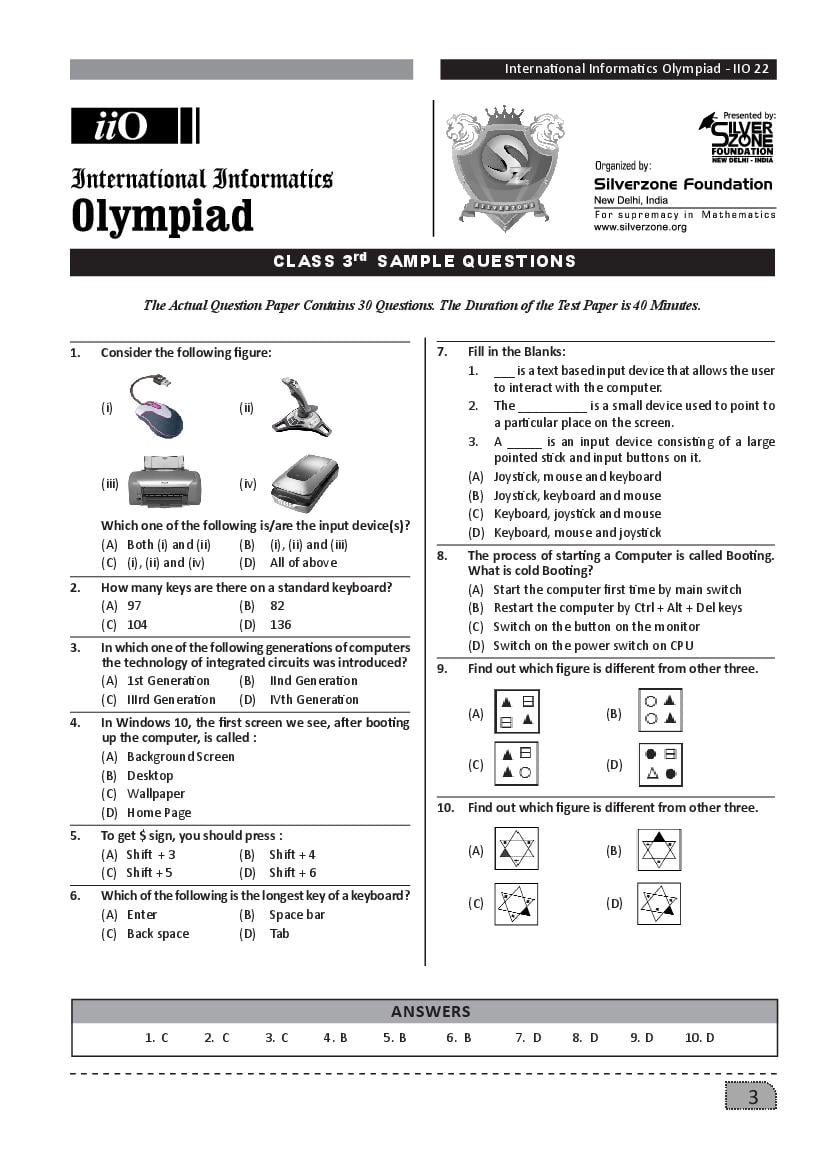
Get here SilverZone iiO Sample Paper for Class 3. Download latest Silverzone Sample Question Papers PDF. More Detail
SilverZone iiO Sample Paper Class 3 - Page 1 of 1

Finished viewing? Save it for later —

Download SilverZone iiO Sample Paper Class 3 (PDF · 1 page)
Downloaded 32 times

About SilverZone iiO Sample Paper Class 3

SilverZone iiO Sample Paper Class 3 is available here for free download. Published by SilverZone for iiO, this sample paper can be viewed online or downloaded as a PDF (1 page). Candidates preparing for iiO can use SilverZone iiO Sample Paper Class 3 to understand the exam pattern, the type of questions asked, and the overall difficulty level.

Frequently Asked Questions

How can I download SilverZone iiO Sample Paper Class 3?

Open this page and click the Download button to save SilverZone iiO Sample Paper Class 3 as a PDF. It is completely free on AglaSem Docs.

Is SilverZone iiO Sample Paper Class 3 free to download?

Yes. SilverZone iiO Sample Paper Class 3 can be viewed online and downloaded as a PDF free of cost on AglaSem Docs.

How many pages does SilverZone iiO Sample Paper Class 3 have?

SilverZone iiO Sample Paper Class 3 contains 1 page, which you can read online or download together as a single PDF.

Where can I find more iiO study material?

You can find more iiO question papers, sample papers, syllabus, and answer keys on AglaSem Docs.

SilverZone iiO Sample Paper Class 3 – Text

Read the full text of this sample paper below — useful to quickly search, copy and reference the content online without downloading the PDF.

📄 View text version (1 page)

Page 1

International Informatics Olympiad - IIO 22 CLASS 3rd SAMPLE QUESTIONS The Actual Question Paper Contains 30 Questions. The Duration of the Test Paper is 40 Minutes. 1. Consider the following figure: 7. Fill in the Blanks: 1. ___ is a text based input device that allows the user to interact with the computer. (i) (ii) 2. The __________ is a small device used to point to a particular place on the screen. 3. A _____ is an input device consisting of a large pointed stick and input buttons on it. (A) Joystick, mouse and keyboard (iii) (iv) (B) Joystick, keyboard and mouse (C) Keyboard, joystick and mouse Which one of the following is/are the input device(s)? (D) Keyboard, mouse and joystick (A) Both (i) and (ii) (B) (i), (ii) and (iii) 8. The process of starting a Computer is called Booting. (C) (i), (ii) and (iv) (D) All of above What is cold Booting? 2. How many keys are there on a standard keyboard? (A) Start the computer first time by main switch (A) 97 (B) 82 (B) Restart the computer by Ctrl + Alt + Del keys (C) 104 (D) 136 (C) Switch on the button on the monitor 3. In which one of the following generations of computers (D) Switch on the power switch on CPU the technology of integrated circuits was introduced? 9. Find out which figure is different from other three. (A) 1st Generation (B) IInd Generation (C) IIIrd Generation (D) IVth Generation (A) (B) 4. In Windows 10, the first screen we see, after booting up the computer, is called : (A) Background Screen (C) (D) (B) Desktop (C) Wallpaper (D) Home Page 10. Find out which figure is different from other three. 5. To get $ sign, you should press : (A) Shift + 3 (B) Shift + 4 (A) (B) (C) Shift + 5 (D) Shift + 6 6. Which of the following is the longest key of a keyboard? (C) (D) (A) Enter (B) Space bar (C) Back space (D) Tab ANSWERS 1. C 2. C 3. C 4. B 5. B 6. B 7. D 8. D 9. D 10. D 3

Document Details

Board / OrgSilverZone
ExamiiO
TypeSample Paper
Pages1
Updated15 Jul 2026

More for iiO

📝Sample Paper