CREST Cyber Olympiad (CCO) Class 2 Sample Paper
Finished viewing? Save it for later —
Download CREST Cyber Olympiad (CCO) Class 2 Sample Paper (PDF · 5 pages)About CREST Cyber Olympiad (CCO) Class 2 Sample Paper
CREST Cyber Olympiad (CCO) Class 2 Sample Paper is available here for free download. Published by AglaSem for Others, this sample paper can be viewed online or downloaded as a PDF (5 pages). Candidates preparing for Others can use CREST Cyber Olympiad (CCO) Class 2 Sample Paper to understand the exam pattern, the type of questions asked, and the overall difficulty level.
Frequently Asked Questions
How can I download CREST Cyber Olympiad (CCO) Class 2 Sample Paper?
Open this page and click the Download button to save CREST Cyber Olympiad (CCO) Class 2 Sample Paper as a PDF. It is completely free on AglaSem Docs.
Is CREST Cyber Olympiad (CCO) Class 2 Sample Paper free to download?
Yes. CREST Cyber Olympiad (CCO) Class 2 Sample Paper can be viewed online and downloaded as a PDF free of cost on AglaSem Docs.
How many pages does CREST Cyber Olympiad (CCO) Class 2 Sample Paper have?
CREST Cyber Olympiad (CCO) Class 2 Sample Paper contains 5 pages, which you can read online or download together as a single PDF.
Where can I find more Others study material?
You can find more Others question papers, sample papers, syllabus, and answer keys on AglaSem Docs.
CREST Cyber Olympiad (CCO) Class 2 Sample Paper – Text
Read the full text of this sample paper below — useful to quickly search, copy and reference the content online without downloading the PDF.
📄 View text version (5 pages)
Page 1
2
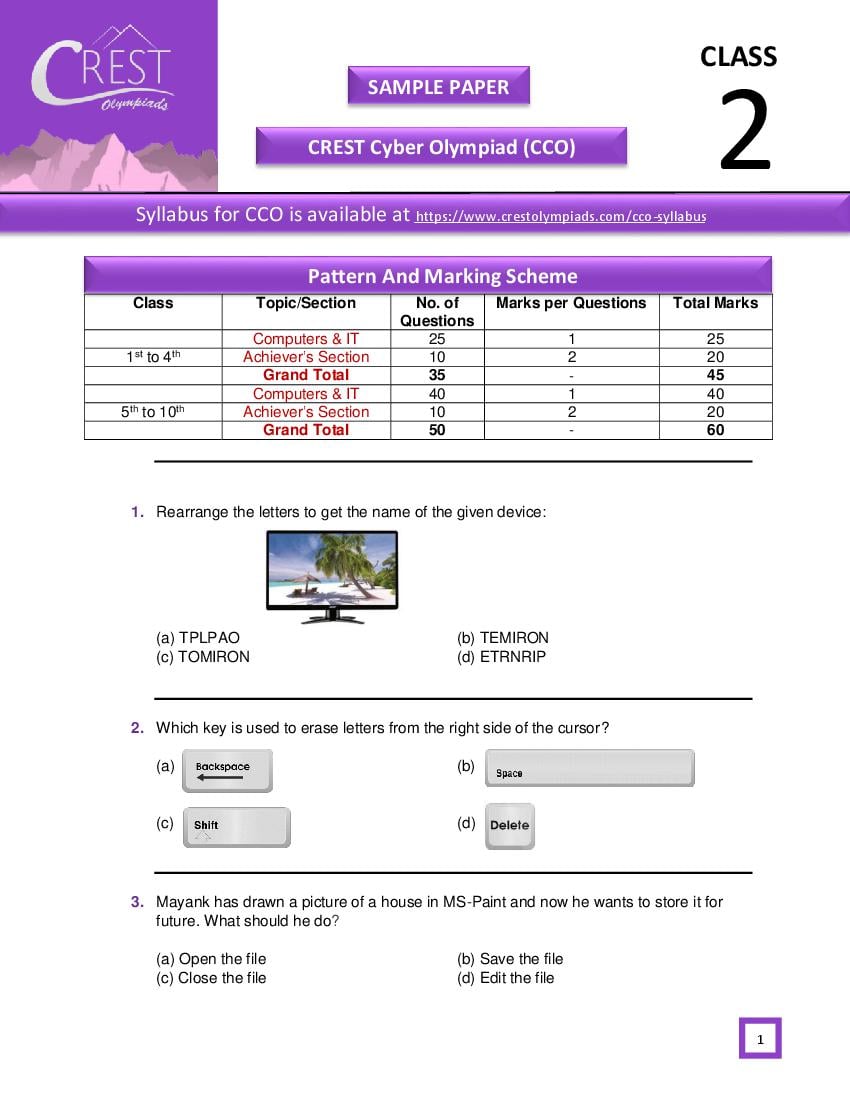
SAMPLE PAPER
CREST Cyber Olympiad (CCO)
Syllabus for CCO is available at https://www.crestolympiads.com/cco-syllabus
Pattern And Marking Scheme
Class Topic/Section No. of Marks per Questions Total Marks
Questions
Computers & IT 25 1 25
st th
1 to 4 Achiever’s Section 10 2 20
Grand Total 35 - 45
Computers & IT 40 1 40
5th to 10th Achiever’s Section 10 2 20
Grand Total 50 - 60
1. Rearrange the letters to get the name of the given device:
(a) TPLPAO (b) TEMIRON
(c) TOMIRON (d) ETRNRIP
2. Which key is used to erase letters from the right side of the cursor?
(a) (b)
(c) (d)
3. Mayank has drawn a picture of a house in MS-Paint and now he wants to store it for
future. What should he do?
(a) Open the file (b) Save the file
(c) Close the file (d) Edit the file
1
Page 2
enhance practical knowledge
4. Drag and drop is a feature associated with which of the following device?
(a) (b)
(c) (d)
5. Match the following based on the use of computer:
(i) Better learning 1.
(ii) Maintain records of patients 2.
(iii) Customer account summary 3.
(a) (i) 2, (ii) 1, (iii) 3 (b) (i) 3, (ii) 1, (iii) 2
(c) (i) 2, (ii) 3, (iii) 1 (d) (i) 3, (ii) 2, (iii) 1
6. Which of the following statements are true:
(i) Desktop is the first screen after switching on the computer
(ii) Main power supply button should be switched off at the end
(iii) CPU is called the brain of a computer
(a) Only statement 1 is true (b) Statements 1 & 3 are true
(c) Statements 1 & 2 are true (c) Statements 1, 2 & 3 are true
2
Page 3
enhance practical knowledge
7. How many types of computers are there in the image given below?
(a) 2 (b) 4
(c) 3 (d) 5
8. What is the correct key combination to print "%'?
(a) (b)
(c) (d)
3
Page 4
9. Write the first letter of each picture and rearrange the letters to get the name of an
output device:
.
(a) P R I N T E R (b) P L O T T E R
(c) M O N I T O R (d) P R O J E C T O R
10. Identify the device with the help of the description given below:
A device that optically scans images and printed text
It is an input device
Captured image is converted into digital image
(a) (b)
(c) (d)
4
Page 5
1. (c) 2. (d) 3. (b) 4. (a) 5. (b) 6. (d) 7. (c) 8. (b) 9. (a) 10. (c)
5
Document Details
| Board / Org | Aglasem |
| Exam | Others |
| Type | Sample Paper |
| Pages | 5 |
| Language | english |
| Updated | 22 Jul 2026 |