MBOSE Class 12 Question Paper 2019 for Information Technology
Finished viewing? Save it for later —
Download MBOSE Class 12 Question Paper 2019 for Information Technology (PDF · 4 pages)About MBOSE Class 12 Question Paper 2019 for Information Technology
MBOSE Class 12 Question Paper 2019 for Information Technology is available here for free download. Published by Meghalaya Board for Class 12, this question paper can be viewed online or downloaded as a PDF (4 pages). Candidates preparing for Class 12 can use MBOSE Class 12 Question Paper 2019 for Information Technology to understand the exam pattern, the type of questions asked, and the overall difficulty level.
Frequently Asked Questions
How can I download MBOSE Class 12 Question Paper 2019 for Information Technology?
Open this page and click the Download button to save MBOSE Class 12 Question Paper 2019 for Information Technology as a PDF. It is completely free on AglaSem Docs.
Is MBOSE Class 12 Question Paper 2019 for Information Technology free to download?
Yes. MBOSE Class 12 Question Paper 2019 for Information Technology can be viewed online and downloaded as a PDF free of cost on AglaSem Docs.
How many pages does MBOSE Class 12 Question Paper 2019 for Information Technology have?
MBOSE Class 12 Question Paper 2019 for Information Technology contains 4 pages, which you can read online or download together as a single PDF.
Where can I find more Class 12 study material?
You can find more Class 12 question papers, sample papers, syllabus, and answer keys on AglaSem Docs.
MBOSE Class 12 Question Paper 2019 for Information Technology – Text
Read the full text of this question paper below — useful to quickly search, copy and reference the content online without downloading the PDF.
📄 View text version (4 pages)
Page 1
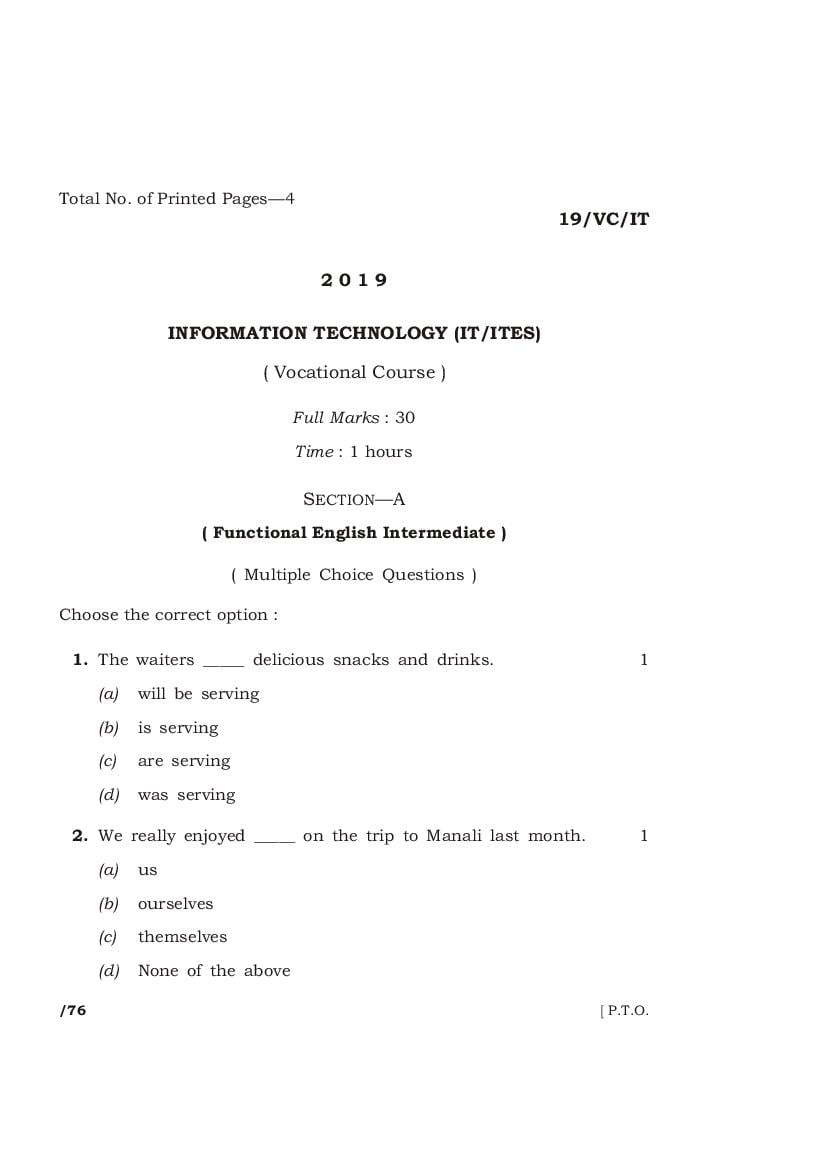
19/VC/IT
2019
INFORMATION TECHNOLOGY (IT/ITES)
( Vocational Course )
Full Marks : 30
Time : 1 hours
SECTION—A
( Functional English Intermediate )
1. The waiters _____ delicious snacks and drinks. 1
(a) will be serving
(b) is serving
(c) are serving
(d) was serving
2. We really enjoyed _____ on the trip to Manali last month. 1
(a) us
(b) ourselves
(c) themselves
/76 [ P.T.O.
Page 2
3. Delhi is a _____ city. 1
(a) noisy
(b) noiseful
(c) noisily
(d) noise
4. I will have _____ halwa for dessert. 1
(a) a
(b) the
(c) an
(d) No article needed
( Short Answer-type Questions )
5. Differentiate between countable nouns and uncountable
nouns with examples. 2
6. Give at least three reasons why writing a good resume is
important. 2
7. Mention the ‘Common Interview Questions’ facing during an
interview. 2
19/VC/IT/76 [ Contd.
Page 3
SECTION—B
( Information Technology )
8. Calendar software allows the user to _____ to other user’s
meeting requests. 1
(a) respond
(b) call
(c) note
(d) prepare
9. Which one is not the advantage of networking? 1
(a) Data sharing
(b) Software sharing
(c) Hardware sharing
(d) Internet access sharing
10. A _____ helps the user to systematically enter the information
in database. 1
(a) task
(b) form
(c) query
11. A function in MS-Excel must begins with 1
(a) an ( ) sign
(b) an equal sign
(c) a plus sign
(d) a > sign
19/VC/IT/76 [ P.T.O.
Page 4
( Very Short Answer-type Questions )
12. Define the meaning of a Web browser. 1
13. What is the function of an Autosum symbol S in MS-Excel? 1
14. Give the full form of an acronym ‘RDBMS’. 1
15. Which feature (in Microsoft Windows XP) is designed to assist
people that have difficulty using keyboard or a mouse (or
both)? 1
( Long Answer-type Questions )
Answer any three questions
16. Explain the process of data transfer over the Internet. 4
17. Define the meaning of a Blog. How do we create a Blog? 1+3=4
18. What do you understand by the term ‘sharing a calendar’?
What is its purpose? Write down the steps how to share copy of
your calendar to others. 1+1+2=4
19. Define the meaning of chart in spreadsheet. Explain the
different types of charts. 1+3=4
20. Define database management system. Explain how data are
organized in a database. 1+3=4
21. Define character formatting. Explain any six character
formatting features used in a Word Processor. 1+3=4
HHH
19/VC/IT/76 K9—310
Document Details
| Board / Org | Meghalaya Board |
| Exam | Class 12 |
| Type | Question Paper |
| Pages | 4 |
| Updated | 15 Jul 2026 |