MBOSE Class 12 Question Paper 2018 for Computer Technique
Finished viewing? Save it for later —
Download MBOSE Class 12 Question Paper 2018 for Computer Technique (PDF · 9 pages)About MBOSE Class 12 Question Paper 2018 for Computer Technique
MBOSE Class 12 Question Paper 2018 for Computer Technique is available here for free download. Published by Meghalaya Board for Class 12, this question paper can be viewed online or downloaded as a PDF (9 pages). Candidates preparing for Class 12 can use MBOSE Class 12 Question Paper 2018 for Computer Technique to understand the exam pattern, the type of questions asked, and the overall difficulty level.
Frequently Asked Questions
How can I download MBOSE Class 12 Question Paper 2018 for Computer Technique?
Open this page and click the Download button to save MBOSE Class 12 Question Paper 2018 for Computer Technique as a PDF. It is completely free on AglaSem Docs.
Is MBOSE Class 12 Question Paper 2018 for Computer Technique free to download?
Yes. MBOSE Class 12 Question Paper 2018 for Computer Technique can be viewed online and downloaded as a PDF free of cost on AglaSem Docs.
How many pages does MBOSE Class 12 Question Paper 2018 for Computer Technique have?
MBOSE Class 12 Question Paper 2018 for Computer Technique contains 9 pages, which you can read online or download together as a single PDF.
Where can I find more Class 12 study material?
You can find more Class 12 question papers, sample papers, syllabus, and answer keys on AglaSem Docs.
MBOSE Class 12 Question Paper 2018 for Computer Technique – Text
Read the full text of this question paper below — useful to quickly search, copy and reference the content online without downloading the PDF.
📄 View text version (9 pages)
Page 1
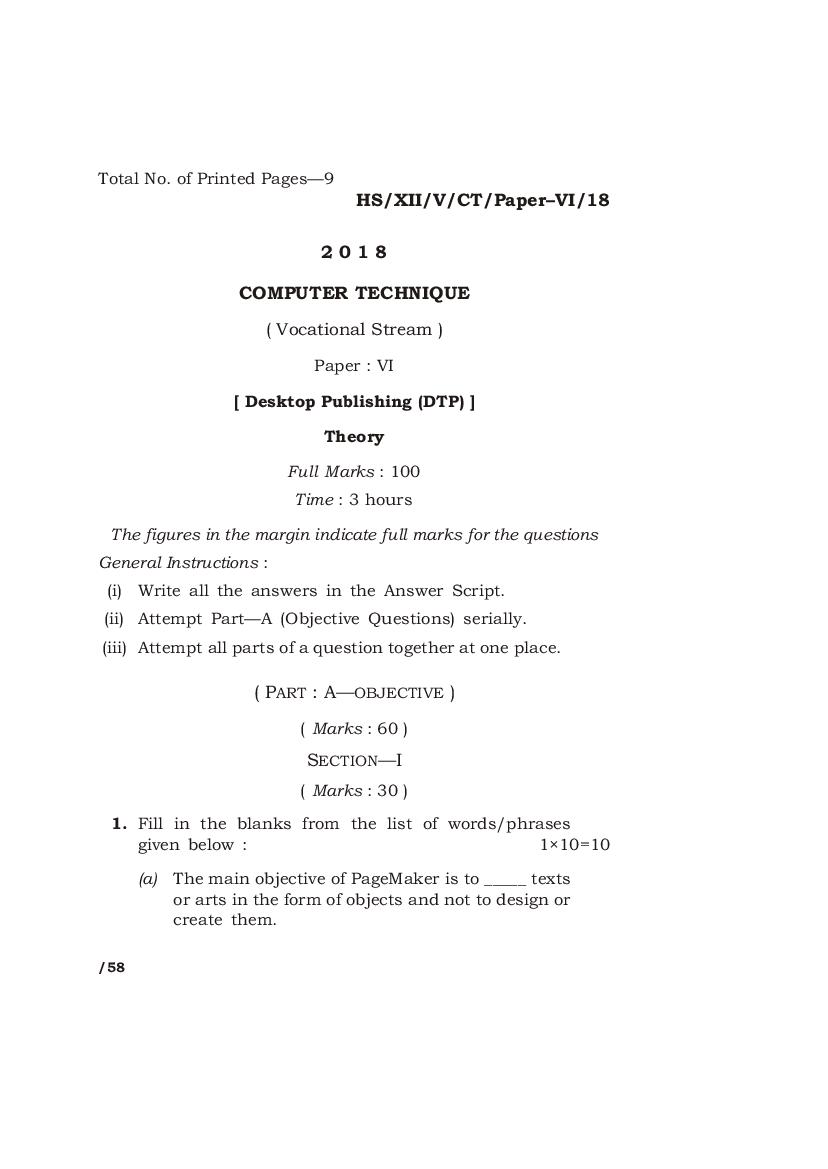
HS/XII/V/CT/Paper–VI/18
2018
COMPUTER TECHNIQUE
( Vocational Stream )
Paper : VI
[ Desktop Publishing (DTP) ]
Theory
Full Marks : 100
Time : 3 hours
The figures in the margin indicate full marks for the questions
General Instructions :
(i) Write all the answers in the Answer Script.
(ii) Attempt Part—A (Objective Questions) serially.
(iii) Attempt all parts of a question together at one place.
( PART : A—OBJECTIVE )
( Marks : 60 )
SECTION—I
( Marks : 30 )
1. Fill in the blanks from the list of words/phrases
given below : 1×10=10
(a) The main objective of PageMaker is to _____ texts
or arts in the form of objects and not to design or
create them.
/58
Page 2
(b) The biggest drawback of typing text directly into
PageMaker as compared to Word processor
programs such as MS-Word or Word perfect is
the excessive amount of _____ required to encode
basic text.
(c) _____ changes the space between any pair of
characters.
(d) The _____ command takes the document back to
the last saved state.
(e) A better way to navigate in a zoom-in document
is by _____.
(f) _____ an image slides the top edge of an image to
the left or right while the bottom of the image or
opposite edge remains in place.
(g) CorelDRAW is a powerful _____ design software.
(h) In CorelDRAW, only the _____ place in the
drawing page are printable.
(i) One of the five view quality options in
CorelDRAW is _____ view.
(j) If equal amount of red and green colors are
throughly mixed, then the resultant color will be
_____ in color.
List of words/phrases :
Skewing Revert Yellow Enhanced
Assemble Kerning Graphic Panning
Objects Memory
Page 3
2. State whether the following statements are True or
False : ½×10=5
(a) In CorelDRAW, a single text can be converted
into curve.
(b) A new node cannot be added into a line or a
curve.
(c) A bitmap image file is smaller in memory size as
compared to vector image file.
(d) In CorelDRAW, both artistic text and paragraph
text are not same.
(e) The color model uses by CRT monitor is CMYK
color model.
(f) In PageMaker, only one layer can be created in a
document.
(g) Master page in PageMaker contains objects that
appear on each page in a document.
(h) In a book in PageMaker, the TOC is placed in the
last page.
(i) A palette in PageMaker is a collection of
commands.
(j) A printer should have less dpi to print a high
quality document.
Page 4
3. Choose the most correct answer for each sentence
from the given choices : 1×5=5
(a) The most commonly used tool from the toolbox
in CorelDRAW is
(i) Zoom tool
(ii) Shape tool
(iii) Pick tool
(b) The color model used by printer is
(i) HSB
(ii) CMYK
(iii) RGB
(c) The tool used to create text blocks in PageMaker
is
(i) Pointer tool
(ii) Text tool
(iii) Rectangle frame tool
(d) In CorelDRAW or PageMaker if there are three or
more objects, to bring a particular object to the
top of a stack, then the command used will be
(i) Arrange–Bring forward
(ii) Arrange–Bring to front
(iii) Arrange–Send backward
(e) In CorelDRAW, perspective effects enable object
to be visualized as
(i) one-dimensional object
(ii) two-dimensional object
(iii) three-dimensional object
Page 5
4. Answer the following questions in 1 or 2 sentences
each : 1×10=10
(a) What is acquire in PageMaker?
(b) What do you mean by arrange in PageMaker or
CorelDRAW?
(c) Define guides and their creation in PageMaker.
(d) What is master page?
(e) What is pagination?
(f) What do you mean by styles in PageMaker?
(g) Give the full form of HSB color model.
(h) Define masking.
(i) How to select multiple objects at one time in
CorelDRAW?
(j) What does the X-value in the status bar
represent in CorelDRAW?
Page 6
SECTION—II
( Marks : 30 )
5. Answer any six of the following in 2 to 3 sentences
each : 2×6=12
(a) Name any three plug-ins in PageMaker and
define their functions.
(b) Differentiate between text block and text frame.
(c) Name three file formats which can be imported
to PageMaker document.
(d) How to make objects non-printing in
PageMaker?
(e) Differentiate between vector or graphic image
and bitmap image in CorelDRAW.
(f) What is the basic difference between Shape tool
and Freehand tool in CorelDRAW?
(g) What is Powerclips in CorelDRAW?
(h) Define Blending in CorelDRAW.
Page 7
6. Answer any six of the following in 3 to 4 sentences
each : 3×6=18
(a) How to fit a given text to a given path in
CorelDRAW?
(b) What is process color in CorelDRAW?
(c) What are the guidelines in CorelDRAW and how
to place them in the drawing window?
(d) Define Docker Windows and their uses in
CorelDRAW.
(e) How are text blocks linked together in
PageMaker?
(f) What is the result of word counter in
PageMaker?
(g) How are objects imported into PageMaker
document?
(h) What is a story editor in PageMaker?
Page 8
( PART : B—DESCRIPTIVE )
( Marks : 40 )
GROUP—I
Answer any five of the following questions : 4×5=20
7. When do you require a master page? How to include
page numbers in the master page? Where can you
change the page numbering style? 2+1½+½=4
8. What is the procedure of creating index in
PageMaker? 4
9. What are the four layer functions? Define each in
PageMaker. 1+1+1+1=4
10. How do frames differ from other objects? How to
distinguish an empty frame from a normal graphic
object? 2+2=4
11. What are the different types of lenses in CorelDRAW?
How to apply them? 2+2=4
12. What are the different tools in a shape flyout?
Explain at least two of them. 2+2=4
13. Differentiate between rotate and mirror an object.
2+2=4
Page 9
GROUP—II
Answer any four of the following questions : 5×4=20
14. Define and explain the process of trimming in
CorelDRAW. 2+3=5
15. What are the different operations applied in a drop
shadow in CorelDRAW? 5
16. What are the different color models? Describe each
briefly. 2+3=5
17. Define data merge in PageMaker. What are the
different documents or publications involved in data
merge? Describe each briefly. 1+2+2=5
18. Define leading, tracking, indent, margin and
hypenation. 1+1+1+1+1=5
19. In a document setup dialog box, what is the
significance of double-sided options, adjust layout,
restart page numbering, facing page and start page #
in PageMaker? 1+1+1+1+1=5
HHH
8K—60/58 HS/XII/V/CT/Paper–VI/18
Document Details
| Board / Org | Meghalaya Board |
| Exam | Class 12 |
| Type | Question Paper |
| Pages | 9 |
| Updated | 15 Jul 2026 |