PSEB 9th Class Syllabus 2027 Computer Science
Finished viewing? Save it for later —
Download PSEB 9th Class Syllabus 2027 Computer Science (PDF · 3 pages)About PSEB 9th Class Syllabus 2027 Computer Science
PSEB 9th Class Syllabus 2027 Computer Science is available here for free download. Published by Punjab Board for Class 9, this syllabus can be viewed online or downloaded as a PDF (3 pages). Candidates preparing for Class 9 can use PSEB 9th Class Syllabus 2027 Computer Science to understand the exam pattern, the type of questions asked, and the overall difficulty level.
Frequently Asked Questions
How can I download PSEB 9th Class Syllabus 2027 Computer Science?
Open this page and click the Download button to save PSEB 9th Class Syllabus 2027 Computer Science as a PDF. It is completely free on AglaSem Docs.
Is PSEB 9th Class Syllabus 2027 Computer Science free to download?
Yes. PSEB 9th Class Syllabus 2027 Computer Science can be viewed online and downloaded as a PDF free of cost on AglaSem Docs.
How many pages does PSEB 9th Class Syllabus 2027 Computer Science have?
PSEB 9th Class Syllabus 2027 Computer Science contains 3 pages, which you can read online or download together as a single PDF.
Where can I find more Class 9 study material?
You can find more Class 9 question papers, sample papers, syllabus, and answer keys on AglaSem Docs.
PSEB 9th Class Syllabus 2027 Computer Science – Text
Read the full text of this syllabus below — useful to quickly search, copy and reference the content online without downloading the PDF.
📄 View text version (4 pages)
Page 1
PSEB 9th Class
Syllabus 2027
Computer Science
EXAM YEAR TYPE SUBJECT
Punjab Class 9 2027 Syllabus Computer Science
Notes · Sample Papers · Previous Year Papers · Mock Tests
Page 2
m .co
m .co SYLLABUS – COMPUTER SCIENCE s e m
se (SESSION: 2026-27) g
l a
a
9TH CLASS
Unit-I
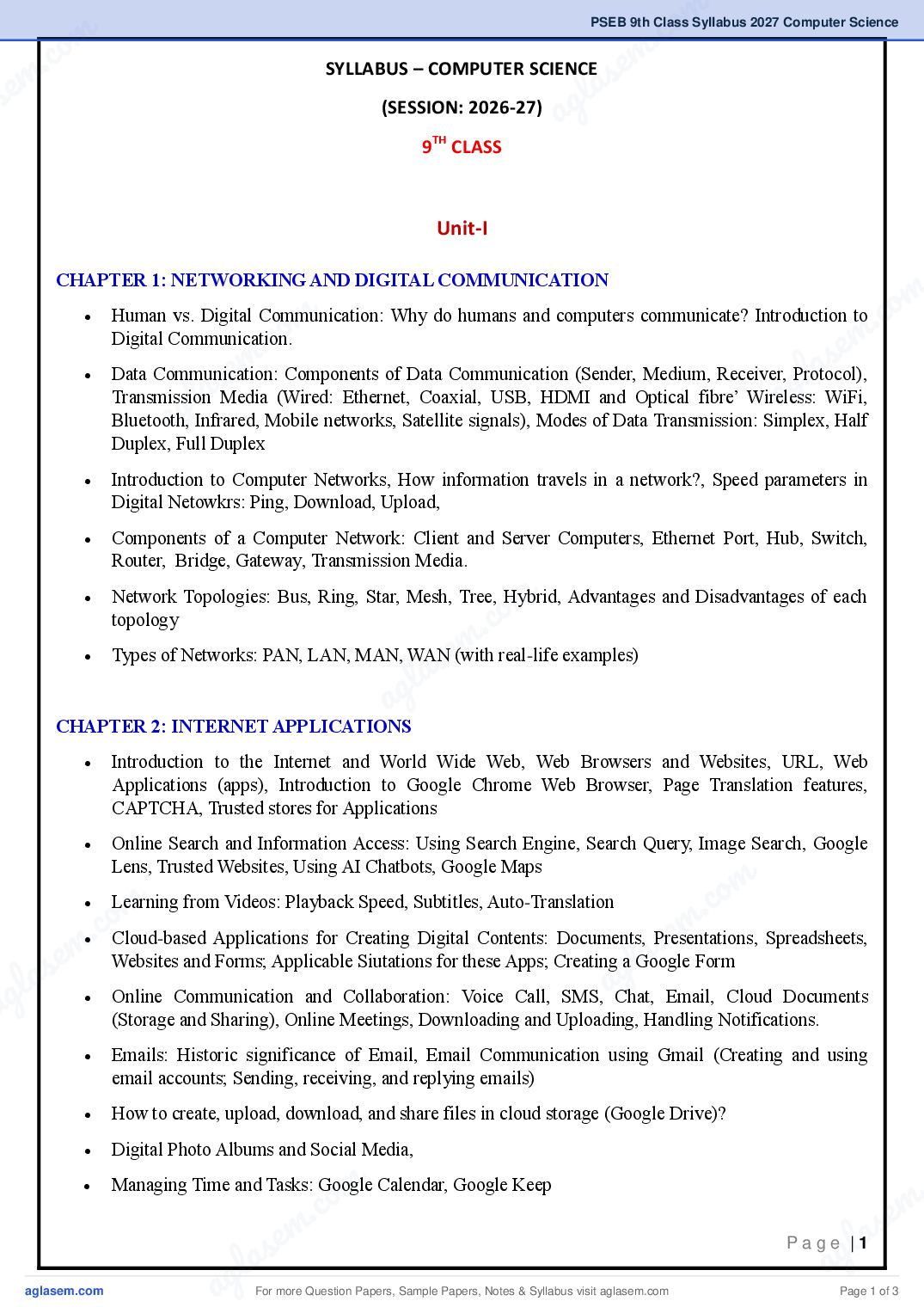
CHAPTER 1: NETWORKING AND DIGITAL COMMUNICATION
m
m
Human vs. Digital Communication: Why do humans and computers communicate? Introduction to .co
.co
Digital Communication.
e m
s em Components of Data Communication (Sender, Medium, Receiver, gProtocol),
Data Communication: l as
l
Transmission
g a Media (Wired: Ethernet, Coaxial, USB, HDMI and Optical fibre’ Wireless: a WiFi,
a
Bluetooth, Infrared, Mobile networks, Satellite signals), Modes of Data Transmission: Simplex, Half
Duplex, Full Duplex
Introduction to Computer Networks, How information travels in a network?, Speed parameters in
Digital Netowkrs: Ping, Download, Upload,
Components of a Computer Network: Client and Server Computers, Ethernet Port, Hub, Switch,
Router, Bridge, Gateway, Transmission Media.
m
Network Topologies: Bus, Ring, Star, Mesh, Tree, Hybrid, Advantages and Disadvantages of each
.co
topology
e m
las
Types of Networks: PAN, LAN, MAN, WAN (with real-life examples)
ag
CHAPTER 2: INTERNET APPLICATIONS
Introduction to the Internet and World Wide Web, Web Browsers and Websites, URL, Web
Applications (apps), Introduction to Google Chrome Web Browser, Page Translation features,
CAPTCHA, Trusted stores for Applications
Online Search and Information Access: Using Search Engine, Search Query, Image Search, Google
Lens, Trusted Websites, Using AI Chatbots, Google Maps
m
c o m
Learning from Videos: Playback Speed, Subtitles, Auto-Translation
m .co
. Cloud-based Applications for Creating Digital Contents: Documents, Presentations,
e
e as
m Websites and Forms; Applicable Siutations for these Apps; Creating a lGoogle Spreadsheets,
las
Form
ag
ag Online Communication and Collaboration: Voice Call, SMS, Chat, Email, Cloud Documents
(Storage and Sharing), Online Meetings, Downloading and Uploading, Handling Notifications.
Emails: Historic significance of Email, Email Communication using Gmail (Creating and using
email accounts; Sending, receiving, and replying emails)
How to create, upload, download, and share files in cloud storage (Google Drive)?
Digital Photo Albums and Social Media,
m
Managing Time and Tasks: Google Calendar, Google Keep .
.co
e m
em l as
las ag
Page |1
ag For more Question Papers, Sample Papers, Notes & Syllabus visit Page 1 of 3
Page 3
CHAPTER 3: E-GOVERNANCE AND CYBER SAFETY
Introduction to E-Governance, its meaning and need
Difference between Governance and E-Governance
Purposes and Advantages of Various Models of E-Governance: G2C, G2B, G2E, G2G
Foundations of E-Governance: Connectivity, Skilled People, Data & Content, Investment
E-Governance Services: National Level, State Level, Local Level (Urban and Rural)
Online Official Document Storage and DigiLocker
Internet Threats: Virus, Spyware, Trojan Horse, Phishing
Safe Online Habits, Protection Against Online Fraud
Cyber Crime and Cyber Ethics: Computer as a target and as a weapon, Ethical use of digital
technologies
CHAPTER 8: DATABASE MANAGEMENT SYSTEM
Data and Information: Raw Data vs Processed Information
Introduction to Database and its Terminology: Entity, Attribute, Record, Table, Keys (Primary Key
and Foreign Key), Relationships between Entities (One-to-One, One-to-Many, Many-to-Many)
Limitations of Spreadsheet-based Data Management
Introduction to Database Management System (DBMS) and its need
Components of DBMS Environment: Hardware, Software (Operating System, DBMS, Business
Applications, Tools), Data, Procedures, Users (End Users, Specialists such as Data Analysts,
Business Users, Technical Users such as Database Administrators, Database Designers, Developers
or Application Programmers)
Database Operations and SQL: Data Definition (DDL), Data Manipulation (DML), Data Control
(DCL)
Unit-III
CHAPTER 4: MICROSOFT EXCEL (PART-1) – SPREADSHEET BASICS
Introduction to Spreadsheets; Uses of Spreadsheets
Essential Spreadsheet Concepts: Grid (rows, columns, cells), Table structure with attributes as
column headers and rows as records.
Spreadsheet Interface and Components: File, Workbook and Worksheet controls, Options and
Commands, Active Cell, Name box and Formula bar, Display Area, Spreadsheet View controls.
Working with Spreadsheets: Entering and Editing Data, Selecting and Managing Cells, Using Fill
Handle and Copy–Paste, Working with Data Series, Data Formats
Page |2
For more Question Papers, Sample Papers, Notes & Syllabus visit Page 2 of 3
Page 4
m .co
c. o Basic Formatting: Font Style, Alignment, Cell formatting—Borderss e mand Colours, Printing: Print
m Area, Print Preview, Page Layout, Headers, Footers, Gridlines la
se ag
Introduction to Visualizing Data Summaries
CHAPTER 5: MICROSOFT EXCEL (PART-2) – CALCULATIONS AND DECISION MAKING
Basic Calculations using Formulas: Operators and Operands
Copying Formulas and Cell Referencing: Relative, Absolute, Mixed References
Arithmetic Operators in formulas and their Precedence
o m
o m . c
. c
Using functions for calculations in Excel Sheets, Mathematical and Counting Functions: SUM,
e m
m
AVERAGE, MIN, MAX, ROUND, LARGE, RANK
e l as
l a
Using Formulas s for Making Decisions: Conditional Operators (=, <, <=, >, >=. <>), ag
Conditional
Functionsg(IF, COUNTIF, SUMIF) and Logical Functions (AND, OR)
a
Conditional Formatting
Unit-IV
CHAPTER 6: MICROSOFT EXCEL (PART-3) – CLEANING AND CONNECTING DATA
Data Consistency and Data Quality: Identifying and Removing Duplicate Records, Sorting Data,
Manual Data Cleaning using Find and Replace
o m
. c
m
General functions used on text data: LEN, ISNUMBER, Count Values: COUNT , COUNTA ,
e
COUNTBLANK,
as
lTRIM,
a g
Standardising and Cleaning textual data: UPPER, LOWER, PROPER
Extracting Parts of Text: LEFT, RIGHT, MID
Combining and Splitting Text: Concatenation operator, CONCAT, TEXTJOIN, TEXTSPLIT
Finding Text within a Larger String: SEARCH and FIND
Working with Dates and Times: TODAY, NOW, DAY, MONTH, YEAR, DATEDIF, TEXT
Defining Named Ranges and Using them in Data Validation
o m
m . c
c. o
Connecting Related Data Across Spreadsheets Using Unique Identifiers: XLOOKUP
e m
e m a s
l VISUAL REPORTING
l asCHAPTER 7: MICROSOFT EXCEL (PART-4) – DATA ANALYSIS AND
a g
ag Preparing Data for Analysis: Organising and categorising data
Using Filters: Category Filters, Text Filters, Number Filters, Colour Filters, Combining Multiple
Filters for Decision Making
Introduction to Pivot Tables: Creating Pivot Tables using Rows, Columns, Values, Filters
Summarising Data Using Pivot Tables: Count, Sum, Average, Analysing Group-wise Performance
Using Charts for Visual Reporting: Purpose of Visual Reporting, interactive charts with Pivot Tables,
m .
.co m
Common Chart Types, Customisation of Charts, Using charts to Identify Trends and Comparisons
s e
s em l a
la ag
Page |3
ag For more Question Papers, Sample Papers, Notes & Syllabus visit Page 3 of 3