HBSE Class 10 Sample Paper 2023 Computer Science Set B
Finished viewing? Save it for later —
Download HBSE Class 10 Sample Paper 2023 Computer Science Set B (PDF · 5 pages)About HBSE Class 10 Sample Paper 2023 Computer Science Set B
HBSE Class 10 Sample Paper 2023 Computer Science Set B is available here for free download. Published by Haryana Board for Class 10, this sample paper can be viewed online or downloaded as a PDF (5 pages). Candidates preparing for Class 10 can use HBSE Class 10 Sample Paper 2023 Computer Science Set B to understand the exam pattern, the type of questions asked, and the overall difficulty level.
Frequently Asked Questions
How can I download HBSE Class 10 Sample Paper 2023 Computer Science Set B?
Open this page and click the Download button to save HBSE Class 10 Sample Paper 2023 Computer Science Set B as a PDF. It is completely free on AglaSem Docs.
Is HBSE Class 10 Sample Paper 2023 Computer Science Set B free to download?
Yes. HBSE Class 10 Sample Paper 2023 Computer Science Set B can be viewed online and downloaded as a PDF free of cost on AglaSem Docs.
How many pages does HBSE Class 10 Sample Paper 2023 Computer Science Set B have?
HBSE Class 10 Sample Paper 2023 Computer Science Set B contains 5 pages, which you can read online or download together as a single PDF.
Where can I find more Class 10 study material?
You can find more Class 10 question papers, sample papers, syllabus, and answer keys on AglaSem Docs.
HBSE Class 10 Sample Paper 2023 Computer Science Set B – Text
Read the full text of this sample paper below — useful to quickly search, copy and reference the content online without downloading the PDF.
📄 View text version (5 pages)
Page 1
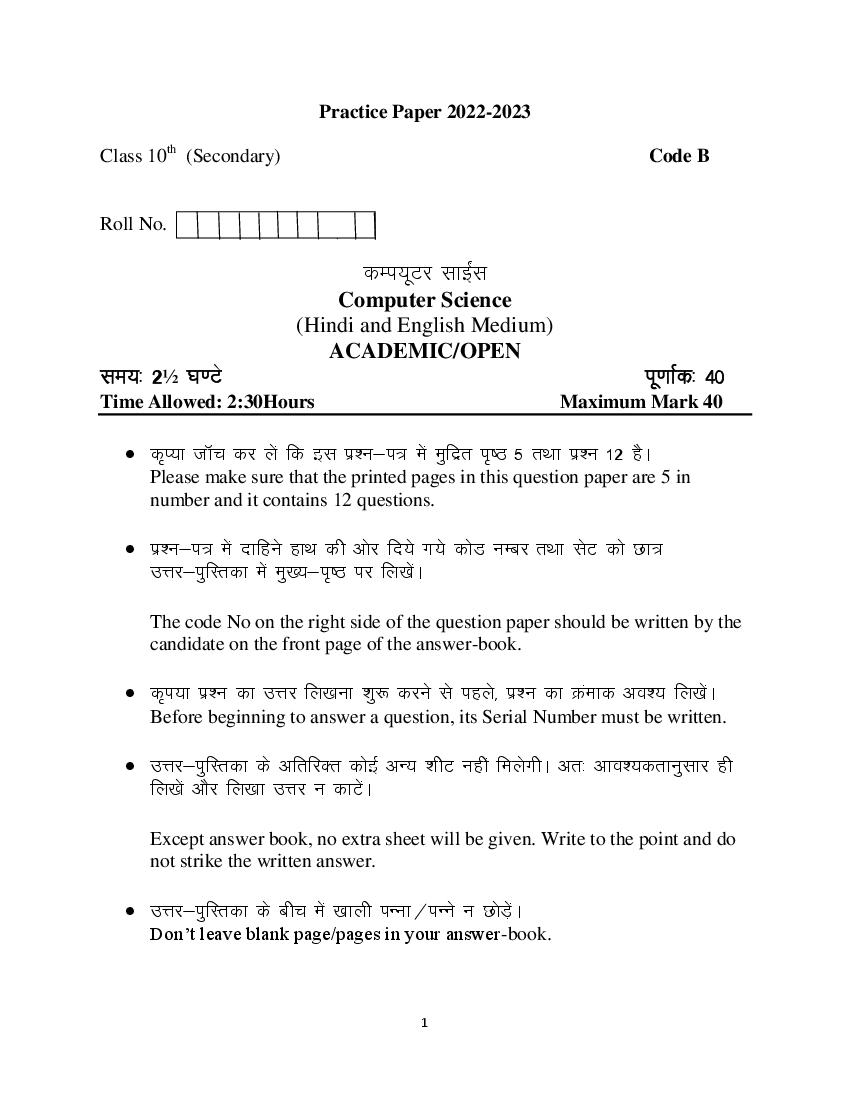
Class 10th (Secondary) Code B
Roll No.
dEi;wVj lkbZal
Computer Science
(Hindi and English Medium)
ACADEMIC/OPEN
le;% 2½ ?k.Vs iw.kkZd% 40
Time Allowed: 2:30Hours Maximum Mark 40
d`I;k tkWp dj ysa fd bl iz”u&i= esa eqfnzr i`’B 5 rFkk iz”u 12 gSA
Please make sure that the printed pages in this question paper are 5 in
number and it contains 12 questions.
Ikz”u&i= esa nkfgus gkFk dh vksj fn;s x;s dksM uEcj rFkk lsV dks Nk=
mÙkj&iqfLrdk esa eq[;&i`’B ij fy[ksAa
The code No on the right side of the question paper should be written by the
candidate on the front page of the answer-book.
d`Ik;k iz”u dk mÙkj fy[kuk “kq: djus ls igys] iz”u dk Øaekd vo”; fy[ksAa
Before beginning to answer a question, its Serial Number must be written.
mÙkj&iqfLrdk ds vfrfjDr dksbZ vU; “khV ugha feysxhA vr% vko”;drkuqlkj gh
fy[ksa vkSj fy[kk mÙkj u dkVsAa
Except answer book, no extra sheet will be given. Write to the point and do
not strike the written answer.
mÙkj&iqfLrdk ds chp esa [kkyh iUuk@iUUks u NksMas+A
Don’t leave blank page/pages in your answer-book.
1
Page 2
Candidate must write their Roll Number on the question paper
d`i;k iz”uksa dk mÙkj nsus ls iwoZ ;g lqfuf”pr dj yas fd iz”u&i= iw.kZ o lgh gS]
ijh{kk ds mijkUr bl lEcU/k esa dksbZ Hkh nkok Lohdkj ugha fd;k tk;sxkA
Before answering the question, ensure that you have been supplied the
correct and complete question paper, no claim in this regard, will be
entertained after examination.
General Instructions:
1. All questions are compulsory.
2. Question numbers 1 to 3 are essay type questions. Each question carries 4
Marks. Internal choice is available in these questions.
3. Question numbers 4 to 7 are short answer type questions. Each question
carries 3 marks.
4. Question numbers 8 to 11 are very short answer type questions. Each
question carries 2 marks.
5. Question number 12 is of objective type and has eight parts. Each part is
of 1mark.
__________________________________________________________________________________
1. Explain components of MS Power Point window. 4
MS Power Point
Or
Explain different views in MS PowerPoint.
MS Power Point
2
Page 3
Or
Name the various groups on the Home tab and their functions.
3. What is cell referencing? Explain its types. 4
Or
Explain MAX() and COUNT() function with example.
MAX() COUNT()
4. What is computer memory? Give classification of computer memory. 3
5. What is design phase of SDLC. 3
SDLC
6. Describe few functions of Start Menu. 3
7. Explain any three input devices. 3
8. Define Database and DBMS. 2
DBMS
9. Write steps to create a shortcut icon in Windows Operating System. 2
10. Write steps to create a new database in MS Access. 2
11. What are various fact finding techniques? 2
3
Page 4
1x8=8
12.(i) …………is the extension of MS PowerPoint 2007 Presentation file.
(ii) SRS serves as a contract between customer and developer. (Ture/False)
SRS
(iii) Font option is present in……………group under Home tab.
(iv) Cell address B5 is an example of………….referencing.
a) Mixed b) Relative
c) Absolute d) None of these
B5
a) b)
c) d)
(v) Which of the following is not Windows 7 Accessories?
(a) Paint (b) Notepad
(c) Calculator (d) Recycle Bin
(a) (b)
(c) (d)
(vi) Every formula or function in MS Excel starts with……….sign.
(a) & (b) #
(c) + (d) =
4
Page 5
(c) + (d) =
(vii) Shortcut key of Centre Alignment is………….
(a) Ctrl+H (b) Ctrl+M
(c) Ctrl+E (d) Ctrl+C
(a) Ctrl+H (b) Ctrl+M
(c) Ctrl+E (d) Ctrl+C
(viii) …………is shortcut key to insert a new slide in a Presentation.
(a) Ctrl+N (b) Ctrl+M
(c) Ctrl+E (d) Ctrl+U
………….
(a) Ctrl+N (b) Ctrl+M
(c) Ctrl+E (d) Ctrl+U
.
5
Document Details
| Board / Org | Haryana Board |
| Exam | Class 10 |
| Type | Sample Paper |
| Pages | 5 |
| Updated | 01 May 2026 |