aglasem.com
Schools Admission Mock Test Playground
ClassChoose class
StateSelect state

Goa Board Class 12 Question Paper Mar 2018 Computer Software Application _New Pattern_
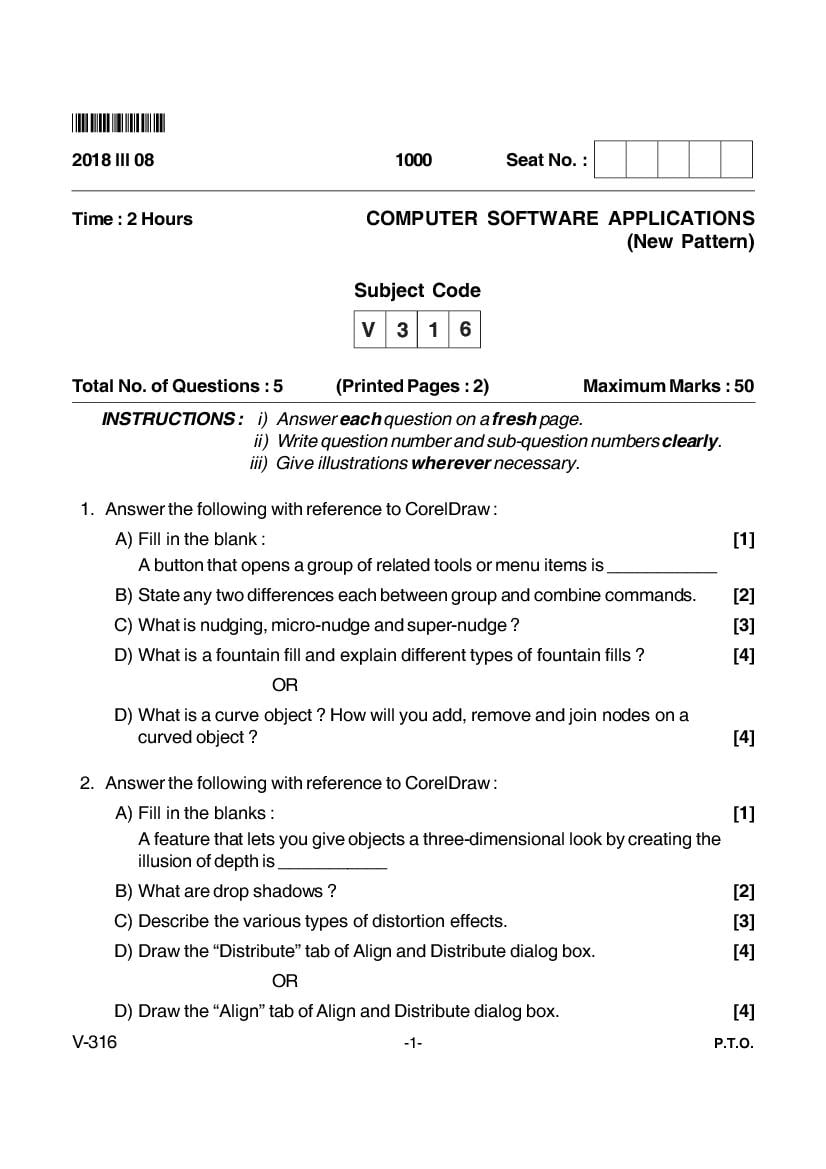
Get here Goa Board Class 12 Question Paper Mar 2018 Computer Software Application _New Pattern_ PDF
Goa Board Class 12 Question Paper Mar 2018 Computer Software Application _New Pattern_ - Page 1 of 2

About Goa Board Class 12 Question Paper Mar 2018 Computer Software Application _New Pattern_

Goa Board Class 12 Question Paper Mar 2018 Computer Software Application _New Pattern_ is available here for free download. Published by Goa Board for Class 12, this question paper can be viewed online or downloaded as a PDF (2 pages). Candidates preparing for Class 12 can use Goa Board Class 12 Question Paper Mar 2018 Computer Software Application _New Pattern_ to understand the exam pattern, the type of questions asked, and the overall difficulty level.

Frequently Asked Questions

How can I download Goa Board Class 12 Question Paper Mar 2018 Computer Software Application _New Pattern_?

Open this page and click the Download button to save Goa Board Class 12 Question Paper Mar 2018 Computer Software Application _New Pattern_ as a PDF. It is completely free on AglaSem Docs.

Is Goa Board Class 12 Question Paper Mar 2018 Computer Software Application _New Pattern_ free to download?

Yes. Goa Board Class 12 Question Paper Mar 2018 Computer Software Application _New Pattern_ can be viewed online and downloaded as a PDF free of cost on AglaSem Docs.

How many pages does Goa Board Class 12 Question Paper Mar 2018 Computer Software Application _New Pattern_ have?

Goa Board Class 12 Question Paper Mar 2018 Computer Software Application _New Pattern_ contains 2 pages, which you can read online or download together as a single PDF.

Where can I find more Class 12 study material?

You can find more Class 12 question papers, sample papers, syllabus, and answer keys on AglaSem Docs.

Goa Board Class 12 Question Paper Mar 2018 Computer Software Application _New Pattern_ – Text

Read the full text of this question paper below — useful to quickly search, copy and reference the content online without downloading the PDF.

📄 View text version (2 pages)

Page 1

*V316* 2018 III 08 1000 Seat No. : Time : 2 Hours COMPUTER SOFTWARE APPLICATIONS (New Pattern) Subject Code $ ! 8 Total No. of Questions : 5 (Printed Pages : 2) Maximum Marks : 50 INSTRUCTIONS : i) Answer each question on a fresh page. ii) Write question number and sub-question numbers clearly. iii) Give illustrations wherever necessary. 1. Answer the following with reference to CorelDraw : A) Fill in the blank : [1] A button that opens a group of related tools or menu items is ___________ B) State any two differences each between group and combine commands. [2] C) What is nudging, micro-nudge and super-nudge ? [3] D) What is a fountain fill and explain different types of fountain fills ? [4] OR D) What is a curve object ? How will you add, remove and join nodes on a curved object ? [4] 2. Answer the following with reference to CorelDraw : A) Fill in the blanks : [1] A feature that lets you give objects a three-dimensional look by creating the illusion of depth is ___________ B) What are drop shadows ? [2] C) Describe the various types of distortion effects. [3] D) Draw the “Distribute” tab of Align and Distribute dialog box. [4] OR D) Draw the “Align” tab of Align and Distribute dialog box. [4] V-316 -1- P.T.O.

Page 2

*V316* 3. Answer the following with reference to PhotoShop : A) What is Adobe Bridge ? [1] B) What are the five key decisions involved in creating a new image ? [2] C) Write the use of Move, Lasso, Magic wand. [3] D) What is a digital camera ? What are various types of digital cameras ? [4] OR D) Explain the Hand, Magnify, color picker and quick mask mode tools. [4] 4. A) Answer the following with reference to PhotoShop : i) Describe two ways you can exit from type editing mode. [2] ii) Describe how to add to, remove from and move a selection. [3] B) Answer the following with reference to Flash : i) Mention two ways you can create a symbol. [2] ii) Name and write the use of three selection tools in flash. [3] 5. Answer the following with reference to Flash : A) What are Frames and keyframes ? [2] B) Write one line each about three ways of incorporating video in flash. [3] C) What is a movie clip ? [2] D) What is tweening ? Explain the two types of tweening. [3] _______________ V-316 -2-

Document Details

Board / OrgGoa Board
ExamClass 12
TypeQuestion Paper
Pages2
Updated30 Apr 2026