CBSE Class 10 Information Technology Question Paper 2019 Solutions
Finished viewing? Save it for later —
Download CBSE Class 10 Information Technology Question Paper 2019 Solutions (PDF · 9 pages)About CBSE Class 10 Information Technology Question Paper 2019 Solutions
CBSE Class 10 Information Technology Question Paper 2019 Solutions is available here for free download. Published by CBSE for Class 10, this solution can be viewed online or downloaded as a PDF (9 pages). Candidates preparing for Class 10 can use CBSE Class 10 Information Technology Question Paper 2019 Solutions to understand the exam pattern, the type of questions asked, and the overall difficulty level.
Frequently Asked Questions
How can I download CBSE Class 10 Information Technology Question Paper 2019 Solutions?
Open this page and click the Download button to save CBSE Class 10 Information Technology Question Paper 2019 Solutions as a PDF. It is completely free on AglaSem Docs.
Is CBSE Class 10 Information Technology Question Paper 2019 Solutions free to download?
Yes. CBSE Class 10 Information Technology Question Paper 2019 Solutions can be viewed online and downloaded as a PDF free of cost on AglaSem Docs.
How many pages does CBSE Class 10 Information Technology Question Paper 2019 Solutions have?
CBSE Class 10 Information Technology Question Paper 2019 Solutions contains 9 pages, which you can read online or download together as a single PDF.
Where can I find more Class 10 study material?
You can find more Class 10 question papers, sample papers, syllabus, and answer keys on AglaSem Docs.
CBSE Class 10 Information Technology Question Paper 2019 Solutions – Text
Read the full text of this solution below — useful to quickly search, copy and reference the content online without downloading the PDF.
📄 View text version (9 pages)
Page 1
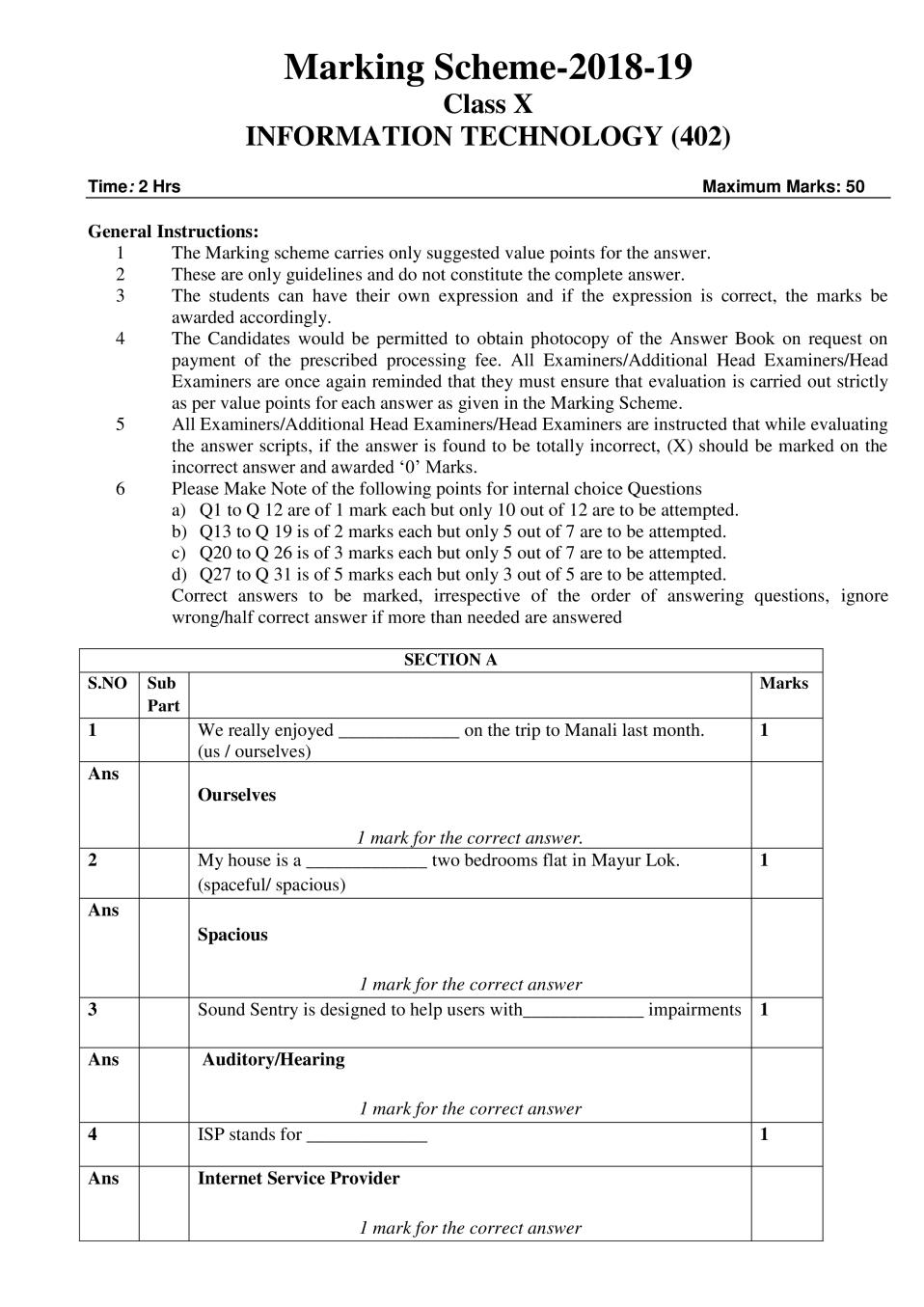
Class X
INFORMATION TECHNOLOGY (402)
Time: 2 Hrs Maximum Marks: 50
General Instructions:
1 The Marking scheme carries only suggested value points for the answer.
2 These are only guidelines and do not constitute the complete answer.
3 The students can have their own expression and if the expression is correct, the marks be
awarded accordingly.
4 The Candidates would be permitted to obtain photocopy of the Answer Book on request on
payment of the prescribed processing fee. All Examiners/Additional Head Examiners/Head
Examiners are once again reminded that they must ensure that evaluation is carried out strictly
as per value points for each answer as given in the Marking Scheme.
5 All Examiners/Additional Head Examiners/Head Examiners are instructed that while evaluating
the answer scripts, if the answer is found to be totally incorrect, (X) should be marked on the
incorrect answer and awarded ‘0’ Marks.
6 Please Make Note of the following points for internal choice Questions
a) Q1 to Q 12 are of 1 mark each but only 10 out of 12 are to be attempted.
b) Q13 to Q 19 is of 2 marks each but only 5 out of 7 are to be attempted.
c) Q20 to Q 26 is of 3 marks each but only 5 out of 7 are to be attempted.
d) Q27 to Q 31 is of 5 marks each but only 3 out of 5 are to be attempted.
Correct answers to be marked, irrespective of the order of answering questions, ignore
wrong/half correct answer if more than needed are answered
SECTION A
S.NO Sub Marks
Part
1 We really enjoyed _____________ on the trip to Manali last month. 1
(us / ourselves)
Ans
Ourselves
1 mark for the correct answer.
2 My house is a _____________ two bedrooms flat in Mayur Lok. 1
(spaceful/ spacious)
Ans
Spacious
1 mark for the correct answer
3 Sound Sentry is designed to help users with_____________ impairments 1
Ans Auditory/Hearing
1 mark for the correct answer
4 ISP stands for _____________ 1
Ans Internet Service Provider
1 mark for the correct answer
Page 2
sentences.
Ans Paragraph / Continuous Section Break / Text wrapping / Break /
<BR> / <br> / Continuous
1 mark for the correct answer
6 _____________ can be used for inserting information at the top of each 1
page automatically
Ans Header / Page Header
1 mark for the correct answer
7 On selecting _____________ the first character in all the words of the 1
selected sentences will be converted to Capital letter.
Ans Capitalize Each Word / Title Case
1 mark for the correct answer
8 Conditional formatting is available under _____________ group in 1
Home tab.
Ans Styles
1 mark for the correct answer
9 Chart option is available in _____________ group under the Insert tab. 1
Ans Illustrations / Charts
1 mark for the correct answer
10 A _____________ software provides the user an electronic version of a 1
calendar.
Ans Calendaring / Calendar
1 mark for any correct answer.
OR
Outlook / Time Management
½ mark for any correct answer.
11 Print option is available under_____________ menu 1
Ans File
1 mark for the correct answer.
12 Calendar software allows the user to _____________ to other users 1
meeting request
Ans Respond / Accept / Decline / Tentative
1 mark for any of the above correct answer.
13 What do you mean by P2P ? 2
Ans Peer-to-peer (P2P) Architecture: Networks in which all computers have
an equal status are called peer to peer networks. Generally, in such a
network each terminal has an equally competent CPU.
OR
Page 3
directly
OR
When two or more computer connected to each other and there is no
client and server between them.
2 marks for any of the above correct answer &
½ mark for full form only
14 What do you understand by Document Template? 2
Ans Template or document template refers to a sample fill-in-the-blank
document that can help in saving time.
OR
It contains a pre-defined formatting styles, graphics, tables, objects,
and other information.
OR
Templates are customized documents that may have sample content,
themes, etc.
Example: Template for Resume, Memorandum, Notice, Brochure
2 marks for the any of the above correct explanation &
½ mark for correct example only
15 What do you understand by Style? 2
Ans Styles or Style sets are pre-defined or customized options used for
creating good looking professional documents with least efforts.
OR
Font style/Chart style/Table style/Border style/Print style (calendar
topic) - Correct explanation of any of the above styles to be considered
2 marks for any of the above correct explanation.
16 What do you mean by Freeze in Spreadsheet? 2
Ans Freeze/Freeze panes refers to keep rows and columns visible while the
rest of the worksheet scrolls based on the current selection.
OR
It "freezes" a row or column, so that it is always displayed in place,
regardless of what part of the spreadsheet is being displayed.
2 marks for any of the above correct explanation.
17 How can you insert an audio clip in a presentation? 2
Ans An audio clip can be inserted in two ways:
• Using Insert tab
a) Click on Sound option under Media clips group in the Insert
tab, a drop down appears
b) Select the Sound from File or Clip Organizer
OR
• Using Sound Option from Slide Transitions (Name of Tab and Group
Varies as per different version)
2 marks for any of the above correct method
Page 4
Ans Objects such as pictures, clipart, shapes and text box can be grouped
together to be treated as a single object.
2 marks for the correct explanation.
OR
Grouping can be used to move, rotate or resize multiple objects in a
presentation.
1 mark for the correct application.
19 What do you understand by task in Microsoft Outlook? 2
Ans Tasks in Microsoft Outlook include action items such as booking a
conference room, booking tickets, reminder for a task completion itself
or any other relevant example
OR
Task refers to actions that can be performed by a user in Microsoft
Outlook.
2 marks for any of the above correct Answer.
20* What do you mean by prepositions? Write any two examples of 3
prepositions.
Ans A preposition is a word that links a noun or pronoun to other words in a
sentence or to show place, time, direction etc.
For example: on, in, during, since, until, by, to, around, at (Or any other
correct example)
1 mark for the correct definition.
1+1 mark each for any two correct example.
21 Define the following 3
a Paying guest 1
Ans Someone who lives on rent in the owner’s house.
OR
A person who pays to stay with someone in their home for usually for a
short time.
1 mark for any of the above correct definition.
b Landlord 1
Ans A man (not necessarily owner) who provides rooms for rent.
OR
A person who rents a house or room to people for money
1 mark for any of the above correct definition.
c Notice 1
Ans A formal announcement that you have to make if you want to move
out/ask a tenant to leave.
OR
The Act of paying attention to something or knowing about something
Page 5
A piece of paper or a sign giving information , a warning etc. that is put
where everyone can read it.
OR
To see and become conscious of something.
1 mark for any of the above correct definition.
22 Write down the process for inserting Page Break. 3
Ans To add another fresh page in a document, choose the page break option
in the Page Layout tab.
a) Click on the Page Layout tab on the Ribbon.
b) Click on the option Breaks in the Page Setup group
c) A dropdown list with options for different types of breaks appears,
select page break from it.
OR
Shortcut keys: Ctrl + Enter.
OR
Click on Insert Tab, select Page break Option under Pages Group.
3 marks for any of the above correct answer
OR
A page break can be inserted anywhere in a document to force the end of
a page and the beginning of a new one.
1 mark for correct definition.
23 Write short notes on the following 3
A Uppercase 1
Ans The selected text will be converted to Capital Letters
OR
All Capital Letters
1 mark for the correct answer.
B Sentence case 1
Ans The first character of the selected sentence will be converted to Capital
Letter
OR
The first character of every sentence should be a capital letter.
1 mark for the correct answer.
C Strikethrough 1
Ans It makes a strikethrough/line through the middle of the selected text.
OR
Example: CBSE EXAMINATION 2018-19
1 mark for the correct answer / Example
Page 6
Ans A slide transition is the visual motion when one slide changes to the next
during a presentation. By default, one slide simply replaces the previous
one on screen.
3 marks for the correct explanation
OR
Types of Slide Transition : from left, from right, checkerboard, fade etc
1 mark for examples of Slide Transition
OR
Slide Transition is used to make presentation attractive/ interesting/
effective
1 mark for any of the above application
25 What do you mean by Speaker Notes? 3
Ans Speaker notes are guided text used by the presenter during a
presentation. An area of the slide that is hidden during the presentation
is reserved for notes for the speaker. Here the presenter can note
important key points to cover during the presentation.
OR
Speaker Notes are not visible to the audience and helps the speaker to
explain the topic/presentation.
3 marks to be considered for above or any relevant answer
26 What is RDBMS? 3
Ans 1) RDBMS - Relational Database Management System
2) It is introduced by E. F. Codd.
3) In this model all data is represented in term of tuples/rows &
columns, grouped into relations/tables. A database organized in
terms of the relational model is a relational database.
4) Oracle, MySQL, MS Access, Open Office Base, Sybase
1 mark for the full form of RDBMS
½ mark for the Highlighted word
3 marks for the definition relevant to the 3rd point or
any other relevant explanation.
1 mark for the correct example of RDBMS.
SECTION B
27 Write down the process for transferring data on the internet 5
Ans The process for transferring data on the internet is as follows:
• The data is broken up into bits of same sized pieces called packets.
• A header is added to each packet.
• Each packet is sent from computer to computer until it finds its
destination.
•At the destination, the packets are examined. If any packets are missing
or damaged, a message is sent asking for them to be re-sent.
•The packets are now reassembled into their original form.
5 marks for the given points or any relevant answer regarding
the above points.
Page 7
TCP/IP /HTTP /Uploading & Downloading
2 marks to be given for the terms mentioned
28 Write short notes on the following 5
a Web server 1
Ans A Web server is a computer that stores websites and their related files for
viewing on the Internet.
1 mark for the correct answer or any other relevant answer.
b Dial-up 2
Ans Dial-up internet access is a form of internet access that uses the facilities
of the public switched telephone network/Direct Subscriber Line
(PSTN/DSL) to establish a connection to an internet service provider
(ISP) via telephone lines using a device called MODEM. Users dial a
particular number provided by the ISP and gain access to the internet.
2 marks for the correct answer or any other relevant answer.
c Wi-Fi 2
Ans Wi-Fi means wireless communication or wireless technology.
1 mark for any of the above correct answer.
OR
It is a popular wireless technology that allows an electronic device such
as computers or mobile phones to exchange data wirelessly over a
network, including high-speed internet connections.
2 marks for the correct answer or any other relevant answer.
OR
Wi-Fi enabled devices such as Laptops, personal computer, smartphones,
video game console, etc. can connect to a network resource.
1 mark for the correct Example
29 Explain the different types of charts. 5
Ans Bar charts: A bar chart (horizontal bars) emphasizes the comparison
between items at a fixed period of time. This chart type also includes
cylinder, cone, and pyramid subtypes.
Column charts: A column chart, unlike a bar chart to which it is often
compared, emphasizes variation over a period of time. this chart type also
includes cylinder, cone, and pyramid subtypes
Line charts: A line chart shows the relationship of the changes in the data
over a period of time.
Page 8
the relationship of the parts to the whole.
Area charts: An area chart shows the relative importance of values over
time.
XY (Scatter) charts: Scatter charts are useful for showing a correlation
among the data points that may not be easy to see from data alone.
1 mark to be given for each chart name and Explanation.
Note:
a) ½ mark each to be given for 5 different Chart Name.
b) ½ mark each to be given for 5 different Chart Diagram.
30 Write down the steps for creating a table in OpenOffice application 5
Ans Open a new database
1) Click on create table in design view
Specify the fields name and the datatypes.
Save the table by clicking on file→Save Option and specify the
table name
2) By Using Table Wizard with appropriate steps.
OR
There are two ways to create a table in OpenOffice application
(Open office impress or Open office writer)
i) Using Insert tab
ii) Click on table option under Tables group in the Insert tab, a
drop down appears
iii) Create table by dragging the mouse over requisite number of
boxes.
Page 9
Draw Table options to create the table.
i) Using Title and Content Option
ii) Click on Layout option available under Slides group in the Home
tab.
iii) Click on Title and Content option from the dropdown list. Now
click the icon available within the layout.
iv) A dialog appears; enter the values for the required number of
columns and rows.
OR
Table Created with correct SQL Statement should be considered
OR
Table Creation through datasheet view with proper steps should also
be considered
5 marks for any of the above correct explanation.
31 What is database server? Explain primary key and foreign key. 5
Ans Database servers are dedicated computers that hold the actual databases
and run only the DBMS and related software. Database servers are also
referred to as Back-ends.
1 mark for correct definition of database server.
A primary key is a unique field/column that identifies a row in a table.
2 marks for correct explanation of primary key.
A foreign key identifies a column or set of columns in one (referencing)
table that refers to a column or set of columns in another (referenced)
table.
OR
a column or set of columns, the value of which is derived from primary
key of some other tables
OR
A column for its content depends on the unique or primary key of another
table
OR
A unique field of one table act as a foreign key of another table.
2 marks for correct explanation of foreign key.
Note: Any relevant example illustrating the primary key and foreign
key to be given due credit.
Document Details
| Board / Org | CBSE |
| Exam | Class 10 |
| Type | Solution |
| Pages | 9 |
| Updated | 30 Apr 2026 |