Goa Board Class 12 Sample Paper 2027 Software Technology
Finished viewing? Save it for later —
Download Goa Board Class 12 Sample Paper 2027 Software Technology (PDF · 19 pages)About Goa Board Class 12 Sample Paper 2027 Software Technology
Goa Board Class 12 Sample Paper 2027 Software Technology is available here for free download. Published by Goa Board for Class 12, this sample paper can be viewed online or downloaded as a PDF (19 pages). Candidates preparing for Class 12 can use Goa Board Class 12 Sample Paper 2027 Software Technology to understand the exam pattern, the type of questions asked, and the overall difficulty level.
Frequently Asked Questions
How can I download Goa Board Class 12 Sample Paper 2027 Software Technology?
Open this page and click the Download button to save Goa Board Class 12 Sample Paper 2027 Software Technology as a PDF. It is completely free on AglaSem Docs.
Is Goa Board Class 12 Sample Paper 2027 Software Technology free to download?
Yes. Goa Board Class 12 Sample Paper 2027 Software Technology can be viewed online and downloaded as a PDF free of cost on AglaSem Docs.
How many pages does Goa Board Class 12 Sample Paper 2027 Software Technology have?
Goa Board Class 12 Sample Paper 2027 Software Technology contains 19 pages, which you can read online or download together as a single PDF.
Where can I find more Class 12 study material?
You can find more Class 12 question papers, sample papers, syllabus, and answer keys on AglaSem Docs.
Goa Board Class 12 Sample Paper 2027 Software Technology – Text
Read the full text of this sample paper below — useful to quickly search, copy and reference the content online without downloading the PDF.
📄 View text version (20 pages)
Page 1
Goa Board Class 12
Sample Paper 2027
Software Technology
EXAM YEAR TYPE
Goa Class 12 2027 Sample Paper
Notes · Sample Papers · Previous Year Papers · Mock Tests
Page 2
.co s e m
s em l a
a ag
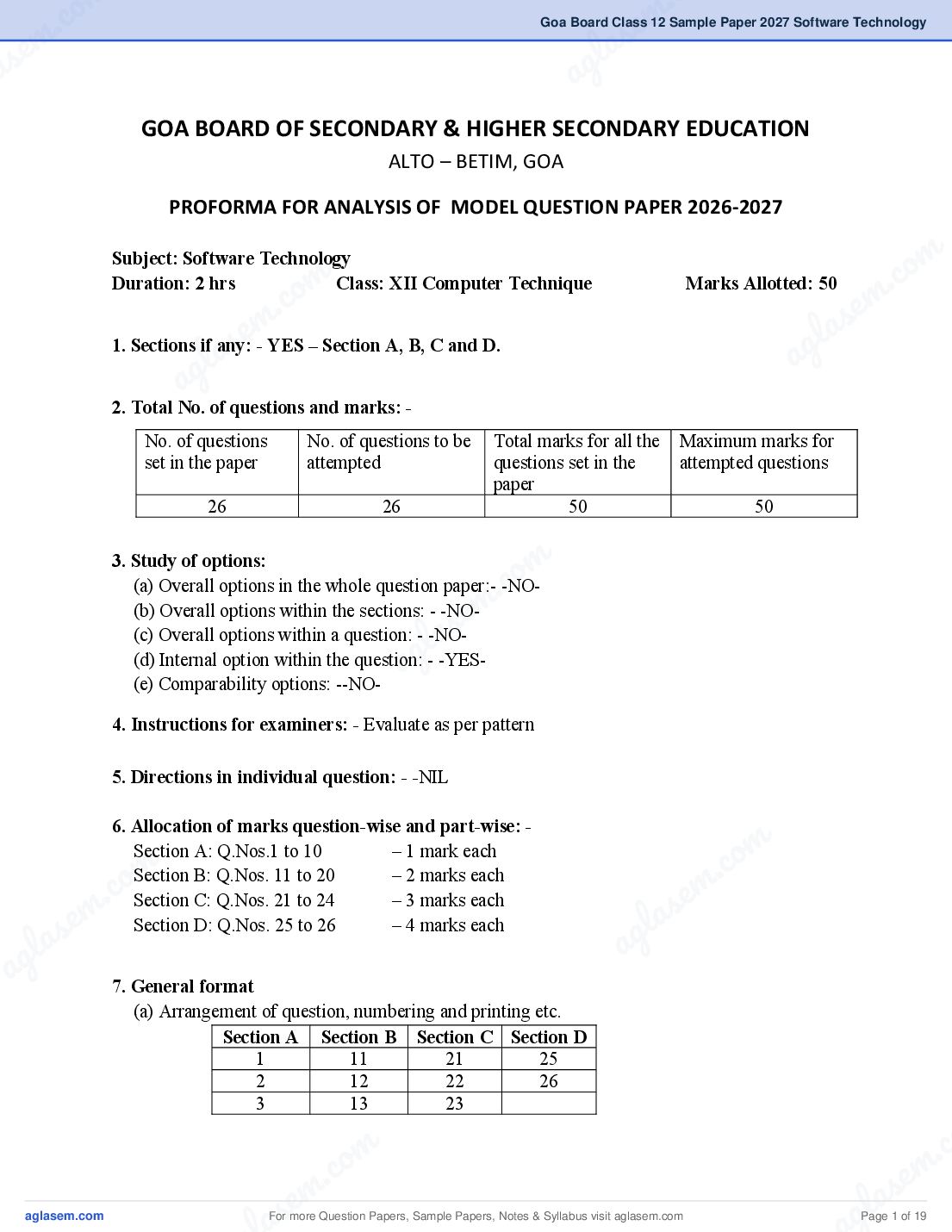
GOA BOARD OF SECONDARY & HIGHER SECONDARY EDUCATION
ALTO – BETIM, GOA
PROFORMA FOR ANALYSIS OF MODEL QUESTION PAPER 2026-2027
m
co
Subject: Software Technology
Duration: 2 hrs
. c om
Class: XII Computer Technique Marks Allotted: 50
em .
e m l as
as
1. Sections if any: - YES – Section A, B, C and D.
l ag
ag
2. Total No. of questions and marks: -
No. of questions No. of questions to be Total marks for all the Maximum marks for
set in the paper attempted questions set in the attempted questions
paper
26 26 50 50
m
.co
3. Study of options:
(a) Overall options in the whole question paper:- -NO-
e m
(b) Overall options within the sections: - -NO-
(c) Overall options within a question: - -NO-
l as
ag
(d) Internal option within the question: - -YES-
(e) Comparability options: --NO-
4. Instructions for examiners: - Evaluate as per pattern
5. Directions in individual question: - -NIL
6. Allocation of marks question-wise and part-wise: -
m
.co
Section A: Q.Nos.1 to 10 – 1 mark each
m
.co
– 2 marks each
Section B: Q.Nos. 11 to 20
e m
e m Section C: Q.Nos. 21 to 24 – 3 marks each
las
las Section D: Q.Nos. 25 to 26 – 4 marks each
ag
ag
7. General format
(a) Arrangement of question, numbering and printing etc.
Section A Section B Section C Section D
1 11 21 25
2 12 22 26
3 13 23
m . c
c. o s e m
s em
For more Question Papers, Sample Papers, Notes & Syllabus visit
gl a
Page 1 of 19
Page 3
5 15
6 16
7 17
8 18
9 19
10 20
8. Question-wise Analysis
Sr. Obj Content Area Form of Language Definiteness Difficulty Marks Time
no. ecti Major area of the of of the level of allotted in
Part ve content topic question Questions answers the min.
no. s questions
1 K MCQ Definite Easy 1 2
2 K Review of Python MCQ Definite Easy 1 2
3 A Programming MCQ Definite Average 1 2
4 U MCQ Definite Average 1 2
5 U MCQ Definite Average 1 2
6 U MCQ Definite Easy 1 2
Networking
7 U MCQ Definite Easy 1 2
8 U MCQ Definite Average 1 2
9 U Dictionary MCQ Definite Easy 1 2
10 K Inheritance MCQ Definite Easy 1 2
11 K Dictionary SA Definite Average 2 4
12 U SA1 Definite Average 2 4
Networking
ENGLISH
13 U SA1 Definite Average 2 4
14 K Tuples SA1 Definite Average 2 4
15 U SA1 Definite Average 2 4
Basic Concepts of
16 K SA1 Definite Easy 2 4
OOPs
17 K SA1 Definite Easy 2 4
18 K SA1 Definite Easy 2 4
Classes in Python
19 U SA1 Definite Average 2 4
20 K Inheritance SA1 Definite Easy 2 4
21 A SA2 Definite Average 3 9
Networking
22 A SA2 Definite Average 3 9
23 U Basic Concepts of SA2 Definite Average 3 9
OOPs
24 A SA2 Partially Average 3 9
Dictionary
Definite
25 S Dictionary LA Partially Difficult 4 12
26 S Tuples LA Definite Difficult 4 12
For more Question Papers, Sample Papers, Notes & Syllabus visit Page 2 of 19
Page 4
.co s e m
s em l a
a ag
A) Weightage to Learning Outcomes
Sr. No. Learning Outcomes Marks Percentage of Marks
1 Knowledge 13 26%
2 Understanding 17 34%
m
3 Application
om
12 24%
. co
. c em
4 Skill
e m 8 16%
l as
l as ag
ag
B) Weightage to Content/Subject Units
Sr. No. Units No. of Questions Marks Percentage
1 Review of Python Programming 4 4 8%
2 Dictionaries 4 10 20%
3 Tuples
m 2 6 12%
c. o 4
em
4 Basic Concepts of OOPs 9 18%
l as
ag
5 Classes 2 4 8%
6 Inheritance 2 3 6%
7 Networking 8 14 28%
C) Coverage of topics
No. of topics in the syllabus Topics covered Percentage
m
m 7 7 100%
.co
m .co s e m
s e g la
g la D) Weightage to form of questions a
a Sr. No. Form of questions Total Marks Percentage
1 Multiple Choice Questions (MCQ) 10 20%
2 Short Answer Type (SA1) 20 40%
3 Short Answer Type (SA2) 12 24%
4 Long Answer Type(LA) 8 16%
Total 100%
m . c
c. o s e m
s em
For more Question Papers, Sample Papers, Notes & Syllabus visit
gl a
Page 3 of 19
Page 5
Sr. No. Form of questions Approx. Time No. of Approx. Time for
for each questions each form of
question in (n) question in mins
mins(t) (n x t)
1 Multiple Choice Questions (MCQ) 2 10 20
2 Short Answer Type (SA1) 4 10 40
3 Short Answer Type (SA2) 9 4 36
4 Long Answer Type(LA) 12 2 24
Total 26 120
As the total time is calculated on the basis of the number of questions required to be answered
and the length of their anticipated answers, it would, therefore be advisable for the candidates to
budget their time properly by cutting out the superfluous words and be within the expected time
limits.
Scheme of Options
There will be no overall choice. However, there is an internal choice in Section C, Q.No.24 &
section D, Q.No.26.
E) Definiteness of Questions:
Sr. No. Definiteness No. of questions Marks Percentage
1 Definite 23 39 78%
2 Partly Definite 3 11 22%
3 Not Definite Nil -- --
F) Weigh Difficulty level of questions:
Sr. No. Level of difficulty No. of question Marks Percentage
1. Easy 10 14 28%
2. Average 14 28 56%
3. Difficult 2 8 16%
A question may vary in difficulty level from individual to individual. As such, the assessment in
respect of each question will be made by the paper setter on the basis of general anticipation from
the group as a whole taking the examination. This provision is only to make the paper balanced in
its weightage, rather than to determine the pattern of marking at any stage.
For more Question Papers, Sample Papers, Notes & Syllabus visit Page 4 of 19
Page 6
m .co
Goa Board of Secondary & Higher Secondary Education, Alto, Betim - Goa
.co s em
em
BLUE PRINT
s g laTechnique
Subject : Software Technology
g la Timing : 2 hours
a
Std : XII Computer
Objective a Knowledge Understanding Application Skill Total
S.N Contents Units MCQ SA-1 SA-II LA MCQ SA-1 SA-II LA MCQ SA-I SA-II LA MCQ SA-I SA-II LA Total
(1) (2) (3) (4) (1) (2) (3) (4) (1) (2) (3) (4) (1) (2) (3) (4) (50)
1 Review of Python 2(1) 1(1) 1(1) 4(4)
Programming
2 Dictionaries 1(1) 1(2) 1(3)* 1(4) 4(10)
m
om .co m
1(2) 1(4)*
e
3 Tuples 2(6)
. c em l as
em
4 Basic Concepts of OOPs 2(2)
s
1(2)
la
1(3) 4(9)
a g
5 Classes 1(2)
ag
1(2) 2(4)
6 Inheritance 1(2) 1(1) 2(3)
7 Networking 4(1) 2(2) 2(3) 8(14)
Total 8(13) 11(17) 5(12) 2(8) 26(50)
Note: Figures outside the brackets indicate the no. of questions and those inside the brackets indicate the marks.
m
m .co
m .co s e m
s e g l a
g l a a
a
For more Question Papers, Sample Papers, Notes & Syllabus visit Page 5 of 19
Page 7
GOA BOARD OF SECONDARY AND HIGHER SECONDARY EDUCATION
ALTO BETIM – GOA 403 521
Course: Computer Technique
SUBJECT: SOFTWARE TECHNOLOGY Std: XII
THEORY – 50 marks
Chapter Syllabus marks
No
1 Review of Python Programming 4
Review of Python programming concepts taught in Std.XI
(Theory content of if else, WHILE loop, FOR loop, Functions,
Lists and strings to be asked for the exam.)
2 Dictionaries 10
2.1 What is dictionary
2.2 Creation, initializing dictionaries
2.3 Accessing the elements in a Dictionary
2.4 Traversing a dictionary
2.5 Dynamic creation of dictionary
2.6 Appending values to the dictionary
2.7 Merging dictionaries
2.8 Removing an item from dictionary
2.9 Dictionary functions and methods
2.9.1 cmp()
2.9.2 len()
2.9.3 clear()
2.9.4 get(key,value)
2.9.5 has_key(key)
2.9.6 items()
2.9.7 keys()
2.9.8 values()
3 Tuples 6
3.1 What is a Tuple
3.2 Tuple Creation
3.3 Add new element to Tuple
3.4 Tuple Assignment
3.5 Tuple Functions
3.5.1 sorted()
3.5.2 len()
3.5.3 max()
3.5.4 min()
3.5.5 tuple()
For more Question Papers, Sample Papers, Notes & Syllabus visit Page 6 of 19
Page 8
m .co
m .co s e m
se
4 Basic concepts of OOPS
g l a 9
4.1 Introduction to OOP in Python
4.2Difference between OOP and Procedural oriented a
programming
4.3 What are classes and objects
4.4 What is OOP methodology
4.5 Definition of Encapsulation
4.6 Definition of Data Abstraction
4.7 Definition of Inheritance
m
.co
4.8 Definition of Polymorphism
m
.co m
4.8.1 Operator Overloading
m s e
a
4.8.2 Function Overloading
s e l
a ag4
4.9 Advantages of OOPS
5 l
ag
Classes in Python
5.1 Name spaces and scope rules
5.2 Defining Classes and Objects,
5.3 Class Attributes v/s Instance Attributes
6 Inheritance 3
6.1 Concept of Inheritance
6.2 Types of Inheritance
6.3 Definition of Single Inheritance, Multilevel Inheritance,
m
.co
Multiple Inheritance, Hierarchical Inheritance and Hybrid
Inheritance.
e m
7 Networking
7.1 Computer Networks
l as 14
ag
7.1.1 What is a Computer Network
7.1.2 Advantages, characteristics of Network
7.2. Types of Networks
7.2.1 LAN
7.2.2 MAN
7.2.3 WAN
7.2.4 Wired Network
7.2.5 Wireless Network
m
m 7.3. Data Transmission
.co
m .co 7.3.1 What is data transmission
s e m
e la
7.3.2 Data Communication
las 7.3.3 Modes of data transmission
ag
ag 7.3.3.1 Simplex
7.3.3.2 Duplex
7.3.3.3 Full Duplex
7.3.4 Types of Signals
7.3.4.1 Analog
7.3.4.2 Digital
7.4 Physical Topologies
7.4.1 Linear Bus
m .
.co s e m
s em l a
g la ag
a For more Question Papers, Sample Papers, Notes & Syllabus visit Page 7 of 19
Page 9
7.4.3 Star
7.4.4 Tree
7.4.5 Mesh Topology
7.5 Client server architecture
7.6 Peer to peer
Note: As of 22/04/2026 Chapter No.2 – Dictionary, 2.9.1 cmp( ) and 2.9.5 has_key( )
is no longer supported by python in the latest version hence it is not included in the
above topic.
Practicals
List of practicals to be completed:
For the 1st Term 10 practicals using Dictionaries.
For the 2nd Term 10 practicals using Tuples.
Total 20 practicals need to be kept in the file.
Using Dictionaries
1. To input ‘n’ names and phone numbers to store it in the dictionary and to input
any
name and to print the phone number of that particular name.
2. To input ‘n’ employee number and name and to display all employee’s information
in
ascending order based upon their number.
3. To create a phone book and delete a particular number using the name.
4. To input any 5 years and the population of any city and print it on the screen.
(6 more programs using dictionaries to be included)
Using Tuples
1. To input 5 subject names and put it in a tuple and display the tuple information on
the output screen.
2. To input any two tuples and interchange the tuple values.
3. To input ‘n’ employee’s salary and find the minimum and maximum salary among
‘n’ employees.
4. To input ‘n’ numbers and separate the tuple in the following manner.
Example: T= (10,20,30,40,50,60)
T1= (10,30,50)
T2= (20,40,60)
5. Write a Python program to calculate the product by multiplying all the numbers of
a given tuple.
(5 more programs using tuples to be included)
For more Question Papers, Sample Papers, Notes & Syllabus visit Page 8 of 19
Page 10
m .co
m .co s e m
se
Marks distribution for the practical exams will be as follows:
g l a
1. File - File must contain all practicals: 10 marks
2. Writeup - Written program (to be kept as record: 10 marks a
3. Viva - Oral questions from the corresponding topic: 10 marks
4. Debugging/Innovative/Logic used/Comments - Marks for doing it differently and
on time. : 10 marks
5. Input/Output - Accuracy, validations used: 10 marks
m
m .co
m .co s e m
s e l a
g l a ag
a
m
m .co
s e
l a
ag
m
m .co
m .co s e m
s e g la
g la a
a
m .
.co s e m
s em l a
g la ag
a For more Question Papers, Sample Papers, Notes & Syllabus visit Page 9 of 19
Page 11
__________________________________________________________________________
Time: 2 Hours SOFTWARE TECHNOLOGY
Subject Code
V 5 3 1 5
Total No. Of Questions:26 Maximum Marks:50
Instructions : i. All questions are compulsory
ii. There are four sections in this question paper (A,B,C & D)
iii. Section A there are ten MCQ of 1 mark each.
iv. Section B contains ten questions of 2 marks each.
v. Section C contains four questions of 3 marks each. Internal
choice is provided for Q24.
vi. Section D contains two questions of 4 marks each. Internal
choice is provided for Q26.
vii. Write the number of each question clearly on the answer book .
Section A
Question numbers from 1 to 10 carry 1 mark each.
1. When does a while loop in python stop executing?
• When the loop condition is true
• When the loop condition becomes false.
• Only when continue statement is encountered.
• After the third iteration.
2. What is the index of the rightmost character of a string while traversing from
right to left.
• 0
• 1
• -1
• 2
3. Given a list L=[10,20,30,40,50,60,70], what would L[1:4] return?
• [10,20,30,40]
• [20,30,40,50]
• [20,30,40]
• [30,40,50]
For more Question Papers, Sample Papers, Notes & Syllabus visit Page 10 of 19
Page 12
m .co
m .co s e m
se l a
4. Which of the following keywords is used for function declaration in Python
g
language?
• def
a
• function_name
• define
• None of the these
5. Which of the following transmission directions listed is not a legitimate channel?
• Simplex
m
• Half Duplex
m .co
• Duplex
.co s e m
em
• Double Duplex
s l a
g laof network that spans the entire world is:
6. The type ag
a • Wide Area Network
• Private Network
• Metropolitan Network
• Local Area Network
7. In which network topology the data is passed through a central concentrator or
hub or a switch.
• Linear Bus topology m
• Ring Topology .co
• Mesh Topology
s em
• Star Topology
g la
a
8. Which network uses radio waves to communicate with other system
• Wireless Network
• Wired Network
• WAN
• MAN
9. Which of the following function will return the key value pair of a dictionary?
m
.co
• keys()
m
.co m
• values()
m • items() s e
s e • all of the above
g la
g la a
a 10. Another term for derived class in inheritance?
• parent
• multilevel
• base
• child
m .
.co s e m
s em l a
g la ag
a For more Question Papers, Sample Papers, Notes & Syllabus visit Page 11 of 19
Page 13
Question numbers from 11 to 20 carry 2 marks each.
11. Explain with an example the keys() built-in Dictionary method.
12. Explain half-duplex mode of Data transmission.
13. Explain Analog and Digital Signals.
14. Write the syntax to create a tuple using built in function and add new
elements to it.
15. What is Data Encapsulation in Object Oriented Programming?
16. Write two differences between object oriented programming and Procedural
oriented Programming.
17. What is Data Abstraction in Object Oriented Programming?
18. Why do we use classes in Python?
19. What is meant by class attributes in Python?
20. Why is inheritance an important aspect of the object-oriented paradigm?
Section C
Question numbers from 21 to 24 carry 3 marks each.
21. With a neat labeled diagram, describe Linear Bus topology.
22. What is a Computer Network? State two advantages of a Computer Network.
23. What is Polymorphism? Explain operator overloading and function
overloading.
24. Write a python code to add ‘n’ book ID and their prices to a dictionary and print
the dictionary. Display the ID of books with price above 250.
OR
24. Explain with example how two dictionaries can be merged into one
dictionary.
For more Question Papers, Sample Papers, Notes & Syllabus visit Page 12 of 19
Page 14
m .co
m .co s e m
se
Section D
g l a
Question numbers from 25 to 26 carry 4 marks each.
a
25. There are ‘n’ number of students in a class of Std.XI Science. Write a python
program to enter the following details of the students using dictionaries.
Name, Roll No
Also input any Name of the student from the class and print the Roll No.
m
.co
pertaining to that particular student name.
m
.co e m
s em program to input any two tuples and interchange the tuple glas
26. Write a Python
values. gla a
a OR
26. Write a python program to input n numbers in a tuple, then add a new
element to that tuple and find the maximum and minimum value among the
given numbers in the tuple.
***********
m
m .co
s e
l a
ag
m
m .co
m .co s e m
s e g la
g la a
a
m .
.co s e m
s em l a
g la ag
a For more Question Papers, Sample Papers, Notes & Syllabus visit Page 13 of 19
Page 15
Section A
1. b) When the loop condition becomes false.
2. c) -1
3. c) [20,30,40]
4. a) def
5. d) Double Duplex
6. a) Wide Area Network
7. d) Star Topology
8. a) Wireless Network
9. c) items()
10. d) child
Section B
11. keys(): It returns a list of key values in a dictionary, which is not in any particular order.
Syntax: D.keys() # D is a dictionary
Example: D={'A':'Ant','B':'Bat','C':'Cat','D':'Dog'}
D.keys()
['A','B','C','D']
12. Half Duplex: Half-duplex data transmission means that data can be transmitted in
both directions on a signal carrier, but not at the same time.
Example of half duplex is a walkie- talkie.
13. Analog Signals: Analog signals are continuous wave form and changes smoothly
over time. These are represented by sine waves. Analog signals contain noise and
wave distortions. Analog signals cannot perform high quality transmission.
Digital signals: : Digital signals are not continuous but are discrete in value and time.
These signals are in the form of binary digits (i.e. 0,1). These are represented by square
For more Question Papers, Sample Papers, Notes & Syllabus visit Page 14 of 19
Page 16
m .co
m .co s e m
se l a
waves. Noise and wave distortions are not found in Digital signals. Digital signals can
g
a
perform high quality transmission. Data transmission between computers is in the
form of digital signals.
14. Syntax:
t = tuple() # t is a variable name and tuple is the built-in-function
We can add new element to tuple using + operator.
t = t + (60,)
Example:
m
t=tuple()
m .co
t=10,20,30
m .co s e m
t=t+(60,)
s e l a
l a
print(t)
g ag
Output:
a
(10,20,30,60)
15. Data Encapsulation: It refers to the bundling of data with the methods that operate
on the data. The data members can be accessed through its member functions
only. It keeps data safe from any external interference.
16.
m Procedural Oriented Programming
Object Oriented Programming
m .co
1. Object-oriented programming is an
s e 1. Procedural programming uses a list of
approach to problem-solving where all
l a instructions to do computation step by
computations are carried out using
ag
objects. It follows a bottom-up approach
step. It follows a top-down approach.
2. The program is divided into objects 2. Program is divided into functions or
modules
3. It provides data hiding so it is more 3. It is less secure
secure
4. It supports inheritance 4. It does not support inheritance
5. Makes use of Access modifiers 5. Access modifiers are not supported.
m
m ‘public’, private’, protected’
.co
m .co 17. Data Abstraction: Data Abstraction is a process of hiding the internal details from
s e m
s e la
the end user. Only the essential information is provided to the outside world while
g
g la the internal details are hidden. For example a mobile phone user does not know a
a how calls are made instead it provides an interface that hides these details from
the user.
18. Classes provide a means of bundling data and functionality together. Creating a
new class creates a new type of object, allowing new instances of that type to be
made. Each class instance can have attributes attached to it for maintaining its
state.
m .
.co s e m
s em l a
g la ag
a For more Question Papers, Sample Papers, Notes & Syllabus visit Page 15 of 19
Page 17
that are shared by all objects of the class. They are accessed using object dot
notation.
Eg. object.class_attribute
20. Inheritance is the process of forming new class from an existing class. The existing
class is called base class and the new class created is called derived class or
inherited class. The data and methods of the base class are accessible to the
inherited class.
Section C
21. Linear Bus/ Bus Topology: In a Bus Topology, all the nodes (File Servers,
Workstations and peripherals) are connected by one single cable. A bus topology
consists of a main run of cable with a terminator at each end. All nodes are
connected to this linear cable. They are popular on LANs because they are
inexpensive and easy to install.
Advantages of Bus Topology:
• Less expensive, easy to handle and implement.
• Requires less cable.
• It is best suited for small networks.
Disadvantages of Bus Topology:
• Since the cable length is limited, this limits the number of stations that can be
connected.
• Entire network fails if there is a break in the main cable.
• Difficult to identify the problem if the entire network fails.
22. A computer network is a collection of
computers connected to each other
for the purpose of sharing
information and resources. It
allows the computers to communicate
with each other and share resources which include information, software and
peripheral devices such as printers, scanners etc.
Advantages of a Computer Network:
1. File Sharing: The major advantage of a computer network is that it allows file
sharing and remote file access. A person sitting at one workstation that is
connected to a network can easily send or receive files present on another
For more Question Papers, Sample Papers, Notes & Syllabus visit Page 16 of 19
Page 18
m .co
m .co s e m
se l a
workstation, provided he is authorized to do so. This saves him/her the hassle
g
a
of carrying a storage device every time data needs to be transported from one
system to another.
2. Resource Sharing: Resource sharing is another important benefit of a computer
network. For example, if there are twelve employees in an organization, each
having their own computer, they will require twelve modems and twelve
printers if they want to use the resources at the same time. A computer
network, on the other hand, provides a cheaper alternative by the provision of
m
m
resource sharing. All the computers can be interconnected using a network, and
.co
.co
just one modem and printer can efficiently provide the services to all twelve
m s e m
users.
s e l a
l a
3. Sharing Storage: On a network, one can access data from any machine. Hence,
g ag
astorage can be distributed and thus database load can be shared on the
network. A file can have copies on two or more machines .
4. Cost effective: Shared resources mean reduction in hardware costs. Shared files
mean reduction in memory requirement, which indirectly means reduction in
file storage expenses. A particular software can be installed only once on the
server and made available across all connected computers at once. This saves
m
the expense of buying and installing the same software as many times for as
many users.
m .co
s e
5. Flexible: A user can log on to a computer anywhere on the network and access
l a
his files. This offers flexibility to the user. A network also allows the network
ag
administrator to choose which user on the network has what specific
permissions to handle a file.
6. Security: Computer networks provide security through authorization.
Authorization is done via user id and password. So, it ensures that when we log
in, we are only able to do it when there is a perfect match between our details
and the details stored in the database.
o m
m c
. in more
c. o23. Polymorphism: m
Polymorphism is the ability to use an operator or function
s e name as the
e m l a
than one way. The methods in the child class that have the same
las methods in the parent class behave differently.
a g
ag Operator Overloading: The feature where and operator can be used in different
forms is known as operator overloading. Example the operator ‘+’ behaves
differently for integers and strings. For integers it adds the numbers and for strings
it concatenates two strings.
m .
.co s e m
s em l a
g la ag
a For more Question Papers, Sample Papers, Notes & Syllabus visit Page 17 of 19
Page 19
name with different implementations. Function name remains same but their
arguments and data type varies.
24. book_dict={ }
n = int(input(“Enter the number of books: “))
for i in range(n):
book_id=input(“Enter Book ID: “)
price = float(input(“Enter Price: “))
book_dict[book_id]=price
print(book_dict)
print(“\nBooks with price above 250: “)
for id,price in book_dict.items():
if price>250:
print(“Book ID: “,id)
OR
24. Two dictionaries can be merged into one by using update() method. It merges the
key and value of one dictionary into the other and overwrites values of the same
key.
Syntax: D1.update(D2) # D1, D2 are dictionaries
Example:
D1={1:10,2:20,3:30}
D2={4:40,5:50}
D1.update(D2)
print(D1)
Output:
{1:10,2:20,3:30, 4:40,5:50}
Section D
25.
student=dict()
n=int(input(“Enter total number of students”))
i=1
while i<= n:
name=input('Enter the Name: ')
For more Question Papers, Sample Papers, Notes & Syllabus visit Page 18 of 19
Page 20
m .co
m .co s e m
se
rno=input('Enter the Roll No.: ')
g l a
student[name]=rno
i=i+1
a
studname= input('Enter the Name to search: ')
if studname in student:
print(student[studname])
m
.co
else:
m
.co
print("Student not found!")
e m
em l as
26.
s
T1 = tuple()
la ag
g
afor i in range(n): number of values in the first tuple'))
n=int(input('Total
a=int(input('Enter the Elements: '))
T1=T1+(a,)
T2=tuple()
m=int(input('Total number of values in the second tuple'))
m
.co
for i in range(m):
a=int(input('Enter the Elements: '))
e m
T2=T2+(a,)
l as
print('First tuple: ',T1)
print('Second tuple: ',T2) ag
T1,T2 = T2,T1
print('After swapping:')
print('First tuple: ',T1)
print('Second tuple: ',T2)
OR
m
m
26. t=tuple()
.co
m .co n=int(input('Total number of values in tuple: '))
s e m
e la
for i in range(n):
las a=int(input('Enter elements: '))
ag
ag t = t+(a,)
b=int(input('Enter first element to be added:'))
t=t+(b,)
print('Maximum value of the tuple: ',max(t))
print('Minimum value of the tuple: ',min(t))
om .
********
.c e m
em l as
las ag
ag For more Question Papers, Sample Papers, Notes & Syllabus visit Page 19 of 19
Document Details
| Board / Org | Goa Board |
| Exam | Class 12 |
| Type | Sample Paper |
| Pages | 19 |
| Updated | 03 Nov 2026 |