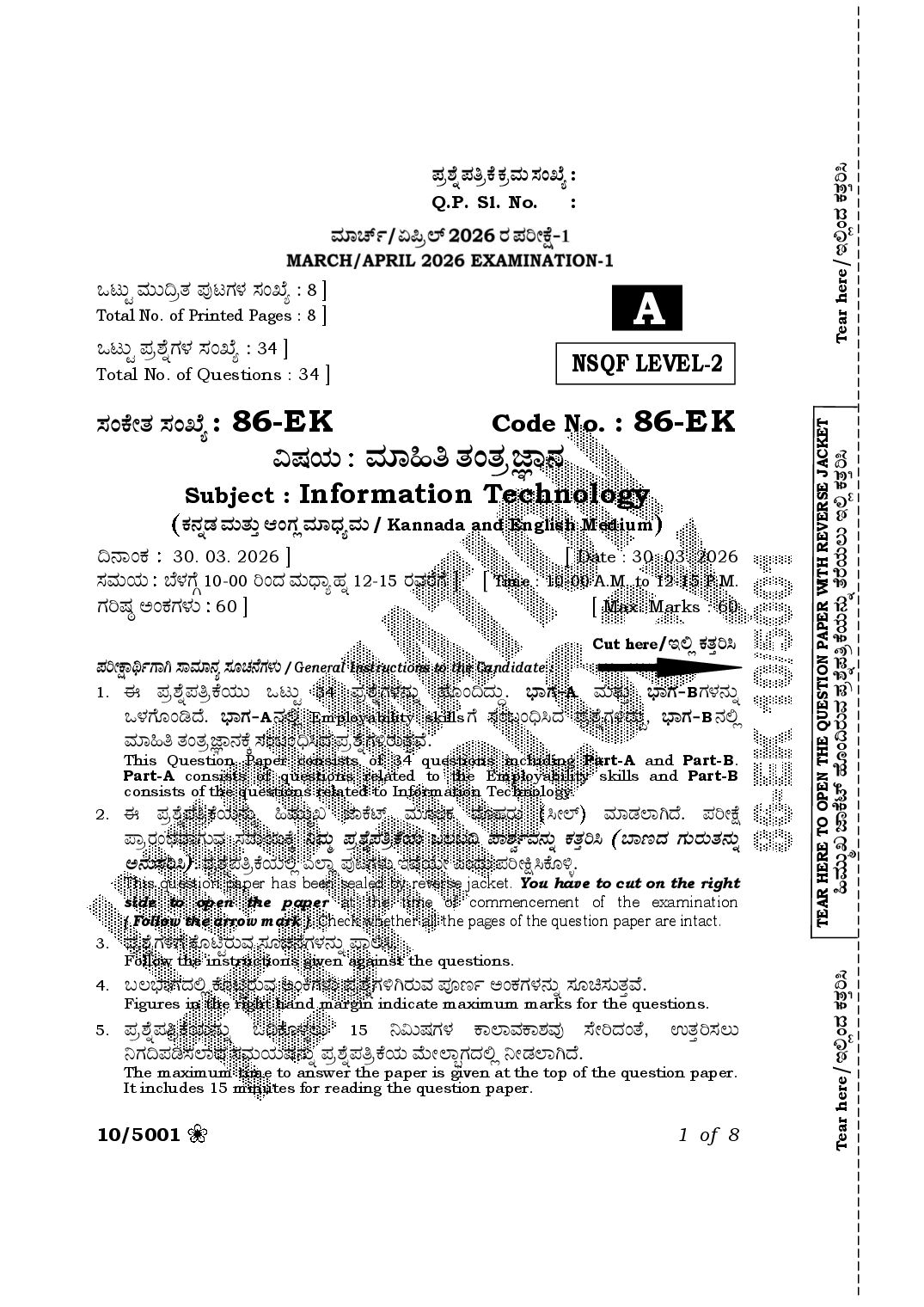
Karnataka SSLC Question Paper 2026 Information Technology
Finished viewing? Save it for later —
Download Karnataka SSLC Question Paper 2026 Information Technology (PDF · 8 pages)About Karnataka SSLC Question Paper 2026 Information Technology
Karnataka SSLC Question Paper 2026 Information Technology is available here for free download. Published by Karnataka Board for Class 10, this question paper can be viewed online or downloaded as a PDF (8 pages). Candidates preparing for Class 10 can use Karnataka SSLC Question Paper 2026 Information Technology to understand the exam pattern, the type of questions asked, and the overall difficulty level.
Frequently Asked Questions
How can I download Karnataka SSLC Question Paper 2026 Information Technology?
Open this page and click the Download button to save Karnataka SSLC Question Paper 2026 Information Technology as a PDF. It is completely free on AglaSem Docs.
Is Karnataka SSLC Question Paper 2026 Information Technology free to download?
Yes. Karnataka SSLC Question Paper 2026 Information Technology can be viewed online and downloaded as a PDF free of cost on AglaSem Docs.
How many pages does Karnataka SSLC Question Paper 2026 Information Technology have?
Karnataka SSLC Question Paper 2026 Information Technology contains 8 pages, which you can read online or download together as a single PDF.
Where can I find more Class 10 study material?
You can find more Class 10 question papers, sample papers, syllabus, and answer keys on AglaSem Docs.
Karnataka SSLC Question Paper 2026 Information Technology – Text
Read the full text of this question paper below — useful to quickly search, copy and reference the content online without downloading the PDF.
📄 View text version (8 pages)
Page 1
Tear here/CÈÉí¨Ü PÜñܤÄÔ
Q.P. Sl. No. :
Joár ÊÜáá©ÅñÜ ±ÜâoWÜÙÜ ÓÜíTæ : 8 ]
Total No. of Printed Pages : 8 ] A
Joár ±ÜÅÍæ°WÜÙÜ ÓÜíTæ : 34 ]
Total No. of Questions : 34 ] NSQF LEVEL-2
ÓÜíPæàñÜ ÓÜíTæ : 86-E K Code No. : 86-E K
TEAR HERE TO OPEN THE QUESTION PAPER WITH REVERSE JACKET
ËÐÜ¿á ÊÜÞ×£ ñÜíñÜÅþÝ®Ü
×ÊÜáá¾S hÝPæp… Öæãí©ÃÜáÊÜ ±ÜÅÍ氱ܣÅPæ¿á®Üá° ñæÃæ¿áÆá CÈÉ PÜñܤÄÔ
Subject : Information Technology
PܮܰvÜ ÊÜáñÜᤠBíWÜÉ ÊÜÞ«ÜÂÊÜá / Kannada and English Medium
©®ÝíPÜ 30. 03. 2026 ] [ Date : 30. 03. 2026
ÓÜÊÜá¿á ¸æÙÜWæY 10-00 Äí¨Ü ÊÜá«ÝÂÖÜ° 12-15 ÃÜÊÜÃæWæ ] [ Time : 10-00 A.M. to 12-15 P.M.
WÜÄÐÜu AíPÜWÜÙÜá 60 ] [ Max. Marks : 60
Cut here/CÈÉ PÜñܤÄÔ
±ÜÄàûݦìWÝX ÓÝÊÜޮܠÓÜãaÜ®Wæ ÙÜ Üá / General Instructions to the Candidate :
1. D ±ÜÅÍ氱ܣÅPæ¿áá Joár 34 ±ÜÅÍæ°WÜÙÜ®Üá° Öæãí©¨Üáª. »ÝWÜ&A ÊÜáñÜᤠ»ÝWÜ&BWÜÙÜ®Üá°
JÙÜWæãíw¨æ. »ÝWÜ&A ®ÜÈÉ Employability skills Wæ ÓÜíŸí˜Ô¨Ü ±ÜÅÍæ°WÜÚ¨Üáª, »ÝWÜ&B ®ÜÈÉ
ÊÜÞ×£ ñÜíñÜÅþÝ®ÜPæR ÓÜíŸí˜Ô¨Ü ±ÜÅÍæ°WÜÚÃÜáñܤÊæ.
This Question Paper consists of 34 questions including Part-A and Part-B.
Part-A consists of questions related to the Employability skills and Part-B
consists of the questions related to Information Technology.
2. D ±ÜÅÍ氱ܣÅPæ¿á®Üá° ×ÊÜáá¾S hÝPæp… ÊÜá ãÆPÜ ÊæãÖÜÃÜá ÔàÇ… ÊÜÞvÜÇÝX¨æ. ±ÜÄàûæ
±ÝÅÃÜí»ÜÊÝWÜáÊÜ ÓÜÊÜá¿áPæR ¯ÊÜá¾ ±ÜÅÍ氱ܣÅPæ¿á ŸÆŸ© ±ÝÍÜÌìÊÜ®Üá° PÜñܤÄÔ ¸Ý|¨Ü WÜáÃÜáñÜ®Üá°
A®ÜáÓÜÄÔ . ±ÜÅÍ氱ܣÅPæ¿áÈÉ GÇÝÉ ±ÜâoWÜÙÜá CÊæÁáà Gí¨Üá ±ÜÄàüÔPæãÚÛ.
This question paper has been sealed by reverse jacket. You have to cut on the right
side to open the paper at the time of commencement of the examination
( Follow the arrow mark ). Check whether all the pages of the question paper are intact.
3. ±ÜÅÍæ°WÜÚWæ PæãqrÃÜáÊÜ ÓÜãaÜ®æWÜÙÜ®Üá° ±ÝÈÔ.
Follow the instructions given against the questions.
Tear here/CÈÉí¨Ü PÜñܤÄÔ
4. ŸÆ»ÝWܨÜÈÉ PæãqrÃÜáÊÜ AíQWÜÙÜá ±ÜÅÍæ°WÜÚXÃÜáÊÜ ±Üä|ì AíPÜWÜÙÜ®Üá° ÓÜãbÓÜáñܤÊæ.
Figures in the right hand margin indicate maximum marks for the questions.
5. ±ÜÅÍ氱ܣÅPæ¿á®Üá° K©PæãÙÜÛÆá 15 ¯ËáÐÜWÜÙÜ PÝÇÝÊÜPÝÍÜÊÜâ ÓæàĨÜíñæ, EñܤÄÓÜÆá
¯WÜ©±ÜwÓÜÇÝ¨Ü ÓÜÊÜá¿áÊÜ®Üá° ±ÜÅÍ氱ܣÅPæ¿á ÊæáàÇݽWܨÜÈÉ ¯àvÜÇÝX¨æ.
The maximum time to answer the paper is given at the top of the question paper.
It includes 15 minutes for reading the question paper.
10/5001 1 of 8
Page 2
»ÝWÜ - A / PART - A
I. Four alternatives are given for each of the following questions /
incomplete statements. Choose the correct alternative and write the
complete answer along with its question number and alphabet :
3×1=3
1. Which of the following is an example for oral communication ?
(A) Letter (B) Phone call
(C) E-mail (D) Newspaper
2. The organisation which has made the sustainable development
goals is
(A) UNICEF (B) WHO
(C) League of Nations (D) United Nations
3. The key to open the ‘start menu’ is
(A) Command key (B) Windows key
(C) Navigation key (D) Control key
II. Answer the following questions : 2×1=2
4. What is stress ?
5. Write the function of ‘Enter key’.
III. Answer the following questions : 2×2=4
6. How to set goals ?
OR
Write any four steps for practising the effective time management.
7. List the important qualities of a successful entrepreneur.
IV. Answer the following question : 1×3=3
8. Explain the communication cycle with diagram.
»ÝWÜ - B / PART - B
V. D PæÙÜX®Ü ±ÜÅÍæ°WÜÚWæ A¥ÜÊÝ A±Üä|ì ÖæàÚPæWÜÚWæ ®ÝÆáR BÁáRWÜÙÜ®Üá° ¯àvÜÇÝX¨æ.
AÊÜâWÜÙÜÈÉ ÖæaÜác ÓÜãPܤÊÝ¨Ü EñܤÃÜÊÜ®Üá° BÄÔ, A¨ÜÃÜ PÜÅÊÜÞûÜÃܨæãí©Wæ ±Üä|ì
EñܤÃÜÊÜ®Üá° ŸÃæÀáÄ 7×1=7
Four alternatives are given for each of the following questions /
incomplete statements. Choose the correct alternative and write the
complete answer along with its question number and alphabet :
9. ȸæÅBµàÓ… ÃæçoÃ…®ÜÈÉ, bñÜÅ ¹wÓÜáÊÜ B«ÝÃÜ ¹í¨Üá
(A) AÇæç®…Êæáíp… (B) BÂíPÜÃ…
(C) pæP…Õ$r Ãݱ… (D) AÃæàíh…Êæáíp…
10/5001 2 of 8
Page 3
In LibreOffice Writer, a reference point for drawing is
(A) Alignment (B) Anchor
(C) Text wrap (D) Arrangement
10. pæí±æÉàp… væçÇÝW… ¸ÝP…Õ A®Üá° ñæÃæ¿áÆá CÃÜáÊÜ ÍÝp…ìPÜp… QàÈ
(A) Ctrl + Shift + N (B) Ctrl + Alt + T
(C) Shift + Alt + N (D) Shift + Alt + T
The short cut key to open the template dialog box is
(A) Ctrl + Shift + N (B) Ctrl + Alt + T
(C) Shift + Alt + N (D) Shift + Alt + T
11. ÍæàÃ… Óæøv…Îàp… BÁáR¿áá Æ»ÜÂËÃÜáÊÜ pݸ…
(A) oãÇ…Õ (B) ¶ÝÊÜÞìp…
(C) C®…ÓÜp…ì (D) ¶æçÇ…
Share spreadsheet option is available under the tab
(A) Tools (B) Format
(C) Insert (D) File
12. ȸæÅ BµàÓ… PÝÂÇ…R®ÜÈÉ, ±ÜÅÓÜá¤ñÜ ËñÜÄñÜÖÝÙæÀáí¨Ü ¸æàÃæ ËñÜÄñÜÖÝÙæWæ ÖÝÃÜÆá
ŸÙÜÓÜáÊÜ ÊæçÎÐÜré
(A) ÊÜÞÂPæãÅà (B) PÜ®æP…r
(C) Öæç±ÜÃ…ÈíP… (D) Pݲ
The feature used to jump to a different spreadsheet from the
current spreadsheet in LibreOffice Calc is
(A) Macro (B) Connect
(C) Hyperlink (D) Copy
13. PæãàÐÜrPÜ¨Ü AvÜxÓÝÆ®Üá° ×àWæ®Üá°ñݤÃæ
(A) µàÇ…x (B) BÂqÅŸãÂp…
(C) ÃæPÝv…ì (D) PÝÂíwvæàp… QàÈ
The row in a table is called
(A) Field (B) Attribute
(C) Record (D) Candidate key
10/5001 3 of 8
Page 4
14. ŸãÈ¿á®… væàpÝpæç±…Wæ Jí¨Üá E¨ÝÖÜÃÜOæ
(A) ON/OFF (B) MEMO
(C) FLOAT (D) TYNYINT
An example for Boolean datatype is
(A) ON/OFF (B) MEMO
(C) FLOAT (D) TYNYINT
15. gÌÆ®Ü BPÜÃÜWÜÙÝ¨Ü ¨ÜÅÊÜ, XÅàÓ… ÊÜáñÜᤠA¯Æ ÊÜÓÜá¤WÜÙÜ ÊÜXàìPÜÃÜ|¨Ü Ë«Ü
(A) PÝÉÓ… G ÊæáqàÄ¿áÇ… (B) PÝÉÓ… Ô ÊæáqàÄ¿áÇ…
(C) PÝÉÓ… w ÊæáqàÄ¿áÇ… (D) PÝÉÓ… ¹ ÊæáqàÄ¿áÇ…
The ignition sources such as liquid, grease and gas materials are
classified under
(A) Class ‘A’ material (B) Class ‘C’ material
(C) Class ‘D’ material (D) Class ‘B’ material
VI. ÓÜãPܤÊÝ¨Ü EñܤÃÜ©í¨Ü ¹qrÃÜáÊÜ ÓܧÙÜÊÜ®Üá° »Ü£ì ÊÜÞw 4×1=4
Fill in the blanks with suitable answer :
16. ÃæçoÃ…®ÜÈÉ , pæí±æÉàp… EÚÓÜÆá ŸÙÜÓÜáÊÜ GP…Õpæ®ÜÒ®… ……………… .
The extension used to save a template in writer is ................... .
17. C®…±Üâp… A®Üá° Ÿ¨ÜÇÝÀáÓÜáÊÝWÜÇæà Lp…±Üâp… A®Üá° ÊÜáá®ÜãÕbÓÜáÊÜ
E±ÜPÜÃÜ|ÊÜ®Üá° ………………… G®Üá°ñݤÃæ.
The tool which predicts the output while changing the input is
called ..................... .
18. væàpݸæàÓ…¯í¨Ü PæàÙÜÇÝWÜáÊÜ ±ÜÅÍæ°¿á®Üá° ………………… Gí¨Üá PÜÃæ¿ááñݤÃæ.
The question asked from the database is called .................. .
19. PÜí±ÜäÂoÃÜ®Üá° ŸÙÜÓÜáÊÝWÜ, PæÙÜ ¸æ®Üá° ®æãàÊÜâ ÓÜí»ÜËÓÜÆá PÝÃÜ| ……………… .
The potential cause for sore lower back while using the computer
is ......................... .
10/5001 4 of 8
Page 5
VII. 20. A-±Üqr¿áÈÉ væàpݸæàÓ… ±Ü¨ÜWÜÙÜ A¥ÜìWÜÙÜ®Üá° ÊÜáñÜᤠB-±Üqr¿áÈÉ væàpݸæàÓ…
±Ü¨ÜWÜÙÜ®Üá° ¯àvÜÇÝX¨æ. AÊÜâWÜÙÜ®Üá° Öæãí©Ô EñܤÃÜWÜÙÜ®Üá° PÜÅÊÜÞûÜÃܨæãvÜ®æ
ŸÃæÀáÄ 4×1=4
Meaning of database terms are given in Column-A and the
database terms are given in Column-B. Match them and write
answers with alphabet :
A-±Üqr B-±Üqr
Column-A Column-B
i) PæãàÐÜrPÜ¨Ü WÜáí±Üâ a) væàpÝpæç±…
Collection of table Datatype
ii) PæãàÐÜrPÜ¨Ü PÜíŸÓÝÆá b) PæÌ„Ä
Column in a table Query
iii) ÃæPÝv…ìÕ ÊÜáñÜᤠµàÇ…x$Õ®Ü WÜáí±Üâ c) BÂqÅŸãÂp…
Collection of records and fields Attribute
iv) ÄÇæàpæv… pæàŸÇ…Õ®Ü WÜáí±Üâ d) pæàŸÇ…
Collection of related tables Table
e) væàpݸæàÓ…
Database
f) ÄÇæàÍÜ®ÜÇ… væàpݸæàÓ…
Relational Database
g) Öæç±ÜÃ…ÈíP…
Hyperlink
VIII. D PæÙÜX®Ü ±ÜÅÍæ°WÜÚWæ EñܤÄÔ 4×1=4
Answer the following questions :
21. wioÇ… CÊæáàh… Gí¨ÜÃæà®Üá
What is a digital image ?
22. ȸæÅBµàÓ… PÝÂÇ…R®ÜÈÉ væàpÝ A®ÝÈÔÓ…®Ü ÊÜáÖÜñÜÌÊæà®Üá
What is the importance of data analysis in LibreOffice Calc ?
10/5001 5 of 8
Page 6
23. ¨ÜñݤíÍÜ ÊÜåèÆÂWÜÙÜá Gí¨ÜÃæà®Üá
What are data values ?
24. PÝ¿áìÓܧÙܨÜÈÉ hÝÃÜÆá ÊÜáñÜᤠ¹àÙÜÆá PÝÃÜ|WÜÙÜ®Üá° £ÚÔ.
Mention the causes for slips and falls at workplace.
IX. D PæÙÜX®Ü ±ÜÅÍæ°WÜÚWæ EñܤÄÔ 4×2=8
Answer the following questions :
25. ÃæçoÃ…®ÜÈÉ ÍæçÈ¿á®Üá° ®ÜËàPÜÄÓÜáÊÜ ÖÜíñÜWÜÙÜ®Üá° ŸÃæÀáÄ.
Write the steps to update a style in writer.
26. vÝPÜáÂÊæáíp…®ÜÈÉ PÝÊæáíp…WÜÙÜ®Üá° ÓæàÄÓÜáÊÜ ÖÜíñÜWÜÙÜ®Üá° ŸÃæÀáÄ.
Write the steps to add comments in a document.
A¥ÜÊÝ /OR
vÝÅÀáíW… B¸æjP…rWÜÙÜ®Üá° WÜáí±Üâ ÊÜÞvÜáÊÜ E±ÜÁãàWÜWÜÙÜ®Üá° ŸÃæÀáÄ ÊÜáñÜá¤
WÜáí±Üâ BÁáR¿áÈÉ ¨æãÃæ¿ááÊÜ ®ÝÆáR BÁáRWÜÙÜ®Üá° £ÚÔ.
Write the advantages of grouping drawing objects and mention
the four options available under the 'group' option.
27. PÝÂÇ…R®ÜÈÉ Ô®ÝÄÁãàÊÜ®Üá° ÓÜêiÓÜáÊÜ ÖÜíñÜWÜÙÜ®Üá° ŸÃæÀáÄ.
Write the steps to create scenario in Calc.
28. ±æùÊÜáÄ QàÈ¿á®Üá° ÊÝÂTÝÂ¯Ô ÊÜáñÜᤠ±æùÊÜáÄ QàÈWæ E¨ÝÖÜÃÜOæ Pæãw.
Define primary key. Give an example for primary key.
X. D PæÙÜX®Ü ±ÜÅÍæ°WÜÚWæ EñܤÄÔ 3×3=9
Answer the following questions :
29. pÝÅÂP… aæàígÓ… oãÇ…¸ÝÃ…®ÜÈÉÃÜáÊÜ ¿ÞÊÜâ¨Ý¨ÜÃÜã BÃÜá Ÿo®…WÜÙÜ
PÝ¿áìWÜÙÜ®Üá° ËÊÜÄÔ.
Explain the functions of any six buttons present on the track
changes tool bar.
30. PÝÂÇ…R®ÜÈÉ WæãàÇ…ÔàP… E±ÜPÜÃÜ|ÊÜ®Üá° ŸÙÜÓÜáÊÜ ÖÜíñÜWÜÙÜ®Üá° ËÊÜÄÔ.
Explain the steps to use the goal seek tool in Calc.
A¥ÜÊÝ /OR
ËñÜÄñÜÖÝÙæ¿áÈÉ PÝÊæáíp…WÜÙÜ®Üá° ¶ÝÊÜÞìp… ÊÜÞvÜáÊÜ ÖÜíñÜWÜÙÜ®Üá° ŸÃæÀáÄ.
Write the steps to format the comments in spreadsheet.
10/5001 6 of 8
Page 7
31. ¯àÊÜâ PÜí±ÜäÂoÃÜ®Üá° ŸÙÜÓÜáÊÝWÜ, ¨ÜêÑr¨æãàÐÜ¨Ü ñæãí¨ÜÃæWÜÙÜ®Üá° ÖæàWæ PÜwÊæá
ÊÜÞwPæãÙÜáÛËÄ ËÊÜÄÔ.
How do you reduce the risks of visual problems while using the
computer ? Explain.
XI. D PæÙÜX®Ü ±ÜÅÍæ°WÜÚWæ EñܤÄÔ 3 × 4 = 12
Answer the following questions :
32. pæàŸÇ… B¶… PÜípæíp…Õ®Ü ×ퟩ¿á Ÿ|¡ÊÜ®Üá° Ÿ¨ÜÈÓÜáÊÜ ÖÜíñÜWÜÙÜ®Üá° ËÊÜÄÔ.
Explain the steps to change the background colour of the Table of
Contents (TOC).
A¥ÜÊÝ /OR
D PæÙÜX®Ü oãÇ…WÜÚí¨Ü bñÜÅWÜÙÜ ÊæáàÇÝWÜáÊÜ ±ÜÄOÝÊÜáWÜÙÜ®Üá° ŸÃæÀáÄ
i) ÄÈඅ ii) ÊæãhÝ‚ÀáP…
iii) ±æäàÓÜrÃæçÓ… iv) ÓæãàÆÃæçÓæàÐÜ®…
Write the effect of the following tools on images :
i) Relief ii) Mosaic
iii) Posterise iv) Solarisation
33. ÖÜíbñÜ ËñÜÄñÜÖÝÙæ¿á®Üá° EÚÓÜáÊÜ ÖÜíñÜWÜÙÜ®Üá° ËÊÜÄÔ.
Explain the steps to save a shared spreadsheet.
34. ȸæÅBµàÓ… ¸æàÓ…®Ü ¿áãÓÜÃ… CíoÃ…¶æàÓ…®ÜÈÉÃÜáÊÜ ®ÝÆáR ZoPÜWÜÙÜ®Üá° ËÊÜÄÔ.
Explain the four components in user interface of LibreOffice Base.
A¥ÜÊÝ /OR
ȸæÅBµàÓ… ¸æàÓ…®ÜÈÉ oãÇ…q±… A®Üá° ÓæàÄÓÜáÊÜ ÖÜíñÜWÜÙÜ®Üá°
E¨ÝÖÜÃÜOæÁãí©Wæ ËÊÜÄÔ.
Explain the steps to add a 'Tool tip' in LibreOffice base with an
example.
10/5001 7 of 8
Page 8
10/5001 8 of 8
Document Details
| Board / Org | Karnataka Board |
| Exam | Class 10 |
| Type | Question Paper |
| Pages | 8 |
| Language | english |
| Updated | 24 Sep 2026 |