PSEB 7th Class Syllabus 2027 Computer Science
Finished viewing? Save it for later —
Download PSEB 7th Class Syllabus 2027 Computer Science (PDF · 3 pages)About PSEB 7th Class Syllabus 2027 Computer Science
PSEB 7th Class Syllabus 2027 Computer Science is available here for free download. Published by Punjab Board for Class 7, this syllabus can be viewed online or downloaded as a PDF (3 pages). Candidates preparing for Class 7 can use PSEB 7th Class Syllabus 2027 Computer Science to understand the exam pattern, the type of questions asked, and the overall difficulty level.
Frequently Asked Questions
How can I download PSEB 7th Class Syllabus 2027 Computer Science?
Open this page and click the Download button to save PSEB 7th Class Syllabus 2027 Computer Science as a PDF. It is completely free on AglaSem Docs.
Is PSEB 7th Class Syllabus 2027 Computer Science free to download?
Yes. PSEB 7th Class Syllabus 2027 Computer Science can be viewed online and downloaded as a PDF free of cost on AglaSem Docs.
How many pages does PSEB 7th Class Syllabus 2027 Computer Science have?
PSEB 7th Class Syllabus 2027 Computer Science contains 3 pages, which you can read online or download together as a single PDF.
Where can I find more Class 7 study material?
You can find more Class 7 question papers, sample papers, syllabus, and answer keys on AglaSem Docs.
PSEB 7th Class Syllabus 2027 Computer Science – Text
Read the full text of this syllabus below — useful to quickly search, copy and reference the content online without downloading the PDF.
📄 View text version (4 pages)
Page 1
PSEB 7th Class
Syllabus 2027
Computer Science
EXAM YEAR TYPE SUBJECT
Punjab Class 7 2027 Syllabus Computer Science
Notes · Sample Papers · Previous Year Papers · Mock Tests
Page 2
m .co s e m
se g l a
a
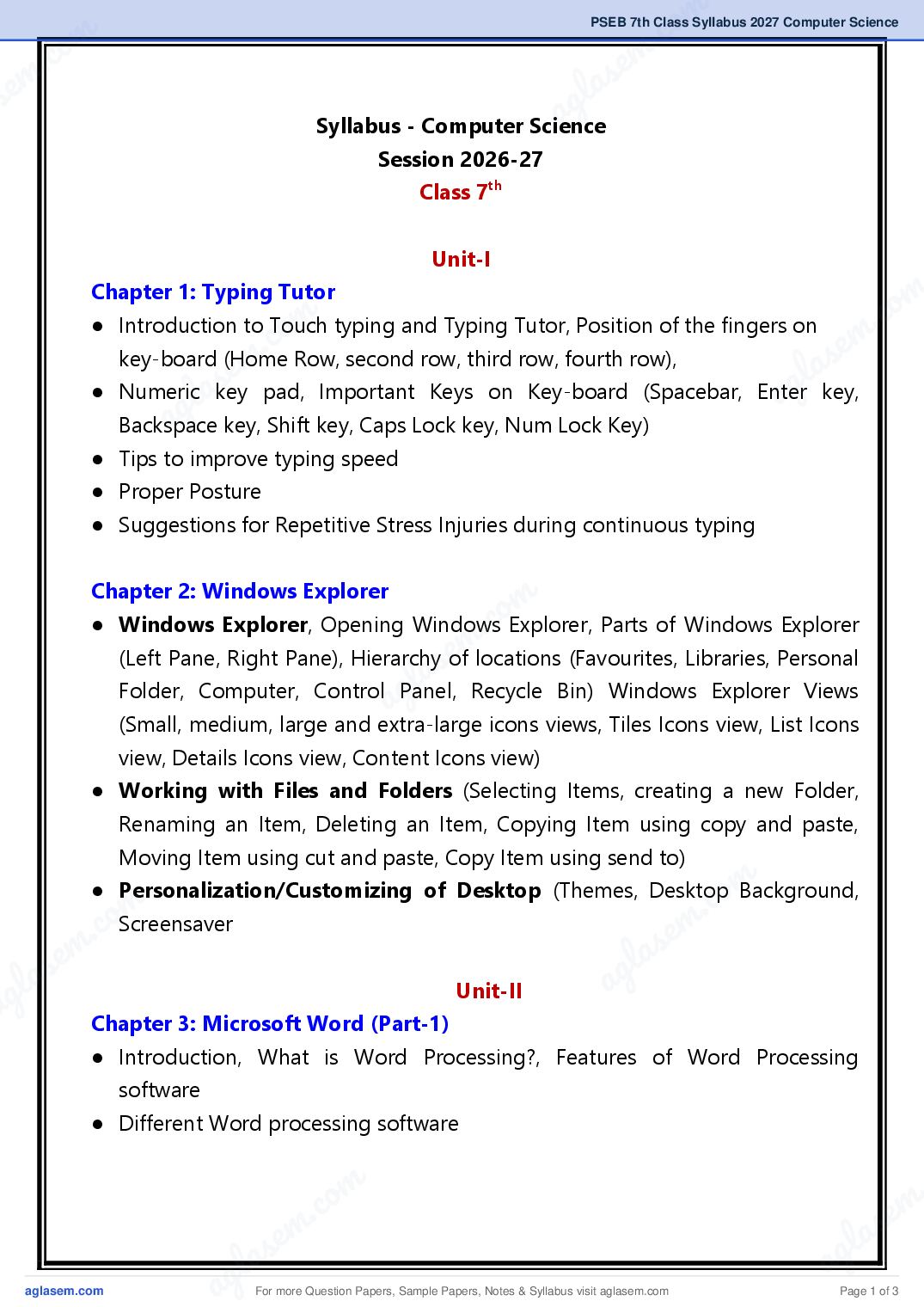
Syllabus - Computer Science
Session 2026-27
Class 7th
Unit-I
m
.co
Chapter 1: Typing Tutor
o m
● Introduction to Touch typing and Typing Tutor, Position of the fingers on
m
. c s e
e m
key-board (Home Row, second row, third row, fourth row),
l a
s
● Numericlakey pad, Important Keys on Key-board (Spacebar, Enterag key,
ag key, Shift key, Caps Lock key, Num Lock Key)
Backspace
● Tips to improve typing speed
● Proper Posture
● Suggestions for Repetitive Stress Injuries during continuous typing
Chapter 2: Windows Explorer
m
.co
● Windows Explorer, Opening Windows Explorer, Parts of Windows Explorer
la Recycle Bin) Windows Explorer Views
(Left Pane, Right Pane), Hierarchy of locations (Favourites, Libraries, Personal
ag
Folder, Computer, Control Panel,
(Small, medium, large and extra-large icons views, Tiles Icons view, List Icons
view, Details Icons view, Content Icons view)
● Working with Files and Folders (Selecting Items, creating a new Folder,
Renaming an Item, Deleting an Item, Copying Item using copy and paste,
Moving Item using cut and paste, Copy Item using send to)
m
.co
● Personalization/Customizing of Desktop (Themes, Desktop Background,
m
c. oScreensaver s e m
s em g l a
g la Unit-II a
a Chapter 3: Microsoft Word (Part-1)
● Introduction, What is Word Processing?, Features of Word Processing
software
● Different Word processing software
s em l a
g la ag
a For more Question Papers, Sample Papers, Notes & Syllabus visit Page 1 of 3
Page 3
Word Window (File Menu, Quick Access Toolbar, Title Bar, Tabs, Ribbon,
Dialog Box Launcher, Ruler, Text Area, Vertical and Horizontal Scroll Bars,
Status Bar, Document Views, Zoom Slider)
● Creating New Document using MS Word, Opening an existing document,
Saving a New/Existing Document
Chapter 4: Microsoft Word (Part-2)
● Selection of text (Using mouse, Using keyboard)
● Home Tab: Clipboard Group (Copy/Cut Text, Pasting Text, Format Painter),
Font Group (Font face and Font size, Font styles, Font color, Text Highlight
color, Text Effects, Change Text Case), Paragraph Group (Bullets and
Numbering, Text Alignment, Adjusting Line Spacing, Shading), Editing Group
(Find and Replace)
● Undo and Redo Commands
● Insert Tab: Pages Group (Page Breaks), Illustrations Group (Picture/Clip Art,
Shapes, Smart Art Graphic), Header & Footer Group (Adding and removing
Headers and Footers, Page Number), Text Group (Text Boxes, WordArt),
Symbols Group (Using Symbols)
Unit-III
Chapter 5: Microsoft Word (Part-3)
● Picture Tools (Format Tab): Adjust Group (Corrections, Color, Artistic Effect,
Compress picture, Change picture, Reset Picture, Remove Background),
Picture Style Group (Picture Style Gallery, Picture Border, Picture Effects),
Arrange Group (Position, Wrap Text, Align, Group, Rotate), Size Group (Crop,
Height and Width)
● Page layout Tab: Page Setup Group (Margins, Orientation, Size, Columns),
Page Background Group (Water Mark, Page Color, Page Borders)
● Review Tab: Proofing Group (Spelling and Grammar, Word Count)
● Printing Documents
For more Question Papers, Sample Papers, Notes & Syllabus visit Page 2 of 3
Page 4
m .co s e m
se Chapter 6: Microsoft Word (Part-4)
g l a
● What is Table? a
● Creating A Table: Using Table Button, Using Insert Table Option, Using
Draw Table Option,
● Entering Data in the Table
● Modifying A Table: Inserting Column In a Table, Inserting Rows In a Table,
m
.co
Insert a Cell in a Table, Deleting Columns in a Table, Deleting Rows in a
o m m
. c
Table, Deleting Cells in a Table, Deleting a Table)
s e
● Properties of
e m a Table: Alignment of a Table, Changing the size of
l a
Row,
Column lorasCell ag
ag Cells, Merging Cells, Splitting Table
● Splitting
Unit-IV
Chapter 7: Introduction to Multimedia
● Introduction, Component of Multimedia (Text, Sound (Audio), Images,
Animation, Video)
m
.co
● Requirement for Multimedia: Hardware requirements (Input Devices,
laText Formats, Image Formats, Digital Audio
Output Devices, Storage Devices) and software requirements
g
● File Formats for Multimedia:
a
File Formats, Digital Video File Formats
● Multimedia Presentation: Types of Multimedia Presentation (Virtual, Slide
Presentation, Web Pages)
● Applications of Multimedia: Education, Business Systems, Medical Services,
Entertainment, Public Places, Multimedia Conferencing
m
m .co
.co
Chapter 8: Storage Devices
s e m
s em● What is memory?, Usage of Memory g l a
g la ● Type of Memory: Primary Memory (RAM, ROM), Secondary a Memory (Hard
a Disk Drive, External Hard Disk Drive, Floppy Disk, Magnetic Tape, CD, DVD,
Pen Drive, Memory Cards)
s em l a
g la ag
a For more Question Papers, Sample Papers, Notes & Syllabus visit Page 3 of 3