HBSE Class 10 Sample Paper 2026 Answers Computer Science
Finished viewing? Save it for later —
Download HBSE Class 10 Sample Paper 2026 Answers Computer Science (PDF · 26 pages)About HBSE Class 10 Sample Paper 2026 Answers Computer Science
HBSE Class 10 Sample Paper 2026 Answers Computer Science is available here for free download. Published by Haryana Board for Class 10, this answer key can be viewed online or downloaded as a PDF (26 pages). Candidates preparing for Class 10 can use HBSE Class 10 Sample Paper 2026 Answers Computer Science to understand the exam pattern, the type of questions asked, and the overall difficulty level.
Frequently Asked Questions
How can I download HBSE Class 10 Sample Paper 2026 Answers Computer Science?
Open this page and click the Download button to save HBSE Class 10 Sample Paper 2026 Answers Computer Science as a PDF. It is completely free on AglaSem Docs.
Is HBSE Class 10 Sample Paper 2026 Answers Computer Science free to download?
Yes. HBSE Class 10 Sample Paper 2026 Answers Computer Science can be viewed online and downloaded as a PDF free of cost on AglaSem Docs.
How many pages does HBSE Class 10 Sample Paper 2026 Answers Computer Science have?
HBSE Class 10 Sample Paper 2026 Answers Computer Science contains 26 pages, which you can read online or download together as a single PDF.
Where can I find more Class 10 study material?
You can find more Class 10 question papers, sample papers, syllabus, and answer keys on AglaSem Docs.
HBSE Class 10 Sample Paper 2026 Answers Computer Science – Text
Read the full text of this answer key below — useful to quickly search, copy and reference the content online without downloading the PDF.
📄 View text version (26 pages)
Page 1
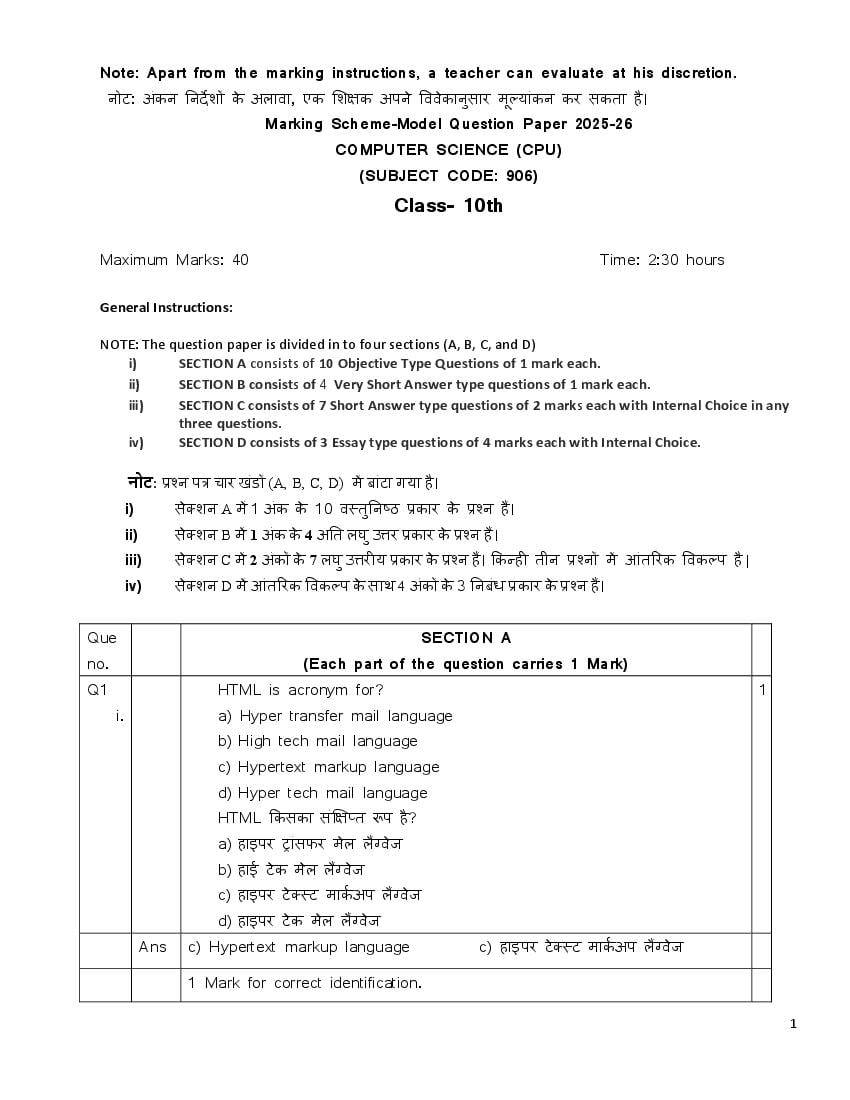
नोट: अंकन ननर्दे शों के अलावा, एक शशक्षक अपने वववेकानुसार मूल्ांकन कर सकता है ।
Marking Scheme-Model Question Paper 2025-26
COMPUTER SCIENCE (CPU)
(SUBJECT CODE: 906)
Class- 10th
Maximum Marks: 40 Time: 2:30 hours
General Instructions:
NOTE: The question paper is divided in to four sections (A, B, C, and D)
i) SECTION A consists of 10 Objective Type Questions of 1 mark each.
ii) SECTION B consists of 4 Very Short Answer type questions of 1 mark each.
iii) SECTION C consists of 7 Short Answer type questions of 2 marks each with Internal Choice in any
three questions.
iv) SECTION D consists of 3 Essay type questions of 4 marks each with Internal Choice.
नोट: प्रश्न पत्र चार खंडों (A, B, C, D) में बांटा ग्ा है।
i) सेक्शन A में 1 अंक के 10 वस्तुननष्ठ प्रकार के प्रश्न हैं।
ii) सेक्शन B में 1 अंक के 4 अनत लघु उत्तर प्रकार के प्रश्न हैं।
iii) सेक्शन C में 2 अंकों के 7 लघु उत्तरी् प्रकार के प्रश्न हैं। ककन्ही तीन प्रश्नों में आंतररक ववकलप है |
iv) सेक्शन D में आंतररक ववकलप के साथ 4 अंकों के 3 ननबंध प्रकार के प्रश्न हैं।
Que SECTION A
no. (Each part of the question carries 1 Mark)
Q1 HTML is acronym for? 1
i. a) Hyper transfer mail language
b) High tech mail language
c) Hypertext markup language
d) Hyper tech mail language
HTML ककसका संक्षक्षप्त रूप है ?
a) हाइपर ट्ांसफर मेल लैंग्वेज
b) हाई टे क मेल लैंग्वेज
c) हाइपर टे क्स्ट माककअप लैंग्वेज
d) हाइपर टे क मेल लैंग्वेज
Ans c) Hypertext markup language c) हाइपर टे क्स्ट माककअप लैंग्वेज
1 Mark for correct identification.
1
Page 2
HTML Tag used for making text bold:
टे क्स्ट को बोलड बनाने के शलए HTML टै ग का उप्ोग कक्ा जाता है :
a) <b> b) <p> c) <d> d) none
Ans a) <b>
1 Mark for correct identification.
iii. Tag used in HTML for creating Hyperlinks: 1
हाइपरशलंक बनाने के शलए HTML में प्र्क्
ु त टै ग:
a) <A> b) <H> c) <U> d) <L>
Ans a) <A>
1 Mark for correct answer.
iv. Sandeep has to send an email to Nitin. He also wants to send the same 1
email to Anil but does not want nitin to know about it. Which option
should Sandeep use to enter the email address of Anil?
सन्र्दीप ने नननतन को एक ईमेल भेजना है । वह वही ईमेल अननल को भी भेजना चाहता
है लेककन नहीं चाहता कक नननतन को इसके बारे में पता चले। अननल का ईमेल पता र्दजक
करने के शलए सन्र्दीप को ककस ववकलप का उप्ोग करना चाहहए?
a) C(copy) b) CC (carbon copy) c) BCC (blind carbon copy) d) none
Ans c) BCC (blind carbon copy)
1 Mark to identify the correct option.
v In MS Access the ________________ view allows you to define the field 1
names, data types & other properties of a table.
एमएस एक्सेस में ________________ व््ू आपको टे बल के फ़ीलड नाम, डेटा प्रकार
और अन्् गुणों को पररभावित करने क़ी अनुमनत र्दे ता है ।
Ans Design View
1 Mark for writing the correct answer.
vi. To use identity of someone for illegal activity is __________type of cyber- 1
crime. अवैध गनतववधध के शलए ककसी क़ी पहचान का उप्ोग करना __________
प्रकार का साइबर-अपराध है ।
Ans Identity theft
1 Mark for correct fill in the blank
vii. Ransomware is a type of malware that encrypts files and demands a 1
ransom for their release. (T/F)
2
Page 3
करने के शलए कफरौती क़ी मांग करता है । (सत््/ असत््)
Ans True सत््
1 Mark for correct Answer.
viii A web server is a computer program that stores & serves web pages to 1
clients upon request. (T/F)
वेब सवकर एक कंप््ूटर प्रोग्राम है जो ग्राहकों के अनुरोध पर वेब पेजों को संग्रहीत और
सेवा प्रर्दान करता है । (सत््/असत््)
Ans True सत््
1 Mark for correct Answer.
Direction for questions ix & x: In the questions given below, there are
two statements marked as Assertion (A) and Reason (R). Choose the
correct option out of the choices given below in each question:
प्रश्न ix एवं x के शलए ननर्दे श: नीचे हर्दए गए प्रश्नों में , कथन (A) और कारण (R) के
रूप में धचन्क्ननत र्दो कथन हैं। प्रत््ेक प्रश्न में नीचे हर्दए गए ववकलपों में से सही ववकलप
का च्न क़ीन्क्जए:
a) Both (A) and (R) are correct and (R) is correct explanation of (A).
b) Both (A) and (R) are correct and (R) is not the correct explanation
of (A).
c) (A) is true but (R) is false.
d) (A) is false but (R) is true.
a) (A)और (R) र्दोनों सही हैं और (R), (A) क़ी सही व््ाख््ा है ।
b) (A) और (R) र्दोनों सही हैं और (R), (A) क़ी सही व््ाख््ा नह ं है ।
c) (A) सत्् है लेककन (R) असत्् है ।
d) (A) असत्् है लेककन (R) सत्् है ।
ix Assertion: MS Access allows users to create tables in both Datasheet 1
and design view.
Reason: Datasheet view provides a grid like interface for entering data
directly, while design view allows users to define field names, data types
and other properties.
अभिकथन: एमएस एक्सेस उप्ोगकताकओं को डेटाशीट और डडज़ाइन दृश्् र्दोनों में टे बल
बनाने क़ी अनम
ु नत र्दे ता है ।
कारण: डेटाशीट दृश्् सीधे डेटा र्दजक करने के शलए धग्रड जैसा इंटरफेस प्रर्दान करता है ,
3
Page 4
पररभावित करने क़ी अनम
ु नत र्दे ता है ।
Ans a) Both (A) and (R) are correct and (R) is correct explanation of (A).
a) (A)और (R) र्दोनों सही हैं और (R), (A) क़ी सही व््ाख््ा है ।
1 Mark for correct identification.
x Assertion: The ul element is used to create an ordered list in HTML. 1
Reason: the ul element stands for “unordered list” and is used to create
a bulleted list in HTML.
अभिकथन: ul तत्व का उप्ोग HTML में एक िमबद्ध सूची बनाने के शलए कक्ा
जाता है ।
कारण: ul तत्व का अथक " "अव््वन्क्स्थत सच
ू ी" है और इसका उप्ोग HTML में बुलेटेड
सूची बनाने के शलए कक्ा जाता है ।
Ans d) (A) is false but (R) is true.
d) (A) असत्् है लेककन (R) सत्् है।
1 Mark for correct identification.
SECTION B
(Each question carries 1 mark)
Q2 Write the tag for superscript in HTML. 1
HTML में सुपरन्क्स्िप्ट के शलए टै ग शलखें।
Ans The tag used for superscript in HTML is <sup> tag.
HTML में सप
ु रन्क्स्िप्ट के शलए प्र्क्
ु त टै ग <sup> टै ग है ।
1 Mark for any correct Answer
Or
Write the tag for subscript in HTML.
HTML में सबन्क्स्िप्ट के शलए टै ग शलखें।
Ans The tag used for subscript in HTML is <sub> tag.
HTML में सबन्क्स्िप्ट के शलए प्र्ुक्त टै ग <sub> टै ग है ।
Q3 Give an example of Primary Key we can use in database. 1
प्राथशमक कंु जी का एक उर्दाहरण र्दीन्क्जए न्क्जसका उप्ोग हम डेटाबेस में कर सकते हैं।
Ans AADHAR NO.
1 Mark for any correct Example.
4
Page 5
Q4 Write names of any 2 Antiviruses we use. 1
हमारे द्वारा उप्ोग कक्े जाने वाले ककन्हीं र्दो एंटीवा्रस के नाम शलखखए।
Ans Kaspersky, McAfee
1 Mark for any correct Names of antivirus.
एंटीवा्रस के ककसी भी सही नाम के शलए 1 अंक
Q5 Define cybersecurity. साइबर सरु क्षा को पररभावित करें . 1
Ans The practice of protecting systems, networks, and programs from digital
attacks. शसस्टम, नेटवकक और प्रोग्राम को डडन्क्जटल हमलों से बचाने का अभ््ास |
1 Mark for any correct Answer ककसी भी सही उत्तर के शलए 1 अंक
Or
What is the term for a tool used to detect and prevent unauthorized
access to a network?
ककसी नेटवकक पर अनाधधकृत पहुंच का पता लगाने और उसे रोकने के शलए उप्ोग ककए
जाने वाले उपकरण को क््ा कहते हैं?
Ans Firewall is the term for a tool used to detect and prevent unauthorized
access to a network.
फा्रवॉल ककसी नेटवकक पर अनाधधकृत पहुंच का पता लगाने और उसे रोकने के शलए
उप्ोग ककए जाने वाले उपकरण है |
1 Mark for any correct Answer. ककसी भी सही उत्तर के शलए 1 अंक
SECTION C
(Each question carries 2 marks)
Q6 How comments can be inserted in HTML? 2
HTML में हटप्पखण्ााँ कैसे डाली जा सकती हैं?
Ans The comment tag is used to insert comments in the source code.
Comments are not displayed in the browsers.
Example:
<!--This is a comment.-->
हटप्पणी टै ग का उप्ोग स्रोत कोड में हटप्पखण्ााँ सन्क्ममशलत करने के शलए कक्ा जाता
है । हटप्पखण्ााँ ब्राउज़र में प्रर्दशशकत नहीं होती हैं. उर्दाहरण:
<!--्ह एक हटप्पणी है .-->
5
Page 6
Q7 What do you mean by <hr> tag in HTML? 2
HTML में <hr> टै ग से आपका क््ा तात्प्क है ?
Ans The <hr> tag in HTML stands for horizontal rule and is used to insert a
horizontal rule in an HTML page to divide or separate document sections.
The <hr> tag is an empty tag, and it does not require an end tag.
Example:
<p>There is a horizontal rule below this paragraph.</p>
<hr>
<p>This is a horizontal rule above this paragraph.</p>
HTML में <hr> टै ग क्षैनतज नन्म के शलए है और र्दस्तावेज़ अनुभागों को ववभान्क्जत ्ा
अलग करने के शलए HTML पष्ृ ठ में क्षैनतज लाइन डालने के शलए उप्ोग कक्ा जाता
है । <hr> टै ग एक खाली टै ग है , और इसे अंनतम टै ग क़ी आवश््कता नहीं है ।
उर्दाहरण:
<p>इस अनुच्छे र्द के नीचे एक क्षैनतज लाइन है ।</p>
<hr>
<p>्ह इस अनुच्छे र्द के ऊपर एक क्षैनतज लाइन है ।</p>
2 Marks for any correct explanation of <hr> tag in HTML.
OR
Q8 List different types of heading tags in HTML.
HTML में ववशभन्न प्रकार के शीिकक टै ग क़ी सच
ू ी बनाएं।
Ans HTML headings are defined with the <h1> to <h6> tags.
<h1> defines the most important heading. <h6> defines the least important
heading.
HTML शीिककों को <h1> से <h6> टै ग के साथ पररभावित कक्ा ग्ा है ।
<h1> सबसे महत्वपूणक शीिकक को पररभावित करता है। <h6> सबसे कम महत्वपूणक
शीिकक को पररभावित करता है ।
Example: Output
1. <h1>Heading no. 1</h1> Heading no. 1
2. <h2>Heading no. 2</h2> Heading no. 2
3. <h3>Heading no. 3</h3> Heading no. 3
4. <h4>Heading no. 4</h4> Heading no. 4
5. <h5>Heading no. 5</h5> Heading no. 5
6. <h6>Heading no. 6</h6> Heading no. 6
6
Page 7
सभी सही HTML शीिकक टै ग के शलए 2 अंक।
Q9 What is Primary key? What are its characteristics? 2
प्राथशमक कंु जी क््ा है ? इसक़ी ववशेिताएाँ क््ा हैं?
Ans PRIMARY KEY: It is a field or collection of fields which identifies every
record uniquely.
Characteristics of a Primary Key:
o A relation can contain only one primary key.
o Primary key field could not contain NULL value.
o It could not have same value in different records.
For example: Aadhar no., enrollment no., employee id, etc.
प्राथभिक कं जी: ्ह एक फ़ीलड ्ा फ़ीलड का संग्रह है जो प्रत््ेक ररकॉडक को ववशशष्ट रूप
से पहचानता है ।
प्राथभिक कं जी की ववशेषताएँ:
o ककसी संबध
ं में केवल एक प्राथशमक कंु जी हो सकती है ।
o प्राथशमक कंु जी फ़ीलड में शून्् मान नहीं हो सकता।
o ववशभन्न ररकार्डकस में इसका मान समान नहीं हो सकता।
1 mark for any correct definition of primary key.
1 mark for characteristics of primary key.
Deduct 1 mark for not writing characteristics of primary key.
Q10 Write short note on Bluetooth technology. 2
ब्लूटूथ तकनीक पर संक्षक्षप्त हटप्पणी शलखें।
Ans Bluetooth:
Bluetooth is a wireless technology used for exchanging data between
electronic devices over short distances. It was invented by Ericsson in
1994 and has since become a common feature in many devices like
smartphones, laptops, headphones, and speakers.
Bluetooth can transfer various types of data such as files, music, and
even internet connections (tethering). The range of Bluetooth typically
extends up to 10 meters, although newer versions can have longer
ranges.
While Bluetooth is suitable for transferring small files and streaming music,
it may not be as fast as other data transfer methods for large files.
ब्लूटूथ:
ब्लट
ू ू थ एक वा्रलेस तकनीक है न्क्जसका उप्ोग कम र्दरू ी पर इलेक्ट्ॉननक उपकरणों के
बीच डेटा के आर्दान-प्रर्दान के शलए कक्ा जाता है । इसका आववष्कार 1994 में एररक्सन
7
Page 8
उपकरणों में एक आम सवु वधा बन गई है ।
ब्लूटूथ ववशभन्न प्रकार के डेटा जैसे फाइलें, संगीत और ्हां तक कक इंटरनेट कनेक्शन
(टे र्दररंग) स्थानांतररत कर सकता है । ब्लूटूथ क़ी रें ज आमतौर पर 10 मीटर तक फैली
होती है , हालांकक नए संस्करणों क़ी रें ज लंबी हो सकती है । जबकक ब्लट
ू ू थ छोटी फाइलों को
स्थानांतररत करने और संगीत स्ट्ीम करने के शलए उप्ुक्त है , ्ह बडी फाइलों के शलए
अन्् डेटा स्थानांतरण ववधध्ों न्क्जतना तेज़ नहीं हो सकता है ।
2 Marks for any correct explanation of Bluetooth.
ब्लूटूथ क़ी ककसी भी सही व््ाख््ा के शलए 2 अंक।
Or
Write short note on Wi-Fi.
वाई-फाई पर संक्षक्षप्त हटप्पणी शलखें।
Ans Wi-Fi is a popular wireless networking technology. Wi-Fi stands for
“wireless fidelity”. Wi-Fi was invented by NCR Corporation/AT&T in the
Netherlands in 1991. By using this technology, we can exchange
information between two or more devices. Wi-Fi has been developed for
mobile computing devices, such as laptops, but it is now extensively using
for mobile applications and consumer electronics like televisions, DVD
players, and digital cameras. It is commonly called a wireless LAN (local
area network).
वाई-फाई एक लोकवप्र् वा्रलेस नेटवककिंग तकनीक है । वा्फा् का अथक है वा्रलैस
कफडेशलटी"। वाई-फाई का आववष्कार 1991 में नीर्दरलैंड में NCR Corporation/AT&T
द्वारा कक्ा ग्ा था। इस तकनीक का उप्ोग करके हम र्दो ्ा र्दो से अधधक उपकरणों
के बीच सूचनाओं का आर्दान-प्रर्दान कर सकते हैं। वाई-फाई को लैपटॉप जैसे मोबाइल
कंप््हू टंग उपकरणों के शलए ववकशसत कक्ा ग्ा है , लेककन अब इसका उप्ोग बडे पैमाने
पर मोबाइल एन्क्प्लकेशन और टे लीववजन, डीवीडी प्ले्र और डडन्क्जटल कैमरे जैसे
उपभोक्ता इलेक्ट्ॉननक्स के शलए कक्ा जा रहा है । इसे आमतौर पर वा्रलेस LAN
(लोकल एरर्ा नेटवकक) कहा जाता है ।
2 Marks for any correct explanation of Wi-Fi.
वाई-फाई क़ी ककसी भी सही व््ाख््ा के शलए 2 अंक।
Q11 How one can ensure proper usage of password. 2
कोई पासवडक का उधचत उप्ोग कैसे सुननन्क्श्चत कर सकता है ?
Ans A password is a secret word or phrase that identifies a user and grants
access to a device or website.
8
Page 9
personal and sensitive information from unauthorized access.
Some best practices to deal with passwords are:
1. Never use personal information such as your name, birthday, user
name, or email address. This type of information is often publicly
available, which makes it easier for someone to guess your
password.
2. Make your password at least 12 characters long.
3. Use a mix of uppercase and lowercase letters, numbers, and special
characters.
4. Don't reuse passwords or use the same password for multiple
accounts.
5. Don't use words from the dictionary or commonly used passwords.
6. Change passwords every 30, 60, or 90 days
7. Never reveal your passwords to others
8. Use a Password Manager.
पासवडक एक गुप्त शब्र्द ्ा वाक््ांश है जो उप्ोगकताक क़ी पहचान करता है और ककसी
डडवाइस ्ा वेबसाइट तक पहुंच प्रर्दान करता है ।
एक मजबूत पासवडक का उप्ोग करना आवश््क है क््ोंकक ्ह आपक़ी व््न्क्क्तगत और
संवेर्दनशील जानकारी को अनधधकृत पहुंच से बचाने में मर्दर्द करता है ।
पासवडक से ननपटने के शलए कुछ सवोत्तम उपा् हैं:
1. कभी भी अपना नाम, जन्महर्दन, उप्ोगकताक नाम ्ा ईमेल पता जैसी व््न्क्क्तगत
जानकारी का उप्ोग न करें । इस प्रकार क़ी जानकारी अक्सर सावकजननक रूप से उपलब्ध
होती है , न्क्जससे ककसी के शलए आपके पासवडक का अनुमान लगाना आसान हो जाता है ।
2. अपना पासवडक कम से कम 12 अक्षर लंबा बनाएं।
3. अपरकेस और लोअरकेस अक्षरों, संख््ाओं और ववशेि वणों के शमश्रण का उप्ोग करें ।
4. पासवडक का पुन: उप्ोग न करें ्ा एकाधधक खातों के शलए एक ही पासवडक का
उप्ोग न करें ।
5. शब्र्दकोश के शब्र्दों ्ा आमतौर पर उप्ोग ककए जाने वाले पासवडक का उप्ोग न
करें ।
6. हर 30, 60 ्ा 90 हर्दन में पासवडक बर्दलें
7. कभी भी अपना पासवडक र्दस
ू रों को न बताएं
8. पासवडक मैनेजर का उप्ोग करें .
2 marks for writing best practices to deal with passwords.
Or 2
What is computer virus?
कंप््ट
ू र वा्रस क््ा है ?
9
Page 10
when executed, replicates itself by modifying other computer programs and
inserting its code. Viruses can spread to other computers and files when
the software or documents they are attached to are transferred from one
computer to another using a network, or through infected email
attachments.
कंप््ूटर वा्रस एक प्रकार का र्दभ
ु ाकवनापण
ू क सॉफ़्टवे्र प्रोग्राम ("मैलवे्र") है , जो
ननष्पाहर्दत होने पर, अन्् कंप््ूटर प्रोग्राम को संशोधधत करके और अपना कोड डालकर
खुर्द क़ी नकल करता है । वा्रस र्दस
ू रे कंप््ूटर और फाइलों में तब फैल सकते हैं जब वे
न्क्जस सॉफ़्टवे्र ्ा र्दस्तावेज़ से जुडे होते हैं, उन्हें नेटवकक का उप्ोग करके ्ा संिशमत
ईमेल अटै चमेंट के माध््म से एक कंप््ट
ू र से र्दस
ू रे कंप््ट
ू र में स्थानांतररत कक्ा जाता
है ।
2 marks for writing correct answer.
Q12 Explain POP3.
POP3 को पररभावित करें |
Ans POP3 (Post Office Protocol 3) is a protocol that allows email clients to
retrieve emails from a mail server. It's a one-way protocol, meaning it only
downloads emails from the server to the client. This older protocol is
often used for offline email access,
POP3 (पोस्ट ऑकफस प्रोटोकॉल 3) एक प्रोटोकॉल है जो ईमेल क्लाइंट को मेल सवकर से
ईमेल प्राप्त करने क़ी अनम
ु नत र्दे ता है । ्ह एकतरफा प्रोटोकॉल है , न्क्जसका अथक है कक
्ह केवल सवकर से क्लाइंट तक ईमेल डाउनलोड करता है । इस पुराने प्रोटोकॉल का
उप्ोग अक्सर ऑफलाइन ईमेल एक्सेस के शलए कक्ा जाता है |
2 marks for writing correct answer.
Or
Write some advantages of Email facility.
ईमेल सुववधा के कुछ लाभ शलखखए।
Ans 1. Easy and Fast – Composing an email is very simple and one of
the fastest ways to communicate. We can send an email in a
minute by just clicking the mouse.
2. Environment-Friendly –It’s paperless and there is no requirement
for pages, pens, or cardboard boxes.
3. Multimedia Emails – Photos, videos, and various types of files can
be shared easily with multiple people through a single email and
are delivered instantly.
10
Page 11
तरीकों में से एक है । हम केवल माउस न्क्क्लक करके एक शमनट में ईमेल भेज
सकते हैं।
2. पर्ाावरण के अनकूल - ्ह कागज रहहत है और इसमें पेज, पेन ्ा काडकबोडक
बॉक्स क़ी कोई आवश््कता नहीं है ।
3. िल्ट िीडिर्ा ईिेल - फोटो, वीडड्ो और ववशभन्न प्रकार क़ी फाइलें एक ही ईमेल
के माध््म से कई लोगों के साथ आसानी से साझा क़ी जा सकती हैं और तरु ं त
ववतररत क़ी जाती हैं।
2 Marks for any two correct advantages of E-mail facility.
SECTION D
(Each question carries 4 Marks)
Q13 Explain different types of Networks (LAN, MAN, WAN).
ववशभन्न प्रकार के नेटवकक (LAN, MAN, WAN) क़ी व््ाख््ा करें ।
Ans LAN (Local area network): A local area network (LAN) is a computer
network that interconnects computers within a limited area such as a
residence, school, laboratory, university campus or office.
Characteristics of LAN:
1. The coverage area is generally a few kilometers.
2. we can run multiple devices to share a transmission medium.
3. we can use the different topologies, mainly bus and ring, in LAN.
4. The communication quality is better IN LAN, and the transmission
error rate is low compared to WAN.
5. It has usually had low cost, installation, expansion, and
maintenance.
MAN (Metropolitan Area Network): A Metropolitan Area Network (MAN) is
a type of network that covers a larger geographical area than a local area
network (LAN) but is smaller than a wide area network (WAN). MANs
typically cover a city or a large campus. They connect multiple LANs
within a specific geographic area, which gives high-speed connectivity.
Characteristics of MAN:
1. MAN cover a larger geographical area, such as a city.
2. MAN gives high-speed data transfer within the defined geographic area.
3. MAN are created with multiple LANs.
11
Page 12
network that covers a very large geographical area, such as cities,
countries, or even continents. WANs connect multiple LANs and MANs,
enabling communication over long distances.
Characteristics of WAN:
1. WANs cover a large geographical area, connecting networks over very
large distances.
2. WAN facilitate communication between devices and networks that are
far apart.
3. WAN use various technologies, including satellite links, and internet
connections, to establish communication over wide distances.
LAN (लोकल एरर्ा नेटवकक): लोकल एरर्ा नेटवकक (LAN) एक कंप््ट
ू र नेटवकक है जो
एक सीशमत क्षेत्र जैसे ननवास, स्कूल, प्र्ोगशाला, ववश्वववद््ाल् पररसर ्ा का्ाकल् में
कंप््ूटरों को आपस में जोडता है ।
LAN क़ी ववशेिताएाँ:
1. कवरे ज क्षेत्र आम तौर पर कुछ ककलोमीटर होता है ।
2. हम एक ट्ांसशमशन माध््म को साझा करने के शलए कई डडवाइस चला सकते हैं।
3. हम LAN में ववशभन्न टोपोलॉजी, मुख्् रूप से बस और ररंग का उप्ोग कर सकते
हैं।
4. LAN में संचार गण
ु वत्ता बेहतर होती है , और WAN क़ी तुलना में ट्ांसशमशन त्रुहट र्दर
कम होती है ।
5. इसमें आमतौर पर कम लागत, स्थापना, ववस्तार और रखरखाव होता है ।
MAN (मेट्ोपॉशलटन एरर्ा नेटवकक): एक मेट्ोपॉशलटन एरर्ा नेटवकक (एमएएन) एक
प्रकार का नेटवकक है जो स्थानी् क्षेत्र नेटवकक (लैन) क़ी तुलना में एक बडे भौगोशलक क्षेत्र
को कवर करता है लेककन एक वाइड एरर्ा नेटवकक (डब्ल्ूएएन) से छोटा है । एमएएन
आमतौर पर एक शहर ्ा एक बडे पररसर को कवर करते हैं। वे एक ववशशष्ट भौगोशलक
क्षेत्र के भीतर कई लैन को जोडते हैं, जो उच्च गनत कनेन्क्क्टववटी र्दे ता है ।
MAN क़ी ववशेिताएं:
1. MAN एक बडे भौगोशलक क्षेत्र को कवर करता है , जैसे कक एक शहर।
2. MAN पररभावित भौगोशलक क्षेत्र के भीतर उच्च गनत डेटा हस्तांतरण र्दे ता है ।
12
Page 13
WAN (वाइड एरर्ा नेटवकक): एक वाइड एरर्ा नेटवकक (WAN) एक प्रकार का नेटवकक है
जो शहरों, र्दे शों ्ा ्हां तक कक महाद्वीपों जैसे बहुत बडे भौगोशलक क्षेत्र को कवर करता
है । डब्ल्ूएएन कई लैन और एमएएन को जोडते हैं, न्क्जससे लंबी र्दरू ी पर संचार सक्षम
होता है ।
WAN क़ी ववशेिताएं:
1. WAN एक बडे भौगोशलक क्षेत्र को कवर करते हैं, जो बहुत बडी र्दरू ी पर नेटवकक को
जोडते हैं।
2. WAN उन उपकरणों और नेटवकक के बीच संचार क़ी सुववधा प्रर्दान करता है जो बहुत
र्दरू हैं।
3. WAN व््ापक र्दरू ी पर संचार स्थावपत करने के शलए उपग्रह शलंक और इंटरनेट
कनेक्शन सहहत ववशभन्न तकनीकों का उप्ोग करता है ।
1 mark for writing correct full forms.
1 marks for each correct definition of LAN/ MAN / WAN.
Deduct ½ marks for writing incorrect full forms.
Or
What is Cloud Computing? Explain its types.
क्लाऊड कमप््ूहटंग क््ा है ? इसके प्रकार बताइ्े।
Ans Cloud computing refers to the delivery of computing services, including
storage, servers, databases software and analytics over the internet. It
allows users to access these resources on-demand, pay only for what
they use, and scale their infrastructure based on their needs.
Types of Cloud:
1. Public cloud
2. Private cloud
3. Hybrid cloud
Public Cloud:
Public clouds are managed by third parties which provide cloud services
over the internet to the public, these services are available as pay-as-you-
go billing models.
They offer solutions for minimizing IT infrastructure costs and become a
good option for handling peak loads on the local infrastructure. Public
13
Page 14
businesses without large upfront investments by completely relying on
public infrastructure for their IT needs.
The fundamental characteristics of public clouds are multitenancy. A public
cloud is meant to serve multiple users, not a single customer. A user
requires a virtual computing environment that is separated, and most likely
isolated, from other users.
Advantages of using a public cloud are:
1. High Scalability
2. Cost Reduction
3. Reliability and flexibility
4. Disaster Recovery
Disadvantages of using a Public cloud are:
1. Loss of control over data
2. Data security and privacy
3. Limited Visibility
4. Unpredictable cost
Private cloud:
Private clouds are distributed systems that work on private infrastructure
and provide the users with dynamic provisioning of computing resources.
Instead of a pay-as-you-go model in private clouds, there could be other
schemes that manage the usage of the cloud and proportionally billing of
the different departments or sections of an enterprise. Private cloud
providers are HP Data Centers, Ubuntu, Elastic-Private cloud, Microsoft,
etc.
The advantages of using a private cloud are as follows:
1. Customer information protection: In the private cloud security
concerns are less since customer data and other sensitive information do
not flow out of private infrastructure.
2. Compliance with standard procedures and operations: Specific
procedures have to be put in place when deploying and executing
applications according to third-party compliance standards. This is not
possible in the case of the public cloud.
Disadvantages of using a private cloud are:
1. The restricted area of operations: Private cloud is accessible within
14
Page 15
2. Expertise requires: In the private cloud security concerns are less
since customer data and other sensitive information do not flow out of
private infrastructure. Hence skilled people are required to manage &
operate cloud services.
Hybrid cloud:
A hybrid cloud is a heterogeneous distributed system formed by combining
facilities of the public cloud and private cloud. For this reason, they are
also called heterogeneous clouds.
A major drawback of private deployments is the inability to scale on-
demand and efficiently address peak loads. Here public clouds are
needed. Hence, a hybrid cloud takes advantage of both public and private
clouds.
Advantages of using a Hybrid cloud are:
1) Cost: Available at a cheap cost than other clouds because it is formed
by a distributed system.
2) Speed: It is efficiently fast with lower cost, It reduces the latency of the
data transfer process.
3) Security: Most important thing is security. A hybrid cloud is totally safe
and secure because it works on the distributed system network.
Disadvantages of using a Hybrid cloud are:
1. It’s possible that businesses lack the internal knowledge necessary
to create such a hybrid environment. Managing security may also be more
challenging.
2. Managing a hybrid cloud may be more difficult.
क्लाउड कंप््ूहटंग से तात्प्क इंटरनेट पर स्टोरे ज, सवकर, डेटाबेस सॉफ्टवे्र और
एनाशलहटक्स सहहत कंप््हू टंग सेवाओं क़ी डडलीवरी से है । ्ह उप्ोगकताकओं को इन
संसाधनों तक ऑन-डडमांड पहुंचने, केवल उनके उप्ोग के शलए भुगतान करने और उनक़ी
आवश््कताओं के आधार पर उनके बुनन्ार्दी ढांचे को स्केल करने क़ी अनुमनत र्दे ता है ।
क्लाउड के प्रकार:
1. सावकजननक क्लाउड
2. ननजी क्लाउड
3. हाइब्रब्रड क्लाउड
सावकजननक क्लाउड:
सावकजननक क्लाउड का प्रबंधन तीसरे पक्षों द्वारा कक्ा जाता है जो जनता को इंटरनेट पर
15
Page 16
उपलब्ध हैं।
वे आईटी बुनन्ार्दी ढांचे क़ी लागत को कम करने के शलए समाधान प्रर्दान करते हैं और
स्थानी् बुनन्ार्दी ढांचे पर चरम भार को संभालने के शलए एक अच्छा ववकलप बन जाते
हैं। सावकजननक क्लाउड छोटे उद््मों के शलए एक पसंर्दीर्दा ववकलप है , जो अपनी आईटी
जरूरतों के शलए सावकजननक बुनन्ार्दी ढांचे पर पूरी तरह से भरोसा करके बडे अधग्रम
ननवेश के ब्रबना अपना व््वसा् शरू
ु कर सकते हैं।
सावकजननक क्लाउड क़ी मूलभूत ववशेिताएाँ बहु-ककरा्ेर्दारी हैं। सावकजननक क्लाउड का
उद्र्दे श्् एक ही ग्राहक को नहीं, बन्क्लक कई उप्ोगकताकओं को सेवा प्रर्दान करना है । एक
उप्ोगकताक को एक वचअ
ुक ल कंप््ूहटंग वातावरण क़ी आवश््कता होती है जो अन््
उप्ोगकताकओं से अलग हो, और संभवतः अलग-थलग हो।
सावकजननक क्लाउड का उप्ोग करने के लाभ हैं:
1. उच्च स्केलेब्रबशलटी
2. लागत में कमी
3. ववश्वसनी्ता और लचीलापन
4. आपर्दा पुनप्राकन्क्प्त
सावकजननक क्लाउड का उप्ोग करने के नुकसान हैं:
1. डेटा पर नन्ंत्रण का नक
ु सान
2. डेटा सरु क्षा और गोपनी्ता
3. सीशमत दृश््ता
4. अप्रत््ाशशत लागत
ननजी क्लाउड:
ननजी क्लाउड ववतररत शसस्टम हैं जो ननजी बुनन्ार्दी ढांचे पर काम करते हैं और
उप्ोगकताकओं को कंप््ूहटंग संसाधनों क़ी गनतशील प्रावधान प्रर्दान करते हैं। ननजी क्लाउड
में 'पे-एज़-्ू-गो' मॉडल के बजा्, ऐसी अन्् ्ोजनाएं हो सकती हैं जो क्लाउड के
उप्ोग और ककसी उद््म के ववशभन्न ववभागों ्ा अनुभागों क़ी आनुपानतक ब्रबशलंग का
प्रबंधन करती हैं। ननजी क्लाउड प्रर्दाता एचपी डेटा सेंटर, उबंटू, इलान्क्स्टक-प्राइवेट क्लाउड,
माइिोसॉफ्ट आहर्द हैं।
ननजी क्लाउड का उप्ोग करने के लाभ इस प्रकार हैं:
1. ग्राहक सूचना सुरक्षा: ननजी क्लाउड में सुरक्षा संबंधी धचंताएाँ कम होती हैं क््ोंकक
ग्राहक डेटा और अन्् संवर्द
े नशील जानकारी ननजी बुनन्ार्दी ढांचे से बाहर नहीं जाती हैं।
2. मानक प्रकि्ाओं और संचालन का अनुपालन: तत
ृ ी्-पक्ष अनुपालन मानकों के अनुसार
अनुप्र्ोगों को तैनात और ननष्पाहर्दत करते सम् ववशशष्ट प्रकि्ाएं अपनाई जानी चाहहए।
सावकजननक क्लाउड के मामले में ्ह संभव नहीं है ।
ननजी क्लाउड का उप्ोग करने के नुकसान हैं:
16
Page 17
इसशलए पहुंच का क्षेत्र प्रनतबंधधत है ।
2. ववशेिज्ञता क़ी आवश््कता: ननजी क्लाउड में सुरक्षा संबंधी धचंताएं कम होती हैं क््ोंकक
ग्राहक डेटा और अन्् संवर्द
े नशील जानकारी ननजी बुनन्ार्दी ढांचे से बाहर नहीं जाती है ।
इसशलए क्लाउड सेवाओं के प्रबंधन और संचालन के शलए कुशल लोगों क़ी आवश््कता
होती है ।
हाइब्रब्रड क्लाउड:
हाइब्रब्रड क्लाउड एक वविम ववतररत प्रणाली है जो सावकजननक क्लाउड और ननजी क्लाउड
क़ी सुववधाओं को शमलाकर बनाई जाती है । इसी कारण इन्हें वविमांगी बार्दल भी कहा
जाता है ।
ननजी तैनाती का एक बडा र्दोि ऑन-डडमांड स्केल करने और पीक लोड को कुशलतापूवक
क
संबोधधत करने में असमथकता है । ्हां सावकजननक बार्दलों क़ी जरूरत है . इसशलए, एक
हाइब्रब्रड क्लाउड सावकजननक और ननजी र्दोनों क्लाउडों का लाभ उठाता है ।
हाइब्रब्रड क्लाउड का उप्ोग करने के लाभ हैं:
1) लागत: अन्् क्लाउडों क़ी तुलना में सस्ती क़ीमत पर उपलब्ध है क््ोंकक ्ह एक
ववतररत प्रणाली द्वारा बनता है ।
2) गनत: ्ह कम लागत के साथ कुशलतापूवक
क तेज़ है , ्ह डेटा ट्ांसफर प्रकि्ा क़ी
ववलंबता को कम करता है ।
3) सरु क्षा: सबसे महत्वपण
ू क चीज है सरु क्षा. हाइब्रब्रड क्लाउड परू ी तरह से सरु क्षक्षत है
क््ोंकक ्ह ववतररत शसस्टम नेटवकक पर काम करता है ।
हाइब्रब्रड क्लाउड का उप्ोग करने के नुकसान हैं:
1. ्ह संभव है कक व््वसा्ों के पास ऐसा शमधश्रत वातावरण बनाने के शलए आवश््क
आंतररक ज्ञान का अभाव हो। सुरक्षा का प्रबंधन करना भी अधधक चुनौतीपूणक हो सकता है .
2. हाइब्रब्रड क्लाउड को प्रबंधधत करना अधधक कहठन हो सकता है ।
1 mark for writing correct definition of cloud computing.
1 marks for each correct explanation of types of cloud computing.
Q14 Explain the tag with attributes for inserting table in HTML. 4
HTML में टे बल डालने के शलए टै ग को ववशेिताओं सहहत समझाइए।
Ans HTML tables allow us to arrange data into rows and columns on the web
page.
We use the <table> tag, to create table in HTML. A table consist of rows
and columns. Table heading, row and column and table data can be set
using one or more <th>, <tr>, and <td> elements.
A table row is defined by the <tr> tag. Each table row starts with a <tr>
....</tr> tag.
To set table header, we use <th> tag. Data inside the <th> are the
17
Page 18
To insert data in table cell, use the <td> tag. Data inside the <td> tag
are the content of the table rows and columns.
Attribute Description Syntax & Example
used to specify border around the table &
Border border="2"
cells
Cell specify amount of spacing between cell
cellpadding="5"
Padding border and cell content.
Cell specify amount of spacing between two
cellspacing="3"
Spacing adjacent cells.
Width used to set the width of the table. width="80%"
used to set the alignment of table
align align="centre"
horizontally.
used to set the background color of the
bgcolor bgcolor="blue"
table.
backgroun background="image.
used to set image in the table background. jpg"
d
HTML टे बल हमें वेब पेज पर डेटा को पंन्क्क्त्ों और स्तंभों में व््वन्क्स्थत करने क़ी
अनुमनत र्दे ती हैं।
HTML में टे बल बनाने के शलए हम <table> टै ग का उप्ोग करते हैं। एक टे बल
पंन्क्क्त्ों और स्तंभों से बनी होती है । टे बल शीिकक, पंन्क्क्त और स्तंभ और टे बल डेटा को
एक ्ा अधधक <th>, <tr>, और <td> तत्वों का उप्ोग करके सेट कक्ा जा सकता है ।
एक ताशलका पंन्क्क्त को <tr> टै ग द्वारा पररभावित कक्ा ग्ा है । प्रत््ेक टे बल पंन्क्क्त
एक <tr> ....</tr> टै ग से शुरू होती है ।
टे बल हे डर सेट करने के शलए हम <th> टै ग का उप्ोग करते हैं। <th> के अंर्दर का डेटा
ककसी ताशलका के कॉलम के शीिकक हैं।
टे बल सेल में डेटा डालने के शलए <td> टै ग का उप्ोग करें । <td> टै ग के अंर्दर का डेटा
टे बल पंन्क्क्त्ों और स्तंभों क़ी सामग्री है ।
Example of inserting Table in HTML:
<html>
18
Page 19
<title> Table Attributes </title>
</head>
<body>
<table width="80%" border="2" bgcolor="skyblue" align="center"
cellspacing="3" cellpadding="5">
<tr>
<th>Name</th>
<th>City</th>
<th>Phone</th>
</tr>
<tr>
<td>SANDEEP</td>
<td>HARYANA</td>
<td>9991606900</td>
</tr>
<tr>
<td>NIDHI</td>
<td>UP</td>
<td>9123456789</td>
</tr>
</table>
</body>
</html>
OUTPUT:
1 mark for any correct definition of Table tag.
3 marks for writing correct Tags & Attributes of Table Tag.
Give full marks if Example is written mentioning attributes of table tag.
Ignore any spelling mistakes in Hindi as well as in English if the meaning
of the word is understood.
Or
Explain Ordered & Unordered lists in HTML.
19
Page 20
Ans ORDERED LIST:
In HTML, an ordered list is a list of items where the order matters. The
list items are numbered by default, using Arabic numbers, letters, or
Roman numerals. For example, an ordered list can start with number 1,
and continue through 2, 3, 4, and so on. An ordered list is also called a
number list.
An HTML ordered list starts with the <ol> tag and ends with the </ol>
tag. The list items start with the <li> tag and end with </li> tag.
The list items will be marked with numbers by default:
type="1" The list items will be numbered with numbers (default)
type="A" The list items will be numbered with uppercase letters
type="a" The list items will be numbered with lowercase letters
type="I" The list items will be numbered with uppercase roman numbers
type="i" The list items will be numbered with lowercase roman numbers
HTML में , एक ऑडकर सच
ू ी उन वस्तओ
ु ं क़ी एक सच
ू ी है जहां ऑडकर मा्ने रखता है ।
सूची आइटम को डडफॉलट रूप से अरबी संख््ाओं, अक्षरों ्ा रोमन अंकों का उप्ोग
करके िमांककत कक्ा जाता है । उर्दाहरण के शलए, एक िमबद्ध सच
ू ी संख््ा 1 से शुरू हो
सकती है , और 2, 3, 4, इत््ाहर्द तक जारी रह सकती है । िमबद्ध सूची को संख््ा सूची
भी कहा जाता है ।
एक HTML ऑडकर क़ी गई सच
ू ी <ol> टै ग से शरू
ु होती है और </ol> टै ग के साथ
समाप्त होती है । सूची आइटम <li> टै ग से शुरू होते हैं और </li> टै ग पर समाप्त होते
हैं।
सच
ू ी आइटम को डडफॉलट रूप से संख््ाओं से धचन्क्ननत कक्ा जाता है
type='1' सच
ू ी आइटम को संख््ाओं से िमांककत कक्ा जाएगा (डडफॉलट)
type='A' सूची आइटम को बडे अक्षरों में िमांककत कक्ा जाएगा
type='a' सच
ू ी आइटम को छोटे अक्षरों से िमांककत कक्ा जाएगा
type='I' सूची आइटम को अपरकेस रोमन संख््ाओं के साथ िमांककत कक्ा जाएगा
type='i' सच
ू ी आइटम को लोअरकेस रोमन संख््ाओं के साथ िमांककत कक्ा जाएगा
Example:
Ordered list code output
<html> Ordered List with Letters
<body>
<h2>Ordered List with Letters</h2>
A. Coffee
20
Page 21
<li>Coffee</li> C. Milk
<li>Tea</li>
<li>Milk</li>
</ol>
</body>
</html>
UNORDERED LIST:
In HTML unordered list, the list items have no specific order or sequence.
An unordered list is also called a Bulleted list, as the items are marked
with bullets. It begins with the <ul> tag and and closes with a </ul> tag.
The list items begin with the <li> tag and end with </li> tag.
The list items will be marked with bullets (small black circles) by default.
HTML अव््वन्क्स्थत सूची में , सूची आइटमों का कोई ववशशष्ट िम ्ा अनुिम नहीं होता
है । एक अव््वन्क्स्थत सच
ू ी को बुलेटेड सूची भी कहा जाता है , क््ोंकक आइटम को बुलेट से
धचन्क्ननत कक्ा जाता है । ्ह <ul> टै ग से शरू
ु होता है और </ul> टै ग के साथ बंर्द होता
है । सूची आइटम <li> टै ग से शुरू होते हैं और </li> टै ग पर समाप्त होते हैं।
सूची आइटम को डडफॉलट रूप से गोशल्ों (छोटे काले घेरे) से धचन्क्ननत कक्ा जाएगा।
Source code in html Output
<html> An unordered HTML list
<body>
<h2>An unordered HTML list</h2>
• Coffee
• Tea
<ul>
• Milk
<li>Coffee</li>
<li>Tea</li>
<li>Milk</li>
</ul>
</body>
</html>
1 mark for any correct definition of ORDERED LIST.
1 mark for any correct definition of UNORDERED LIST.
1 mark for example of ordered list.
1 mark for example of unordered list.
21
Page 22
Q15 Define E-mail. Explain structure of email. 4
ई-मेल को पररभावित करें . ईमेल क़ी संरचना समझाइ्े।
Ans. E-MAIL (ELECTRONIC MAIL):
E-Mail or Electronic Mail is a paperless method of sending messages,
letters, video and graphics from one person to another or many people at
the same time via Internet. E-mail is very fast, easy and much cheaper,
takes only a few seconds to arrive at the destination. It works 24 /7 i.e.,
24 hours a day and seven days a week.
There are many free web-based e-mail services also available on the
Internet.
YAHOO! Mail (http://www.mail.yahoo.com),
Gmail (http://www.gmail.com) ,
Rediffmail (http://www.rediffmail.com) , etc.
Components of an E-Mail Address:
Internet e-mail addresses have two main parts:
[email protected]
1. User ID (xyz.abc) that refers to the recipient’s mailbox.
2. Symbol @ (read it as “at the rate”).
3. Host name (gmail.com), also called the domain name.
Sending an email message:
• Click on Compose button
• “To:” field: Type the e-mail address of the recipient in the. For
more than one person, e-mail id should separate by commas.
• “Subject:” field: Type subject of your message.
• “cc:” field: CC stands for "carbon copy". It allows someone other
than the primary recipient to receive a copy of an email.
• “Bcc:” field: BCC stands for "blind carbon copy". It's an email
function that sends a copy of an email to multiple recipients
without revealing their email addresses to other recipients.
• Click on Attach files for attaching file(s) and Insert Photos
• Click on send button to send the message.
22
Page 23
ई-मेल ्ा इलेक्ट्ॉननक मेल इंटरनेट के माध््म से एक व््न्क्क्त से र्दस
ू रे व््न्क्क्त ्ा एक
ही सम् में कई लोगों को संर्देश, पत्र, वीडड्ो और ग्राकफक्स भेजने क़ी एक कागज रहहत
ववधध है । ई-मेल बहुत तेज़, आसान और बहुत सस्ता है , गंतव्् तक पहुंचने में केवल कुछ
सेकंड लगते हैं। ्ह 24/7 ्ानी हर्दन के 24 घंटे और सप्ताह के सातों हर्दन काम करता
है ।
इंटरनेट पर कई ननःशुलक वेब-आधाररत ई-मेल सेवाएाँ भी उपलब्ध हैं।
्ाहू! मेल (http://www.mail.yahoo.com),
जीमेल (http://www.gmail.com),
रे डडफमेल (http://www.rediffmail.com) आहर्द।
ई-िेल पते के घटक:
इंटरनेट ई-मेल पते के र्दो मुख्् भाग हैं:
[email protected]
1. उप्ोगकताक आईडी (xyz.abc) जो प्राप्तकताक के मेलबॉक्स को संर्दशभकत करती है ।
2. प्रतीक @ (इसे "र्दर पर" के रूप में पढें )।
3. होस्ट नाम (gmail.com), न्क्जसे डोमेन नाम भी कहा जाता है ।
एक ईिेल संदेश िेजना:
• कंपोज़ बटन पर न्क्क्लक करें
• "प्रनत:" फ़ीलड: प्राप्तकताक का ई-मेल पता टाइप करें । एक से अधधक व््न्क्क्त्ों के शलए
ई-मेल आईडी को अलपववराम से अलग कक्ा जाना चाहहए।
• "ववि्:" फ़ीलड: अपने संर्देश का ववि् टाइप करें ।
• "सीसी:" फ़ीलड: सीसी का मतलब "काबकन कॉपी" है । ्ह प्राथशमक प्राप्तकताक के अलावा
ककसी अन्् व््न्क्क्त को ईमेल क़ी एक प्रनत प्राप्त करने क़ी अनुमनत र्दे ता है ।
• "गुप्त प्रनत:" फ़ीलड: BCC का अथक "ब्लाइंड काबकन कॉपी" है । ्ह एक ईमेल फंक्शन है
जो अन्् प्राप्तकताकओं को उनके ईमेल पते बताए ब्रबना कई प्राप्तकताकओं को ईमेल क़ी
एक प्रनत भेजता है ।
• फाइल संलग्न करने और फोटो सन्क्ममशलत करने के शलए फाइलें संलग्न करें पर न्क्क्लक
करें
23
Page 24
1 mark for writing correct definition of Email.
1 mark for Components of an E-Mail Address.
2 marks for correct steps for Sending an email message:
OR
Explain following protocols: i) FTP ii) HTTP
ननमनशलखखत प्रोटोकॉल समझाएं: i) FTP ii) HTTP
Ans.
i) FTP (File Transfer Protocol):
• FTP is a standard network protocol used to transfer files from
one host to another over internet.
• It allows for the uploading and downloading of files between
a client and a server.
• FTP operates in two modes: the command mode for sending
commands to the server and the data transfer mode for
transferring files.
• It supports two types of data transfer modes: ASCII and
binary. ASCII mode is suitable for text files, while binary
mode is used for non-text files like images or executables.
ii) HTTP:
o HTTP stands for Hypertext Transfer Protocol.
o It is a protocol used to access the data on the World Wide Web
(www).
o The HTTP protocol can be used to transfer the data in the form of
plain text, hypertext, audio, video, and so on.
o HTTP is similar to the FTP as it also transfers the files from one host
24
Page 25
connection, i.e., no control connection to transfer the files.
o HTTP is used to carry the data in the form of MIME-like format.
o HTTP is similar to SMTP as the data is transferred between client and
server. The HTTP differs from the SMTP in the way the messages are
sent from the client to the server and from server to the client. SMTP
messages are stored and forwarded while HTTP messages are
delivered immediately.
Features of HTTP:
1. Connectionless protocol
2. Media independent
3. Stateless Protocol
एफ़ट पी (फ़ाइल रांसफर प्रोटोकॉल):
• एफटीपी एक मानक नेटवकक प्रोटोकॉल है न्क्जसका उप्ोग इंटरनेट पर
फाइलों को एक होस्ट से र्दस
ू रे होस्ट में स्थानांतररत करने के शलए कक्ा
जाता है।
• ्ह क्लाइंट और सवकर के बीच फाइलों को अपलोड और डाउनलोड करने
क़ी अनुमनत र्दे ता है ।
• एफटीपी र्दो मोड में काम करता है: सवकर पर कमांड भेजने के शलए कमांड
मोड और फाइलों को स्थानांतररत करने के शलए डेटा ट्ांसफर मोड।
• ्ह र्दो प्रकार के डेटा ट्ांसफर मोड का समथकन करता है: ASCII और
बाइनरी। ASCII मोड टे क्स्ट फाइलों के शलए उप्क्
ु त है , जबकक बाइनरी मोड
का उप्ोग छवव्ों ्ा ननष्पार्दन ्ोग्् जैसी गैर-टे क्स्ट फाइलों के शलए
कक्ा जाता है।
ii) HTTP:
o HTTP का मतलब हाइपरटे क्स्ट ट्ांसफर प्रोटोकॉल है।
25
Page 26
शलए कक्ा जाता है ।
o HTTP प्रोटोकॉल का उप्ोग डेटा को सार्दे टे क्स्ट, हाइपरटे क्स्ट, ऑडड्ो, वीडड्ो आहर्द
के रूप में स्थानांतररत करने के शलए कक्ा जा सकता है ।
o HTTP FTP के समान है क््ोंकक ्ह फाइलों को एक होस्ट से र्दस
ू रे होस्ट में
स्थानांतररत भी करता है । लेककन, HTTP FTP से अधधक सरल है क््ोंकक HTTP केवल
एक कनेक्शन का उप्ोग करता है , ्ानी, फाइलों को स्थानांतररत करने के शलए कोई
नन्ंत्रण कनेक्शन नहीं है ।
o HTTP का उप्ोग डेटा को MIME जैसे प्रारूप में ले जाने के शलए कक्ा जाता है ।
o HTTP SMTP के समान है क््ोंकक डेटा क्लाइंट और सवकर के बीच स्थानांतररत कक्ा
जाता है । क्लाइंट से सवकर और सवकर से क्लाइंट तक संर्देश भेजने के तरीके में HTTP
SMTP से शभन्न होता है । एसएमटीपी संर्देश संग्रहीत और अग्रेवित ककए जाते हैं जबकक
HTTP संर्देश तुरंत ववतररत ककए जाते हैं।
HTTP क़ी ववशेिताएं:
1. कनेक्शन रहहत प्रोटोकॉल
2. मीडड्ा स्वतंत्र
3. स्टे टलेस प्रोटोकॉल
2 marks for any correct explanation of FTP.
2 marks for any correct explanation of HTTP.
26
Document Details
| Board / Org | Haryana Board |
| Exam | Class 10 |
| Type | Sample Paper |
| Pages | 26 |
| Updated | 24 Sep 2026 |