HBSE Class 9 Syllabus 2024 Computer Science
Finished viewing? Save it for later —
Download HBSE Class 9 Syllabus 2024 Computer Science (PDF · 16 pages)About HBSE Class 9 Syllabus 2024 Computer Science
HBSE Class 9 Syllabus 2024 Computer Science is available here for free download. Published by Haryana Board for Class 9, this syllabus can be viewed online or downloaded as a PDF (16 pages). Candidates preparing for Class 9 can use HBSE Class 9 Syllabus 2024 Computer Science to understand the exam pattern, the type of questions asked, and the overall difficulty level.
Frequently Asked Questions
How can I download HBSE Class 9 Syllabus 2024 Computer Science?
Open this page and click the Download button to save HBSE Class 9 Syllabus 2024 Computer Science as a PDF. It is completely free on AglaSem Docs.
Is HBSE Class 9 Syllabus 2024 Computer Science free to download?
Yes. HBSE Class 9 Syllabus 2024 Computer Science can be viewed online and downloaded as a PDF free of cost on AglaSem Docs.
How many pages does HBSE Class 9 Syllabus 2024 Computer Science have?
HBSE Class 9 Syllabus 2024 Computer Science contains 16 pages, which you can read online or download together as a single PDF.
Where can I find more Class 9 study material?
You can find more Class 9 question papers, sample papers, syllabus, and answer keys on AglaSem Docs.
HBSE Class 9 Syllabus 2024 Computer Science – Text
Read the full text of this syllabus below — useful to quickly search, copy and reference the content online without downloading the PDF.
📄 View text version (16 pages)
Page 1
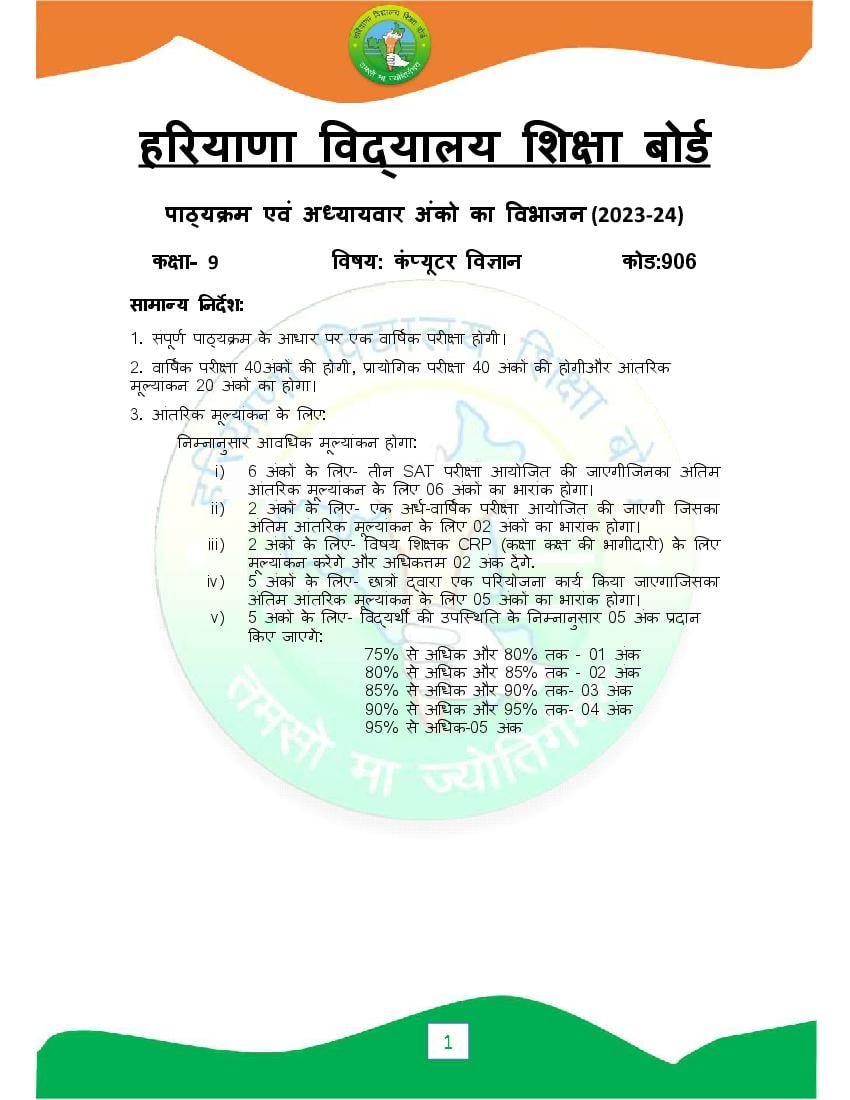
पा य म एवं अ यायवार अंको का वभाजन (2023-24)
क ा- 9 वषय: कं यूटर व ान कोड:906
सामा य नदश:
1. संपण
ू पा य म के आधार पर एक वा षक पर ा होगी।
2. वा षक पर ा 40अंक क होगी, ायो गक पर ा 40 अंक क होगीऔर आंत रक
मू यांकन 20 अंक का होगा।
3. आंत रक मू यांकन के लए:
न नानुसार आव धक मू यांकन होगा:
i) 6 अंक के लए- तीन SAT पर ा आयोिजत क जाएगीिजनका अं तम
आंत रक मू यांकन के लए 06 अंक का भारांक होगा।
ii) 2 अंक के लए- एक अध-वा षक पर ा आयोिजत क जाएगी िजसका
अं तम आंत रक मू यांकन के लए 02 अंक का भारांक होगा।
iii) 2 अंक के लए- वषय श क CRP (क ा क क भागीदार ) के लए
मू यांकन करगे और अ धक म 02 अंक दगे.
iv) 5 अंक के लए- छा वारा एक प रयोजना काय कया जाएगािजसका
अं तम आंत रक मू यांकन के लए 05 अंक का भारांक होगा।
v) 5 अंक के लए- व यथ क उपि थ त के न नानुसार 05 अंक दान
कए जाएग:
75% से अ धक और 80% तक - 01 अंक
80% से अ धक और 85% तक - 02 अंक
85% से अ धक और 90% तक- 03 अंक
90% से अ धक और 95% तक- 04 अंक
95% से अ धक-05 अंक
1
Page 2
म यू नट अंक
सं या
1 कं यट
ू र स टम 10
2 कं यूटर सॉ टवेयर 05
3 वड ोसेसर(ऍमएस वड) 10
4 ेडशीट(ऍमएस ए सेल) 10
5 ेजटे शन सॉ टवेयर (ऍमएस पॉवरपॉइंट) 05
कुल 40
ायो गक पर ा 40
आंत रक मू यांकन 20
कुल योग 100
ायो गक पर ा के लए योज़ना
म यू नट अंक
सं या
1 वंडोज ऑपरे टंग स टम 05
2 वड ोसेसर (ऍमएस वड) 10
3 ेडशीट (ऍमएस ए सेल) 10
4 ेजटे शन सॉ टवेर (ऍमएस पॉवरपॉइंट) 05
5 रपोट फाइल: वड ोसेसर , ेडशीट और ेजटे शन टूल के कम से कम 05
चार द तावेज़ होने चा हएं
6 मौ खक पर ा। 05
कुल योग 40
2
Page 3
ृ पा य म (2023-24)
क ा- 9 वषय: कं यट
ू र व ान कोड:906
यू नट I: कं यट
ू र स टम
कं यूटर का प रचय:कं यूटर का इ तहास, कं यूटर क पीढ़ , कं यूटर क प रभाषा, कं यूटर
क वशेषताएं(लाभव सीमाएं), लाक डाय ाम और कं यट ू र स टम के घटक:CPU( ALU&
CU), मैमोर , I/O यू नटकं यूटर के अनु योग, कं यूटर के कार
इनपुट/आउटपुट डवाइस
इनपटु डवाइस:क बोड,माउस, कैनर, ओसीआर(OCR) ,ऍमआईसीआर(MICR),लाइट पेन,
बीसीआर(BCR),ओऍमआर(OMR), ै क बॉल, माइ ोफोन.
आउटपट
ु डवाइस: मॉ नटर, पीकर, ोजे टर, लॉटर, ट
ं र और उसके कार .
कं यूटर मैमोर : कं यूटर मैमोर क प रभाषा, मैमोर क इकाइयां , मैमोर के कार
ाइमर मैमोर : रै म(RAM) और रोम(ROM)
सेकडर मैमोर : हाड ड क, लॉपी ड क, सीडी(CD), बीआरडी(BRD) , डीवीडी(DVD), पैन
ाइव, मैमोर काड
यू नट II: कं यट
ू र सॉ टवेयर
सॉ टवेयर का वग करण: स टम सॉ टवेयर(ऑपरे टंग
स टम,क पाइलर,इंटर ेटर,असे बलर),ए ल केशन सॉ टवेयर, यू ट लट सॉ टवेयर
ऍमएस वंडो2010: डे कटॉप, टा कबार, आइकॉन, द स पीसी, र सायकल बन, ,फाइल
ए स लोरर,एज ाउज़र , फाइल फो डर बनाने के चरण,फाइल/फो डर हटाने के
चरण,फाइल/फो डर र टोर करने के चरण,फाइल/फो डर के नाम बदलने के
चरण,कट,कॉपी,पे ट,थी स और बैक ाउं ड
यू नट III : ऍमएस वड2010
ऍमएस वड का प रचय:वड ोसे सर,ऍमएस वड वंडो के घटक, वड डॉ यूमट बनाना और
सहे जना
ऍमएस वड म फोमाि टं ग : फॉ ट साइज़, फॉ ट टाइल (B, I, U) , फॉ ट टाइप, फॉ ट
कलर, से टंग फॉ ट इफ़े ट,पैरा ाफ एलाइनमट, से टंग इंड स , बॉडस और शे डंग
तीक ,आकृ तय ,ि लपाट,वड आट,हैडर/फुटर, पेज नंबर और टे बल इ सट करना. बल ु ेट और
नंब रंग
पे लंग और ामर, फाइंड और र लेस, पेज सेटअप, ट
ं ी यू, डॉ यूमट ट
ं करना
यू नट IV:ऍमएस ए सेल2010
ऍमएस ए सेलका प रचय: ेडशीट,ऍमएस ए सेल वंडो के घटक, वकबुक, वकशीट,
3
Page 4
सहे जना. नंबर,टे ट,फोमुले , डेट/टाइम वकशीट म डालना, वकशीट को ए डट और फॉमट
करना, सेल ,कॉलम,रो को हटाना और डालना
चाट:चाट क प रभाषा, ए बेडेड चाट और चाट शीट, चाट के कार ,चाट के घटक,ऍमएस
ए सेल म चाट बनाना ,चाट फॉमट करना , वकशीट/चाट शीट ट
ं करना
फं शन : SUM() ,Average() , MAX(), MIN() ,Count()
यू नट V:ऍमएस पॉवरपॉइंट
पॉवरपॉइंट का प रचय: ेजटे शन सॉ टवेयर,ऍमएस पॉवरपॉइंट वंडो के घटक, लाइड के मूल
त व. ेजटे शन बनाना और सहे जना , व भन कार के लाइड लेआउट, लाइड के व भन
कार के यू: नामल यू(आउटलाइन यऔ ू र लाइड यू ), लाइड सॉटर यू, लाइड शो यू.
लाइड को फॉमट करना : लाइड लेआउट और लाइड डजाईन बदलना , कलर क म
बदलना , लाइड बैक ाउं ड बदलना ,ि लप आट, प चर,शेप , हैडर/फुटर
और लाइड नंबर डालना
एनीमेशन क म और साउं ड इफ़े ट जोड़ना, लाइड शो बनाना और दे खना
4
Page 5
क ा- 9 वषय: कं यट
ू र व ान कोड:906
वषय- व तु श ण दोहराई योगा मक
कालांश कालांश काय
अ ैल कं यट
ू र स टम: 14 7
कं यूटर का प रचय
मई कं यूटर स टम: 16 7
इनपुट/आउटपुट डवाइस
कं यट
ू र मैमोर
जन
ू
जुलाई कं यूटर सॉ टवेयर: 12 5 6
सॉ टवेयर का वग करण
ऍमएस वंडोस2010
अग त ऍमएस-वड: 12 4 8
ऍमएस वड का प रचय
ऍमएस वड म फोमाि टं ग
सतंबर ऍमएस-वड 12 4 6
पे लंग और ामर, फाइंड
और र लेस, पेज सेटअप,
ट
ं ी यू, डॉ यूमट ट
ं
करना
अध-वा षक पर ा
अक् तूबर ऍमएस ए सेल: 12 4 7
ऍमएस ए सेलका प रचय
नवंबर ऍमएस ए सेल: 12 4 5
चाट
फं शन
5
Page 6
पॉवरपॉइंट का प रचय
लाइड को फॉमट करना
जनवर शीतकाल न अवकाश 5 2 2
ऍमएस पॉवरपॉइंट
एनीमेशन कम और
साउं ड इफ़े ट जोड़ना,
लाइड शो बनाना और
दे खना
वा षक ायो गक पर ा
फ़रवर दोहराई
माच वा षक पर ा
नोट:
वषय श क को सलाह द जाती है क वे छा को श दावल या अवधारणा क
प टता को बढ़ाने के लए अ याय म उपयोग क जाने वाल श दावल प रभाषा मक
श द क नोटबुक तैयार करने के लए नद शत कर।
छा को श क क सु वधानुसार ोजे ट वक दया जानाहै । ( अ धमानत: दस बर
के मह ने म)
नधा रत पु तक:
6
Page 7
योग
वंडोज ऑपरे टंग स टम:
माउस और क बोड का उपयोग करके फाइल स टम का ने वगेशन
फाइल/फो डर पर बे सक स टम ऑपरे शन:
एट
र नेम
कट/कॉपी/पे ट
डल ट
ऍमएस वड:
नीचे दए हुये टू स को शा मल करके ऍमएस वड डॉ यूमट बनाना
टे ट और पैरा ाफ क ए ड टंग और फोम टंग
पेज और पैरा ाफ सेटअप
प चर,शेपस , स ब सऔर वड आट
ऍमएस ए सेल:
नीचे दए हुये टू स को शा मल करकेवकशीट बनाना
डाटा और सेल को फॉमट करना
व भन कार के चाट बनाना:लाइन ,बार,ए रया, पाई
फं शन : Min(),Max(),Average(),Count(),Sum()
ऍमएस पॉवरपॉइंट:
नीचे दए हुये टू स को शा मल करकेवकशीट बनाना
लाइड को ए डट और फॉमट करना
साउं ड और प चर डालना
व न भाव के साथ प चर और टे ट को ए नमेट करना
7
Page 8
क ा- 9 वषय: कं यट
ू र व ान कोड:906
न का अंक सं या ववरण कुल अंक
कार
व तु न ठ न 1 10 4 बहु- वक पीय न 10
2 र त थान भरो न
2 अ भकथन-कारण
2 सह /गलत
अत 2 5 कसी एक न म आंत रक वक प 10
लघु रा मक दया जाएगा
न
लघु रा मक 3 4 कसी एक न म आंत रक वक प 12
न दया जाएगा
द घ उ रा मक 4 2 सभी न म आंत रक वक प 8
न दया जाएगा
कुल 21 40
8
Page 9
Syllabus and Chapter wise division of Marks (2023-24)
Class- 9 Subject: Computer Science Code:906
General Instructions:
1. There will be an Annual Examination based on the entire syllabus.
2. The Annual Examination will be of 40 marks, Practical Examination will be
of 20 marks and 20 marks weightage shall be for Internal Assessment.
3. For Internal Assessment:
There will be Periodic Assessment that would include:
i) For 6 marks- Three SAT exams will be conducted and will have
a weightage of 06 marks towards the final Internal Assessment.
ii) For 2 marks- One half yearly exam will be conducted and will
have a weightage of 02 marks towards the final Internal
Assessment.
iii) For 2 marks- Subject teacher will assess and give maximum
02 marks for CRP (Class Room Participation).
iv) For 5 marks- A project work to be done by students and will
have a weightage of 05 marks towards the final Internal
Assessment.
vi) For 5 marks- Attendance of student will be awarded 05 marks
as:
Above 75% to 80% - 01 marks
Above80% to 85% - 02 marks
Above85% to 90% - 03 marks
Above90% to 95% - 04 marks
Above 95% - 05 marks
9
Page 10
Class- 9 Subject: Computer Science Code: 906
Sr. No. UNIT Marks
1 Computer System 10
2 Computer Software 05
3 Word Processor(MS Word) 10
4 Spreadsheet (MS Excel) 10
5 Presentation Software (MS Powerpoint) 05
Total 40
Practical Examination 40
Internal Assessment 20
Grand Total 100
Scheme for Practical Examination
Sr. No. UNIT Marks
1 Windows Operating system 05
2 Word Processor(MS Word) 10
3 Spreadsheet (MS Excel) 10
4 Presentation Software (MS Powerpoint) 05
5 Report File: Containg 4 documents each with MS Word , 05
Excel and Powerpoint
6 Viva 05
Total 40
10
Page 11
Class- 9 Subject: Computer Science Code: 906
Unit I:Computer System
Introduction to Computer: History of computer, Generations of Computer,
Definition of Computer, Characteristics of Computer(advantages and
limitations), Block Diagram and Components of a Computer System-
CPU(ALU & CU), Memory, I/O unit Applications of Computer, Types of
Computers.
Input/output Devices:
Input devices:Keyboard, Mouse, Scanner, OCR, MICR,Light Pen, Bar code
Reader, OMR, Track Ball,Microphone.
Output Devices: Monitor, Speaker, Projector, Plotter, Printer and its type.
Computer Memory:
Definition of computer memory, Units of Memory, Types of Memory, Primary
Memory: RAM and ROM
Secondary Memory: Hard Disk, Floppy Disk, CD, BRD, DVD, Pen drive,
Memory Card.
Unit II: Computer Software
Classification of software: system software(Operating system, Compiler,
Interpreter, Assembler)Application Software, Utility Software.
MS window 2010: Desktop, Taskbar, Icons, This PC, Recycle Bin, Taskbar
,File Explorer,Edge Browser,Steps to Create New File/ Folder, Steps to delete
File/Folder ,Steps to restore File/Folder , Steps to Rename File/Folder, Cut
,Copy ,Paste, Themes and background
Unit III: MS-Word2010
Introduction to MS Word: word Processor, MS Word Window components,
creating and saving a document
11
Page 12
Colour, Setting font effects, Paragraph Alignment, Setting Indents , Borders and
Shading,Bulleted and Numbered list
Inserting symbols, Shapes, ClipArt, word Art, Headers and Footers, Page
Number and tables.
Spellingand Grammar, Find and Replace, Page Setup, Print Preview, Printing a
document
Unit IV: MS-Excel2010
Introduction to MS Excel: Spreadsheet, MS Excel Window components,
workbook, worksheet, cell, cell Address, Cell pointer, Active cell, range of
cells, Creating and saving a worksheet. Enter numbers, text, formulae and
Date/Time, Editing and formatting worksheet, insert and delete cells, rows and
columns.
Charts:Definition of chart,embedded charts and chartsheet,Types of
charts,components of chart,creating chart in MS Excel,Printing
worksheet/Charts.
Functions: Sum(),Average(),Max(),Min(), Count( )
Unit V: MS Power-Point2010
Introduction to Power-Point:Presentation software, MS PowerPoint Window
components, Basic elements of a slide,Creating and saving a Presentation,
Different types of slide layouts, Different views of a slide: normal (outline view
and slide view), slide sorter view, Slide Show view.
Formatting a slide : Changing slide design and slide layout , Changing colour
schemes,Changing Slide Background Inserting ClipArt, Pictures, Shapes,
Headers /Footers and slide numbers.
Adding Animations Schemes and sound effects, Creating and viewing a slide
show.
12
Page 13
Class- 9 Subject: Computer Science Code: 906
Month Subject- content Teaching Revision Practical
Periods Periods Work
April Computer System: 14 7
Introduction to
Computer
May Computer System: 16 7
Input/output devices
Computer memory
June
Summer Vacation
July Computer Software: 12 5 6
Classification of
software
MS windows 2010
August MS-Word: 12 4 8
Introduction to MS
Word
Formatting in MS
Word
September Half-Yearly Exams 12 4 6
MS Word:
Spelling and
grammar,Find and
Replace, Page Setup,
Print Preview,
Printing a document
October MS-Excel: 12 4 7
Introduction to MS
Excel
13
Page 14
Charts
Functions
December MS Power-Point: 13 4 6
Introduction to
Power-Point
Formatting a slide
January Winter Vacation 5 2 2
MS Power-Point :
Adding Animations
Schemes and sound
effects, Creating and
viewing a slide
show.
February Revision
March Annual Examination
Note:
Subject teachers are advised to direct the students to prepare
notebook of the Terminology/Definitional Words used in the lessons
for enhancement of vocabulary or clarity of the topic.
Project work must be given to the students as per the convenience of
the teacher. ( Preferably in the month of December)
14
Page 15
Practical
Windows Operating System
Navigation of the file system using a mouse and keyboard.
Basic system operation on File/Folder:
Create
Rename
Cut/Copy/Paste
Delete
MS Word Problems in MS Word incorporating the tools given below
Editing and Formatting text and Paragraph
Page and Paragraph setup
Inserting Pictures ,shapes , Symbols and WordArt
MS Excel
Problems in Spreadsheet incorporating the tools given below
Formatting cells and Data
Create different types of charts :Line ,Bar, Area, Pie
Create a simple spreadsheet based on Functions :
Min(),Max(),Average(),Count(),Sum()
MS PowerPoint Creating PowerPoint Presentation with Slides incorporating
the tools given below
Editing and Formatting slides
Inserting Pictures and Sounds
Animating Pictures and text with sound effects
15
Page 16
Class- IX Subject: CPU Code:906
Type of Marks Number Description Total
Question Marks
Objective 1 10 4 Multiple Choice 10
Type Questions2Fill in the blank
Questions 2 Assertion Reason
2 True/False
Very Short 2 5 Internal choice will be given 10
Answer type in any one question.
Questions
Short Answer 3 4 Internal choice will be given 12
type in any one question.
Questions
Essay type 4 2 Internal choice will be 8
Questions given in all the questions
Total 21 40
16
Document Details
| Board / Org | Haryana Board |
| Exam | Class 9 |
| Type | Syllabus |
| Pages | 16 |
| Updated | 30 Apr 2026 |