HP Board Class 10 Model Question Paper 2022 Computer Science Term 2
Finished viewing? Save it for later —
Download HP Board Class 10 Model Question Paper 2022 Computer Science Term 2 (PDF · 6 pages)About HP Board Class 10 Model Question Paper 2022 Computer Science Term 2
HP Board Class 10 Model Question Paper 2022 Computer Science Term 2 is available here for free download. Published by Himachal Pradesh Board for Class 10, this sample paper can be viewed online or downloaded as a PDF (6 pages). Candidates preparing for Class 10 can use HP Board Class 10 Model Question Paper 2022 Computer Science Term 2 to understand the exam pattern, the type of questions asked, and the overall difficulty level.
Frequently Asked Questions
How can I download HP Board Class 10 Model Question Paper 2022 Computer Science Term 2?
Open this page and click the Download button to save HP Board Class 10 Model Question Paper 2022 Computer Science Term 2 as a PDF. It is completely free on AglaSem Docs.
Is HP Board Class 10 Model Question Paper 2022 Computer Science Term 2 free to download?
Yes. HP Board Class 10 Model Question Paper 2022 Computer Science Term 2 can be viewed online and downloaded as a PDF free of cost on AglaSem Docs.
How many pages does HP Board Class 10 Model Question Paper 2022 Computer Science Term 2 have?
HP Board Class 10 Model Question Paper 2022 Computer Science Term 2 contains 6 pages, which you can read online or download together as a single PDF.
Where can I find more Class 10 study material?
You can find more Class 10 question papers, sample papers, syllabus, and answer keys on AglaSem Docs.
HP Board Class 10 Model Question Paper 2022 Computer Science Term 2 – Text
Read the full text of this sample paper below — useful to quickly search, copy and reference the content online without downloading the PDF.
📄 View text version (6 pages)
Page 1
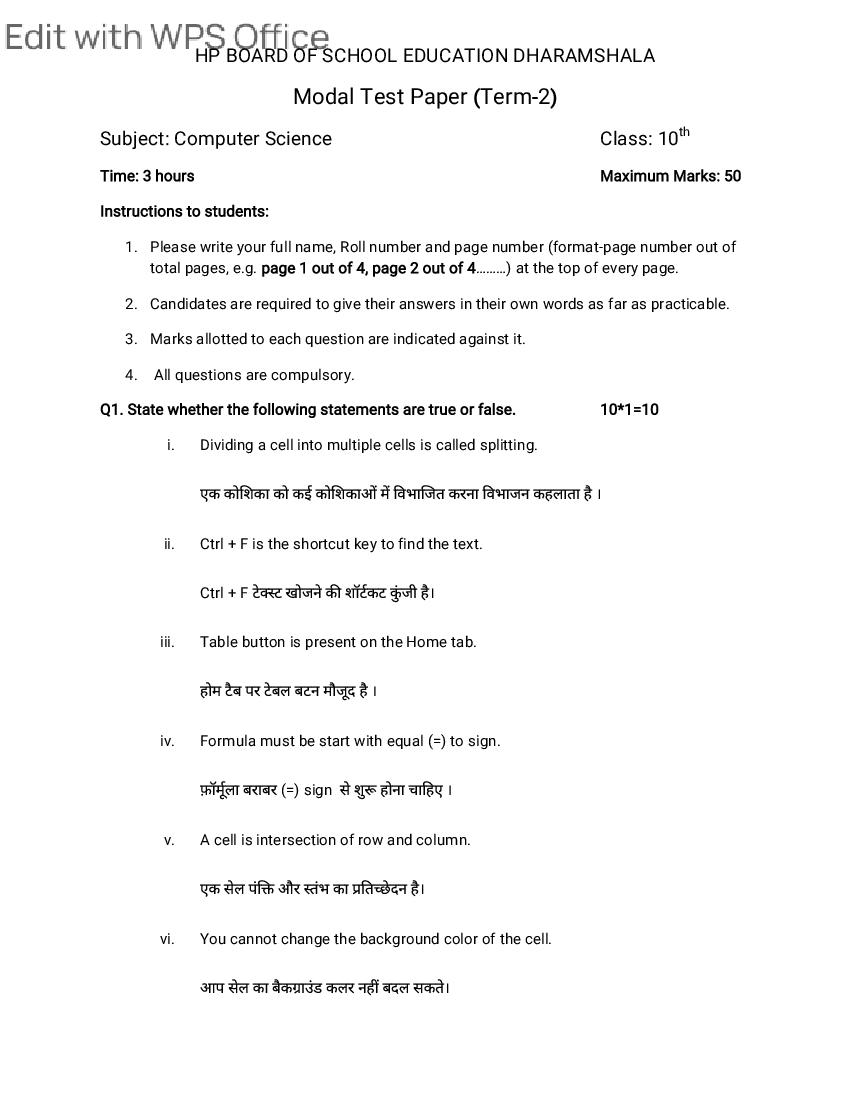
Modal Test Paper (Term-2)
Subject: Computer Science Class: 10th
Time: 3 hours Maximum Marks: 50
Instructions to students:
1. Please write your full name, Roll number and page number (format-page number out of
total pages, e.g. page 1 out of 4, page 2 out of 4………) at the top of every page.
2. Candidates are required to give their answers in their own words as far as practicable.
3. Marks allotted to each question are indicated against it.
4. All questions are compulsory.
Q1. State whether the following statements are true or false. 10*1=10
i. Dividing a cell into multiple cells is called splitting.
एक को शका को कई को शका म वभा जत करना वभाजन कहलाता है ।
ii. Ctrl + F is the shortcut key to find the text.
Ctrl + F टे ट खोजने क शॉटकट कुं जी है।
iii. Table button is present on the Home tab.
होम टै ब पर टे बल बटन मौजूद है ।
iv. Formula must be start with equal (=) to sign.
फ़ॉमूला बराबर (=) sign से शु होना चा हए ।
v. A cell is intersection of row and column.
एक सेल पं और तंभ का त े दन है।
vi. You cannot change the background color of the cell.
आप सेल का बैक ाउं ड कलर नह बदल सकते।
Page 2
ेडशीट म एक से अ धक वकशीट ह।
viii. Plus (+) operator is used to add the values of cells.
लस (+) ऑपरेटर का उपयोग को शका के मू य को जोड़ने के लए कया जाता है।
ix. Min () is used to find the largest value.
Min ( ) का उपयोग सबसे बड़ा मान ात करने के लए कया जाता है।
x. You can change the color of sheet tab.
आप शीट टै ब का रंग बदल सकते ह।
Q2. Multiple Choice Questions: 10*1=10
i. Bullet and Numbering button/option is present on the ________tab.
बुलेट और नंब रग बटन/ वक प ________टै ब पर मौजूद है।
a. Home b. Insert c. Layout d. none of these
a. ह◌ोम b. Insert c. लेआउट d. इनम से कोई नह
ii. Combining the two cells of a table into single cell is called _______.
एक टे बल के दो से स को सगल सेल म मलाना _______ कहलाता है।
a. Splitting b. Merging c. Auto fill d. None of these
a. बंटवारा b. वलय c. ऑटो भरण d. इनम से कोई नह
iii. _________ Option helps you to locate specific text in a document.
___________ वक प आपको कसी द तावेज़ म व श टे ट का पता लगाने म मदद करता है।
a. Replace b. Font c. Find d. None of thesethe
a. बदल b. फ़ॉ ट c. फाइंड d. इनम से कोई नह
Page 3
ए सेल शीट म येक ________ का एक व श पता होता है।
a. Cell b. Row c. Column d. All of thesethe
a. शैल b. रौ c. कोलम d. इनम से कोई नह
v. An excel workbook consist of ________.
एक ए सेल वकबुक म ________ होता है।
a. Worksheet b. Rows c. Columns d. Formula
a. बरक शीट् b. रौ c. कोलम d. फारमूला
vi. __________ Alignment is used to align the text right side.
__________ संरेखण का उपयोग टे ट को दा ओर संरे खत करने के लए कया जाता है।
a. Left b. Right c. Center d. All of these
a. ले ट b. राईट c. सटर d. इनम से कोई नह
vii. __________ is the shortcut key to bold the text in MS-Excel.
__________ MS-Excel म टे ट को बो करने क शॉटकट कुं जी है।
a. Ctrl + P b. Ctrl +B c. Alt + P d. Alt +B
a. Ctrl + P b. Ctrl +B c. Alt + P d. Alt +B
viii. __________ is the shortcut key to underline text in MS-Excel.
__________ MS-Excel म टे ट को रेखां कत करने क शॉटकट कुं जी है।
a. Ctrl + F b. Ctrl +U c. Alt + F d. Alt +U
Page 4
ix. ___________ Option is used to change the color the text.
___________ वक प का योग टे ट का रंग बदलने के लए कया जाता है।
a. Text color b. Cell color c. Cell Border d. None of these
a. टे सट कलर b. शैल कलर c. शैल बोरडर d. इनम से कोई नह
X. ________ Function is used to add the values of a cell range.
________ फ़ं न का उपयोग सेल रज के मान को जोड़ने के लए कया जाता है।
a. MIN () b. AVG () c. IF () d. SUM ()
a. MIN () b. AVG () c. IF () d. SUM ()
Q3.
a. What do you mean by bullets and numbers? 2
बुलेट और नंबर से आप या समझते ह?
b. What is Spreadsheet? Explain. 2
ेडशीट या है? ा या क जये |
c. Write the steps to insert a table in the document. 3
द तावेज़ म ता लका स म लत करने के चरण ल खए।
OR
What do you mean by merging and splitting of cells in a table? Explain.
ता लका म सेल के वलय और वभाजन से आप या समझते ह? ा या क जये |
Q4.
a. Write the steps to insert symbols in MS-Word. 3
MS-Word म तीक को स म लत करने के चरण ल खए |
Page 5
MS-Excel म फ़ाइल बनाने और सहेजने के चरण ल खए।
c. What are different types of alignments in MS-Excel? 3
MS-Excel म व भ कार के alignments या ह?
Or
Write the steps to change font type and font size in MS-Excel.
MS-Excel म फॉ ट टाइप और फॉ ट साइज बदलने के टे स ल खए।
Q5.
a. Write the steps to delete row and column in MS-Excel? 4
MS-Excel म row और कॉलम डलीट करने के टे स ल खए?
b. What is find and replace option in MS-Word? 5
MS-Word म फाइंड एंड र लेस ऑ शन या है?
c. Explain the following statistical functions in MS-Excel: 5
MS-Excel म न न ल खत सां यक य काय क ा या कर:
SUM () AVG () MAX () IF ()
OR
Explain different types of operator (+, - , *, /) with example.
fofHkUu izdkj ds vkWijsVj ¼+,-,X,/½ dh mnkgj.k lfgr O;k[;k djsaA
Page 6
Document Details
| Board / Org | Himachal Pradesh Board |
| Exam | Class 10 |
| Type | Sample Paper |
| Pages | 6 |
| Updated | 01 May 2026 |