CBSE Class 10 Foundation of Information Technology Question Paper 2019 set 53 Solutions
Finished viewing? Save it for later —
Download CBSE Class 10 Foundation of Information Technology Question Paper 2019 set 53 Solutions (PDF · 8 pages)About CBSE Class 10 Foundation of Information Technology Question Paper 2019 set 53 Solutions
CBSE Class 10 Foundation of Information Technology Question Paper 2019 set 53 Solutions is available here for free download. Published by CBSE for Class 10, this solution can be viewed online or downloaded as a PDF (8 pages). Candidates preparing for Class 10 can use CBSE Class 10 Foundation of Information Technology Question Paper 2019 set 53 Solutions to understand the exam pattern, the type of questions asked, and the overall difficulty level.
Frequently Asked Questions
How can I download CBSE Class 10 Foundation of Information Technology Question Paper 2019 set 53 Solutions?
Open this page and click the Download button to save CBSE Class 10 Foundation of Information Technology Question Paper 2019 set 53 Solutions as a PDF. It is completely free on AglaSem Docs.
Is CBSE Class 10 Foundation of Information Technology Question Paper 2019 set 53 Solutions free to download?
Yes. CBSE Class 10 Foundation of Information Technology Question Paper 2019 set 53 Solutions can be viewed online and downloaded as a PDF free of cost on AglaSem Docs.
How many pages does CBSE Class 10 Foundation of Information Technology Question Paper 2019 set 53 Solutions have?
CBSE Class 10 Foundation of Information Technology Question Paper 2019 set 53 Solutions contains 8 pages, which you can read online or download together as a single PDF.
Where can I find more Class 10 study material?
You can find more Class 10 question papers, sample papers, syllabus, and answer keys on AglaSem Docs.
CBSE Class 10 Foundation of Information Technology Question Paper 2019 set 53 Solutions – Text
Read the full text of this solution below — useful to quickly search, copy and reference the content online without downloading the PDF.
📄 View text version (8 pages)
Page 1
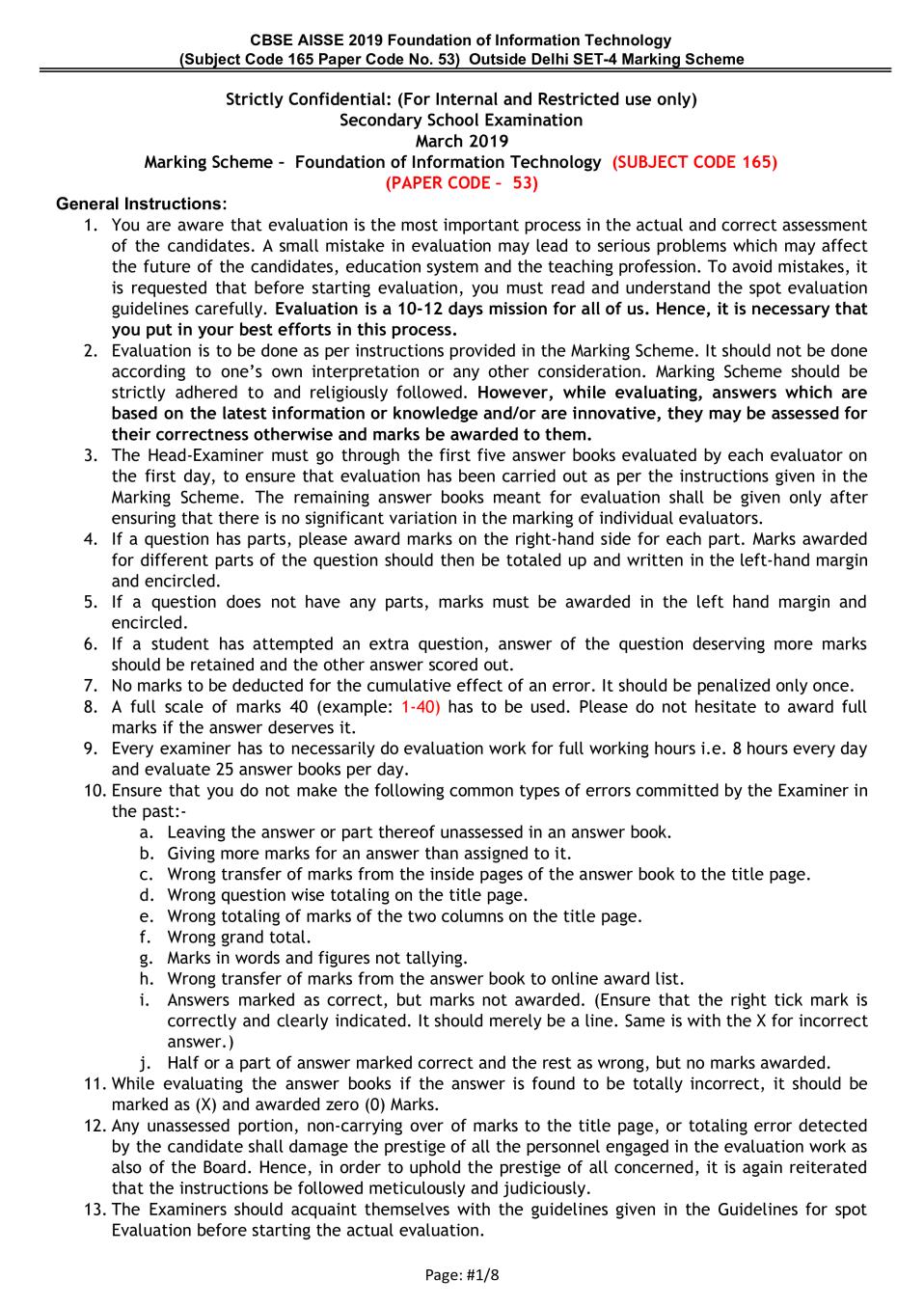
Secondary School Examination
March 2019
Marking Scheme – Foundation of Information Technology (SUBJECT CODE 165)
(PAPER CODE – 53)
General Instructions:
1. You are aware that evaluation is the most important process in the actual and correct assessment
of the candidates. A small mistake in evaluation may lead to serious problems which may affect
the future of the candidates, education system and the teaching profession. To avoid mistakes, it
is requested that before starting evaluation, you must read and understand the spot evaluation
guidelines carefully. Evaluation is a 10-12 days mission for all of us. Hence, it is necessary that
you put in your best efforts in this process.
2. Evaluation is to be done as per instructions provided in the Marking Scheme. It should not be done
according to one’s own interpretation or any other consideration. Marking Scheme should be
strictly adhered to and religiously followed. However, while evaluating, answers which are
based on the latest information or knowledge and/or are innovative, they may be assessed for
their correctness otherwise and marks be awarded to them.
3. The Head-Examiner must go through the first five answer books evaluated by each evaluator on
the first day, to ensure that evaluation has been carried out as per the instructions given in the
Marking Scheme. The remaining answer books meant for evaluation shall be given only after
ensuring that there is no significant variation in the marking of individual evaluators.
4. If a question has parts, please award marks on the right-hand side for each part. Marks awarded
for different parts of the question should then be totaled up and written in the left-hand margin
and encircled.
5. If a question does not have any parts, marks must be awarded in the left hand margin and
encircled.
6. If a student has attempted an extra question, answer of the question deserving more marks
should be retained and the other answer scored out.
7. No marks to be deducted for the cumulative effect of an error. It should be penalized only once.
8. A full scale of marks 40 (example: 1-40) has to be used. Please do not hesitate to award full
marks if the answer deserves it.
9. Every examiner has to necessarily do evaluation work for full working hours i.e. 8 hours every day
and evaluate 25 answer books per day.
10. Ensure that you do not make the following common types of errors committed by the Examiner in
the past:-
a. Leaving the answer or part thereof unassessed in an answer book.
b. Giving more marks for an answer than assigned to it.
c. Wrong transfer of marks from the inside pages of the answer book to the title page.
d. Wrong question wise totaling on the title page.
e. Wrong totaling of marks of the two columns on the title page.
f. Wrong grand total.
g. Marks in words and figures not tallying.
h. Wrong transfer of marks from the answer book to online award list.
i. Answers marked as correct, but marks not awarded. (Ensure that the right tick mark is
correctly and clearly indicated. It should merely be a line. Same is with the X for incorrect
answer.)
j. Half or a part of answer marked correct and the rest as wrong, but no marks awarded.
11. While evaluating the answer books if the answer is found to be totally incorrect, it should be
marked as (X) and awarded zero (0) Marks.
12. Any unassessed portion, non-carrying over of marks to the title page, or totaling error detected
by the candidate shall damage the prestige of all the personnel engaged in the evaluation work as
also of the Board. Hence, in order to uphold the prestige of all concerned, it is again reiterated
that the instructions be followed meticulously and judiciously.
13. The Examiners should acquaint themselves with the guidelines given in the Guidelines for spot
Evaluation before starting the actual evaluation.
Page: #1/8
Page 2
title page, correctly totaled and written in figures and words.
15. The Board permits candidates to obtain a photocopy of the Answer Book on request in an RTI
application and also separately as a part of the re-evaluation process on payment of the
processing charges.
Specific Instructions:
1. All answers provided in the Marking scheme are SUGGESTIVE.
2. Examiners are requested to accept all possible alternative correct answer(s).
3. Wherever HTML Tags are asked – ignore the format/additional arguments if so given in the
answer(s)
4. Wherever multiple answers are suggested, they are in order of appropriateness
FOUNDATION OF INFORMATION TECHNOLOGY
SECTION A
1 Multiple Choice Questions:
(a) Which of the following are not the attribute of <A> tag? 1
(i) NAME
(ii) TITLE
(iii) HREF
(iv) SRC
Ans (iv) SRC OR (ii) TITLE OR (iv) and (ii)
(1 Mark for writing correct answer)
(b) Heading tags in HTML are 1
(i) H1…..H6
(ii) H1….H5
(iii) H1….H10
(iv) H1….H8
Ans (i) H1….H6
(1 Mark for writing correct answer)
(c) Which of the following is/are a popular Web Browser(s)? 1
(i) Firefox
(ii) Safari
(iii) Navigator
(iv) All of the above
Ans (iv) all of the above (or) (i) or (ii) or (iii)
(1 Mark for writing correct answer)
(d) Which of the following is not true about XML? 1
(i) Its full form is Extensible Markup Language
(ii) New tags can be defined in XML as per the requirement
(iii) XML is used for data sharing
(iv) XML tags are not case sensitive
Ans (iv) XML tags are not case sensitive
(1 Mark for writing correct answer)
(e) M in HTML stands for 1
(i) MANAGEMENT
(ii) MARKUP
(iii) MODIFIED
iv) MACHINE
Ans (ii) MARKUP
(1 Mark for writing correct answer)
2 Mention the suitable HTML tag and the attribute to insert an image named globe.jpg 1
in the background of a webpage.
Ans Tag is <body>
Attribute is background
Page: #2/8
Page 3
<body background="globe.jpg">
(½ Mark for body tag )
(½ Mark for background attribute)
3 Write the URL of any e-governance website. 1
Ans india.gov.in, indianrail.gov.in, ssc.nic.in,
mha.nic.in,eis.ernet.in, rbi.org.in, mca.gov.in,
upsc.gov.in, incometaxindia.gov.in
OR
any URL with part extension .gov
OR
any URL with part extension .org
OR
any URL with part extension .nic
NOTE: the URL preceded with http:// or https:// or www. should be accepted
(1 Mark for writing correct answer)
4 What is the full form of URL? 1
Ans Uniform Resource Locator
(1 Mark for writing correct answer)
OR
(½ Mark for any two correct expanded words of URL)
5 Briefly discuss the role of a web browser in Internet surfing. 1
Ans A web browser is a software that navigates through world wide web and displays 1
web page
(1 Mark for writing correct answer)
OR
(1 Mark for writing answer conveying proper role of a web browser)
6 What are e-Groups? 1
Ans E-groups are online social networking services which allow a user to create, 1
post, comment and read information of their interest
(1 Mark for writing correct answer)
OR
(1 Mark for writing answer conveying proper explanation of e-Groups)
SECTION ‘B’
7 Differentiate between e-mail Spamming and Computer Worms. 2
Ans Spam: It refers to any unsolicited, unwanted email by an identified or 2
unidentified source.
Computer Worms: It is a program capable of reproducing and spreading itself to
another computer system, usually by means of a computer network. It is a type
of malware.
(1 mark for explaining e-mail spamming)
OR
(1 Mark for writing answer conveying proper explanation of spamming)
(1 mark for explaining Computer Worms)
OR
(1 Mark for writing answer conveying proper explanation of Worms)
8 Briefly explain the significance of Video Conferencing. 2
Ans. A two-way video conversation among multiple participants
(2 marks for explaining the significance of video conferencing)
OR
(2 marks for writing answer conveying similar significance)
OR
(1 mark for writing example of video conferencing such as Skype, Facetime,
Page: #3/8
Page 4
9 Shreya, has just started learning HTML.She has made a list of few HTML tags which 2
she will be using in creating a webpage but by mistake she has mentioned wrong
attributes in front of the tags.Help her in selecting correct attributes from ‘Column
B ‘ for the tag given in ‘Column A’
Column A Column B
(TAGS) (ATTRBUTES)
BODY NAME
IMG TEXT
OL ALT
A START
Ans BODY → TEXT
IMG → ALT
OL → START
A → NAME
(½ mark each)
OR
Mention any two attributes of <IMG> tag along with their significance.
Ans Any two of the following:
SRC - To locate the file or picture
ALT - To specify the alternate text
HEIGHT - To specify the height of the image
WIDTH - To specify the width of the image
ALIGN - To place the image against left /right/top/middle/bottom margin.
BORDER - To specify the border width around the image
HSPACE - To specify the whitespace on the left and right of the image
VSPACE - To specify the whitespace on the top and bottom of the image
SIZES - To specify image sizes for different page layouts
SRCSET - To specify URL of image to use in different situations
CROSSORIGIN - To allow images from 3rd party sites
USEMAP - To specify an image as a client side image map
(½ mark each for any two correct attributes)
(½ mark each for correct significance or examples of any two attributes)
10 Explain the term Data and Database Briefly. 2
Ans Data: It is raw facts and figures.
OR
Numeric/text/image/audio/video values used in computers.
Database: It is an organized collection of related data or information. It arranges
information in the form of table.
OR
Collection of data which can be accessed / managed /queried in a systematic
manner
(1 mark for writing correct explanation/definition/example of Data)
(1 mark for writing correct explanation/definition/example of Database)
OR 2
Observe the field names of a database given below in ‘Column A’ related to train
reservation. Write suitable data types for each field in front of the respective field
in ‘Column B’.
Column A Column B
(Field Name) (Data Type)
PassengerName
Page: #4/8
Page 5
Gender
MobileNo
Ans. 2
Column A Column B
(Field Name) (Data Type)
PassengerName Text /char/varchar/varchar_ignorecase
Age number/numeric/integer/decimal
Gender Text /char/ varchar/varchar_ignorecase
MobileNo numeric/integer/number/decimal/text
/varchar/varchar_ignorecase
(½ mark for correct Data type for each field)
11 Mr. Ayush Sports Captain of the school,has to display sequence of events of the 3
upcoming Annual Sports Day on the school website.Help him in writing HTML code to
create a table in HTML as shown in the given screenshot:
ANNUAL SPORTS DAY - SEQUENCE OF EVENTS
8:00 AM - 9:00 AM 9:00 AM - 1:00 PM 1:00 PM - 2:00 PM
CULTURAL EVENTS TRACK EVENTS PRIZE DISTRIBUTION
Ans. <HTML> 3
<BODY><TABLE BORDER = "1">
<TR> <TH COLSPAN= "3" > ANNUAL SPORTS DAY - SEQUENCE OF
EVENTS</TH></TR>
<TR ALIGN=”CENTER”> <TD> 8:00 AM - 9 : 00 AM</TD>
<TD> 9 : 00 AM - 1 : 00 PM</TD>
<TD> 1 : 00 PM - 2 : 00 PM</TD></TR>
<TR ALIGN="CENTER"><TD> CULTURAL EVENTS</TD>
<TD>TRACK EVENTS</TD>
<TD>PRIZE DISTRIBUTION</TD></TR>
</TABLE>
</BODY>
</HTML>
(½ mark each for table tag and border)
(½ mark for colspan with TH/TD tag)
(½ mark for TR)
(½ mark for TD)
(½ mark for proper closing of all tags)
12 Discuss the role of web servers and web clients briefly. 3
Ans. WEB SERVER: It is a computer program that serves the requested HTML pages or
web pages. It uses client /server model and world wide web’s http and serves
the files from websites to web users.
For example Apache,IIS,Sun java system .
Web client: Web browser is a web client. It is the requesting program that
navigates through the WWW and displays web pages.
For example google chrome, navigator, firefox.
Note: Examples are optional
(1½ mark each for writing role of web server and web client)
OR
(1 mark for writing a correct example of web server)
(1 mark for writing a correct example of web client)
Page: #5/8
Page 6
project.Help him in writing HTML code for the same.
ASIAN COUNTRIES AND THEIR CAPITALS
1. INDIA
o New Delhi
2. PAKISTAN
o Islamabad
3. THAILAND
o Bangkok
Ans. <HTML> 3
<BODY>ASIAN COUNTRIES AND THEIR CAPITALS<BR>
<OL>
<LI> INDIA
<UL TYPE="circle">
<LI> New Delhi
</UL><LI>PAKISTAN
<UL TYPE = "circle">
<LI>Islamabad
</UL>
<LI>THAILAND
<UL TYPE="circle">
<LI> Bangkok
</UL>
</OL>
</BODY>
</HTML>
(1 mark for proper usage of OL tag with LI)
(1 mark for proper usage of UL tag with type → attribute)
(1 mark for HTML structure with BODY and the heading)
NOTE:
● Marks to be awarded for opening multiple OL tags correctly using START
attributes
● Only ½ Mark to be given if <HTML> or <BODY> is used correctly.
14 What do you understand by the term “Computer Virus”? Mention any two symptoms 3
which may confirm the virus infection.
Ans. A computer virus is a malicious software that attaches itself to other programs
in order to alter their behaviour, often in a harmful way.
Symptoms which may confirm the virus infection (Any two):
1. An antivirus software detects the presence of a computer virus
2. Slow startup and slow computer performance
3. Files get duplicated
4. Files get deleted by itself
5. Computer shuts down by itself
6. Unexpected behaviour of any executable program
(1 mark for correct definition/explanation of computer virus)
(1 mark each for any two similar type of symptoms)
OR 3
Suggest any three precautionary measures which one should adopt while being on
the social networking websites
Ans. Precautionary measures: (Any three)
1. Regularly change the password
2. Do not post/share personal information like mobile no, address, family
details, bank details etc anywhere online.
3. Avoid responding to unknown people.
Page: #6/8
Page 7
5. Do not share or spread unconfirmed information to anyone
6. Your conversation should not hurt sentiments of any
person/group/community/institution/organisation
7. Do not get influenced by rumours spread online.
(1 mark each for writing any three correct precautionary measures)
15 Draw the XML tree for the code given below.Also identify and name the root element. 5
<LIBRARY>
<BOOKS>
<CLASSICS>
<Author>Albert Phill</Author>
<Name>Beyond the moon</Name>
</CLASSICS>
</BOOKS>
<MAGAZINE>
<SPORTS>
<Name>Sporstar</Name>
<Frequency>Fortnightly</Frequency>
</SPORTS>
</MAGAZINE>
</LIBRARY>
Ans
Root Element: LIBRARY
(½ Mark for drawing LIBRARY as root)
(½ Mark for drawing BOOKS under LIBRARY)
(½ Mark for drawing CLASSICS under BOOKS)
(½ Mark for drawing MAGAZINE under BOOKS)
(½ Mark for drawing SPORTS under MAGAZINE)
(½ Mark for drawing Author under CLASSICS)
(½ Mark for drawing Name under CLASSICS)
(½ Mark for drawing Name under SPORTS)
(½ Mark for drawing Frequency under SPORTS)
(½ Mark for writing the name of the Root element as LIBRARY)
Note: Marks not to be deducted for drawing/writing values of the XML tags
below the tag.
16 Attempt any one question out of given two:
Sushila, a web designer working with Global Designers,is supposed to design a web
page as shown below :
Page: #7/8
Page 8
the specifications as given below:
(a) Background colour of page should be pink and all the hyperlinked text should
be green in colour.
(b) Image named taj.jpg should be placed in the centre of the webpage.
(c) Heading “The Taj Mahal” should be first level of the heading and underlined.
(d) Paragraph should have following formatting styles applicable:
Colour-Blue
Size-5
Font style-Times New Roman
(e) At the bottom of the page,”Contact Us” text should be linked with
[email protected] email id.
Ans <HTML>
<BODY BGCOLOR="PINK" LINK="GREEN">
<CENTER><IMG SRC="taj.jpg"> <BR>
<H1> <U> The Taj Mahal </U></H1> </CENTER>
<P><FONT COLOR="BLUE" SIZE="5" FACE="TIMES NEW ROMAN">
The Taj Mahal is a world famous white marble monument<BR>
located on the Yamuna river bank in the Indian historical city
of Agra.</FONT></P>
<BR><A HREF="mailto:[email protected]">Contact Us </A>
</BODY> </HTML>
(½ mark for bgcolor attribute of <body> )
(½ mark for link attribute of <body>)
(½ mark for <img> → src)
(½ mark for writing <center> or attribute align = ‘middle’ in <img>)
(½ mark for <H1> tag)
(½ mark for <U> tag)
(½ mark for <font> tag with size OR text colour)
(½ mark for <font> tag with text style/face )
(½ mark for proper usage of <A> tag )
(½ mark for <html> structure )
OR 5
Differentiate between Container and Empty elements in HTML. Also give any two
examples of HTML tags from each category.
Ans HTML container elements require a starting as well as an ending tags. For
eg <html>, <head>, <body>.
Empty elements HTML empty elements require just a starting tag and not
an ending tag. e.g. <img>, <br>, <hr> etc.
(1 mark for writing the difference between Container and Empty elements)
(1 mark each for writing any two examples of Container elements)
(1 mark each for writing any two examples of Empty elements)
Page: #8/8
Document Details
| Board / Org | CBSE |
| Exam | Class 10 |
| Type | Solution |
| Pages | 8 |
| Updated | 09 Jun 2026 |