HBSE Class 9 Sample Paper 2026 Answers Computer Science
Finished viewing? Save it for later —
Download HBSE Class 9 Sample Paper 2026 Answers Computer Science (PDF · 14 pages)About HBSE Class 9 Sample Paper 2026 Answers Computer Science
HBSE Class 9 Sample Paper 2026 Answers Computer Science is available here for free download. Published by Haryana Board for Class 9, this answer key can be viewed online or downloaded as a PDF (14 pages). Candidates preparing for Class 9 can use HBSE Class 9 Sample Paper 2026 Answers Computer Science to understand the exam pattern, the type of questions asked, and the overall difficulty level.
Frequently Asked Questions
How can I download HBSE Class 9 Sample Paper 2026 Answers Computer Science?
Open this page and click the Download button to save HBSE Class 9 Sample Paper 2026 Answers Computer Science as a PDF. It is completely free on AglaSem Docs.
Is HBSE Class 9 Sample Paper 2026 Answers Computer Science free to download?
Yes. HBSE Class 9 Sample Paper 2026 Answers Computer Science can be viewed online and downloaded as a PDF free of cost on AglaSem Docs.
How many pages does HBSE Class 9 Sample Paper 2026 Answers Computer Science have?
HBSE Class 9 Sample Paper 2026 Answers Computer Science contains 14 pages, which you can read online or download together as a single PDF.
Where can I find more Class 9 study material?
You can find more Class 9 question papers, sample papers, syllabus, and answer keys on AglaSem Docs.
HBSE Class 9 Sample Paper 2026 Answers Computer Science – Text
Read the full text of this answer key below — useful to quickly search, copy and reference the content online without downloading the PDF.
📄 View text version (14 pages)
Page 1
नोट: अॊकन ननदे शों के अरावा, एक शशऺक अऩने वववेकानसु ाय भल
ू माॊकन कय सकता है ।
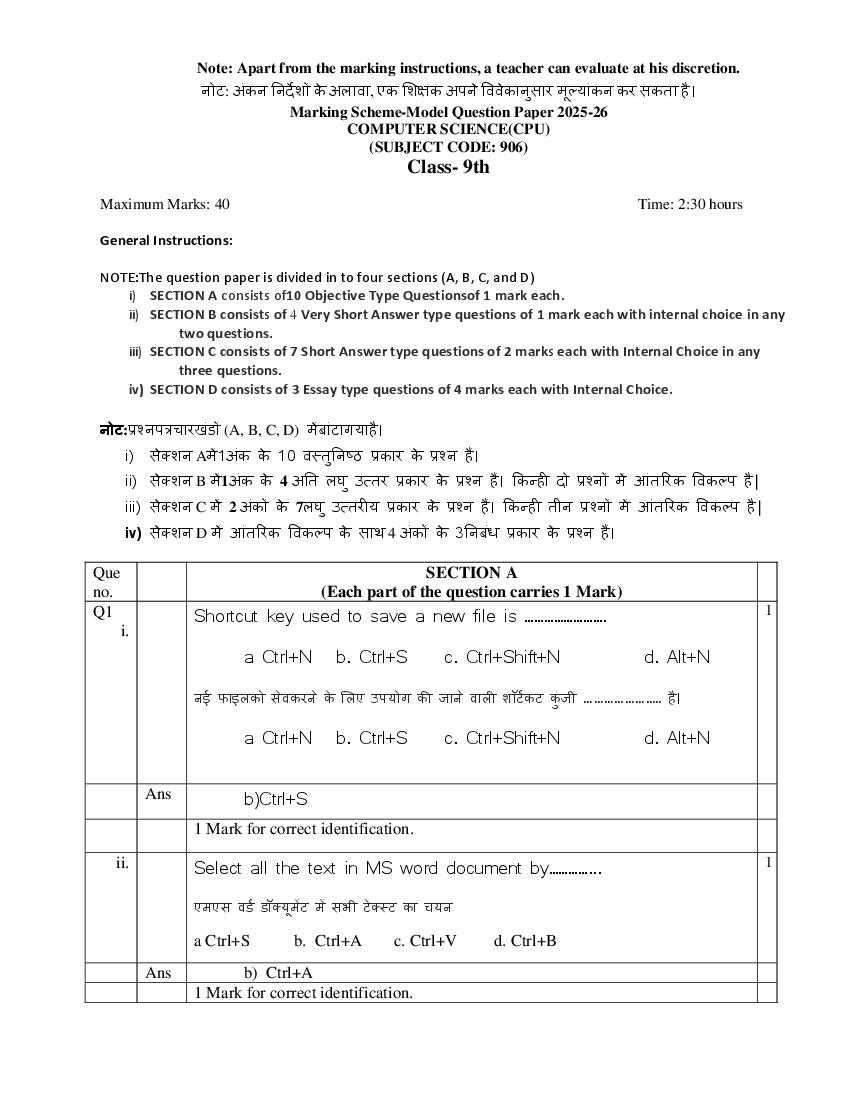
Marking Scheme-Model Question Paper 2025-26
COMPUTER SCIENCE(CPU)
(SUBJECT CODE: 906)
Class- 9th
Maximum Marks: 40 Time: 2:30 hours
General Instructions:
NOTE:The question paper is divided in to four sections (A, B, C, and D)
i) SECTION A consists of10 Objective Type Questionsof 1 mark each.
ii) SECTION B consists of 4 Very Short Answer type questions of 1 mark each with internal choice in any
two questions.
iii) SECTION C consists of 7 Short Answer type questions of 2 marks each with Internal Choice in any
three questions.
iv) SECTION D consists of 3 Essay type questions of 4 marks each with Internal Choice.
नोट:प्रश्नऩत्रचायखॊडों (A, B, C, D) भें फाॊटागमाहै ।
i) सेक्शन Aभें 1अॊक के 10 वस्तनु नष्ठ प्रकाय के प्रश्न हैं।
ii) सेक्शन B भें1अॊक के 4 अनत रघु उत्तय प्रकाय के प्रश्न हैं। ककन्ही दो प्रश्नों भें आॊतरयक ववकलऩ है |
iii) सेक्शन C भें 2 अॊकों के 7रघु उत्तयीम प्रकाय के प्रश्न हैं। ककन्ही तीन प्रश्नों भें आॊतरयक ववकलऩ है |
iv) सेक्शन D भें आॊतरयक ववकलऩ के साथ 4 अॊकों के 3ननफॊध प्रकाय के प्रश्न हैं।
Que SECTION A
no. (Each part of the question carries 1 Mark)
Q1 Shortcut key used to save a new file is ……………………. 1
i.
a Ctrl+N b. Ctrl+S c. Ctrl+Shift+N d. Alt+N
नई फाइरको सेवकयने के शरए उऩमोग की जाने वारी शॉटट कट कॊु जी ………………….. है ।
a Ctrl+N b. Ctrl+S c. Ctrl+Shift+N d. Alt+N
Ans b)Ctrl+S
1 Mark for correct identification.
ii. Select all the text in MS word document by…………... 1
एभएस वडट डॉक्मूभेंट भें सबी टे क्स्ट का चमन
a Ctrl+S b. Ctrl+A c. Ctrl+V d. Ctrl+B
Ans b) Ctrl+A
1 Mark for correct identification.
Page 2
Ctrl + I का प्रमोग ककमा जाता है ।
a. Save the Document b. Print the Document
c. Italic d. Close the Document
Ans c) Italic
1 Mark for correct answer.
iv. The shortcut key to cut a file is______. 1
ककसी फाइर को कटकयने की शॉटट कट कॊु जी _________ है ।
a. Ctrl + X b. Ctrl + P c. Ctrl + C d. Ctrl + V
Ans a) Ctrl + X
1 Mark to identify the correct option.
v File extention of MS excel is ………………………. 1
एभएसएक्सेर का फाइर एक्सटें शन…………………है ।
Ans .xlsx
1 Mark for writing the correct answer.
vi. Extension of power point presentation is________ 1
ऩावयप्वाइॊट प्रेजेंटेशन का एक्सटें शन _________है ।
Ans .pptx
1 Mark for correct fill in the blank
vii. PowerPoint program is used to create a presentation. (T/F) 1
ऩावयऩॉइॊट प्रोग्राभ का उऩमोग प्रेजेंटेशन फनाने के लरए ककमा जाता है । (सत्म/असत्म)
Ans True सत्म
1 Mark for correct Answer.
viii Speaker is an output device. (T/F) 1
ु डडवाइस है ।
स्ऩीकय एक आउटऩट (सत्म/असत्म)
Ans True सत्म
Page 3
two statements marked as Assertion (A) and Reason (R). Choose
the correct option out of the choices given below in each question:
प्रश्न ix एवं x के शरए ननदे श: नीचे ददए गए प्रश्नों भें , कथन (A) औय कायण
(R) के रूऩ भें चचह्ननत दो कथन हैं। प्रत्मेक प्रश्न भें नीचे ददए गए ववकलऩों भें
से सही ववकलऩ का चमन कीह्जए:
a )Both (A) and (R) are correct and (R) is correct explanation of
(A).
b) Both (A) and (R) are correct and (R) is not the correct
explanation of (A).
c)(A) is true but (R) is false.
d)(A) is false but (R) is true
a)(A)औय (R) दोनों सही हैं औय (R), (A) की सही व्माख्मा है ।
b)(A) औय (R) दोनों सही हैं औय (R), (A) की सही व्माख्मा नह ं है ।
c) (A) सत्म है रेककन (R) असत्म है ।
d)(A) असत्म है रेककन (R) सत्म है ।
ix Assertion: Operating system is software that enables the computer 1
hardware to communicate and operate with software.
Reason: Window is not an open-source operating system.
अभिकथन:ऑऩये दटॊग शसस्टभ एक हाडडवेमयहै जो कॊप्मट
ू य सॉफ्टवेमय को सॉफ़्टवेमय के साथ
सॊवाद कयने औय सॊचाशरत कयने भें सऺभ फनाता है ।
कारण: ववॊडो एक ओऩन सोसट ऑऩये दटॊग शसस्टभ है ।
Ans c) (A) is true but (R) is false.
c) (A) सत्म है रेककन (R) असत्म है ।
1 Mark for correct identification.
Page 4
Reason: When you move a file to recycle bin it will be immediately deleted from
computer.
अभिकथन:यीसामकर बफन का उऩमोग हटाई गई फाइरों औय फोलडयों को सॊग्रहीत कयने के शरए
ककमा जाता है ।
कारण:जफ आऩ ककसी फाइर को यीसामकर बफन भें रे जाते हैं तो वह तुयॊत कॊप्मूटय से डडरीट हो
जाती है ।
a)Both (A) and (R) are correct and (R) is correct explanation of (A).
a)(A)औय (R) दोनों सही हैं औय (R), (A) की सही व्माख्मा है ।
1 Mark for correct identification.
SECTION B
(Each part of the question carries 1 Mark)
Q2 Full form of RAM ? 1
यै भ का ऩूणरू
ट ऩ ?
OR
Full form of ALU ?
ए एर मू का ऩूणट रूऩ क्मा है ?
Ans Random Access memory
यैंडभ एक्सेस भेभोयी
OR
Arithmetic And Logic Unit
अरयथभेटटक रॉजजक मूननट
Q3 What is operating system? 1
ऑऩये दटॊग शसस्टभ क्मा है ?
OR
What is icons?
आइकन क्मा है ?
Ans An operating system (OS) is a fundamental software that acts as an interface
Page 5
ऑऩये टटॊग लसस्टभ (OS) एक लसस्टभ सॉफ्टवेमय है जो उऩमोगकताड औय कॊप्मूटय के हाडडवेमय के फीच
इॊटयपेस के रूऩ भें कामड कयता है ।
OR
An icon is a graphic image, a small picture or object that represents a file,
program, web page, or command.
आइकन एक ग्राकपक छवव, एक छोटा चचत्र मा ऑब्जेक्ट है जो ककसी फाइर, प्रोग्राभ, वेफ ऩेज मा
कभाॊड का प्रनतननचधत्व कयता है ।
Q4 Define MAX() Function? 1
MAX() फॊक्शन ऩरयबावषत कयें
Ans The MAX function is a function which finds the highest number in a range.
For example: =MAX(A1:A10)
MAX फॊक्शन एक ऐसा फॊक्शन है जो ककसी श्रेणी भें सफसे फडी सॊख्मा ऻात
कयता है ।
उदाहयण के शरए := MAX (A1:A10)
Q5 What is slide? 1
स्राइड क्मा है ?
Ans A slide is actual holder of the information in MS PowerPoint.
एक स्राइड एभएस ऩावयऩॉइॊट भें जानकायी का वास्तववक धायक है ।
SECTION C
(Each question carries 2 marks)
Q6 Write advantages of computers. 2
कॊप्मट
ू य के राब शरखखए।
OR
Write applications of computers.
कॊप्मूटय के अनुप्रमोग शरखखए।
Ans Advantages of computers: Speed , Accuracy, large Storage, versatility,Automatic
कॊप्मट
ू य के राब : गनत, सटीकता, फडा बॊडायण, फहुववऻता, स्वचाशरत
Page 6
Banking, Education, Business, Healthcare, Entertainment, Military etc.
फैंककॊ ग, शशऺा, व्माऩाय, स्वास््म सेवा, भनोयॊ जन, सैन्म आदद।
Q7 Write Steps to delete file/folder. 2
फाइर/फोल्डय हटाने के चयण शरखखए ।
OR
Define a) recycle bin b) Desktop
ऩरयबावषत कयें a) यीसामकर बफन b) डेस्कटॉऩ
Ans 1.Open location where you want to delete file/folder.
2.Click right mouse button on tha file/folder.
3.A pop-up will open.
4.Select “delete” option.
5.then OK by confirm it.
1. वह स्थान खोरें जहाॉ आऩ फाइर/फोलडय हटाना चाहते हैं।
2. फाइर/फोलडय ऩय दामाॉ भाउस फटन ह्क्रक कयें ।
3. एक ऩॉऩ-अऩ खर
ु ेगा।
4. “हटाएॉ” ववकलऩ चुनें।
5. कपय ऩह्ु ष्ट कयके ओके कयें ।
OR
a) The Recycle Bin is a place where items deleted in Windows are temporarily stored until
they are permanently deleted.
a) यीसामकर बफन वह स्थान है जहाॊ ववॊडोज़ भें डडरीट ककए गए आइटभ तफ तक अस्थामी रूऩ से
सॊग्रहीत ककए जाते हैं जफ तक कक वे स्थामी रूऩ से डडरीट न हो जाएॊ।
b) A desktop is a computer screen display area that represents the kinds of objects like
my computer ,icons, folders ,files, recycle bin etc.
Page 7
ू य स्रीन डडस्प्रे ऺेत्र है जो ववशबन्न प्रकाय की वस्तओ
ु ॊ जैसे भेया कॊप्मट
ू य,
आइकन, फोलडसट, फाइरें, यीसामकर बफन आदद का प्रनतननचधत्व कयता है ।
Q8 Write steps to create new document in MS word 2010. 2
एभएस वडड 2010 भें नमा दस्तावेज़ फनाने के चयण लरखें।
OR
What is header and footer?
हे डय औय पूटय क्मा है ?
Ans 1. Click on File Tab in MS Word 2010.
2. Select New Option.
3. A dialog box will appear.
4. Choose Blank Document option.
5. Then Press OK.
1. MS Word 2010 भें फाइर टै फ ऩय ह्क्रक कयें ।
2. नमा ववकलऩ चुनें।
3. एक डामरॉग फॉक्स ददखाई दे गा।
4. खारी दस्तावेज़ ववकलऩ चन
ु ें।
5. कपय ओके दफाएॉ।
OR
A header is area that is placed at the top of a page, while a footer is placed at the bottom, ,
of a page Typically these fields are used to enter document information, such as
document name, chapter titles, page numbers, creation date, and so on.
हे डय वह ऺेत्र होता है जो ऩष्ृ ठ के शीषट ऩय यखा जाता है , जफकक फुटय ऩष्ृ ठ के नीचे ऩय यखा जाता है ।
आम तौर पर इन ऺेत्रों का उपयोग दस्तावेज़ की जानकार डाऱने के भऱए ककया जाता है , जैसे कक
दस्तावेज़ का नाम, अध्याय का शीषषक, पष्ृ ठ संख्या, ननमाषण नतथथ और इसी तरह की अन्य
जानकार ।
Q9 Explain following functions. 2
Page 8
ननम्नलरखखत पॊक्शन को स्ऩष्ट कीजजए।
i) औसत() ii) न्मूनतभ()
Ans i) The function is used to calculate the arithmetic mean of a given set of arguments in
Excel. For example, if you have numbers in cells A1:A5 and want to find the average, you
would use the formula =AVG(A1:A5).
i) इस फॊक्शन का उऩमोग एक्सेर भें ददए गए तकों के सभह
ू के अॊकगखणतीम भाध्म की गणना
कयने के शरए ककमा जाता है ।उदाहयण के शरए, मदद आऩके कऺों A1:A5 भें सॊख्माएॊ हैं औय आऩ
उनका औसत ऻात कयना चाहते हैं, तो आऩ सत्र
ू =AVG(A1:A5) का उऩमोग कयें गे।
ii) The MIN function in Excel returns the smallest number in a set of values or a range of
cells. For example, if you have numbers in cells A1:A5 and want to find the smallest, you
would use the formula =MIN(A1:A5).
ii) एक्सेर भें MIN फॊक्शन भानों के सभह
ू मा कऺों की श्रेणी भें सफसे छोटी सॊख्मा दे ता है ।
उदाहयण के शरए, मदद आऩके ऩास सेर A1:A5 भें सॊख्माएॉ हैं औय आऩ सफसे छोटी सॊख्मा ढूॉढना
चाहते हैं, तो आऩ सत्र
ू =MIN(A1:A5) का उऩमोग कयें गे।
Q10 Define Worksheet and workbook in MS Excel. 2
एभएस एक्सेर भें वकडशीटऔय वकडफक
ु को ऩरयबावषत कयें ।
Ans A worksheet is a single file known as spreadsheet. A workbook is a collection of two or
more spreadsheets.
वकटशीट एक एकर फाइर होती है ह्जसे स्प्रेडशीट के नाभ से जाना जाता है । वकटफक
ु दो मा अचधक
स्प्रेडशीट का सॊग्रह होता है ।
Q11 What is PowerPoint ? 2
ऩावयऩॉइॊट क्मा है ?
Ans PowerPoint is a presentation software application, primarily from Microsoft, that allows
users to create visually engaging presentations using slides.
ऩावयऩॉइॊट एक प्रेजेंटेशन सॉफ्टवेमय एप्रीकेशन है , जो भख्
ु म रूऩ से भाइरोसॉफ्ट का है , जो
उऩमोगकताटओॊ को स्राइड्स का उऩमोग कयके आकषटक प्रस्तनु तकयण फनाने की अनभ
ु नत दे ता है ।
Q12 Explain i) Mouse ii) Keyboard 2
व्माख्मा कयें i) भाउस ii) कीफोडड
Page 9
cursor (pointer) on a computer screen and interact with the graphical user interface (GUI).
कॊप्मट
ू य भाउस एक छोटा, हाथ भें ऩकडा जाने वारा इनऩट
ु डडवाइस है जो उऩमोगकताटओॊ को
कॊप्मट
ू य स्रीन ऩय कसटय (ऩॉइॊटय) को ननमॊबत्रत कयने औय ग्राकपकर मज
ू य इॊटयपेस (जीमआ
ू ई) के
साथ फातचीत कयने की अनभ
ु नत दे ता है ।
A keyboard is an input device that allows you to type letters, numbers, and symbols into
your computer. A standard keyboard has 104 keys. every keyboard has a variety of keys
with unique functions.
कीफोडट एक इनऩट ु डडवाइस है जो आऩको अऩने कॊप्मट ू य भें अऺय, सॊख्माएॉ औय प्रतीक टाइऩ कयने
की अनभ
ु नत दे ता है । एक भानक कीफोडट भें 104 कॊु ह्जमाॉ होती हैं। प्रत्मेक कीफोडट भें अद्ववतीम कामों
के साथ कई कॊु ह्जमाॉ होती हैं।
SECTION-D
(Each question carries 4 marks)
Q13 Explain Block diagram of computer. 4
कॊप्मूटय के ब्रॉक आये ख को सभझाइए।
OR
What is printer and explain type of printer in detail.
वप्रॊटय क्मा है औय वप्रॊटय के प्रकाय को ववस्ताय से सभझाइए।
Ans A Block Diagram of a Computer provides an overview of the major components and their
interactions with each other.
1.Input Unit: The input unit takes all the data received by the computer. The input unit
comprises different devices such as a mouse, keyboard, scanner, etc.
2.Control Unit (CU):Control Unit (CU) is the controller of all the activities, tasks, and
operations. All these operations are performed inside the computer. The control unit
ensures that all tasks inside the computer work together smoothly, coordinating with the
input and output units.
3.Arithmetic Logic Unit (ALU):The Arithmetic Logic Unit is comprised of two terms-
arithmetic and logic. ALU is where the actual calculations happen. ALU helps the
computer add numbers, subtract them etc.
4.Memory Unit:The Memory Unit stores all the data that has to be processed or has been
processed.
5.Output Unit:An output unit is like the part of the computer that shows you the results of
what you've asked it to do.
Page 10
ू य का ब्रॉक डामग्राभ प्रभख
ु घटकों औय एक दस
ू ये के साथ उनकी अॊत्करमाओॊ का अवरोकन
प्रदान कयता है ।
1. इनऩट
ु मनू नट: इनऩट
ु मनू नट कॊप्मट
ू य द्वाया प्राप्त सबी डेटा को रेती है । इनऩट
ु मनू नट भें भाउस,
कीफोडट, स्कैनय आदद जैसे ववशबन्न उऩकयण शाशभर होते हैं।
2. कॊट्रोर मनू नट (CU): कॊट्रोर मनू नट (CU) सबी गनतववचधमों, कामों औय सॊचारन का ननमॊत्रक है । मे
सबी ऑऩये शन कॊप्मट
ू य के अॊदय ककए जाते हैं। कॊट्रोर मनू नट मह सनु नह्श्चत कयती है कक कॊप्मट
ू य के
अॊदय सबी कामट इनऩट
ु औय आउटऩट
ु मनू नट के साथ सभन्वम कयते हुए सच
ु ारू रूऩ से काभ कयें ।
3. अॊकगखणतीम तकट इकाई (ALU): अॊकगखणतीम तकट इकाई भें दो शब्द शाशभर हैं- अॊकगखणत औय
तकट। ALU वह जगह है जहाॉ वास्तववक गणनाएॉ होती हैं। ALU कॊप्मट
ू य को सॊख्माओॊ को जोडने,
घटाने आदद भें भदद कयता है ।
4. भेभोयी मनू नट: भेभोयी मनू नट उन सबी डेटा को सॊग्रहीत कयती है ह्जन्हें सॊसाचधत ककमा जाना है मा
सॊसाचधत ककमा जा चुका है ।
5. आउटऩट
ु मनू नट: आउटऩट
ु मनू नट कॊप्मट
ू य के उस दहस्से की तयह है जो आऩको आऩके द्वाया
ककए जाने वारे काभ के ऩरयणाभ ददखाता है ।
OR
Printer: A printer is a hardware output device that is used to generate hard copy and print
any document. A document can be of any type such as a text file, image, or the
combination of both. there are different types of printers, nowadays, two types of printers
are commonly used, which are inkjet and laser printers.
1. Impact printers function by striking a tool against an ink ribbon onto the paper, which
leaves an imprint of the image or text. Dot-matrix printers, Band printers, and Chain
printers.
2. Non-impact printers create pictures, characters, and figures without any uninterrupted
contact between the printing device and the paper. Laser printers, Inkjet printers and
Thermal printers are some examples of Non-Impact printers.
वप्रॊटय एक हाडटवेमय आउटऩट
ु डडवाइस है ह्जसका उऩमोग हाडट कॉऩी फनाने औय ककसी बी दस्तावेज़
को वप्रॊट कयने के शरए ककमा जाता है । दस्तावेज़ ककसी बी प्रकाय का हो सकता है जैसे कक टे क्स्ट
फाइर, छवव मा दोनों का सॊमोजन। वप्रॊटय ववशबन्न प्रकाय के होते हैं, आजकर दो प्रकाय के वप्रॊटय
आभतौय ऩय उऩमोग ककए जाते हैं, जो इॊकजेट औय रेजय वप्रॊटय हैं।
1. इम्ऩैक्ट वप्रॊटय कागज ऩय स्माही रयफन ऩय उऩकयण के प्रहाय द्वाया कामट कयते हैं, ह्जससे छवव
मा ऩाठ की छाऩ यह जाती है । डॉट-भैदट्रक्स वप्रॊटय, फैंड वप्रॊटय औय चेन वप्रॊटय।
2. नॉन-इम्ऩैक्ट वप्रॊटय वप्रॊदटॊग डडवाइस औय कागज़ के फीच ककसी बी ननफाटध सॊऩकट के बफना चचत्र,
अऺय औय आकृनतमाॉ फनाते हैं। रेजय वप्रॊटय, इॊकजेट वप्रॊटय औय थभटर वप्रॊटय नॉन-इम्ऩैक्ट वप्रॊटय के
कुछ उदाहयण हैं।
Q14 Define Cell, cell address, active cell, range of cell 4
सेर, सेर एड्रेस, एजक्टवसेर, सेर की यें ज ऩरयबावषत कयें ।
Page 11
What is chart and explain different types of charts.
चाटड क्मा है औय ववलबन्न प्रकाय के चाटड की व्माख्मा कयें ।
Ans Cell:A cell is the basic unit of a spreadsheet in Excel. It is the intersection point of a row
and a column. Each cell can contain text, numbers, formulas, or other types of data. Cells
are identified by their unique combination of row and column identifiers, such as A1, B2,
C3, etc.
Cell Address:A cell address, also known as a cell reference, is a unique identifier for a
specific cell in an Excel spreadsheet. It consists of the column letter followed by the row
number, such as A1, B2, C3, etc. Cell addresses are used to refer to specific cells when
entering data, creating formulas, or performing calculations in Excel.
Active cell is the currently selected cell, and you can change it by clicking on another cell
or using the keyboard.
A range of cells is a group of two or more cells, usually in a rectangular shape, identified
by the first cell's address and the last cell's address (e.g., A1:C5).
सेर: सेर एक्सेर भें स्प्रेडशीट की भर
ू इकाई है । मह ऩॊह्क्त औय कॉरभ का प्रनतच्छे द बफॊद ु है । प्रत्मेक
सेर भें टे क्स्ट, सॊख्माएॉ, सत्र
ू मा अन्म प्रकाय के डेटा हो सकते हैं। सेर की ऩहचान ऩॊह्क्त औय कॉरभ
ऩहचानकताटओॊ के उनके अद्ववतीम सॊमोजन से होती है , जैसे A1, B2, C3, आदद।
सेर ऩता: सेर ऩता, ह्जसे सेर सॊदबट के रूऩ भें बी जाना जाता है , एक्सेर स्प्रेडशीट भें एक ववशशष्ट
सेर के शरए एक अद्ववतीम ऩहचानकताट है । इसभें कॉरभ अऺय के फाद ऩॊह्क्त सॊख्मा होती है , जैसे
A1, B2, C3, आदद। सेर ऩते का उऩमोग डेटा दजट कयते सभम, सत्र
ू फनाते सभम मा एक्सेर भें
गणना कयते सभम ववशशष्ट सेर को सॊदशबटत कयने के शरए ककमा जाता है ।
सकिम सेर वतडभान भें चमननत सेर है , औय आऩ इसे ककसी अन्म सेर ऩय जक्रक कयके मा कीफोडड
का उऩमोग कयके फदर सकते हैं।
सेर की एक श्रेणी दो मा अचधक सेर का एक सभूह है , जो आभतौय ऩय एक आमताकाय आकाय भें
होती है , जजसे ऩहरे सेर के ऩते औय अॊनतभ सेर के ऩते (उदाहयण के लरए, A1:C5) द्वाया ऩहचाना
जाता है ।
OR
CHART: A chart is a graphical representation of data. It's a visual way to display
numerical information, making it easier to understand trends, patterns, and relationships
within the data.
Types of charts available in MS Excel:
1. Column Chart: This type of chart uses vertical bars to represent data. Each bar typically
Page 12
2. Bar Chart: Similar to a column chart, a bar chart uses horizontal bars to represent data.
Each bar represents a category, and the length of the bar corresponds to the value of the
data.
3. Line Chart: A line chart displays data points connected by straight lines. It's useful for
showing trends or changes over time.
4. Pie Chart: A pie chart is a circular graph divided into slices, with each slice representing
a portion of the whole.
5. Area Chart: An area chart is similar to a line chart, but the area below the line is filled
with color. It's useful for showing cumulative totals over time
चाटट : चाटट डेटा का एक ग्राकपकर प्रनतननचधत्व है । मह सॊख्मात्भक जानकायी प्रदशशटत कयने का एक
दृश्म तयीका है , ह्जससे डेटा के बीतय रुझान, ऩैटनट औय सॊफध
ॊ ों को सभझना आसान हो जाता है ।
MS Excel भें उऩरब्ध चाटट के प्रकाय:
1. कॉरभ चाटट : इस प्रकाय का चाटट डेटा को दशाटने के शरए रॊफवत ऩदिमों का उऩमोग कयता है ।
प्रत्मेक ऩिी आभ तौय ऩय एक श्रेणी का प्रनतननचधत्व कयती है, औय ऩिी की ऊॊचाई डेटा के भल
ू म से
भेर खाती है ।
2. फाय चाटट : कॉरभ चाटट के सभान, एक फाय चाटट डेटा को दशाटने के शरए ऺैनतज ऩदिमों का उऩमोग
कयता है । प्रत्मेक ऩिी एक श्रेणी का प्रनतननचधत्व कयती है , औय ऩिी की रॊफाई डेटा के भल
ू म से भेर
खाती है ।
3. राइन चाटट : एक राइन चाटट सीधी ये खाओॊ से जड
ु े डेटा बफॊदओ
ु ॊ को प्रदशशटत कयता है । मह सभम के
साथ रुझान मा ऩरयवतटन ददखाने के शरए उऩमोगी है ।
4. ऩाई चाटट : एक ऩाई चाटट एक गोराकाय ग्राप है ह्जसे स्राइस भें ववबाह्जत ककमा जाता है , ह्जसभें
प्रत्मेक स्राइस ऩयू े के एक दहस्से का प्रनतननचधत्व कयता है ।
5. ऺेत्र चाटट : एक ऺेत्र चाटट एक राइन चाटट के सभान है , रेककन ये खा के नीचे का ऺेत्र यॊ ग से बया
होता है । मह सभम के साथ सॊचमी मोग ददखाने के शरए उऩमोगी है ।
Q15 Explain MS window components. 4
एभएस ववॊडो घटकों को सभझाइए।
OR
Explain the following terms:
Bold, Italic, Underline, Font size
Page 13
फोल्ड, इटै लरक, अॊडयराइन, फॉन्ट साइज
Ans MS window components are:
i) Title Bar: Displays the document name and the application name
(Microsoft Word).
ii) File Tab: Accesses the Backstage view, which provides options for file
operations like opening, saving, printing, and sharing documents.
iii) Quick Access Toolbar: Contains frequently used commands, such as
Save, Undo, and Redo.
iv) Ribbon: A wide bar at the top of the window that organizes commands
into tabs and groups, making it easy to find and use the desired
features.
v) Document Area: The main area where the document content is displayed
and edited.
vi) Rulers: Vertical and horizontal rulers that are used for formatting and
positioning elements within the document.
vii) Status Bar: Displays information about the document, such as page
number, word count, and proofing status.
viii) View Buttons: Allow you to switch between different document views,
such as Print Layout, Normal, Outline, and Web Layout.
एभएस ववॊडो घटकों
i) शीषडक ऩट्टी: दस्तावेज़ का नाभ औय अनप्र
ु मोग का नाभ (Microsoft Word)
प्रदलशडत कयता है ।
ii) फाइर टै फ: फैकस्टे ज दृश्म तक ऩहुॉचता है , जो दस्तावेज़ों को खोरने, सहे जने,
वप्रॊट कयने औय साझा कयने जैसे फाइर सॊचारन के लरए ववकल्ऩ प्रदान कयता
है ।
iii) त्वरयत ऩहुॉच टूरफाय: इसभें अक्सय उऩमोग ककए जाने वारे आदे श होते हैं, जैसे
कक सहे जें, ऩव
ू व
ड त कयें औय कपय से कयें ।
iv) रयफन: ववॊडो के शीषड ऩय एक ववस्तत
ृ ऩट्टी जो आदे शों को टै फ औय सभूहों भें
Page 14
कयना आसान हो जाता है ।
v) दस्तावेज़ ऺेत्र: भुख्म ऺेत्र जहाॉ दस्तावेज़ साभग्री प्रदलशडत औय सॊऩाटदत की जाती
है ।
vi) रूरय: ऊर्धवाडधय औय ऺैनतज रूरय जो दस्तावेज़ के बीतय तत्वों को स्वरूवऩत
कयने औय जस्थनत ननधाडयण के लरए उऩमोग ककए जाते हैं।
vii) जस्थनत ऩट्टी: दस्तावेज़ के फाये भें जानकायी प्रदलशडत कयता है , जैसे कक ऩष्ृ ठ
सॊख्मा, शब्द गणना औय प्रकू फॊ ग जस्थनत।
viii) दृश्म फटन: आऩको वप्रॊट रेआउट, साभान्म, रूऩये खा औय वेफ रेआउट जैसे
ववलबन्न दस्तावेज़ दृश्मों के फीच जस्वच कयने की अनुभनत दे ता है ।
OR
i) The Bold property determines whether the text is bold.
ii) The Italic property determines whether the text is italic.
iii) The Underline property determines whether text is underlined.
iv) The Size property determines the height, in points, of displayed text.
i) फोलड प्रॉऩटी मह ननधाटरयत कयती है कक टे क्स्ट फोलड है ।
ii) इटै शरक प्रॉऩटी मह ननधाटरयत कयती है कक टे क्स्ट इटै शरक है ।
iii) अॊडयराइन प्रॉऩटी मह ननधाटरयत कयती है कक टे क्स्ट ये खाॊककत है ।
iv) साइज़ प्रॉऩटी प्रदशशटत टे क्स्ट की ऊॉचाई, ऩॉइॊट भें , ननधाटरयत कयती है ।
Document Details
| Board / Org | Haryana Board |
| Exam | Class 9 |
| Type | Sample Paper |
| Pages | 14 |
| Updated | 24 Sep 2026 |