HBSE Class 9 Sample Paper 2027 Computer Science Marking Scheme
Finished viewing? Save it for later —
Download HBSE Class 9 Sample Paper 2027 Computer Science Marking Scheme (PDF · 14 pages)About HBSE Class 9 Sample Paper 2027 Computer Science Marking Scheme
HBSE Class 9 Sample Paper 2027 Computer Science Marking Scheme is available here for free download. Published by Haryana Board for Class 9, this answer key can be viewed online or downloaded as a PDF (14 pages). Candidates preparing for Class 9 can use HBSE Class 9 Sample Paper 2027 Computer Science Marking Scheme to understand the exam pattern, the type of questions asked, and the overall difficulty level.
Frequently Asked Questions
How can I download HBSE Class 9 Sample Paper 2027 Computer Science Marking Scheme?
Open this page and click the Download button to save HBSE Class 9 Sample Paper 2027 Computer Science Marking Scheme as a PDF. It is completely free on AglaSem Docs.
Is HBSE Class 9 Sample Paper 2027 Computer Science Marking Scheme free to download?
Yes. HBSE Class 9 Sample Paper 2027 Computer Science Marking Scheme can be viewed online and downloaded as a PDF free of cost on AglaSem Docs.
How many pages does HBSE Class 9 Sample Paper 2027 Computer Science Marking Scheme have?
HBSE Class 9 Sample Paper 2027 Computer Science Marking Scheme contains 14 pages, which you can read online or download together as a single PDF.
Where can I find more Class 9 study material?
You can find more Class 9 question papers, sample papers, syllabus, and answer keys on AglaSem Docs.
HBSE Class 9 Sample Paper 2027 Computer Science Marking Scheme – Text
Read the full text of this answer key below — useful to quickly search, copy and reference the content online without downloading the PDF.
📄 View text version (15 pages)
Page 1
HBSE Class 9 Sample
Paper 2027 Computer
Science Marking
Scheme
EXAM YEAR TYPE SUBJECT
Haryana Class 9 2027 Answer Key Computer Science
Notes · Sample Papers · Previous Year Papers · Mock Tests
Page 2
.co s e m
s em l a
a ag can evaluate at his discretion.
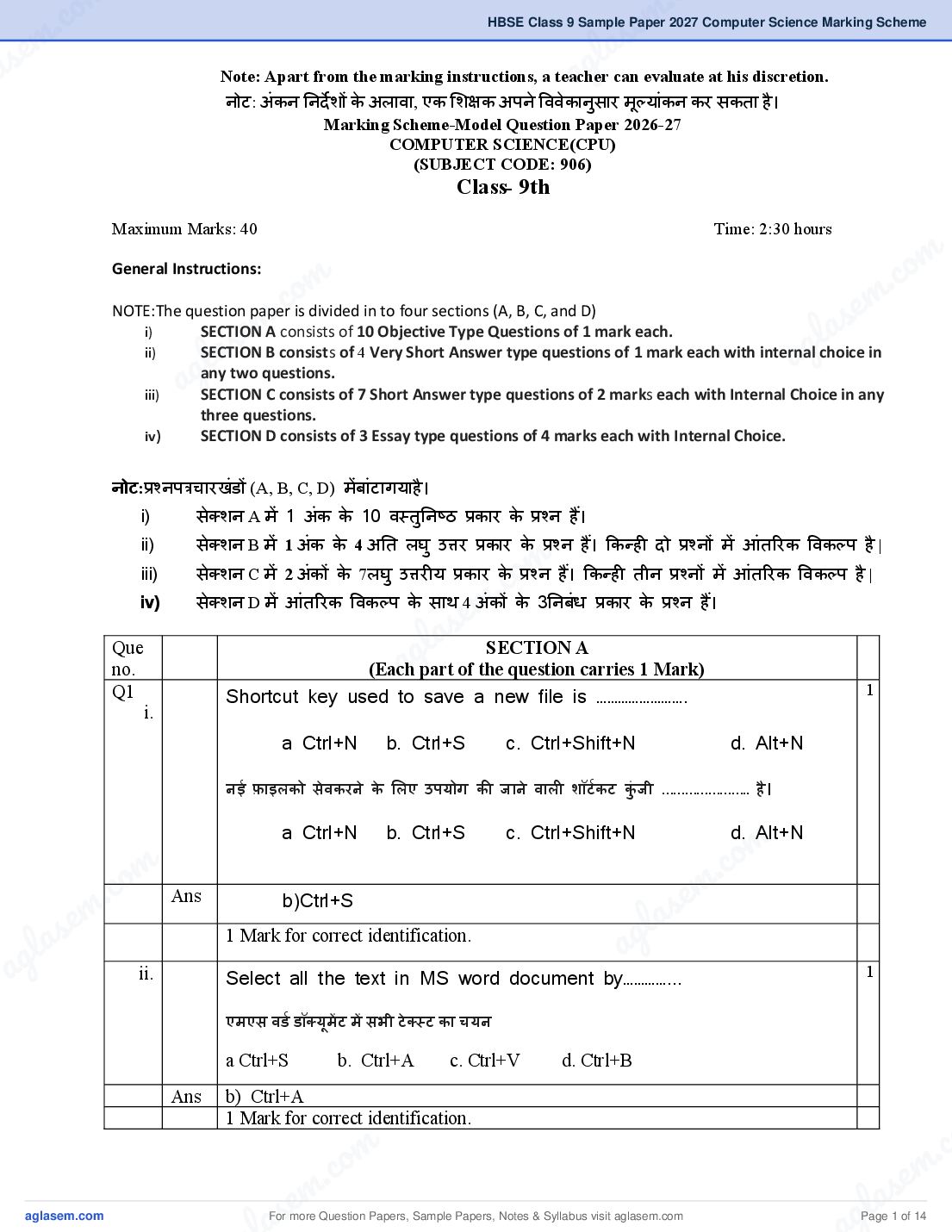
Note: Apart from the marking instructions, a teacher
नोट: अंकन नन्शे शों के अलावा, एक शश्षक अपने वववेकानुसार मूल्ांकन कर सकता है ।
Marking Scheme-Model Question Paper 2026-27
COMPUTER SCIENCE(CPU)
(SUBJECT CODE: 906)
Class- 9th
Maximum Marks: 40 Time: 2:30 hours
m
General Instructions:
om . co
. c e m
NOTE:The question paper is divided in to four sections (A, B, C, and D)
e m l as
i)
ii)
l as
SECTION A consists of 10 Objective Type Questions of 1 mark each.
SECTION B consists of 4 Very Short Answer type questions of 1 mark each with internal choice in
ag
iii) ag
any two questions.
SECTION C consists of 7 Short Answer type questions of 2 marks each with Internal Choice in any
three questions.
iv) SECTION D consists of 3 Essay type questions of 4 marks each with Internal Choice.
नोट:्ቚश्नप्ቔचारखंडों (A, B, C, D) मेंबांटाग्ाहै ।
i) सेक्शन A में 1 अंक के 10 वस्तनु नष्ठ ्ቚकार के ्ቚश्न हैं।
ii) सेक्शन B में 1 अंक के 4 अनत लघु उ्ቈर ्ቚकार के ्ቚश्न हैं। ककन्ही ्शो ्ቚश्नों में आंतररक ववकलप है |
o m
सेक्शन C में 2 अंकों के 7लघु उ्ቈरी् ्ቚकार के ्ቚश्न हैं। ककन्ही तीन ्ቚश्नों में आंतररक ववकलप है |
iii)
. c
iv)
e m
सेक्शन D में आंतररक ववकलप के साथ 4 अं कों के 3ननबंध ्ቚकार के ्ቚश्न हैं।
a s
l SECTION A
Que
no. (Each
g
a part of the question carries 1 Mark)
Q1 Shortcut key used to save a new file is ……………………. 1
i.
a Ctrl+N b. Ctrl+S c. Ctrl+Shift+N d. Alt+N
नई फाइलको सेवकरने के शलए उप्ोग की जाने वाली शॉटटकट कंु जी ………………….. है।
a Ctrl+N b. Ctrl+S c. Ctrl+Shift+N
m
d. Alt+N
m .co
m .co Ans
s e m
la
b)Ctrl+S
s e g
g la 1 Mark for correct identification.
a
a ii. Select all the text in MS word document by…………... 1
एमएस वडट डॉक््ूमेंट में सभी टे क्स्ट का च्न
a Ctrl+S b. Ctrl+A c. Ctrl+V d. Ctrl+B
Ans b) Ctrl+A
1 Mark for correct identification.
m . c
c. o s e m
s em
For more Question Papers, Sample Papers, Notes & Syllabus visit
gl a
Page 1 of 14
Page 3
Ctrl + I का ्ቚ्ोग कक्ा जाता है ।
a. Save the Document b. Print the Document
c. Italic d. Close the Document
Ans c) Italic
1 Mark for correct answer.
iv. The shortcut key to cut a file is______. 1
ककसी फाइल को कटकरने की शॉटटकट कंु जी _________ है।
a. Ctrl + X b. Ctrl + P c. Ctrl + C d. Ctrl + V
Ans a) Ctrl + X
1 Mark to identify the correct option.
v File extention of MS excel is ………………………. 1
एमएस एक्सेल का फाइल एक्सटें शन…………………है।
Ans .xlsx
1 Mark for writing the correct answer.
vi. Extension of power point presentation is________ 1
पावर प्वाइंट ्ቚेजेंटेशन का एक्सटें शन _________है।
Ans .pptx
1 Mark for correct fill in the blank
vii. PowerPoint program is used to create a presentation. (T/F) 1
पावरपॉइंट ्ቚो्ቇाम का उप्ोग ्ቚेजेंटेशन बनाने के शलए कक्ा जाता है। (सत््/असत््)
Ans True सत््
1 Mark for correct Answer.
viii Speaker is an output device. (T/F) 1
स्पीकर एक आउटपुट डडवाइस है। (सत््/असत््)
Ans True सत््
For more Question Papers, Sample Papers, Notes & Syllabus visit Page 2 of 14
Page 4
.co s e m
s em l a
a ag given below, there are
Direction for questions ix&x: In the questions
two statements marked as Assertion (A) and Reason (R). Choose
the correct option out of the choices given below in each question:
्ቚश्न ix एवं x के शलए नन्शे श: नीचे द्शए गए ्ቚश्नों में , कथन (A) और कारण
(R) के रूप में चचह्ननत ्शो कथन हैं। ्ቚत््ेक ्ቚश्न में नीचे द्शए गए ववकलपों में
m
से सही ववकलप का च्न कीह्जए:
om . co
. c em
em
a )Both (A) and (R) are correct and (R) is correct explanation of
l as
l a s
(A). ag
ag
b) Both (A) and (R) are correct and (R) is not the correct
explanation of (A).
c)(A) is true but (R) is false.
d)(A) is false but (R) is true
m
.co
a)(A)और (R) ्शोनों सही हैं और (R), (A) की सही व््ाख््ा है ।
m
e
s (A) की सही व््ाख््ा नह ं है।
g l a
b)(A) और (R) ्शोनों सही हैं और (R),
c) (A) सत्् है लेककन (R) a असत्् है।
d)(A) असत्् है लेककन (R) सत्् है।
ix Assertion: Operating system is software that enables the computer 1
hardware to communicate and operate with software.
m
m Reason: Window is not an open-source operating system.
.co
m .co अभिकथन:ऑपरे दटंग शसस्टम एक हाडटवे्रहै जो कंप््ट
s e m
ू र सॉफ्टवे्र को सॉ़ቸटवे्र के साथ संवा्श करने
s e और संचाशलत करने में स्षम बनाता है।
g la
g la a
a कारण: ववंडो एक ओपन सोसट ऑपरे दटंग शसस्टम है।
Ans c) (A) is true but (R) is false.
c) (A) सत्् है लेककन (R) असत्् है।
1 Mark for correct identification.
m . c
c. o s e m
s em
For more Question Papers, Sample Papers, Notes & Syllabus visit
gl a
Page 3 of 14
Page 5
Reason: When you move a file to recycle bin it will be immediately deleted from
computer.
अभिकथन:रीसा्कल बबन का उप्ोग हटाई गई फाइलों और फोलडरों को सं्ቇहीत करने के शलए
कक्ा जाता है।
कारण:जब आप ककसी फाइल को रीसा्कल बबन में ले जाते हैं तो वह तुरंत कंप््ूटर से डडलीट हो
जाती है।
a)Both (A) and (R) are correct and (R) is correct explanation of (A).
a)(A)और (R) ्शोनों सही हैं और (R), (A) की सही व््ाख््ा है ।
1 Mark for correct identification.
SECTION B
(Each part of the question carries 1 Mark)
Q2 Full form of RAM ? 1
रै म का पूणटरूप ?
OR
Full form of ALU ?
एoएलo ्ूo का पूणट रूप क््ा है?
Ans Random Access memory
रैंडम एक्सेस मेमोरी
OR
Arithmetic And Logic Unit
अररथमेदटक लॉह्जक ्ूननट
Q3 What is operating system? 1
ऑपरे दटंग शसस्टम क््ा है?
OR
What is icons?
आइकन क््ा है?
For more Question Papers, Sample Papers, Notes & Syllabus visit Page 4 of 14
Page 6
.co s e m
s em l a
a ag that acts as an interface
Ans An operating system (OS) is a fundamental software
between the user and the computer's hardware
ऑपरे दटंग शसस्टम (OS) एक शसस्टम सॉफ्टवे्र है जो उप्ोगकताट और कंप््ूटर के हाडटवे्र के बीच
इंटरफेस के रूप में का्ट करता है।
OR
An icon is a graphic image, a small picture or object that represents a file,
m
om
program, web page, or command.
. co
. c
आइकन एक ्ቇाकफक छवव, एक छोटा चच्ቔ ्ा ऑब्जेक्ट है जो ककसी फाइल, ्ቚो्ቇाम, वेब पेज ्ा कमांड का em
e m l as
as
्ቚनतननचधत्व करता है।
l Define MAX() Function? ag
Q4
ag 1
MAX() फंक्शन पररभावित करें
Ans The MAX function is a function which finds the highest number in a range.
For example: =MAX(A1:A10)
MAX फंक्शन एक ऐसा फंक्शन है जो ककसी ्ቦेणी में सबसे बडी संख््ा ्ञात करता है।
m
उ्शाहरण के शलए := MAX (A1:A10)
m .co
e
Q5 What is slide? 1
l as
ag
स्लाइड क््ा है?
Ans A slide is actual holder of the information in MS PowerPoint.
एक स्लाइड एमएस पावरपॉइंट में जानकारी का वास्तववक धारक है।
m
SECTION C
co
m (Each question carries 2 marks)
m.co
.Q6 s e
em
Write advantages of computers.
la
2
l as कंप््ूटर के लाभ शलखखए।
ag
ag OR
Write applications of computers.
कंप््ूटर के अनु्ቚ्ोग शलखखए।
Ans Advantages of computers: Speed , Accuracy, large Storage, versatility,Automatic
कंप््ूटर के लाभ : गनत, सटीकता, बडा भंडारण, बहुवव्ञता, स्वचाशलत
m . c
c. o s e m
s em
For more Question Papers, Sample Papers, Notes & Syllabus visit
gl a
Page 5 of 14
Page 7
Banking, Education, Business, Healthcare, Entertainment, Military etc.
बैंककं ग, शश्षा, व््ापार, स्वास््् सेवा, मनोरं जन, सैन्् आद्श।
Q7 Write Steps to delete file/folder. 2
फाइल/फोलडर हटाने के चरण शलखखए ।
OR
Define a) recycle bin b) Desktop
पररभावित करें a) रीसा्कल बबन b) डेस्कटॉप
Ans 1.Open location where you want to delete file/folder.
2.Click right mouse button on tha file/folder.
3.A pop-up will open.
4.Select “delete” option.
5.then OK by confirm it.
1. वह स्थान खोलें जहााँ आप फाइल/फोलडर हटाना चाहते हैं।
2. फाइल/फोलडर पर ्शा्ााँ माउस बटन ह्क्लक करें ।
3. एक पॉप-अप खुलेगा।
4. “हटाएाँ” ववकलप चुनें।
5. कफर पुह्ष्ट करके ओके करें ।
OR
a) The Recycle Bin is a place where items deleted in Windows are temporarily stored until
they are permanently deleted.
a) रीसा्कल बबन वह स्थान है जहां ववंडोज़ में डडलीट ककए गए आइटम तब तक अस्था्ी रूप से
सं्ቇहीत ककए जाते हैं जब तक कक वे स्था्ी रूप से डडलीट न हो जाएं।
b) A desktop is a computer screen display area that represents the kinds of objects like
my computer ,icons, folders ,files, recycle bin etc.
For more Question Papers, Sample Papers, Notes & Syllabus visit Page 6 of 14
Page 8
.co s e m
s em l a
a ag ्ቚकार की वस्तुओं जैसे मेरा कंप््ूटर,
b) डेस्कटॉप एक कंप््ूटर स्रीन डडस्प्ले ्षे्ቔ है जो ववशभन्न
आइकन, फोलडसट, फाइलें, रीसा्कल बबन आद्श का ्ቚनतननचधत्व करता है।
Q8 Write steps to create new document in MS word 2010. 2
एमएस वडट 2010 में न्ा ्शस्तावेज़ बनाने के चरण शलखें।
m
om . co
c m
OR
m . s e
e
What is header and footer?
s g l a
g a
l हेडर और फूटर क््ा है? a
a
Ans 1. Click on File Tab in MS Word 2010.
2. Select New Option.
3. A dialog box will appear.
4. Choose Blank Document option.
m
.co
5. Then Press OK.
m
1. MS Word 2010 में फाइल टै ब पर ह्क्लक करें ।
e
l as
2. न्ा ववकलप चुनें।
ag
3. एक डा्लॉग बॉक्स द्शखाई ्शे गा।
4. खाली ्शस्तावेज़ ववकलप चन
ु ें ।
5. कफर ओके ्शबाएाँ।
OR
o m
m c
. at the bottom, ,
m .co m
e such as
A header is area that is placed at the top of a page, while a footer is placed
s
s e document name, chapter titles, page numbers, creation date,land
g a so on.
of a page Typically these fields are used to enter document information,
g la a
a हेडर वह ्षे्ቔ होता है जो पष्ृ ठ के शीिट पर रखा जाता है, जबकक फुटर पष्ृ ठ के नीचे पर रखा जाता है।
आम तौर पर इन ्ቌे्ቔों का उपयोग दस्तावेज़ की जानकार डालने के भलए ककया जाता है, जैसे कक
दस्तावेज़ का नाम, अध्याय का शीर्षक, पष्ृ ठ संख्या, ननमाषण नतथथ और इसी तरह की अन्य
जानकार ।
Q9 Explain following functions. 2
m . c
c. o s e m
s em
For more Question Papers, Sample Papers, Notes & Syllabus visit
gl a
Page 7 of 14
Page 9
ननम्नशलखखत फंक्शन को स्पष्ट कीह्जए।
i) औसत() ii) न््ूनतम()
Ans i) The function is used to calculate the arithmetic mean of a given set of arguments in
Excel. For example, if you have numbers in cells A1:A5 and want to find the average, you
would use the formula =AVG(A1:A5).
i) इस फंक्शन का उप्ोग एक्सेल में द्शए गए तकों के समूह के अंकगखणती् माध्् की गणना
करने के शलए कक्ा जाता है।उ्शाहरण के शलए, ्द्श आपके क्षों A1:A5 में संख््ाएं हैं और आप
उनका औसत ्ञात करना चाहते हैं, तो आप स्ቔ
ू =AVG(A1:A5) का उप्ोग करें गे।
ii) The MIN function in Excel returns the smallest number in a set of values or a range of
cells. For example, if you have numbers in cells A1:A5 and want to find the smallest, you
would use the formula =MIN(A1:A5).
ii) एक्सेल में MIN फंक्शन मानों के समूह ्ा क्षों की ्ቦेणी में सबसे छोटी संख््ा ्शे ता है।
उ्शाहरण के शलए, ्द्श आपके पास सेल A1:A5 में संख््ाएाँ हैं और आप सबसे छोटी संख््ा ढूाँढना
चाहते हैं, तो आप सू्ቔ =MIN(A1:A5) का उप्ोग करें गे।
Q10 Define Worksheet and workbook in MS Excel. 2
एमएस एक्सेल में वकटशीटऔर वकटबुक को पररभावित करें ।
Ans A worksheet is a single file known as spreadsheet. A workbook is a collection of two or
more spreadsheets.
वकटशीट एक एकल फाइल होती है ह्जसे स््ቚेडशीट के नाम से जाना जाता है। वकटबुक ्शो ्ा अचधक
स््ቚेडशीट का सं्ቇह होता है।
Q11 What is PowerPoint ? 2
पावरपॉइंट क््ा है?
Ans PowerPoint is a presentation software application, primarily from Microsoft, that allows
users to create visually engaging presentations using slides.
पावरपॉइंट एक ्ቚेजेंटेशन सॉफ्टवे्र एप्लीकेशन है, जो मुख्् रूप से माइरोसॉफ्ट का है, जो
उप्ोगकताटओं को स्लाइड्स का उप्ोग करके आकिटक ्ቚस्तुनतकरण बनाने की अनुमनत ्शे ता है।
Q12 Explain i) Mouse ii) Keyboard 2
For more Question Papers, Sample Papers, Notes & Syllabus visit Page 8 of 14
Page 10
.co s e m
s em l a
a व््ाख््ा करें i) माउस ii) कीबोडट
ag
Ans A Computer mouse is a small, handheld input device that allows users to control the
cursor (pointer) on a computer screen and interact with the graphical user interface (GUI).
कंप््ट
ू र माउस एक छोटा, हाथ में पकडा जाने वाला इनपट
ु डडवाइस है जो उप्ोगकताटओं को
कंप््ूटर स्रीन पर कसटर (पॉइंटर) को नन्ंब्ቔत करने और ्ቇाकफकल ्ूजर इंटरफेस (जी्ूआई) के
m
om
साथ बातचीत करने की अनुमनत ्शे ता है।
. co
. c e m
e m
A keyboard is an input device that allows you to type letters, numbers, and symbols into
l as
l as
your computer. A standard keyboard has 104 keys. every keyboard has a variety of keys
ag
g
with unique functions.
a कीबोडट एक इनपुट डडवाइस है जो आपको अपने कंप््ूटर में अ्षर, संख््ाएाँ और ्ቚतीक टाइप करने
की अनुमनत ्शे ता है । एक मानक कीबोडट में 104 कंु ह्ज्ााँ होती हैं। ्ቚत््ेक कीबोडट में अद्ववती् का्ों
के साथ कई कंु ह्ज्ााँ होती हैं।
SECTION-D
(Each question carries 4 marks)
Q13 Explain Block diagram of computer. 4
m
कंप््ूटर के ब्लॉक आरे ख को समझाइए।
m .co
s e OR
g
What is printer and explain type l aof printer in detail.
a
व्ቚंटर क््ा है और व्ቚंटर के ्ቚकार को ववस्तार से समझाइए।
Ans A Block Diagram of a Computer provides an overview of the major components and their
interactions with each other.
1.Input Unit: The input unit takes all the data received by the computer. The input unit
comprises different devices such as a mouse, keyboard, scanner, etc.
2.Control Unit (CU):Control Unit (CU) is the controller of all the activities, tasks, and
m
.co
operations. All these operations are performed inside the computer. The control unit
m
.co
ensures that all tasks inside the computer work together smoothly, coordinating with the
input and output units.
e m
e m las
3.Arithmetic Logic Unit (ALU):The Arithmetic Logic Unit is comprised of two terms-
las g
arithmetic and logic. ALU is where the actual calculations happen. ALU helps the
a
g
computer add numbers, subtract them etc.
a 4.Memory Unit:The Memory Unit stores all the data that has to be processed or has been
processed.
5.Output Unit:An output unit is like the part of the computer that shows you the results of
what you've asked it to do.
m . c
c. o s e m
s em
For more Question Papers, Sample Papers, Notes & Syllabus visit
gl a
Page 9 of 14
Page 11
ू रे के साथ उनकी अंतःकर्ाओं का अवलोकन
्ቚ्शान करता है।
1. इनपट
ु ्नू नट: इनपट
ु ्नू नट कंप््ट
ू र द्वारा ्ቚाप्त सभी डेटा को लेती है। इनपुट ्नू नट में माउस,
कीबोडट, स्कैनर आद्श जैसे ववशभन्न उपकरण शाशमल होते हैं।
2. कं्ोल ्ूननट (CU): कं्ोल ्ूननट (CU) सभी गनतववचध्ों, का्ों और संचालन का नन्ं्ቔक है । ्े
सभी ऑपरे शन कंप््ूटर के अं्शर ककए जाते हैं। कं्ोल ्ूननट ्ह सुननह्श्चत करती है कक कंप््ूटर के
अं्शर सभी का्ट इनपुट और आउटपुट ्ूननट के साथ समन्व् करते हुए सुचारू रूप से काम करें ।
3. अंकगखणती् तकट इकाई (ALU): अंकगखणती् तकट इकाई में ्शो शब््श शाशमल हैं- अंकगखणत और
तकट। ALU वह जगह है जहााँ वास्तववक गणनाएाँ होती हैं। ALU कंप््ूटर को संख््ाओं को जोडने,
घटाने आद्श में म्श्श करता है।
4. मेमोरी ्नू नट: मेमोरी ्नू नट उन सभी डेटा को सं्ቇहीत करती है ह्जन्हें संसाचधत कक्ा जाना है ्ा
संसाचधत कक्ा जा चुका है।
5. आउटपुट ्ूननट: आउटपुट ्ूननट कंप््ूटर के उस दहस्से की तरह है जो आपको आपके द्वारा
ककए जाने वाले काम के पररणाम द्शखाता है।
OR
Printer: A printer is a hardware output device that is used to generate hard copy and print
any document. A document can be of any type such as a text file, image, or the
combination of both. there are different types of printers, nowadays, two types of printers
are commonly used, which are inkjet and laser printers.
1. Impact printers function by striking a tool against an ink ribbon onto the paper, which
leaves an imprint of the image or text. Dot-matrix printers, Band printers, and Chain
printers.
2. Non-impact printers create pictures, characters, and figures without any uninterrupted
contact between the printing device and the paper. Laser printers, Inkjet printers and
Thermal printers are some examples of Non-Impact printers.
व्ቚंटर एक हाडटवे्र आउटपट
ु डडवाइस है ह्जसका उप्ोग हाडट कॉपी बनाने और ककसी भी ्शस्तावेज़
को व्ቚंट करने के शलए कक्ा जाता है। ्शस्तावेज़ ककसी भी ्ቚकार का हो सकता है जैसे कक टे क्स्ट
फाइल, छवव ्ा ्शोनों का सं्ोजन। व्ቚंटर ववशभन्न ्ቚकार के होते हैं, आजकल ्शो ्ቚकार के व्ቚंटर
आमतौर पर उप्ोग ककए जाते हैं, जो इंकजेट और लेजर व्ቚंटर हैं।
1. इम्पैक्ट व्ቚंटर कागज पर स््ाही ररबन पर उपकरण के ्ቚहार द्वारा का्ट करते हैं, ह्जससे छवव
्ा पाठ की छाप रह जाती है । डॉट-मैद्क्स व्ቚंटर, बैंड व्ቚंटर और चेन व्ቚंटर।
2. नॉन-इम्पैक्ट व्ቚंटर व्ቚंदटंग डडवाइस और कागज़ के बीच ककसी भी ननबाटध संपकट के बबना चच्ቔ,
अ्षर और आकृनत्ााँ बनाते हैं। लेजर व्ቚंटर, इंकजेट व्ቚंटर और थमटल व्ቚंटर नॉन-इम्पैक्ट व्ቚंटर के
कुछ उ्शाहरण हैं।
For more Question Papers, Sample Papers, Notes & Syllabus visit Page 10 of 14
Page 12
.co s e m
s em l a
a Q14 Define Cell, cell address, active cell, range of cell ag 4
सेल, सेल ए्ቑेस, एह्क्टवसेल, सेल की रें ज पररभावित करें ।
OR
What is chart and explain different types of charts.
चाटट क््ा है और ववशभन्न ्ቚकार के चाटट की व््ाख््ा करें ।
m
Ans
om
Cell: A cell is the basic unit of a spreadsheet in Excel. It is the intersection point of a row
. co
. c e m
s
and a column. Each cell can contain text, numbers, formulas, or other types of data. Cells
e m
are identified by their unique combination of row and column identifiers, such as A1, B2,
l a
as
l Cell Address: A cell address, also known as a cell reference, is a unique identifier for a
C3, etc.
ag
g
a specific cell in an Excel spreadsheet. It consists of the column letter followed by the row
number, such as A1, B2, C3, etc. Cell addresses are used to refer to specific cells when
entering data, creating formulas, or performing calculations in Excel.
Active cell is the currently selected cell, and you can change it by clicking on another cell
or using the keyboard.
m
A range of cells is a group of two or more cells, usually in a rectangular shape, identified
.co
by the first cell's address and the last cell's address (e.g., A1:C5).
e m
सेल: सेल एक्सेल में स््ቚेडशीट की मूल इकाई है । ्ह पंह्क्त और कॉलम का ्ቚनतच्छे ्श बबं्श ु है। ्ቚत््ेक
l as
g ्ቚकार के डेटा हो सकते हैं। सेल की पहचान पंह्क्त और कॉलम
सेल में टे क्स्ट, संख््ाएाँ, सू्ቔ ्ा अन््
a
पहचानकताटओं के उनके अद्ववती् सं्ोजन से होती है, जैसे A1, B2, C3, आद्श।
सेल पता: सेल पता, ह्जसे सेल सं्शभट के रूप में भी जाना जाता है, एक्सेल स््ቚेडशीट में एक ववशशष्ट
सेल के शलए एक अद्ववती् पहचानकताट है। इसमें कॉलम अ्षर के बा्श पंह्क्त संख््ा होती है, जैसे
A1, B2, C3, आद्श। सेल पते का उप्ोग डेटा ्शजट करते सम्, सू्ቔ बनाते सम् ्ा एक्सेल में
गणना करते सम् ववशशष्ट सेल को सं्शशभटत करने के शलए कक्ा जाता है।
o m
m c
. करके ्ा कीबोडट
.co
सकर् सेल वतटमान में च्ननत सेल है, और आप इसे ककसी अन्् सेल पर ह्क्लक
e m
e m का उप्ोग करके ब्शल सकते हैं।
la s
las a g
ag सेल की एक ्ቦेणी ्शो ्ा अचधक सेल का एक समूह है, जो आमतौर पर एक आ्ताकार आकार में
होती है, ह्जसे पहले सेल के पते और अंनतम सेल के पते (उ्शाहरण के शलए, A1:C5) द्वारा पहचाना
जाता है।
OR
m . c
c. o s e m
s em
For more Question Papers, Sample Papers, Notes & Syllabus visit
gl a
Page 11 of 14
Page 13
numerical information, making it easier to understand trends, patterns, and relationships
within the data.
Types of charts available in MS Excel:
1. Column Chart: This type of chart uses vertical bars to represent data. Each bar typically
represents a category, and the height of the bar corresponds to the value of the data.
2. Bar Chart: Similar to a column chart, a bar chart uses horizontal bars to represent data.
Each bar represents a category, and the length of the bar corresponds to the value of the
data.
3. Line Chart: A line chart displays data points connected by straight lines. It's useful for
showing trends or changes over time.
4. Pie Chart: A pie chart is a circular graph divided into slices, with each slice representing
a portion of the whole.
5. Area Chart: An area chart is similar to a line chart, but the area below the line is filled
with color. It's useful for showing cumulative totals over time
चाटट: चाटट डेटा का एक ्ቇाकफकल ्ቚनतननचधत्व है। ्ह संख््ात्मक जानकारी ्ቚ्शशशटत करने का एक
दृश्् तरीका है, ह्जससे डेटा के भीतर रुझान, पैटनट और संबंधों को समझना आसान हो जाता है।
MS Excel में उपलब्ध चाटट के ्ቚकार:
1. कॉलम चाटट: इस ्ቚकार का चाटट डेटा को ्शशाटने के शलए लंबवत पट्दट्ों का उप्ोग करता है।
्ቚत््ेक पट्टी आम तौर पर एक ्ቦेणी का ्ቚनतननचधत्व करती है, और पट्टी की ऊंचाई डेटा के मूल्
से मेल खाती है ।
2. बार चाटट: कॉलम चाटट के समान, एक बार चाटट डेटा को ्शशाटने के शलए ्षैनतज पट्दट्ों का
उप्ोग करता है । ्ቚत््ेक पट्टी एक ्ቦेणी का ्ቚनतननचधत्व करती है, और पट्टी की लंबाई डेटा के
मूल् से मेल खाती है।
3. लाइन चाटट: एक लाइन चाटट सीधी रे खाओं से जुडे डेटा बबं्शओ
ु ं को ्ቚ्शशशटत करता है। ्ह सम् के
साथ रुझान ्ा पररवतटन द्शखाने के शलए उप्ोगी है।
4. पाई चाटट: एक पाई चाटट एक गोलाकार ्ቇाफ है ह्जसे स्लाइस में ववभाह्जत कक्ा जाता है, ह्जसमें
्ቚत््ेक स्लाइस पूरे के एक दहस्से का ्ቚनतननचधत्व करता है।
5. ्षे्ቔ चाटट: एक ्षे्ቔ चाटट एक लाइन चाटट के समान है, लेककन रे खा के नीचे का ्षे्ቔ रं ग से भरा
होता है । ्ह सम् के साथ संच्ी ्ोग द्शखाने के शलए उप्ोगी है।
For more Question Papers, Sample Papers, Notes & Syllabus visit Page 12 of 14
Page 14
.co s e m
s em l a
a Q15 Explain MS window components. ag 4
एमएस ववंडो घटकों को समझाइए।
OR
Explain the following terms:
Bold, Italic, Underline, Font size
m
ननम्न शब््शों को व््ाख््ा करे :
om . co
. c e m
em
बोलड, इटै शलक, अंडरलाइन, फॉन्ट साइज
l as
l as ag
ag
Ans MS window components are:
i) Title Bar: Displays the document name and the application name
(Microsoft Word).
ii) File Tab: Accesses the Backstage view, which provides options for file
operations like opening, saving, printing, and sharing documents.
m
.co
iii) Quick Access Toolbar: Contains frequently used commands, such as
Save, Undo, and Redo.
e m
iv)
as
Ribbon: A wide bar at the top of the window that organizes commands
l
ag
into tabs and groups, making it easy to find and use the desired
features.
v) Document Area: The main area where the document content is
displayed and edited.
vi) Rulers: Vertical and horizontal rulers that are used for formatting and
positioning elements within the document.
vii) Status Bar: Displays information about the document, such as page
o m
c
number, word count, and proofing status.
m .document views,
m .co viii) m
eLayout.
View Buttons: Allow you to switch between different
s
e la
such as Print Layout, Normal, Outline, and Web
las a g
ag
एमएस ववंडो घटकों
i) शीिटक पट्टी: ्शस्तावेज़ का नाम और अन्ቚ
ु ्ोग का नाम (Microsoft Word)
्ቚ्शशशटत करता है।
m . c
c. o s e m
s em
For more Question Papers, Sample Papers, Notes & Syllabus visit
gl a
Page 13 of 14
Page 15
व्ቚंट करने और साझा करने जैसे फाइल संचालन के शलए ववकलप ्ቚ्शान करता
है।
iii) त्वररत पहुाँच टूलबार: इसमें अक्सर उप्ोग ककए जाने वाले आ्शे श होते हैं, जैसे
कक सहेजें, पूवटवत करें और कफर से करें ।
iv) ररबन: ववंडो के शीिट पर एक ववस्तत
ृ पट्टी जो आ्शे शों को टै ब और समूहों में
व््वह्स्थत करती है, ह्जससे वांनछत सुववधाओं को ढूाँढ़ना और उनका उप्ोग
करना आसान हो जाता है ।
v) ्शस्तावेज़ ्षे्ቔ: मुख्् ्षे्ቔ जहााँ ्शस्तावेज़ साम्ቇी ्ቚ्शशशटत और संपाद्शत की
जाती है।
vi) रूलर: ऊध्वाटधर और ्षैनतज रूलर जो ्शस्तावेज़ के भीतर तत्वों को स्वरूवपत
करने और ह्स्थनत ननधाटरण के शलए उप्ोग ककए जाते हैं।
vii) ह्स्थनत पट्टी: ्शस्तावेज़ के बारे में जानकारी ्ቚ्शशशटत करता है, जैसे कक पष्ृ ठ
संख््ा, शब््श गणना और ्ቚूकफं ग ह्स्थनत।
viii) दृश्् बटन: आपको व्ቚंट लेआउट, सामान््, रूपरे खा और वेब लेआउट जैसे
ववशभन्न ्शस्तावेज़ दृश््ों के बीच ह्स्वच करने की अनम
ु नत ्शे ता है।
OR
i) The Bold property determines whether the text is bold.
ii) The Italic property determines whether the text is italic.
iii) The Underline property determines whether text is underlined.
iv) The Size property determines the height, in points, of displayed text.
i) बोलड ्ቚॉपटी ्ह ननधाटररत करती है कक टे क्स्ट बोलड है ।
ii) इटै शलक ्ቚॉपटी ्ह ननधाटररत करती है कक टे क्स्ट इटै शलक है ।
iii) अंडरलाइन ्ቚॉपटी ्ह ननधाटररत करती है कक टे क्स्ट रे खांककत है ।
iv) साइज़ ्ቚॉपटी ्ቚ्शशशटत टे क्स्ट की ऊाँचाई, पॉइंट में, ननधाटररत करती है।
For more Question Papers, Sample Papers, Notes & Syllabus visit Page 14 of 14
Document Details
| Board / Org | Haryana Board |
| Exam | Class 9 |
| Type | Answer Key |
| Pages | 14 |
| Updated | 03 Nov 2026 |