Karnataka SSLC Question Paper 2021 Information Technology
Finished viewing? Save it for later —
Download Karnataka SSLC Question Paper 2021 Information Technology (PDF · 20 pages)About Karnataka SSLC Question Paper 2021 Information Technology
Karnataka SSLC Question Paper 2021 Information Technology is available here for free download. Published by Karnataka Board for Class 10, this question paper can be viewed online or downloaded as a PDF (20 pages). Candidates preparing for Class 10 can use Karnataka SSLC Question Paper 2021 Information Technology to understand the exam pattern, the type of questions asked, and the overall difficulty level.
Frequently Asked Questions
How can I download Karnataka SSLC Question Paper 2021 Information Technology?
Open this page and click the Download button to save Karnataka SSLC Question Paper 2021 Information Technology as a PDF. It is completely free on AglaSem Docs.
Is Karnataka SSLC Question Paper 2021 Information Technology free to download?
Yes. Karnataka SSLC Question Paper 2021 Information Technology can be viewed online and downloaded as a PDF free of cost on AglaSem Docs.
How many pages does Karnataka SSLC Question Paper 2021 Information Technology have?
Karnataka SSLC Question Paper 2021 Information Technology contains 20 pages, which you can read online or download together as a single PDF.
Where can I find more Class 10 study material?
You can find more Class 10 question papers, sample papers, syllabus, and answer keys on AglaSem Docs.
Karnataka SSLC Question Paper 2021 Information Technology – Text
Read the full text of this question paper below — useful to quickly search, copy and reference the content online without downloading the PDF.
📄 View text version (20 pages)
Page 1
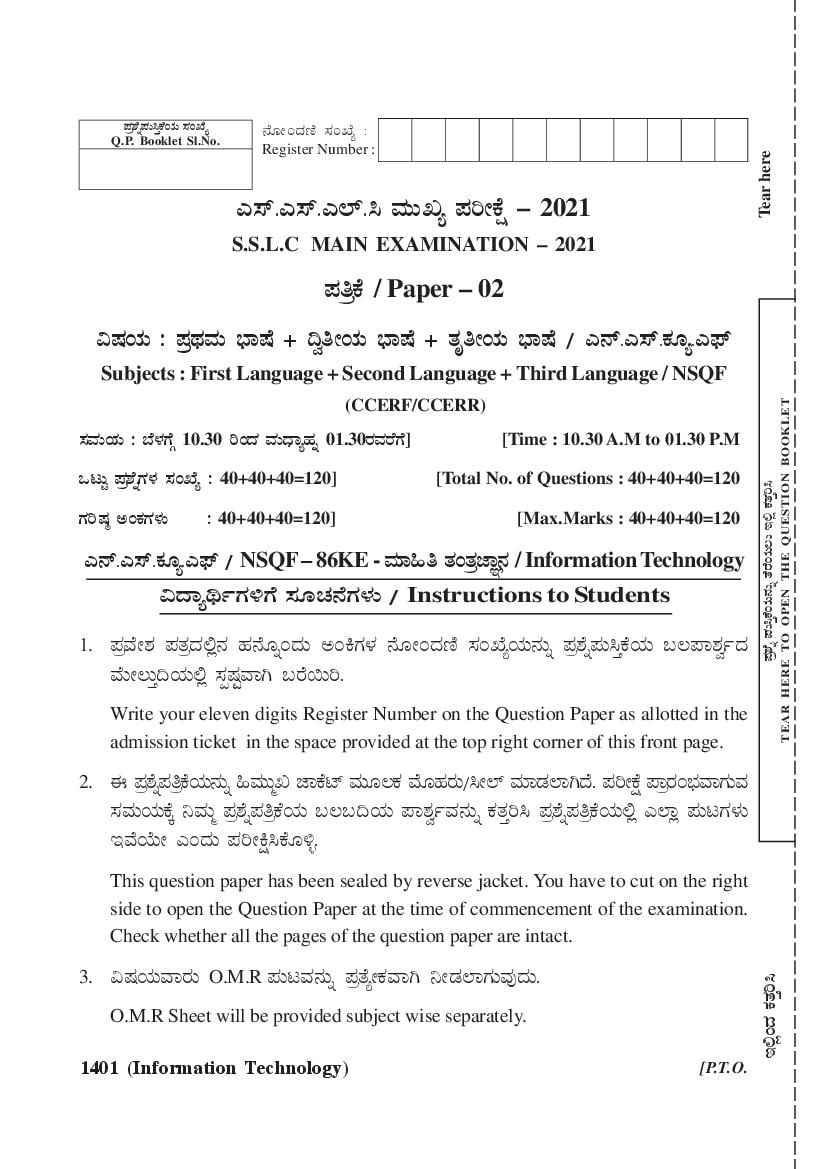
Q.P. Booklet Sl.No.
Register Number :
Tear here
J¸ï.J¸ï.J¯ï.¹ ªÀÄÄRå ¥ÀjÃPÉë – 2021
S.S.L.C MAIN EXAMINATION – 2021
¥ÀwPæ É / Paper – 02
«µÀAiÀÄ : ¥Àx
æ ª
À ÄÀ ¨sÁµÉ + ¢éwÃAiÀÄ ¨sÁµÉ + vÀÈwÃAiÀÄ ¨sÁµÉ / J£ï.J¸ï.PÀÆå.J¥sï
Subjects : First Language + Second Language + Third Language / NSQF
TEAR HERE TO OPEN THE QUESTION BOOKLET
(CCERF/CCERR)
¸ÀªÄÀ AiÀÄ : ¨É¼U
À ÎÉ 10.30 jAzÀ ªÀÄzsÁåºÀß 01.30gÀªg
À U
É É] [Time : 10.30 A.M to 01.30 P.M
MlÄÖ ¥À±
æ ßÉ UÀ¼À ¸ÀASÉå : 40+40+40=120] [Total No. of Questions : 40+40+40=120
¥Àæ±Éß ¥ÀĹÛPÉAiÀÄ£ÀÄß vÉgÉAiÀÄ®Ä E°è PÀvÀÛj¹
UÀjµÀ× CAPÀU¼
À ÄÀ : 40+40+40=120] [Max.Marks : 40+40+40=120
J£ï.J¸ï.PÀÆå.J¥sï / NSQF – 86KE - ªÀiÁ»w vÀAvÀe
æ ÁÕ£À / Information Technology
«zÁåyðUÀ½UÉ ¸ÀÆZÀ£U
É ¼
À ÄÀ / Instructions to Students
1. ¥Àª
æ ÃÉ ±À ¥Àvz
æÀ °
À £
è À ºÀ£Æ
É ßAzÀÄ CAQUÀ¼À £ÉÆÃAzÀt ¸ÀASÉåAiÀÄ£ÀÄß ¥À±
æ ßÉ ¥ÀĹÛPA
É iÀÄ §®¥Á±ÀéðzÀ
ªÉÄîÄÛ¢AiÀÄ°è ¸ÀàµÖª
À ÁV §gɬÄj.
Write your eleven digits Register Number on the Question Paper as allotted in the
admission ticket in the space provided at the top right corner of this front page.
2. F ¥À±
æ ßÉ ¥ÀwPæ AÉ iÀÄ£ÀÄß »ªÀÄÄäR eÁPÉmï ªÀÄÆ®PÀ ªÉƺÀgÄÀ /¹Ã¯ï ªÀiÁqÀ¯ÁVzÉ. ¥ÀjÃPÉë ¥ÁægAÀ ¨sª
À ÁUÀĪÀ
¸ÀªÄÀ AiÀÄPÉÌ ¤ªÀÄä ¥À±
æ ßÉ ¥ÀwPæ A
É iÀÄ §®§¢AiÀÄ ¥Á±ÀéðªÀ£ÄÀ ß PÀvj
ÛÀ ¹ ¥À±
æ ßÉ ¥ÀwPæ A
É iÀÄ°è J¯Áè ¥ÀÄlUÀ¼ÄÀ
EªÉAiÉÄà JAzÀÄ ¥ÀjÃQë¹PÉƽî.
This question paper has been sealed by reverse jacket. You have to cut on the right
side to open the Question Paper at the time of commencement of the examination.
Check whether all the pages of the question paper are intact.
3. «µÀAiÀĪÁgÀÄ O.M.R ¥ÀÄlªÀ£ÄÀ ß ¥Àv
æ åÉ ÃPÀªÁV ¤ÃqÀ¯ÁUÀĪÀÅzÀÄ.
ÛÀ ¹
E°èAzÀ PÀvj
O.M.R Sheet will be provided subject wise separately.
1401 (Information Technology) [P.T.O.
Page 2
4. F ¥À±
æ ßÉ ¥ÀwPæ A
É iÀÄÄ ªÀÄÆgÀÄ ¨sÁµÁ «µÀAiÀÄUÀ¼£
À ÄÀ ß ºÉÆA¢zÀÄÝ, ¥Àw
æ «µÀAiÀĪÀÇ ¥Àv
æ åÉ ÃPÀªÁzÀ
¥ÀĹÛPA
É iÀÄ£ÀÄß ºÉÆA¢zÉ.
This Question Paper consists of three languages and each language has separate
question booklet.
5. ¥Àw
æ «µÀAiÀÄPÉÌ 40 ¥À±
æ ßÉ UÀ½zÀÄÝ, F ¥À±
æ ßÉ ¥ÀwPæ A
É iÀÄÄ MlÄÖ 120 ¥À±
æ ßÉ UÀ¼£
À ÄÀ ß ºÉÆA¢zÉ.
(i) ¥Àx
æ ª
À ÄÀ ¨sÁµÉ - ¥À±
æ ßÉ UÀ¼À PÀª
æ ÄÀ ¸ÀASÉå 01 jAzÀ 40
(ii) ¢éwÃAiÀÄ ¨sÁµÉ - ¥À±
æ ßÉ UÀ¼À PÀª
æ ÄÀ ¸ÀASÉå 41 jAzÀ 80
(iii) vÀÈwÃAiÀÄ ¨sÁµÉ / J£ï.J¸ï.PÀÆå.J¥sï - ¥À±
æ ßÉ UÀ¼À PÀª
æ ÄÀ ¸ÀASÉå 81 jAzÀ 120
40 Questions are provided against each subject. This question paper contains 120
questions in all.
(i) First Language – Question No 01 To 40
(ii) Second Language – Question No 41 To 80
(iii) Third Language / NSQF– Question No 81 To 120
6. ¥Àæw ¥Àæ±ÉßUÉ MAzÀÄ CAPÀ«zÀÄÝ, J¯Áè ¥Àæ±ÉßUÀ½UÀÆ GvÀÛj¸ÀĪÀÅzÀÄ PÀqÁØAiÀÄ ºÁUÀÆ ¥Àw
æ
¸ÀjAiÀiÁzÀ GvÀg
Û PÀ ÌÉ MAzÀÄ CAPÀ«zÀÄÝ, vÀ¥ÁàzÀ GvÀg
Û PÀ ÌÉ AiÀiÁªÀÅzÉà IÄuÁvÀäPÀ CAPÀU¼
À ÄÀ
EgÀĪÀÅ¢®è.
Each question carries one mark. Answering all the questions is compulsory and each
correct answer will be awarded one mark. There will be no negative marking for
wrong answers.
7. ¥ÀjÃPÁë CªÀ¢A
ü iÀÄ°è,
J) ¥À±
æ ßÉ UÀ¼£
À ÄÀ ß eÁUÀgÆ
À PÀv¬
É ÄAzÀ N¢j.
1401 (Information Technology) -2-
Page 3
©) N.JA.Dgï. (OMR) ¥ÀÄlzÀ°è ¥Àw
æ ¥À±
æ ßÉ ¸ÀASÉåUÉ ¸Àj ºÉÆAzÀĪÀ GvÀg
Û ª
À £
À ÄÀ ß UÀÄgÀÄw¸À®Ä
¤ÃqÀ¯ÁVgÀĪÀ £Á®ÄÌ ªÀÈvÀU
Û ¼
À À ¥ÉÊQ ¸ÀjAiÀiÁzÀ GvÀg
Û z
À À MAzÀÄ ªÀÈvÀª
Û £
À ÄÀ ß ¤Ã°/PÀ¥ÄÀ à
±Á¬ÄAiÀÄ ¨Á¯ï ¥Á¬ÄAmï ¥É£ï ªÀiÁvÀæ G¥ÀAiÉÆÃV¹ ¸ÀA¥ÀÆtðªÁV ±ÉÃqï ªÀiÁr.
MªÉÄä GvÀg
Û ª
À £
À ÄÀ ß ±ÉÃqï ªÀiÁrzÀ ªÉÄÃ¯É §zÀ¯Á¬Ä¸À®Ä CªÀPÁ±À«®è ªÀÄvÀÄÛ AiÀiÁªÀÅzÉÃ
C£ÀUv
À åÀ UÀÄgÀÄvÀÄUÀ¼£
À ÄÀ ß N.JA.Dgï. (OMR) ªÉÄÃ¯É ªÀiÁqÀ¨ÁgÀzÄÀ .
GzÁºÀgu
À :É ¥À±
æ ßÉ ¸ÀASÉå 20PÉÌ GvÀg
Û z
À À DAiÉÄÌ ¸ÀASÉå C DVzÀÝ°,è N.JA.Dgï. (OMR)
¥ÀÄlzÀ°è DAiÉÄÌ C AiÀÄ£ÀÄß ¤Ã°/PÀ¥ÄÀ à ¨Á¯ï ¥Á¬ÄAmï ¥É£ï G¥ÀAiÉÆÃV¹ F PɼU
À É
vÉÆÃj¹zÀAvÉ ªÀÈvÀª
Û £
À ÄÀ ß ¸ÀA¥ÀÆtðªÁV ±ÉÃqï ªÀiÁqÀ¨ÃÉ PÀÄ.
¥Àæ±Éß ¸ÀASÉå : 20) A B C D (EzÀÄ GzÁºÀgÀuÉUÉ ªÀiÁvÀæ)
¹) N.JA.Dgï ºÁ¼ÉAiÀÄ£ÀÄß ªÀÄqÀZÄÀ ªÀÅzÀÄ, ºÀjAiÀÄĪÀÅzÀÄ CxÀªÁ ¸ÉÖÃ¥À¯ï ¦£ï ªÀiÁqÀ¨ÁgÀzÄÀ .
During the examination,
a) Read the questions carefully.
b) Completely darken/shade the relevant oval against Question No. in the OMR
answer sheet using blue/black ball point pen. Do not try to alter the entry and not
to do any stray marks on OMR Sheet.
Example: In the question booklet, if C is the correct answer for Question No.20,
then in the OMR sheet, shade the option C using blue/black ball point pen as
follows.
Question No. : 20) A B C D (This is an example only)
c) Do not fold, tear, wrinkle or staple on the OMR Sheet.
1401 (Information Technology) -3- [P.T.O.
Page 4
8. MAzÀÄ ¥À±
æ ßÉ UÉ MAzÀQÌAvÀ ºÉZÄÀ Ñ ªÀÈvÀU
Û ¼
À £
À ÄÀ ß ±ÉÃqï ªÀiÁrzÀ°è CAvÀºÀ GvÀg
Û U
À ¼
À £
À ÄÀ ß vÀ¥àA
É zÀÄ
¥ÀjUÀt¹
 CAPÀU¼
À £
À ÄÀ ß ¤ÃqÀ¯ÁUÀĪÀÅ¢®è.
If more than one oval is shaded for a given question, such answer is treated as
wrong and no marks will be given.
9. N.JA.Dgï. (OMR) ¥ÀÄlzÀ°è ¤UÀ¢vÀ ¸Àܼz
À °
À è «zÁåyð ºÁUÀÆ PÉÆoÀr ªÉÄðéZÁgÀPg
À ÄÀ
vÀ¥àz
À ÃÉ ¸À» ªÀiÁqÀ¨ÃÉ PÀÄ.
Student and Room Invigilator should sign in the OMR sheet in the space provided.
10. ¥ÀjÃPÁë CªÀ¢ü ªÀÄÄVzÀ £ÀAvÀgÀ «µÀAiÀĪÁgÀÄ GvÀj
Û ¹zÀ N.JA.Dgï (OMR)£ÀÄß PÉÆoÀr
ªÉÄðéZÁgÀPj
À UÉ vÀ¥àz
À ÃÉ M¦à¸¨
À ÃÉ PÀÄ.
Candidate should return the subject wise answered OMR sheet to the Room Invigilator
before leaving the examination hall.
11. PÀZÁÑ PÁAiÀÄðªÀ£ÄÀ ß ¥À±
æ ßÉ ¥ÀĹÛPAÉ iÀÄ PÉÆ£ÉAiÀÄ°è ¤ÃrgÀĪÀ PÀZÁÑ PÁAiÀÄðzÀ ºÁ¼ÉAiÀÄ°èAiÉÄà ªÀiÁqÀĪÀÅzÀÄ.
Rough work can be done in the space provided at the end of the Question Booklet.
12. ¥ÀjÃPÁë PÉÆoÀrAiÉƼÀUÉ PÁå®Ä̯ÃÉ lgï, ªÉƨÉÊ¯ï ¥sÆ
É Ã£ï ªÀÄvÀÄÛ EvÀgÉ AiÀiÁªÀÅzÉà J¯ÉPÁÖç¤Pï
G¥ÀPg
À t
À UÀ¼£
À ÄÀ ß vÀgÄÀ ªÀÅzÀ£ÄÀ ß ¤µÉâü¸¯
À ÁVzÉ.
The Calculator, mobiles and any other electronic equipment are not allowed inside
the examination hall.
1401 (Information Technology) -4-
Page 5
ªÀiÁ»w vÀAvÀe
æ ÁÕ£À / Information Technology
PɼV
À £À ¥Àw
æ AiÉÆAzÀÄ ¥À± æ ßÉ UÀ½UÉ/C¥ÀÆtð ºÉýPÉU½
À UÉÉ £Á®ÄÌ DAiÉÄÌU¼
À £
À ÄÀ ß ¤ÃqÀ¯ÁVzÉ. CªÀÅUÀ¼°
À è
¸ÀjAiÀiÁzÀ GvÀÛgªÀ £À ÄÀ ß Dj¹ ¤ªÀÄUÉ ¤ÃrgÀĪÀ OMR GvÀÛgÀ ¥ÀwPæ AÉ iÀÄ°è PÀ¥ÄÀ à/¤Ã° ±Á»AiÀÄ
¨Á¯ï ¥Á¬ÄAmï ¥É£ï¤AzÀ ¸ÀjAiÀiÁzÀ DAiÉÄÌAiÀÄ£ÀÄß ±ÉÃqï ªÀiÁrj.
Four choices are given for each of the following questions / incomplete statements.
Choose the correct answer among them and shade the correct option in the
OMR sheet given to you with a black / blue ball point pen. [40 × 1 = 40]
81) zÉÊ»PÀ «PÀ¯ÁAUÀvAÉ iÀÄļÀî UÀtPÀAiÀÄAvÀz
æ À §¼ÀPz
É ÁgÀjUÉ ¸ÀºÁAiÀÄ ªÀiÁqÀ®Ä EgÀĪÀ MAzÀÄ
DAiÉÄÌ.
A) ¦ü®Ögï QðUÀ¼ÀÄ B) mÁUÀ¯ï QðUÀ¼ÄÀ
C) ¹ÖQ QðUÀ¼ÀÄ D) ¹ÃjAiÀįï QðUÀ¼ÀÄ
The option for helping computer users with physical disabilities is
A) Filter keys B) Toggle keys
C) Sticky keys D) Serial keys
82) «±ÉõÀ ¸Ázs£ À U
À ¼
À ÁzÀ ¹¥sï, ¥À¥ïs ªÀÄvÀÄÛ ¨Év
æ ï ¹éZïUÀ¼£
À ÄÀ ß UÀtPÀAiÀÄAvÀPæ ÌÉ ¸ÀA¥ÀQð¸À®Ä
§¼À¸ÄÀ ªÀÅzÀÄ.
A) ¥ÁågÀ®¯ï ¥ÉÆÃmïð B) ªÉ¨ï ¥ÉÆÃmïð
C) ¹ÃjAiÀÄ¯ï ¥ÉÆÃmïð D) Kgï ¥ÉÆÃmïð
Special devices like Sip, Puff and Breath switches can be connected to
computer using
A) Parallel port B) Web port
C) Serial port D) Air port
1401 (Information Technology) -5- [P.T.O.
Page 6
83) F PɼV
À £ÀªÅÀ UÀ¼°
À è AiÀiÁªÀÅzÀÄ £ÉmïªÀQðAUï£À C£ÀÄPÀÆ®ªÀ®è?
A) zÀvÁÛA±À ºÀAaPÉ B) AiÀÄAvÁæA±À ºÀAaPÉ
C) CAvÀeÁð® ¥ÀæªÉñÀ ºÀAaPÉ D) PÁAiÀÄð ºÁ¼É ºÀAaPÉ
Which of the following is NOT an advantage of Networking?
A) Data Sharing B) Hardware Sharing
C) Internet Access Sharing D) Worksheet Sharing
84) ¥ÀÄlzÀ Pɼ¨
À Ás UÀPÌÉ ¸ÉÃj¸À®àqÄÀ ªÀ zÀ¸ÁÛªÃÉ f£À J¯Áè ¥ÀÄlUÀ¼®
À Æè ¥ÀÄ£ÀgÁªÀwðvÀªÁUÀ§ºÀÄzÁzÀ
¥ÀoåÀ CxÀªÁ avÀæ
A) ²gÉÆïÉÃR B) ¥ÀÄl PɼÀUÉ
C) Cr n¥Ààt D) ¥ÀÄl «¨sÀd£É
The text or image included at the bottom of the page which repeats in all
pages of the document is called as
A) Header B) Page down
C) Footer D) Page Break
85) rfl¯ï UÀtPÀAiÀÄAvÀæ ¸ÀAeÉÕU¼
À £
À ÄÀ ß C£À¯ÁUï ¸ÀAeÉÕU¼
À ÁV ¥ÀjªÀwð¸ÀĪÀ ¸Ázs£
À À
A) ªÀÄÄzÀPæ À B) ¸ÁÌöå£g
À ï
C) ªÉÆÃqɪÀiï D) AiÀÄÄ.J¸ï.©
The device which converts digital computer signals into analog signals
A) Printer B) Scanner
C) Modem D) USB
1401 (Information Technology) -6-
Page 7
86) DAiÉÄÌ ªÀiÁrzÀ ¥ÀoåÀ zÀ°è ¸ÀtÚ CPÀëgÀU¼
À £
À ÄÀ ß zÉÆqÀØ CPÀëgÀU½
À UÉ ºÁUÀÆ zÉÆqÀØ CPÀëgÀU¼
À £
À ÄÀ ß
¸ÀtÚ CPÀëgÀU½
À UÉ §zÀ¯Á¬Ä¸À®Ä §¼À¸ÄÀ ªÀ DAiÉÄÌ.
A) mÁUÀ¯ï PÉøï B) ¸ÀtÚ PÉøï
C) zÉÆqÀØ PÉøï D) ªÁPÀå PÉøï
The option used to convert small letters to capital letters and capital letters
to small letters in the selected text is
A) Toggle case B) Lower case
C) Upper case D) Sentence case
87) ¥ÀzÀ ¸ÀA¸ÀÌgu
À U
É É ¸ÀA§A¢ü¹zÀAvÉ,
¸À¨ï¹Ìç¥ïÖ : DAiÉÄÌ ªÀiÁrzÀ ¥ÀoåÀ ¸ÁªÀiÁ£Àå ¥ÀoåÀ QÌAvÀ PɼU
À É §gÀ®Ä :: ¸ÀÆ¥Àgï¹Ìç¥ïÖ : _____
A) DAiÉÄÌ ªÀiÁrzÀ ¥ÀoÀå ¸ÁªÀiÁ£Àå ¥ÀoÀå ¸ÁÜ£ÀzÀ ¥ÀPÀPÉÌ §gÀ®Ä
B) DAiÉÄÌ ªÀiÁrzÀ ¥ÀoÀå ¸ÁªÀiÁ£Àå ¥ÀoÀå ¸ÁÜ£ÀQÌAvÀ zÀÆgÀ ºÉÆÃUÀ®Ä
C) DAiÉÄÌ ªÀiÁrzÀ ¥ÀoÀå ¸ÁªÀiÁ£Àå ¥ÀoÀå ¸ÁÜ£ÀQÌAvÀ ªÉÄÃ¯É §gÀ®Ä
D) DAiÉÄÌ ªÀiÁrzÀ ¥ÀoÀå ¸ÁªÀiÁ£Àå ¥ÀoÀå ¸ÁÜ£ÀzÀ »AzÉ §gÀ®Ä
With reference to word processing,
Subscript : To make selected text lower than normal :: Superscript : ______
A) Selected text beside normal text position
B) Selected text away from normal text position
C) Selected text higher than normal text position
D) Selected text behind normal text position
1401 (Information Technology) -7- [P.T.O.
Page 8
88) ¥ÀoåÀ zÀ »£Éß¯É §tÚª£
À ÄÀ ß §zÀ¯Á¬Ä¸À®Ä §¼À¸¨
À ÃÉ PÁzÀ DAiÉÄÌ.
A) ¥ÀoÀå ¥ÀPæ Á±ÀªÀiÁ£À §tÚ B) CPÀëgÀ §tÚ
C) CPÀëgÀ ±ÉÊ° D) CPÀëgÀ UÁvÀæ
The option used to change the background colour of the text is
A) Text Highlight Colour B) Font Colour
C) Font Face D) Font Size
89) PÉ®ªÀÅ µÀgv
À ÄÀ U
Û ¼
À £
À ÄÀ ß G¥ÀAiÉÆÃV¹PÉÆAqÀÄ ¤¢ðµÀÖ zÀvÁÛA±Àª£
À ÄÀ ß ºÉÆgÀvU
É AÉ iÀÄ®Ä §¼À¸ÄÀ ªÀ
DAiÉÄÌ.
A) ¸Ámïð B) ¦ü®g
Ö ï
C) ¸ÉÖöʯï D) ¥sÁAmï
The option that helps to extract a particular data using some conditions is
A) Sort B) Filter
C) Style D) Font
90) ¦üÃæ gÀhiïó ¥Éãïì DAiÉÄÌAiÀÄÄ «AqÉÆøï UÀÆ¥
æ ï£À PɼU
À É F mÁå¨ï£À CrAiÀÄ°è ®¨såÀ «zÉ.
A) ºÉÆêÀiï B) ªÀÅå
C) E£Àm
ì ïð D) r¸ï¥ÉèÃ
The freeze panes option is available under windows group in the tab
A) Home B) View
C) Insert D) Display
1401 (Information Technology) -8-
Page 9
91) ¨Ágï £ÀPëÉ ªÀÄvÀÄÛ PÁ®A £ÀPëÉ UÀ½VgÀĪÀ ¸ÁªÀÄåvÉ. EªÀÅ
A) ¥ÀÆtðzÉÆA¢UÉ ¨sÁUÀUÀ¼À ¸ÀA§AzsÀªÀ£ÀÄß vÉÆÃj¸ÀÄvÀÛªÉ.
B) zÀvÁÛA±ÀUÀ¼À CA±ÀUÀ¼À £ÀqÀÄ«£À ¥ÀgÀ¸ÀàgÀ ¸ÀA§AzsÀªÀ£ÀÄß vÉÆÃj¸ÀÄvÀÛªÉ.
C) ¹°AqÀgï, PÉÆÃ£ï ªÀÄvÀÄÛ ¦gÀ«ÄqïUÀ¼ÉA§ G¥À«zsÀUÀ¼À£ÀÄß M¼ÀUÉÆArªÉ.
D) ªÀÈvÀÛUÀ¼À DPÁgÀzÀ°è gÀa¸À¯ÁUÀÄvÀÛzÉ.
Similarity between Bar chart and a column chart is that, they
A) show relationship of parts to whole
B) show co relation among data points
C) include cylinder, cone and pyramid subtypes
D) are drawn in the form of circle
92) DmÉÆøÀªiÀ ï DAiÉÄÌAiÀÄÄ AiÀiÁªÀ UÀÄA¦£À°è ®¨såÀ «gÀÄvÀÛzÉ ?
A) JrnAUï B) ¸É¯ïì
C) ¸ÉÖöʯïì D) ¥sÁAmï
Autosum option is available under which group?
A) Editing B) Cells
C) Styles D) Font
93) PÉÆñÀU¼À À ªÀiË®åUÀ¼£
À ÄÀ ß Dzsj
À ¹, PÉÆñÀU¼
À À ¥sÁªÀiÁåðnAUï C£ÀÄß §zÀ¯Á¬Ä¸À®Ä ¤ÃªÀÅ
§¼À¸ÄÀ ªÀÅzÀÄ.
A) §tÚ ¥sÁªÀiÁåðnAUï B) ¥ÀoÀå ¥sÁªÀiÁåðnAUï
C) PÀArõÀ£À¯ï ¥sÁªÀiÁåðnAUï D) ¸Ámïð & ¦ü®Ögï
To change the formatting of cells based on values in it, you make use of
A) Colour formatting B) Text formatting
C) Conditional formatting D) Sort and Filter
1401 (Information Technology) -9- [P.T.O.
Page 10
94) MAzÀÄ «vÀjvÀ ºÁ¼ÉAiÀÄ°è £ÀPëÉ UÀ¼£
À ÄÀ ß gÀa¸À®Ä ¸ÀºÁAiÀÄPÁjAiÀiÁUÀĪÀ mÁå¨ï.
A) ªÀÅå mÁå¨ï B) E£Àm
ì ïð mÁå¨ï
C) r¸ï¥Éèà mÁå¨ï D) ºÉÆêÀiï mÁå¨ï
The tab helpful to create charts in a spreadsheet is
A) View tab B) Insert tab
C) Display tab D) Home tab
95) C¯ÉÆà ZÉÃAd¸ï ¨ÉÊ ªÉÆÃgï zÁå£ï M£ï AiÀÄƸÀgï CmïzÀ ¸ÉêÀiï mÉʪÀiï DAiÉÄÌAiÀÄÄ
¤ªÀÄUÉ ¸ÀºÁAiÀÄ ªÀiÁqÀĪÀÅzÀÄ.
A) ªÀPïð§ÄPï ªÀÄfðAUïUÉ
B) «vÀjvÀ ºÁ¼ÉAiÀÄ ºÀAaPÉUÉ
C) PÉÆñÀUÀ¼À °AQAUïUÉ
D) PÁAiÀÄð ºÁ¼ÉAiÀÄ°è£À zÀvÁÛA±ÀUÀ¼À ªÉÄÃ¯É ¯ÉPÁÌZÁgÀ ªÀiÁqÀ®Ä.
Allow changes by more than one user at the same time, the option that
helps to perform
A) Workbook merging
B) Sharing spreadsheet
C) Linking of cells
D) Calculating data across worksheet
1401 (Information Technology) -10-
Page 11
96) ¥À¸
æ ÄÀ ÛwAiÀÄ PÉêÀ® ¥ÀoåÀ ¨sÁUÀª£
À ÄÀ ß ªÀÄĢ渮
À Ä §¼À¸¯
À ÁUÀĪÀ DAiÉÄÌ.
A) ºÁåAqï Omï B) Omï¯ÉÊ£ï
C) ¸ÉèöÊqïì D) £ÉÆÃmïì
The option used to print only the text part of the presentation
A) Handout B) Outline
C) Slides D) Notes
97) ¥À¸
æ ÄÀ ÛwAiÀÄ°è ¸ËAqï DAiÉÄÌAiÀÄÄ F mÁå¨ï£À CrAiÀÄ°è ®¨såÀ «zÉ.
A) mÉç¯ïì B) E£Àm
ì ïð
C) E®è¸ÖÉçõÀ£ïì D) ¥sÁAmï
In a presentation, the sound option is available under this tab
A) Tables B) Insert
C) Illustrations D) Font
98) ¥À¸
æ ÄÀ w
Û AiÀÄ°è ¥ÀjªÀvð
À £ÉAiÀÄ£ÀÄß ¸ÉÃj¸À®Ä §¼À¸¨
À ÃÉ PÁzÀ mÁå¨ï.
A) mÁ椵
ì £
À ï B) qÀÄågÃÉ µÀ£ï
C) C¤ªÉÄõÀ£ïì D) ¥É¸
æ A
É mÉõÀ£ï
To insert a transition to your presentation, the tab to be used is
A) Transition B) Duration
C) Animation D) Presentation
1401 (Information Technology) -11- [P.T.O.
Page 12
99) £ÉêÀÄPÁwUÀ¼£
À ÄÀ ß ªÀVðÃPÀj¸À®Ä ªÀiÁqÀ¨ÃÉ PÁVgÀĪÀÅzÀÄ.
A) MAzÀÄ §tÚzÀ DAiÉÄÌ ªÀiÁqÀĪÀÅzÀÄ
B) MAzÀÄ CPÀëgÀ ±ÉÊ°AiÀÄ£ÀÄß DAiÉÄÌ ªÀiÁqÀĪÀÅzÀÄ
C) MAzÀÄ ¢£ÁAPÀªÀ£ÀÄß DAiÉÄÌ ªÀiÁqÀĪÀÅzÀÄ
D) MAzÀÄ ªÉüÉAiÀÄ£ÀÄß DAiÉÄÌ ªÀiÁqÀĪÀÅzÀÄ
This is to be done to Categorize an appointments
A) Select a colour
B) Select a font style
C) Select a date
D) Select a time
100) PÁå¯ÉAqÀgï£À vÀAvÁæA±Àz°
À è ¨ÉA§°vÀ ªÀÄÆgÀÄ «ÃPÀëuÉU¼
À AÉ zÀgÉ ?
A) ¢£À, ªÁgÀ, ªÀµÀð B) ªÁgÀ, wAUÀ¼ÀÄ, ªÀµÀð
C) ¢£À, wAUÀ¼ÀÄ, ªÀµÀð D) ¢£À, ªÁgÀ, wAUÀ¼ÀÄ
The three views supported to a calendaring software are
A) Day, Week, Year B) Week, Month, Year
C) Day, Month, Year D) Day, Week, Month
101) F PɼPÀ A
À qÀªÅÀ UÀ¼°
À è AiÀiÁªÀÅzÀÄ qÉÃmÁ¨ÉøïUÉ GzÁºÀgu
À AÉ iÀÄ®è?
A) MgÁPÀ¯ï B) ªÉÄÊPÉÆæøÁ¥ïÖ CPÉì¸ï
C) ªÉÄÊ J¸ï PÀÆåJ¯ï D) jr¥sï ¨ÉÆïï
Which of the following is NOT an example of database?
A) ORACLE B) Microsoft Access
C) MySQL D) Rediffbol
1401 (Information Technology) -12-
Page 13
102) ¥sÁèmï ¥sÊÉ ¯ïUÉ ¸ÀA§A¢ü¹zÀAvÉ PɼV
À £À AiÀiÁªÀ ºÉýPÉ ¸ÀjAiÀiÁVzÉ?
A) zÀvÁÛA±ÀªÀ£ÀÄß C£ÉÃPÀ PÉÆõÀÖPÀUÀ¼À°è ¸ÀAUÀ滸À¯ÁUÀÄvÀÛzÉ
B) zÀvÁÛA±ÀªÀ£ÀÄß MAzÀÄ PÉÆõÀÖPÀzÀ°è ¸ÀAUÀ滸À¯ÁUÀÄvÀÛzÉ
C) MAzÀÄ ¸ÁªÀiÁ£Àå PÉëÃvÀªÀ£ÀÄß §¼À¹ PÉÆõÀÖPÀUÀ¼À£ÀÄß ¸ÀA¥ÀQð¸À¯ÁUÀÄvÀÛzÉ
D) zÉÆqÀØ ¥ÀæªÀiÁtzÀ zÀvÁÛA±ÀzÀ ±ÉÃRgÀuÉUÉ EzÀ£ÀÄß §¼À¸À¯ÁUÀÄvÀÛzÉ
Which of the following statements is true with reference to a flat file?
A) Data is stored in multiple tables
B) Data is stored in a single table
C) Tables are linked using a common field
D) It is used to store large amount of data
103) MAzÀÄ qÉÃmÁ¨Éøï£À°è AiÀiÁªÀÅzÉà ¥sÁªÀiÁðmï£À PÀqv
À UÀ ¼
À £
À ÄÀ ß ¸ÀAUÀ»
æ ¸À®Ä §¼À¸ÄÀ ªÀ qÉÃmÁmÉÊ¥ï
A) £ÀÆåªÄÀ jPï B) ¨ÉÊ£Àj
C) D¯Áá£Æ
À åªÄÀ jPï D) qÉÃmï mÉʪÀiï
The datatype used for storing files of any format in a database is
A) Numeric B) Binary
C) Alphanumeric D) Date time
1401 (Information Technology) -13- [P.T.O.
Page 14
104) MAzÀÄ qÉÃmÁ¨ÉøïUÉ ºÉƸÀ zÁR¯ÉU¼
À £
À ÄÀ ß ¸ÉÃj¸À®Ä §¼À¸¨
À ÃÉ PÁzÀ ºÉýPÉ
A) r°Ãmï B) C¥ïqÉÃmï
C) E£Àm
ì ïð D) QæAiÉÄÃmï
The statement used to add new records to the database is
A) DELETE B) UPDATE
C) INSERT D) CREATE
105) ««zsÀ PÉÆõÀÖPU
À ¼
À °
À ègÄÀ ªÀ ªÀiÁ»wAiÀÄ£ÀÄß ¸ÉÃj¸À®Ä ªÀÄvÀÄÛ ±ÉÆâü¸®
À Ä G¥ÀAiÉÆÃV¸ÀĪÀ
¸Ázs£
À À
A) PÉÆõÀÖPÀ B) ¥À±
æ ßÉ
C) CqÀ¸
Ø Á®Ä D) PÀA§¸Á®Ä
The tool is used to join information from different tables and filter the
information is
A) Table B) Query
C) Row D) Column
106) mÉç¯ï£À MAzÀÄ CqÀظÁ®£ÀÄß UÀÄgÀÄw¸ÀĪÀ C£À£åÀ QÃ?
A) ¥sÁj£ï Qà B) ¥sÁèmï ¥sÉʯï
C) ¥Éöæ ʪÀÄj Qà D) E£ïqÉPïì QÃ
The unique key that identifies a row in a table is?
A) Foreign key B) Flat file
C) Primary key D) Index key
1401 (Information Technology) -14-
Page 15
107) MAzÀÄ «vÀjvÀ ºÁ¼ÉAiÀÄ°è, ¨ÉÃæ Pï DAiÉÄÌAiÀÄÄ AiÀiÁªÀ UÀÄA¦£À°è ®¨såÀ «zÉ?
A) ªÀPïð §ÄPï ªÀÅå B) ªÀÅå
C) ±ÉÆà D) ¥ÉÃeï ¸Él¥ï
In a spread sheet, the Break option is available under which group?
A) Work book view B) View
C) Show D) Page Setup
108) MAzÀÄ CxÀªÁ ºÉZÄÀ Ñ zÁR¯ÉU¼
À £
À ÄÀ ß qÉÃmÁ¨Éøï¤AzÀ vÉUAÉ iÀÄ®Ä §¼À¸¯
À ÁUÀĪÀ ºÉýPÉ
A) C¥ïqÉÃmï B) r°Ãmï
C) E£Àm
ì ïð D) QæAiÉÄÃmï
The statement which is used to remove one or more records in a database
A) UPDATE B) DELETE
C) INSERT D) CREATE
109) zÀ¸ÁÛªÉÃdÄ«£À°è ªÀ¸ÀÄÛUÀ¼À£ÀÄß JA¨Éqï ªÀiÁqÀĪÁUÀ, E-ªÉÄÊ¯ï ªÀiÁqÀ®Ä vÉÆAzÀgÉ
GAmÁUÀ§ºÀÄzÀÄ KPÉAzÀgÉ
A) zÀ¸ÁÛªÉÃdÄ«£À UÁvÀæ ºÉZÁÑUÀÄvÀÛzÉ
B) zÀ¸ÁÛªÉÃdÄ«£À UÁvÀæ PÀrªÉÄAiÀiÁUÀÄvÀÛzÉ
C) zÀ¸ÁÛªÉÃdÄ«£À UÁvÀæ §zÀ¯ÁUÀĪÀÅ¢®è
D) zÀ¸ÁÛªÉÃdÄ«£À ¥sÁªÀiÁðmï §zÀ¯ÁUÀÄvÀÛzÉ
When you embed objects in a document, you may have trouble for emailing
because,
A) The size of document increases
B) The size of document decreases
C) The size of document remains same
D) The format of document changes
1401 (Information Technology) -15- [P.T.O.
Page 16
110) ¥ÀÄl zÀȶÖPÆ
É Ã£À «zsU
À ¼
À À ¸ÀASÉå
A) 2 B) 3
C) 4 D) 1
Number of types of page orientation is
A) 2 B) 3
C) 4 D) 1
111) PÁå¯ÉAqÀgï C£ÀÄß ºÀAaPÉƼÀî®Ä G¥ÀAiÉÆÃV¸ÀĪÀ DAiÉÄÌ
A) ¥À©èµï B) ¸ÀZïð
C) ¸ÉÃj¹ D) ¸ÉAqï
The option used to share a calender is
A) Publish B) Search
C) Add D) Send
112) £ÀPëÉ DAiÉÄÌAiÀÄÄ AiÀiÁªÀ mÁå¨ï£À CrAiÀÄ°è ®¨såÀ «gÀÄvÀÛz?É
A) ªÀÅå B) jªÀÅå
C) C¤ªÉÄõÀ£ï D) E£ï¸Àmïð
Chart option is available under which tab?
A) View B) Review
C) Animation D) Insert
1401 (Information Technology) -16-
Page 17
113) It started raining _________ we went out.
A) as soon as B) because
C) however D) although
114) "Ravi has changed the curtains of the bedroom" Select the option that is in
passive voice
A) The curtains of the bedroom have been changed by Ravi
B) The curtains of Ravi's bedroom are changed
C) Ravi changed the curtains of the bedroom
D) Curtains of the bedroom changed by Ravi
115) The garden is beside the school.
The meaning of the underlined word in the above sentence is
A) Next to B) Behind
C) Opposite D) Above
116) "I am going to market". The verb in the given sentence is
A) I am B) going
C) to D) market
1401 (Information Technology) -17- [P.T.O.
Page 18
117) Helping verbs are known as
A) Modals B) Voice
C) Speech D) Adverbs
118) Identify the future continuous tense of the sentence
"I contacted my Doctor"
A) I am contacting my Doctor
B) I will be contacting my Doctor
C) I had contacted my Doctor
D) I would be contacting my doctor
119) The robber was disappointed to find a few coins in the locker
The underlined word in the above sentence is a/an
A) Quantifier B) Article
C) Preposition D) Adverb
120) The book store is just ____________ the street.
A) under B) across
C) below D) to
1401 (Information Technology) -18-
Page 19
PÀZÁÑ PÁAiÀÄðPÁÌV/SPACE FOR ROUGH WORK
1401 (Information Technology) -19-
Page 20
PÀZÁÑ PÁAiÀÄðPÁÌV/SPACE FOR ROUGH WORK
1401 (Information Technology) -20-
Document Details
| Board / Org | Karnataka Board |
| Exam | Class 10 |
| Type | Question Paper |
| Pages | 20 |
| Updated | 22 Jul 2026 |