Goa Board Class 9 Syllabus 2027 Domestic Data Entry Operator
Finished viewing? Save it for later —
Download Goa Board Class 9 Syllabus 2027 Domestic Data Entry Operator (PDF · 3 pages)About Goa Board Class 9 Syllabus 2027 Domestic Data Entry Operator
Goa Board Class 9 Syllabus 2027 Domestic Data Entry Operator is available here for free download. Published by Goa Board for Class 9, this syllabus can be viewed online or downloaded as a PDF (3 pages). Candidates preparing for Class 9 can use Goa Board Class 9 Syllabus 2027 Domestic Data Entry Operator to understand the exam pattern, the type of questions asked, and the overall difficulty level.
Frequently Asked Questions
How can I download Goa Board Class 9 Syllabus 2027 Domestic Data Entry Operator?
Open this page and click the Download button to save Goa Board Class 9 Syllabus 2027 Domestic Data Entry Operator as a PDF. It is completely free on AglaSem Docs.
Is Goa Board Class 9 Syllabus 2027 Domestic Data Entry Operator free to download?
Yes. Goa Board Class 9 Syllabus 2027 Domestic Data Entry Operator can be viewed online and downloaded as a PDF free of cost on AglaSem Docs.
How many pages does Goa Board Class 9 Syllabus 2027 Domestic Data Entry Operator have?
Goa Board Class 9 Syllabus 2027 Domestic Data Entry Operator contains 3 pages, which you can read online or download together as a single PDF.
Where can I find more Class 9 study material?
You can find more Class 9 question papers, sample papers, syllabus, and answer keys on AglaSem Docs.
Goa Board Class 9 Syllabus 2027 Domestic Data Entry Operator – Text
Read the full text of this syllabus below — useful to quickly search, copy and reference the content online without downloading the PDF.
📄 View text version (4 pages)
Page 1
Goa Board Class 9
Syllabus 2027
Domestic Data Entry
Operator
EXAM YEAR TYPE
Goa Class 9 2027 Syllabus
Notes · Sample Papers · Previous Year Papers · Mock Tests
Page 2
m .co
c. o
e m
em l a s
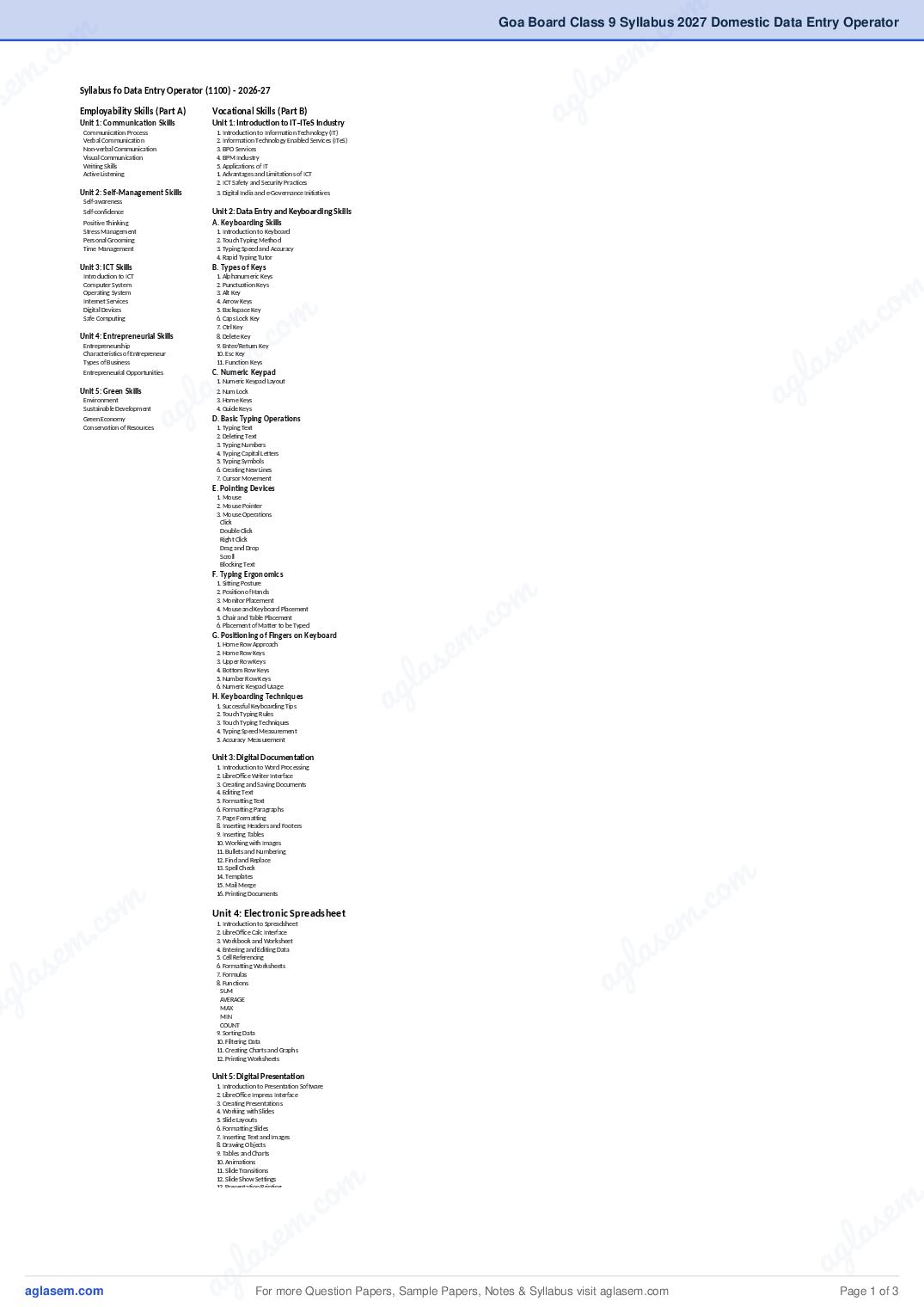
s Syllabus fo Data Entry Operator (1100) - 2026-27
Employability Skills (Part A)
Unit 1: Communication Skills
Vocational Skills (Part B)
Unit 1: Introduction to IT–ITeS Industry a g
Communication Process 1. Introduction to Information Technology (IT)
Verbal Communication 2. Information Technology Enabled Services (ITeS)
Non-verbal Communication 3. BPO Services
Visual Communication 4. BPM Industry
Writing Skills 5. Applications of IT
Active Listening 1. Advantages and Limitations of ICT
2. ICT Safety and Security Practices
Unit 2: Self-Management Skills 3. Digital India and e-Governance Initiatives
Self-awareness
Self-confidence Unit 2: Data Entry and Keyboarding Skills
Positive Thinking A. Keyboarding Skills
Stress Management 1. Introduction to Keyboard
Personal Grooming 2. Touch Typing Method
Time Management 3. Typing Speed and Accuracy
4. Rapid Typing Tutor
m
Unit 3: ICT Skills B. Types of Keys
co
Introduction to ICT 1. Alphanumeric Keys
Computer System 2. Punctuation Keys
m .
Operating System 3. Alt Key
co
Internet Services 4. Arrow Keys
m
Digital Devices 5. Backspace Key
. e
Safe Computing 6. Caps Lock Key
s
7. Ctrl Key
m
Unit 4: Entrepreneurial Skills
a
8. Delete Key
e l
Entrepreneurship 9. Enter/Return Key
s
Characteristics of Entrepreneur 10. Esc Key
a g
Types of Business 11. Function Keys
l a
Entrepreneurial Opportunities C. Numeric Keypad
ag
1. Numeric Keypad Layout
Unit 5: Green Skills 2. Num Lock
Environment 3. Home Keys
Sustainable Development 4. Guide Keys
Green Economy D. Basic Typing Operations
Conservation of Resources 1. Typing Text
2. Deleting Text
3. Typing Numbers
4. Typing Capital Letters
5. Typing Symbols
6. Creating New Lines
7. Cursor Movement
E. Pointing Devices
1. Mouse
2. Mouse Pointer
3. Mouse Operations
Click
Double Click
Right Click
Drag and Drop
Scroll
Blocking Text
m
F. Typing Ergonomics
co
1. Sitting Posture
2. Position of Hands
.
3. Monitor Placement
4. Mouse and Keyboard Placement
em
5. Chair and Table Placement
6. Placement of Matter to be Typed
s
G. Positioning of Fingers on Keyboard
a
1. Home Row Approach
l
2. Home Row Keys
g
3. Upper Row Keys
4. Bottom Row Keys
a
5. Number Row Keys
6. Numeric Keypad Usage
H. Keyboarding Techniques
1. Successful Keyboarding Tips
2. Touch Typing Rules
3. Touch Typing Techniques
4. Typing Speed Measurement
5. Accuracy Measurement
Unit 3: Digital Documentation
1. Introduction to Word Processing
2. LibreOffice Writer Interface
3. Creating and Saving Documents
4. Editing Text
5. Formatting Text
6. Formatting Paragraphs
7. Page Formatting
8. Inserting Headers and Footers
9. Inserting Tables
10. Working with Images
11. Bullets and Numbering
m
12. Find and Replace
co
13. Spell Check
14. Templates
m .
15. Mail Merge
c. o
16. Printing Documents
m
se
Unit 4: Electronic Spreadsheet
em la
1. Introduction to Spreadsheet
2. LibreOffice Calc Interface
s
3. Workbook and Worksheet
la g
4. Entering and Editing Data
a
5. Cell Referencing
6. Formatting Worksheets
g
7. Formulas
a
8. Functions
SUM
AVERAGE
MAX
MIN
COUNT
9. Sorting Data
10. Filtering Data
11. Creating Charts and Graphs
12. Printing Worksheets
Unit 5: Digital Presentation
1. Introduction to Presentation Software
2. LibreOffice Impress Interface
3. Creating Presentations
4. Working with Slides
5. Slide Layouts
6. Formatting Slides
7. Inserting Text and Images
8. Drawing Objects
9. Tables and Charts
m .
10. Animations
co
11. Slide Transitions
m
12. Slide Show Settings
. e
13. Presentation Printing
e m la s
l a s a g
ag For more Question Papers, Sample Papers, Notes & Syllabus visit Page 1 of 3
Page 3
Class IX Vocational Education
Domestic Data Entry Operator
No of
Months Weeks Alloted Weeks Topics Periods Total Hrs Theory Practicals
Required
Introduction to Vocational Education &
5
Assesssment Pattern
April
Familiarise Ss with Part A, Part B, and To Share
( 5 X 5 = 25 )
resources (Pdf's) with Ss,
1 2 3
4 2 Part A: Unit 1: Communication Skills 15 10 2 3
June
( 4 X 5 = 20 ) 3 2 3
4 Part A: Unit 3: Basic ICT Skills 15 10 2 3
1 2 3
5 Part A: Unit 3: Basic ICT Skills
2 2 3
July ( 5 X 5 = 25 ) 3 Part B: Unit 1:Introduction to IT–ITeS Industry 5 3 2 3
4 2 3
5 Part B: Unit 2:Data Entry and Keyboarding Skills 15 10
2 3
1 2 3
4 Part B: Unit 2:Data Entry and Keyboarding Skills
2 2 3
August 3 2 3
( 4 X 5 = 20 ) Part B: Unit 3: Digital Documentation (Elementary) 25 17
4 2 3
1 2 3
4 2 2 3
September 3 Part B: Unit 3: Digital Documentation (Elementary)
2 3
( 4 X 5 = 20 )
4 2 3
3 1 Revision (Reflection),
10 7
October 2 Practical Exams, Viva voce etc.
( 3 X 5 = 15 ) 3 PartA: Unit 2: Self Management Skills 10 7
1 2 3
November 1 PartA: Unit 2: Self Management Skills
(1X5=5) 2 3
3 1 2 3
PartA: Unit 4: Entrepreneurial Skills 10 7
December 2 2 3
( 3 X 5 = 15 ) 3 PartA: Unit 5: Green Skills 5 3 2 3
3 1 2 3
January 2 Part B" Unit 4: Electronic Spreadsheet (Elementary) 20 13 2 3
( 3 X 5 = 15 )
3 2 3
1 Part B: Unit 4: Electronic Spreadsheet (Elementary) 2 3
4
2 2 3
February 3 Part B: Unit 5: Digital Presentation 20 13 2 3
( 4 X 5 = 20 )
4 2 3
2 1 2 3
March 2 Revision, Practical Exams, Viva Voce 10 7
( 2 X 5 = 10 ) 2 3
Total 160 107 62 93
Part C: Practical Work
Practical Examination 6
Written Test 2
Viva Voce 3
Total 11
Part D Project Work/Field Visit 18
Practical File/ Student Portfolio 10
Viva Voce 4
Total 32
Part E Continuous and Comprehensive Evaluation (CCE) 5
48
For more Question Papers, Sample Papers, Notes & Syllabus visit Page 2 of 3
Page 4
Domestic Data Entry Operator m .co
Academic Year : 2026-27 .co e m
em l a s
Theory Component
l a s 30
a g
Practical Component a g 40
Portfolio 10
Project / Assignment 20
Marks Distribution out of 30 (Ist Term)
Marks
Part A : Employability Skills
om .co
m
Unit 1: Communication Skill 4
. c e m
c. o em s
Unit 3: Basic ICT Skills 4
s la
em ag
Part B: Vocational Skills
s
Unit 1 : Introduction to IT–ITeS Industry 4
g l a
la Unit 2 : Data Entry and Keyboarding Skills
Unit 3 : Digital Documentation (Elementary)
8
10
a
Total 30
Marks Distribution out of 30 (IInd Term)
Marks
Part A : Employability Skills
Unit 2: Self-management Skills 3
om
.c
Unit 4: Entrepreneurial Skills 3
m
c. o m
Unit 5: Green Skill 2
Part B: Vocational Skills
m s e
s e
Unit 4 : Electronic Spreadsheet (Elementary) 12
l a
l a
Unit 5 : Digital Presentation 10
ag
ag Total 30
For more Question Papers, Sample Papers, Notes & Syllabus visit Page 3 of 3
Document Details
| Board / Org | Goa Board |
| Exam | Class 9 |
| Type | Syllabus |
| Pages | 3 |
| Updated | 04 Nov 2026 |