Karnataka 2nd PUC Answer Key 2026 Information Technology (Model Answers)
Finished viewing? Save it for later —
Download Karnataka 2nd PUC Answer Key 2026 Information Technology (Model Answers) (PDF · 7 pages)About Karnataka 2nd PUC Answer Key 2026 Information Technology (Model Answers)
Karnataka 2nd PUC Answer Key 2026 Information Technology (Model Answers) is available here for free download. Published by Karnataka Board for Class 12, this answer key can be viewed online or downloaded as a PDF (7 pages). Candidates preparing for Class 12 can use Karnataka 2nd PUC Answer Key 2026 Information Technology (Model Answers) to understand the exam pattern, the type of questions asked, and the overall difficulty level.
Frequently Asked Questions
How can I download Karnataka 2nd PUC Answer Key 2026 Information Technology (Model Answers)?
Open this page and click the Download button to save Karnataka 2nd PUC Answer Key 2026 Information Technology (Model Answers) as a PDF. It is completely free on AglaSem Docs.
Is Karnataka 2nd PUC Answer Key 2026 Information Technology (Model Answers) free to download?
Yes. Karnataka 2nd PUC Answer Key 2026 Information Technology (Model Answers) can be viewed online and downloaded as a PDF free of cost on AglaSem Docs.
How many pages does Karnataka 2nd PUC Answer Key 2026 Information Technology (Model Answers) have?
Karnataka 2nd PUC Answer Key 2026 Information Technology (Model Answers) contains 7 pages, which you can read online or download together as a single PDF.
Where can I find more Class 12 study material?
You can find more Class 12 question papers, sample papers, syllabus, and answer keys on AglaSem Docs.
Karnataka 2nd PUC Answer Key 2026 Information Technology (Model Answers) – Text
Read the full text of this answer key below — useful to quickly search, copy and reference the content online without downloading the PDF.
📄 View text version (7 pages)
Page 1
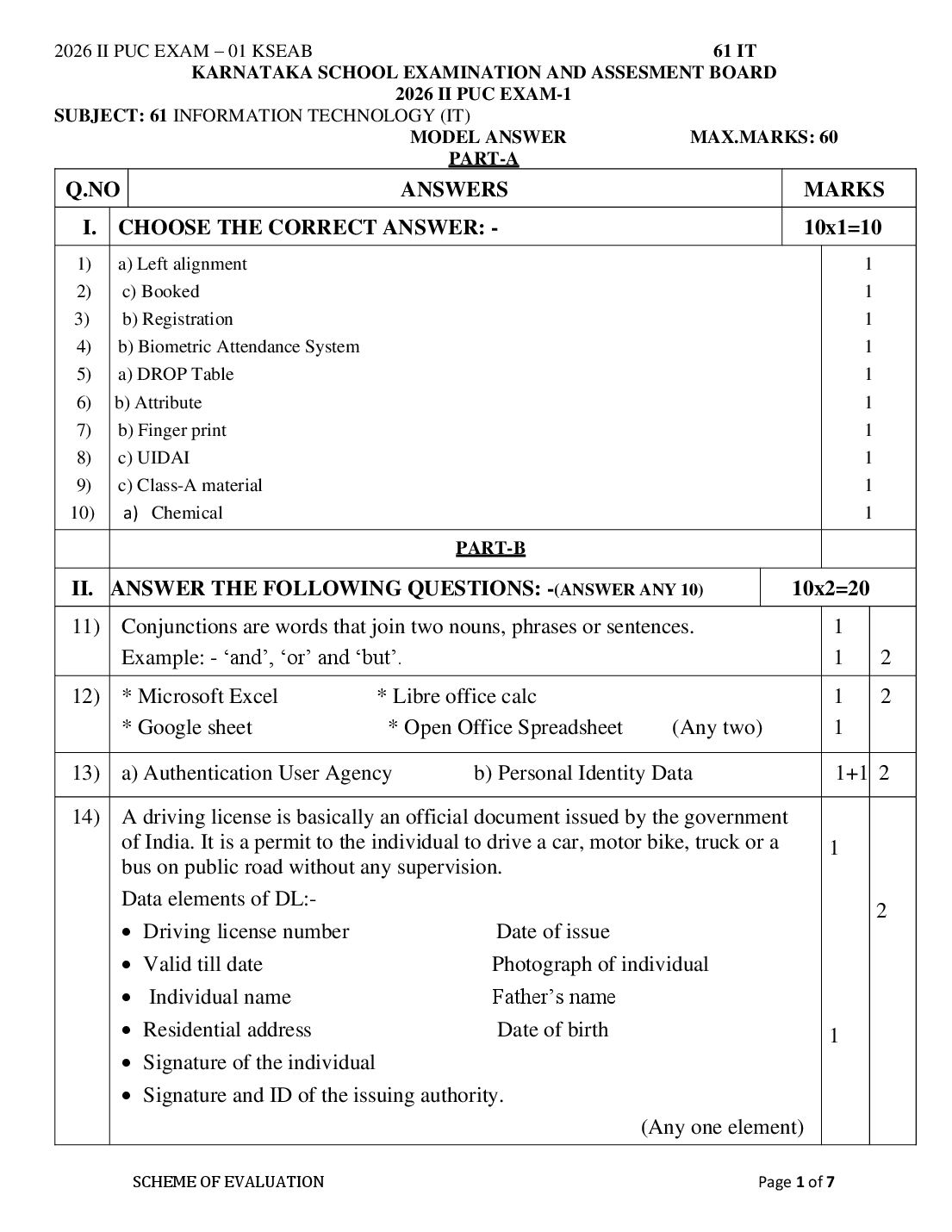
KARNATAKA SCHOOL EXAMINATION AND ASSESMENT BOARD
2026 II PUC EXAM-1
SUBJECT: 61 INFORMATION TECHNOLOGY (IT)
MODEL ANSWER MAX.MARKS: 60
PART-A
Q.NO ANSWERS MARKS
I. CHOOSE THE CORRECT ANSWER: - 10x1=10
1) a) Left alignment 1
2) c) Booked 1
3) b) Registration 1
4) b) Biometric Attendance System 1
5) a) DROP Table 1
6) b) Attribute 1
7) b) Finger print 1
8) c) UIDAI 1
9) c) Class-A material 1
10) a) Chemical 1
PART-B
II. ANSWER THE FOLLOWING QUESTIONS: -(ANSWER ANY 10) 10x2=20
11) Conjunctions are words that join two nouns, phrases or sentences. 1
Example: - ‘and’, ‘or’ and ‘but’. 1 2
12) * Microsoft Excel * Libre office calc 1 2
* Google sheet * Open Office Spreadsheet (Any two) 1
13) a) Authentication User Agency b) Personal Identity Data 1+1 2
14) A driving license is basically an official document issued by the government
of India. It is a permit to the individual to drive a car, motor bike, truck or a 1
bus on public road without any supervision.
Data elements of DL:-
2
• Driving license number Date of issue
• Valid till date Photograph of individual
• Individual name Father’s name
• Residential address Date of birth 1
• Signature of the individual
• Signature and ID of the issuing authority.
(Any one element)
SCHEME OF EVALUATION Page 1 of 7
Page 2
15) ➢ Mandatory Signs Cautionary Signs 1
➢ Informative Signs (Any two) 1 2
16) * Numeric Data type * String Data type 1
* Date and Time data type (Any two) 1 2
17) ➢ Data Control Language (DCL) is used to control access to the database, 1
which is very essential to a database system with respect to security
concerns.
➢ The commands GRANT and REVOKE are used as a part of DCL. 1
GRANT: Allows access privileges to the users to the database.
REVOKE : Withdraws user's access privileges given by using GRANT 2
command.
18) a) Cardinality:-The number of rows in a relation is called cardinality. 1 2
b) Degree:- The number of columns (attributes) in a relation is called Degree. 1
19) ➢ NIC (NATIONAL INFORMATICS CENTRE) cloud service 1
➢ GOOGLE cloud service
1 2
➢ APPLE cloud service (Any two)
20) ➢ Trip and fall ½
➢ Slip and fall ½ 2
➢ Injuries caused due to escalators or elevators (or lifts) ½
➢ Accidents due to falling of goods ½
➢ Accidents due to moving objects (Any Four)
➢ Avoid dust production, generation of solid particles and gases in the air. 1
21) ➢ Extensive use of automobile vehicles in the campus can lead to the air 2
pollution. So, organisation must use limited number of vehicles to avoid air 1
pollution.
➢ Ozone produced in the air can pollute the air. The generation of ozone gas
must be kept at low level by the organisation. (Any two)
22) ➢ All employees must know where the fire extinguishers are located, and how 1
to properly use them. 2
➢ Fire extinguishers and First Aid Stations should be clearly marked with 1
signs.
➢ Never block access to Exits, fire extinguishers, electric switches and panels.
➢ Do not block or stack material against doors.
➢ Do not use flammable material near electrical panels, switches, lift trucks
or any electrical equipment.
➢ Make sure all equipment is properly grounded where needed.
➢ Fire extinguishers must be inspected regularly.
➢ Report to your supervisor any defect in electrical, fire prevention or
material handling equipment.
SCHEME OF EVALUATION Page 2 of 7
Page 3
➢ No flammable materials are to be placed around an exit door way. (Any
two)
23) (a) Dry eyes:- Forget to blink 1
( b) Sore lower back :- No lumbar support 1 2
PART-C
III. ANSWER THE FOLLOWING (ANSWER ANY SIX) :- 6x3=18
24) * Eye contact 1
* Gestures 1 3
1
* Avoiding distractions
* Giving feedback. (Any Three)
25) (a) Cell:-A cell is a rectangular shaped box where the row and column meet. 1
(b) Work book :- It is a collection of work sheets. 1 3
(c) Work sheet :- It is a collection of cells in the form of grids.
1
26) ➢ Login into the software by using admin login and password 1
➢ Select Administration > Daily Punches 1
➢ If the administrator requires to see the daily punches of the back date then 1
change the date in the given menu.
➢ The daily punching report can be exported into Excel form. 3
27) ➢ Document based enrolment – It requires proof of identity, proof of 1
address and date of birth certificates.
➢ Introducer based enrolment – It requires a introducer such as doctor,
1
health worker, postman, elected body member or local NGO representative
➢ Head of family-based enrolment – It requires name of head of family,
Aadhar number of head and proof of relationship. 3
➢ Child enrolment below 5 years of age – It requires date of birth proof and 1
Aadhaar number of any parent. (Any Three)
28) Check for eligibility.:
➢ If a person wants to obtain a driving licence for motorcycle without gear,
then the applicant must be 16 years old and must have the consent of guardian 1
or parents.
➢ If one wish to obtain a driving licence for motorcycle with gear then the
1
applicant must be at least 18 years old.
3
➢ If the individual wants to apply commercial heavy vehicle and transport
vehicles then the applicant must be 8th standard pass and must be of 20 years
of age. Every applicant must be conversant with the traffic 1
SCHEME OF EVALUATION Page 3 of 7
Page 4
Rules and regulations.
Documents required:
➢ Age proof – birth certificate / PAN card / Passport/ 10th class marksheet/
TC of school
➢ Proof of address – passport, Aadhaar card, electricity bill, voter id card or
ration card.
Online application process:
➢ Visit the nearest RTO website for filling the online form.
➢ Attach the photograph and required documents.
➢ Pay the prescribed fees and submit to the RTO.
➢ DML is a component of SQL that enhances efficient user interaction with 1
the database system by providing a set of commands. 3
29) ➢ DML permits users to insert data into tables, retrieve existing data, delete 1
data from tables and modify the stored data.
1
➢ The common DML commands are SELECT, INSERT, UPDATE and
DELETE.
30) a) Entity:- An entity is a object or a thing in the real world with independent 1
existence.
b) Attribute:- The column in a relation is called Attribute. 1
c). Schema:- The overall structure of a database is called the database schema,
1 3
which is specified during database design.
31) ➢ Scalable – We can increase or reduce the computing power / storage on
demand and in automated method. 1
➢ Lower infrastructure and management costs for the user. 1
➢ Improved performance 1 3
➢ Lower maintenance costs
➢ Increased storage capacity
➢ Improved backup and recovery (Any Three)
32) ➢ Fingerprint image quality is very important for accurate recognition. 1
➢ The scanned image will not be accurate if there are cuts or injuries in the 1
finger. 1
➢ Some skin conditions or diseases can make the fingerprint inaccurate. 3
➢ The finger may not be placed correctly in the sensor, resulting in an
incorrect image.
➢ If the finger is wet due to water or sweat, the sensor will not give a correct
image. (Any Three)
SCHEME OF EVALUATION Page 4 of 7
Page 5
33) ➢ It is the risks arising from the physical work environment – floors, 1
facilities, walls, and ceilings. 3
➢ Physical hazards could also mean working with machinery and electricity- 1
operated machines.
➢ Work processes or specific assignments could also qualify as areas where
1
physical hazards are present.
➢ There is a vast list of physical hazards across all industries, but when we
look at one specific sector, these dangers are also particular to the work
setting.
(Any Three points)
PART-D
IV. ANSWER THE FOLLOWING (ANSWER ANY TWO) 2x6=12
34) • Desktop/Laptop. 1
• Camera – 2Mega Pixel. 1
• Slap Scanner – ECMP. 1
• Single Finger print Device – UCL. 1
• IRIS Scanner. 1
• Printer. 1
• Scanner.
• Windows 7 or Windows 8 (32-bit and/or 64-bit editions).
6
• High-speed Bank Network Connectivity (for uninterrupted connectivity
during client installation/enrolments/Updation).
• The enrolment station (Laptop/Desktop) should be pre-installed with
associated drivers for printer,
• Camera, scanner etc.
• Updated window O/S installed using windows live update.
• Anti-virus if any installed should be disabled while client installation.
• 2 GHz, Dual core CPU or Later.
• 4GB RAM or higher.
• 160 GB HDD.
• Dedicated USB 2.0 port(Minimum 5 ports required) for use of IRIS, Finger
print scanner, Camera etc.
• Valid (alpha numeric/numeric) Bios Serial number.
(Any 3 hardware and Any 3 software)
SCHEME OF EVALUATION Page 5 of 7
Page 6
35)
➢ Reducing Redundancy 1
➢ Improved Data Sharing.
1 6
➢ Data Integrity.
➢ Security. 1
➢ Data Consistency. 1
➢ Backup and Recovery. 1
➢ Data Atomicity
1
➢ Development of new applications (Any six)
36) Cloud computing means storing and accessing data and programs in remote 1
servers over the Internet instead of computer's hard drive.
2
6
Cloud computing architecture refers to the components and sub
components
required for cloud computing.
At the most basic level, a cloud architecture consists of the following
components.
• The front end consisting of the user’s device or computer which is 1
connected over network and accessing data/application remotely.
• The back end refers to the cloud itself. It contains all group of networked 1
computers, servers, storage devices and other services that forms the cloud.
• A network connection (internet) to connect the back-end cloud when
needed (on-demand).
1
SCHEME OF EVALUATION Page 6 of 7
Page 7
• Position your computer such that the end of the monitor should be at your 1
37) eye level.
• Keep the neck neutral with monitor directly ahead to prevent to turn your 1
neck.
• Keep your monitor at least arm length distance, or 20 to 30 inches away 1
from you.
• Maximize contact of your back against the backrest of the chair.
1
• Adjust height of armrests so that your elbows are at 100-110 degrees 1 6
open angle.
• Place keyboard at a slight negative tilt if you are sitting upright. 1
• While typing, keep your hands slightly lower than elbows, with fingers
pointing downwards at the floor.
• Minimize any twisting of your wrists from side to side or up and down.
• Use a keyboard palm rest as needed only when you are not typing. Do not
rest your wrists when typing. It leads to wrist strain.
• Always take small breaks while working on the computer to stretch your
muscles, keep your blood flowing, and to rest your eyes.
(Any six)
***************
SCHEME OF EVALUATION Page 7 of 7
Document Details
| Board / Org | Karnataka Board |
| Exam | Class 12 |
| Type | Answer Key |
| Pages | 7 |
| Language | english |
| Updated | 23 Oct 2026 |