HBSE Class 10 Syllabus 2027 Computer Science
Finished viewing? Save it for later —
Download HBSE Class 10 Syllabus 2027 Computer Science (PDF · 17 pages)About HBSE Class 10 Syllabus 2027 Computer Science
HBSE Class 10 Syllabus 2027 Computer Science is available here for free download. Published by Haryana Board for Class 10, this syllabus can be viewed online or downloaded as a PDF (17 pages). Candidates preparing for Class 10 can use HBSE Class 10 Syllabus 2027 Computer Science to understand the exam pattern, the type of questions asked, and the overall difficulty level.
Frequently Asked Questions
How can I download HBSE Class 10 Syllabus 2027 Computer Science?
Open this page and click the Download button to save HBSE Class 10 Syllabus 2027 Computer Science as a PDF. It is completely free on AglaSem Docs.
Is HBSE Class 10 Syllabus 2027 Computer Science free to download?
Yes. HBSE Class 10 Syllabus 2027 Computer Science can be viewed online and downloaded as a PDF free of cost on AglaSem Docs.
How many pages does HBSE Class 10 Syllabus 2027 Computer Science have?
HBSE Class 10 Syllabus 2027 Computer Science contains 17 pages, which you can read online or download together as a single PDF.
Where can I find more Class 10 study material?
You can find more Class 10 question papers, sample papers, syllabus, and answer keys on AglaSem Docs.
HBSE Class 10 Syllabus 2027 Computer Science – Text
Read the full text of this syllabus below — useful to quickly search, copy and reference the content online without downloading the PDF.
📄 View text version (18 pages)
Page 1
HBSE Class 10 Syllabus
2027 Computer Science
EXAM YEAR TYPE SUBJECT
Haryana Class 10 2027 Syllabus Computer Science
Notes · Sample Papers · Previous Year Papers · Mock Tests
Page 2
.co s e m
s em l a
a ag
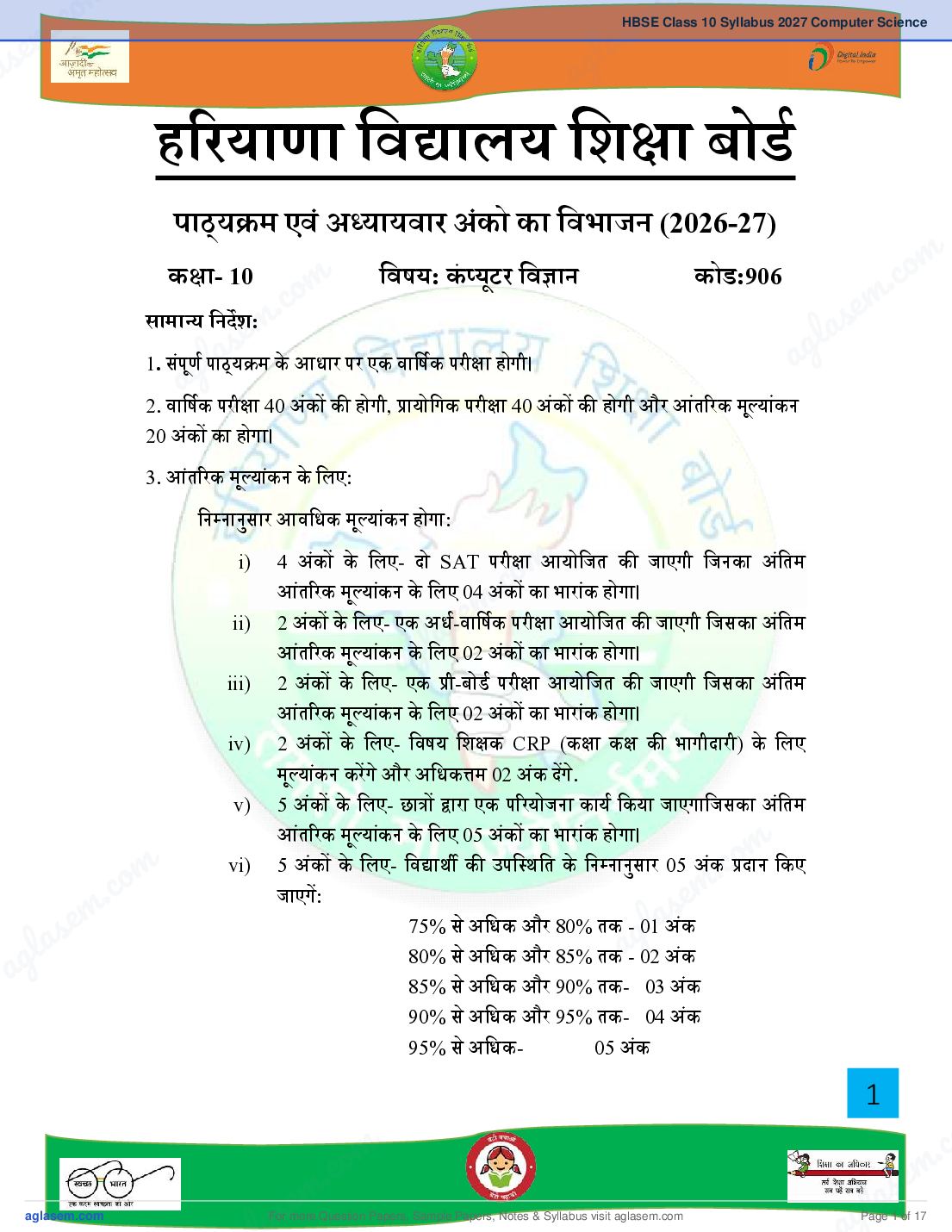
ह रयाणा िव ालय िश ा बोड
पाठ्य म एवं अ यायवार अंको का िवभाजन (2026-27)
m
क ा- 10
om
िवषय: कं यूटर िव ान कोड:906 . co
c m
सामा य िनदश:m. as e
s e g l
a
l ् य म के आधार पर एक वािषक परी ा होगी।
1. संपणू gपाठ a
a
2. वािषक परी ा 40 अक
ं क होगी, ायोिगक परी ा 40 अंक क होगी और आतं रक मू याक
ं न
20 अंक का होगा।
3. आतं रक मू याक
ं न के िलए:
िन नानुसार आविधक मू याक
ं न होगा:
i) 4 अंक के िलए- दो SAT परी ाmआयोिजत क जाएगी िजनका अंितम
आंत रक मू याक
o ं होगा।
ं न के िलए 04 अ.ंकc का भाराक
e m परी ा आयोिजत क जाएगी िजसका अंितम
ii) 2 अंक के िलए- एक अध-वािषक
l as
आंत रक मू याक ं न केgिलए 02 अंक का भाराक ं होगा।
iii) 2 अक
a
ं के िलए- एक ी-बोड परी ा आयोिजत क जाएगी िजसका अिं तम
आतं रक मू याक ं न के िलए 02 अक ं का भाराक ं होगा।
iv) 2 अंक के िलए- िवषय िश क CRP (क ा क क भागीदारी) के िलए
मू याक
ं न करगे और अिधक म 02 अंक दगे.
v) 5 अंक के िलए- छा ारा एक प रयोजना काय िकया जाएगािजसका अंितम
आंत रक मू याकं न के िलए 05 अंक का भाराक ं होगा।
5 अंक के िलए- िव ाथ क उपि थित के िन नानसु ार 05 अंक.coदान िकए
m
m vi)
c. o जाएग:
s em
e m 75% से अिधक और 80% तक - 01laअक
las ag ं
ag 80% से अिधक और 85% तक - 02 अक ं
85% से अिधक और 90% तक- 03 अक ं
90% से अिधक और 95% तक- 04 अक ं
95% से अिधक- 05 अकं
1
m . c
c. o s e m
s em
For more Question Papers, Sample Papers, Notes & Syllabus visit
gl a
Page 1 of 17
Page 3
क ा- 10 िवषय: कं यटू र िव ान कोड:906
म यूिनट अंक
सं या
1 एमएस ए सेस 05
2 सचं ार ौ ोिगक 06
3 इटं रनेट 08
4 एचटीएमएल (HTML) 15
5 साइबर सरु ा 06
कुल 40
ायोिगक परी ा 40
आंत रक मू यांकन 20
कुल योग 100
ायोिगक परी ा के िलए योज़ना
म यूिनट अंक
सं या
1 लैब टे ट: एमएस ए सेस ैि टकल 05
इटं रनेट 05
एचटीएमएल कोड 10
2 रपोट फ़ाइल (HTML के कम से कम 10 पृ और MS Access के 2 10
द तावेज़)
3 मौिखक परी ा 10
कुल योग 40
2
For more Question Papers, Sample Papers, Notes & Syllabus visit Page 2 of 17
Page 4
.co s e m
s em l a
a ag
यूिनट I: MS Access 2010
डेटाबेस क बुिनयादी अवधारणा और डेटाबेस क आव यकता, डेटाबेस के लाभ, एमएस
ए सेस डेटाबेस क िवशेषताएं, एमएस ए सेस के िवंडो घटक, एक नया डेटाबेस बनाना,
मौजूदा डेटाबेस खोलना, एमएस ए सेस डेटाबेस के त व / ऑ जे ट, एमएस ए सेस म डेटा
m
कार, िडजाइन यू म टेबल बनाना, डेटाशीट यू म टेबल बनाना, ाथिमक कंु जी, टेबल म
m . co
ाइमरी क से.cटoकरने के िलए चरण, िकसी तािलका म डेटा देखना और सपं ािदत करना. e m
em l as
l a s ag
यूिनटaIIg : संचार ौ ोिगक
कं यटू र नेटवक का प रचय, कं यटू र नेटवक क आव यकता
कं यटू र नेटवक के कार: PAN, LAN, MAN, WAN
ासं िमशन मीिडया (गाइडेड और अनगाइडेड)
वायड/वायरलेस संचार, वाई-फाई, लटू ू थ, लाउड कं यिू टंग (सावजिनक और िनजी)
m
यिू नट III : इटं रनेट . co
e mइटं रनेट का काय, इटं रनेट के िलए हाडवेयर और
l as
इटं रनेट का प रचय, इटं रनेट का इितहास,
सॉ टवेयर आव यकताए,ं व ड वाइड
a g वेब, वेब सवर, वेब पेज, वेब साइट, वेब पोटल, वेब
पता / यआ ू रएल, वेब ाउज़र, सच इजं न, लॉग, ई-मेल संरचना।
इंटरनेट ोटोकॉल: TCP, FTP, IP, SMTP, HTTP/HTTPs, (के वल प रचय)
यूिनट IV: HTML
HTML का प रचय:
HTML का इितहास, HTML के िलए टे ट एिडटर, HTML द तावेज़ बनाना
o m और
o c मट्स।
m सहेजना, वेब ाउज़र का उपयोग करके वेबपेज तक पहचं ना, कंटेनर और ए mटी .एले
. c HTML क मल ू सरं चना: s e
e m l a
las HTML टै ग , हे
ड टै ग, शीषक टै ग । ag
ag बॉडी टैग (ऐि यटू ् स: text, background, bgcolor)
HTML म टे ट फोमिटंग एलेमट्स:
P (पैरा ाफ), B (बो ड), I (इटैिल स), U (रे खांिकत) टैग।
3
m . c
c. o s e m
s em
For more Question Papers, Sample Papers, Notes & Syllabus visit
gl a
Page 3 of 17
Page 5
फ़ॉ ट टैग (ऐि यटू ् स: face, size, color)
Sup (सुपरि ट), sub(सबि ट) टैग।
BR टैग, HR टैग, एचटीएमएल म िट पिणयां डालना।
HTML म सूिचयाँ
ओड़रे ड सिू चयाँ: <OL>, अनोड़रे ड सूिचयाँ <UL> ऐि यटू ् स के साथ: type,
start.<LI> टैग।
िववरण सूिचयाँ: <DL>, <DT> और <DD> टैग।
HTML म छिवयाँ सि मिलत करना
िच डाल: <img> टैग (ऐि यटू ् स: src, चौड़ाई, ऊंचाई, alt, align)
HTML म टेबल सि मिलत करना
टेबल (ऐि यटू ् स: border, width, cellpadding, cell spacing).
<TH> (टेबल हैडर). <TR> (ऐि यटू ् स: align, width, height).
<TD> (ऐि यटू ् स: bgcolor, rowspan, colspan).
वेब पेज को िलक ं करना:
<A> एक ं र टैग (ऐि यटू ् स: नाम href, शीषक, alt).
यूिनट V : साइबर सरु ा
साइबर खतरे: कं यटू र वायरस, मालवेयर, एडवेयर, वो स, ोजन हॉस, पाइवेयर,
रसमवेयर। हैकस और ै कस।
सरु ा उपाय: पहचान क चोरी, पहचान सरं ण, पासवड का उिचत उपयोग, सचू ना क
गोपनीयता, एटं ीवायरस।
4
For more Question Papers, Sample Papers, Notes & Syllabus visit Page 4 of 17
Page 6
.co s e m
s em l a
a ag
योग:
एमएस ए सेस
एक नया डेटाबेस बनाना
िडज़ाइन य और डेटाप क य का उपयोग करके तािलका बनाना m
m . co
.coिकसी तािलका म डेटा संपािदत करना e m
em ाथिमक कुंजी को तािलका म सेट करना। l as
l as ag
agइंटरनेट
िविभ न वेब ाउज़र का उपयोग करके इटं रनेट पर सिफग।
वेबपेज, वेबसाइट, होम पेज और यूआरएल क अवधारणा सीखना।
सच इंजन का उपयोग करके जानकारी ढूँढना।
m
.co
ई-मेल भेजना
e m
एचटीएमएल
l as
ag HTML वेबपृ बनाना:
िन न टैग का उपयोग करके
एचटीएमएल, हेड, टाइटल, बॉडी
फ़ांट
CENTER, B, I, U, P, SUB, SUP, H1 to H6, BR, HR.
UL, OL, DL m
m .co
m .co वेबपेज म छिव सि मिलत करना।
s e m
s e वेबपेज म तािलका सि मिलत करना. gla
g la a
a <a> टैग का उपयोग करके वेबपृ को िलक
ं करना
5
m . c
c. o s e m
s em
For more Question Papers, Sample Papers, Notes & Syllabus visit
gl a
Page 5 of 17
Page 7
क ा- 10 िवषय: कं यटू र िव ान कोड:906
मास िवषय- व तु िश ण दोहराई योगा मक
कालाशं कालांश काय
अ ैल एमएस ए सेस 12 2 6
मई संचार ौ ोिगक 16 4
जनू ी म कालीन अवकाश (प रयोजना काय)
जल
ु ाई इटं रनेट 14 2 4
अग त HTML: 16 4
HTML का प रचय
HTML क मलू सरं चना
िसतंबर HTML: 10 2 6
HTML म टे ट फोमिटंग एलेमट्स
अध-वािषक परी ा
अ ू बर HTML: 12 2 6
HTML म सूिचयाँ
HTML म छिवयाँ
सि मिलत करना
नवबं र HTML: HTML म टेबल 12 3 5
सि मिलत करना
6
For more Question Papers, Sample Papers, Notes & Syllabus visit Page 6 of 17
Page 8
.co s e m
s em l a
a ag
िदसंबर HTML: वेब पेज को िलंक करना 12 2 6
साइबर सुर ा : साइबर खतरे
जनवरी साइबर सरु ा: सरु ा उपाय 12 2 6
फ़रवरी दोहराई 20 m
om . co
. c e m
माच
em वािषक परी ा
l as
l as ag
ag
नोट:
िवषय िश क को सलाह दी जाती है िक वे छा को श दावली या अवधारणा क
प ता को बढ़ाने के िलए अ याय म उपयोग क जाने वाली
श दावलीप रभाषा मक श द क नोटबुक तै यार करने के िलए िनदिशत कर।
m
m .co
s e
l a
ag
m
m .co
m .co s e m
s e g la
g la a
a
7
m . c
c. o s e m
s em
For more Question Papers, Sample Papers, Notes & Syllabus visit
gl a
Page 7 of 17
Page 9
क ा- 10 िवषय: कं यटू र िव ान कोड:906
समय: 2½ घंटे
द ताएं अकं ितशतता
ान 16 40%
बोध 12 30%
अनु योग 4 20%
कौशल 5 10%
कुल 30 100%
का कार अंक सं या िववरण कुल अंक
व तिु न 1 1*10 4 बह-िवक पीय 10
2 र थान भरो
2 अिभकथन-कारण
2 सही/गलत
अित लघु रा मक 1 4 िक ही दो म आतं रक िवक प 04
िदया जाएगा
लघु रा मक 2 7 िक ही तीन म आंत रक िवक प 14
िदया जाएगा
दीघ उ रा मक 4 3 सभी म आंत रक िवक प िदया 12
जाएगा
कुल 24 40
8
For more Question Papers, Sample Papers, Notes & Syllabus visit Page 8 of 17
Page 10
.co s e m
s em l a
a ag
m
om . co
. c e m
e m l as
BOARDl as OF SCHOOL EDUCATION HARYANAag
ag
Syllabus and Chapter wise division of Marks (2026-27)
Class- 10 Subject: Computer Science Code:906
General Instructions:
1. There will be an Annual Examination based on the entire syllabus.
m
.co
2. The Annual Examination will be of 40 marks, Practical Examination will be
m
of 40 marks and 20 marks weightage shall be for Internal Assessment.
e
3. For Internal Assessment:
l as
ag
There will be Periodic Assessment that would include:
i) For 4 marks- Two SAT exams will be conducted and will have a
weightage of 04 marks towards the final Internal Assessment.
ii) For 2 marks- One half yearly exam will be conducted and will
have a weightage of 02 marks towards the final Internal
Assessment.
m
.co
iii) For 2 marks- One pre-board exam will be conducted and will
m
.co
have a weightage of 02 marks towards the final Internal
m Assessment.
s em
s e g a maximum 02
lgive
la
iv) For 2 marks- Subject teacher will assess and
g marks for CRP (Classroom Participation). a
a v) For 5 marks- A project work to be done by students and will
have a weightage of 05 marks towards the final Internal
Assessment.
9
m . c
c. o s e m
s em
For more Question Papers, Sample Papers, Notes & Syllabus visit
gl a
Page 9 of 17
Page 11
as:
Above 75% to 80% - 01 marks
Above 80% to 85% - 02 marks
Above 85% to 90% - 03 marks
Above 90% to 95% - 04 marks
Above 95% - 05 marks
Course Structure (2026-27)
Class- 10 Subject: Computer Science Code: 906
Sr. No. UNIT Marks
1 MS Access 05
2 Communication Technology 06
3 Internet 08
4 HTML 15
5 Cyber Security 06
Total 40
Practical Examination 40
Internal Assessment 20
Grand Total 100
Scheme for Practical Examination
Sr. Unit Name Marks
No.
1 Lab Test: MS Access Practical 5
Internet 5
10
For more Question Papers, Sample Papers, Notes & Syllabus visit Page 10 of 17
Page 12
.co s e m
s em l a
a ag
HTML Code 10
2 Report File (At least 10 pages of HTML and 2 documents of 10
MS Access)
3 Viva 10
m
om
Total 40
. co
. c e m
em l as
l as ag
ag
UNIT I: MS Access2010
Basic Concepts and need for a Database, Advantages of database,
Features of MS Access Database, Window Components of MS Access,
creating a new Database, opening an existing Database, Elements/Objects
of MS Access Database, Data Types in MS Access, Creating Table in
Design View, Creating Table in Datasheet view, Primary Key, Steps for
Setting Primary Key in a table, viewing and editing data in a table.
m
Unit II: Communication Technology
m .co
s e
Introduction of computer Network, Need of a computer Network.
l a
Types of computer Network: PAN, LAN, MAN, WAN
ag
Transmission media (guided and unguided)
Wired/wireless communication, Wi-Fi, Bluetooth, Cloud Computing
(Public and Private)
UNIT III: Internet
Introduction to internet, History of internet, Working of internet,
Hardware and Software requirements for internet, World Wide Web, m
m Web Servers, Web Page, Web Site, Web Portal, Web Address/URL, Web .co
m .co Browser, Search Engine, Blogs, E-mail structure.
s e m
s e Internet Protocols: TCP, FTP, IP, SMTP, HTTP/HTTPs, POP3
g la
g la (introduction only).
a
a
UNIT IV: HTML
Introduction to HTML:
11
m . c
c. o s e m
s em
For more Question Papers, Sample Papers, Notes & Syllabus visit
gl a
Page 11 of 17
Page 13
HTML document, accessing a Webpage using Web Browser, container
and empty elements.
Basic Structure of HTML:
HTML Tag, HEAD Tag, TITLE Tag.
BODY Tag (attributes: text, background, bgcolor)
Text Formatting elements in HTML:
p (paragraph), b (bold), i (italics), u (underline) tags.
h1...h6 (heading Tags)
Font Tag (attributes: face, size, color)
Sup(superscript), sub(subscript) tags.
BR Tag, HR Tag, Inserting comments in HTML.
Lists in HTML
Ordered Lists: <OL>, Unordered List <UL> with attributes: type, start.
<LI> Tag.
Description lists: <DL>, <DT> and <DD> Tags.
Inserting images in HTML
Insert images: <img> Tag (attributes: src, width, height, alt, align)
Inserting Table in HTML
Table (attributes: border, width, cellpadding, cell spacing).
<TH> (Table Header). <TR> (attributes: align, width, height).
<TD> (attributes: bgcolor, rowspan, colspan).
Linking in web pages:
<A> Anchor tag (Attributes: Name href, title, alt).
UNIT V: Cyber Security
Cyber Threats: Computer virus, Malware, Adware, Worms, Trojan
horse, Spyware, Ransomware. Hackers and Crackers.
Safety measures: Identity theft, identity Protection, Proper usage of
Passwords, Confidentiality of information, Antivirus.
Practicals:
MS Access:
Creating a New Database
12
For more Question Papers, Sample Papers, Notes & Syllabus visit Page 12 of 17
Page 14
.co s e m
s em l a
a ag
Creating a Table using Design View and Datasheet View
Editing data in a Table
Setting the Primary Key in a table.
Internet:
m
om
Surfing internet using various web browsers.
. co
. c
Learning the concept of webpage, website, home page and e m
em URL.
l as
l as Finding information using Search engine. ag
ag Sending E-mail
HTML:
Creating HTML webpages using following tags:
HTML, HEAD, TITLE, BODY
FONT
m
UL, OL, DL m .co
CENTER, B, I, U, P, SUB, SUP, H1 to H6, BR, HR.
s e
l a
Inserting image in a webpage.
ag
Inserting table in a webpage.
Linking webpages using <a> tag.
m
m .co
m .co s e m
s e g la
g la a
a
13
m . c
c. o s e m
s em
For more Question Papers, Sample Papers, Notes & Syllabus visit
gl a
Page 13 of 17
Page 15
Class- 10 Subject: Computer Science Code: 906
Month Subject- content Teaching Revision Practical
Periods Periods Work
April MS Access 12 2 6
May Communication 16 4
Technology
June
Summer Vacation (Project Work)
July Internet 14 2 4
August HTML: 16 4
Introduction to HTML
Basic Structure of HTML
September HTML: Text formatting 10 2 6
elements in HTML
Half-Yearly Exams
14
For more Question Papers, Sample Papers, Notes & Syllabus visit Page 14 of 17
Page 16
.co s e m
s em l a
a ag
October HTML: 12 2 6
Lists in HTML
Inserting images in HTML
November HTML: Inserting table in 12 3 5
HTML
m
December HTML:
om 12 2 6 . co
. c e m
linking in web pages
e m l as
as
l Cyber Security: Cyber ag
ag threats
January Cyber Security: 12 2 6
Safety measures
February Revision 20
m
m .co
March Annual Examination
s e
l a
ag
Note:
Subject teachers are advised to direct the students to prepare
notebook of the Terminology/Definitional Words used in the lessons
for enhancement of vocabulary or clarity of the topic. m
m .co
m .co s e m
s e g la
g la a
a
15
m . c
c. o s e m
s em
For more Question Papers, Sample Papers, Notes & Syllabus visit
gl a
Page 15 of 17
Page 17
Class- 10 Subject: Computer Science Code: 906
Time: 2:30 Hours
Competencies Marks Percentage
Knowledge 16 40%
Understanding 12 30%
Application 8 20%
Skill 4 10%
Total 40 100%
Type of Marks Questions Description Total
Question Marks
Objective 1 10 4 Multiple Choice Questions 10
Type (MCQ)
Questions 2 Fill in the blank
16
For more Question Papers, Sample Papers, Notes & Syllabus visit Page 16 of 17
Page 18
.co s e m
s em l a
a ag
2 Assertion Reason
2 True/False
Very Short 1 4 Internal choice will be given 4
Answer type in any two questions.
Questions
Short Answer 2 7 Internal choice will be given 14 m
type
om in any three question. . co
. c e m
Questions
em l as
l as
Essay type 4 3 Internal choice will be given 12
ag
ag
Questions in all the questions
Total 24 40
m
m .co
s e
l a
ag
m
m .co
m .co s e m
s e g la
g la a
a
17
m . c
c. o s e m
s em
For more Question Papers, Sample Papers, Notes & Syllabus visit
gl a
Page 17 of 17
Document Details
| Board / Org | Haryana Board |
| Exam | Class 10 |
| Type | Syllabus |
| Pages | 17 |
| Updated | 04 Nov 2026 |