Karnataka 2nd PUC Question Paper 2026 Electronics and Hardware
Finished viewing? Save it for later —
Download Karnataka 2nd PUC Question Paper 2026 Electronics and Hardware (PDF · 12 pages)About Karnataka 2nd PUC Question Paper 2026 Electronics and Hardware
Karnataka 2nd PUC Question Paper 2026 Electronics and Hardware is available here for free download. Published by Karnataka Board for Class 12, this question paper can be viewed online or downloaded as a PDF (12 pages). Candidates preparing for Class 12 can use Karnataka 2nd PUC Question Paper 2026 Electronics and Hardware to understand the exam pattern, the type of questions asked, and the overall difficulty level.
Frequently Asked Questions
How can I download Karnataka 2nd PUC Question Paper 2026 Electronics and Hardware?
Open this page and click the Download button to save Karnataka 2nd PUC Question Paper 2026 Electronics and Hardware as a PDF. It is completely free on AglaSem Docs.
Is Karnataka 2nd PUC Question Paper 2026 Electronics and Hardware free to download?
Yes. Karnataka 2nd PUC Question Paper 2026 Electronics and Hardware can be viewed online and downloaded as a PDF free of cost on AglaSem Docs.
How many pages does Karnataka 2nd PUC Question Paper 2026 Electronics and Hardware have?
Karnataka 2nd PUC Question Paper 2026 Electronics and Hardware contains 12 pages, which you can read online or download together as a single PDF.
Where can I find more Class 12 study material?
You can find more Class 12 question papers, sample papers, syllabus, and answer keys on AglaSem Docs.
Karnataka 2nd PUC Question Paper 2026 Electronics and Hardware – Text
Read the full text of this question paper below — useful to quickly search, copy and reference the content online without downloading the PDF.
📄 View text version (12 pages)
Page 1
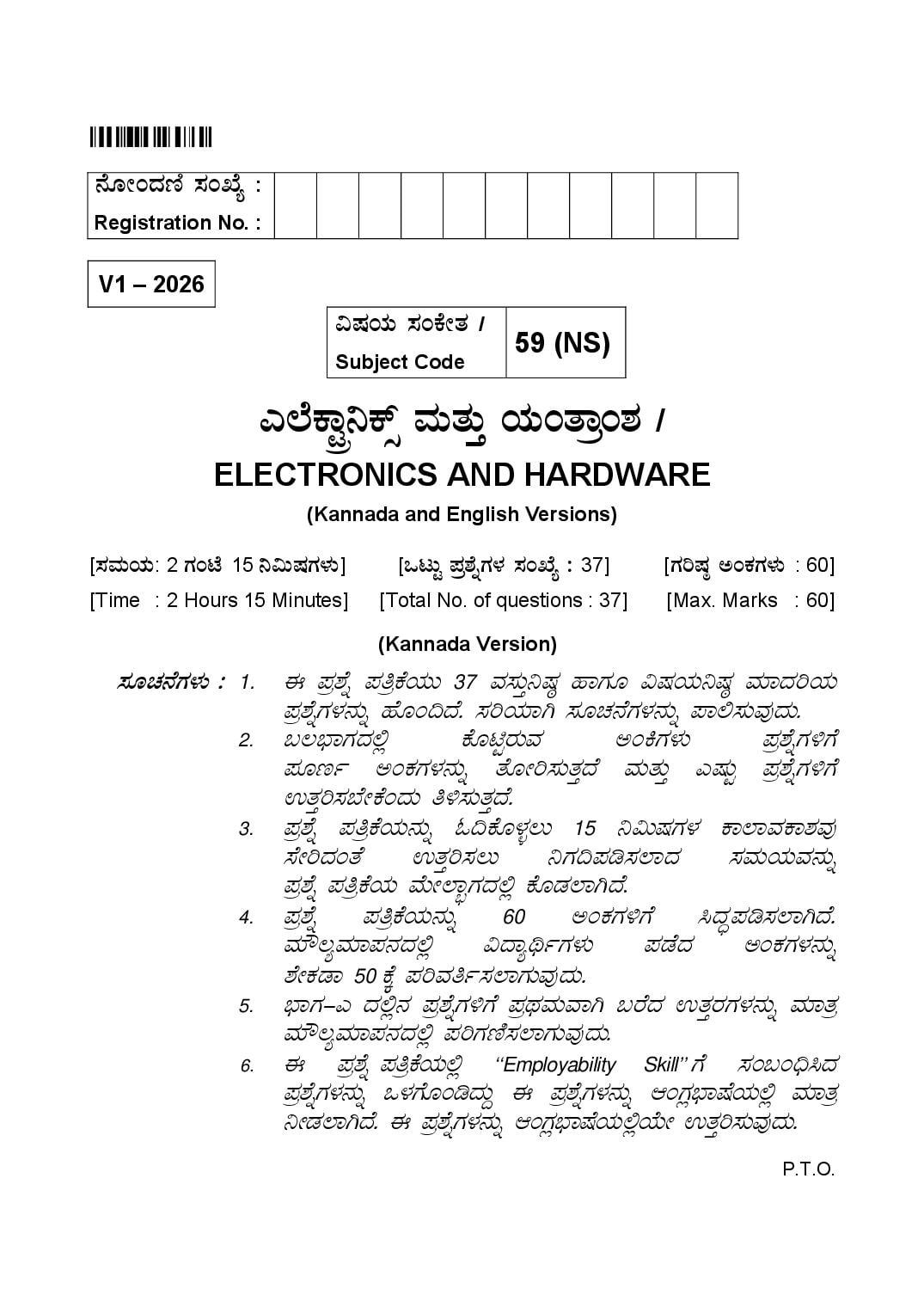
Registration No. :
V1 – 2026
«µÀAiÀÄ ¸ÀAPÉÃvÀ /
59 (NS)
Subject Code
J¯ÉPÁÖç¤Pïì ªÀÄvÀÄÛ AiÀÄAvÁæA±À /
ELECTRONICS AND HARDWARE
(Kannada and English Versions)
[¸ÀªÀÄAiÀÄ: 2 UÀAmÉ 15 ¤«ÄµÀUÀ¼ÀÄ] [MlÄÖ ¥Àæ±ÉßUÀ¼À ¸ÀASÉå : 37] [UÀjµÀ× CAPÀUÀ¼ÀÄ : 60]
[Time : 2 Hours 15 Minutes] [Total No. of questions : 37] [Max. Marks : 60]
(Kannada Version)
¸ÀÆZÀ£ÉUÀ¼ÀÄ : 1. F ¥Àæ±Éß ¥ÀwæPÉAiÀÄÄ 37 ªÀ¸ÀÄÛ¤µÀ× ºÁUÀÆ «µÀAiÀĤµÀ× ªÀiÁzÀjAiÀÄ
¥Àæ±ÉßUÀ¼À£ÀÄß ºÉÆA¢zÉ. ¸ÀjAiÀiÁV ¸ÀÆZÀ£ÉUÀ¼À£ÀÄß ¥Á°¸ÀĪÀÅzÀÄ.
2. §®¨sÁUÀzÀ°è PÉÆnÖgÀĪÀ CAQUÀ¼ÀÄ ¥Àæ±ÉßUÀ½UÉ
¥ÀÆtð CAPÀUÀ¼À£ÀÄß vÉÆÃj¸ÀÄvÀÛzÉ ªÀÄvÀÄÛ JµÀÄÖ ¥Àæ±ÉßUÀ½UÉ
GvÀÛj¸À¨ÉÃPÉAzÀÄ w½¸ÀÄvÀÛzÉ.
3. ¥Àæ±Éß ¥ÀwæPÉAiÀÄ£ÀÄß N¢PÉƼÀî®Ä 15 ¤«ÄµÀUÀ¼À PÁ¯ÁªÀPÁ±ÀªÀÅ
¸ÉÃjzÀAvÉ GvÀÛj¸À®Ä ¤UÀ¢¥Àr¸À¯ÁzÀ ¸ÀªÀÄAiÀĪÀ£ÀÄß
¥Àæ±Éß ¥ÀwæPÉAiÀÄ ªÉÄïÁãUÀzÀ°è PÉÆqÀ¯ÁVzÉ.
4. ¥Àæ±Éß ¥ÀwæPÉAiÀÄ£ÀÄß 60 CAPÀUÀ½UÉ ¹zÀÞ¥Àr¸À¯ÁVzÉ.
ªÀiË®åªÀiÁ¥À£ÀzÀ°è «zÁåyðUÀ¼ÀÄ ¥ÀqÉzÀ CAPÀUÀ¼À£ÀÄß
±ÉÃPÀqÁ 50 PÉÌ ¥ÀjªÀwð¸À¯ÁUÀĪÀÅzÀÄ.
5. ¨sÁUÀ-J zÀ°è£À ¥Àæ±ÉßUÀ½UÉ ¥ÀæxÀªÀĪÁV §gÉzÀ GvÀÛgÀUÀ¼À£ÀÄß ªÀiÁvÀæ
ªÀiË®åªÀiÁ¥À£ÀzÀ°è ¥ÀjUÀt¸À¯ÁUÀĪÀÅzÀÄ.
6. F ¥Àæ±Éß ¥ÀwæPÉAiÀÄ°è ‘‘Employability Skill’’ UÉ ¸ÀA§A¢ü¹zÀ
¥Àæ±ÉßUÀ¼À£ÀÄß M¼ÀUÉÆArzÀÄÝ F ¥Àæ±ÉßUÀ¼£ À ÄÀ ß DAUÀè¨Ás µÉAiÀÄ°è ªÀiÁvÀæ
¤ÃqÀ¯ÁVzÉ. F ¥Àæ±ÉßUÀ¼£ À ÄÀ ß DAUÀè¨Ás µÉAiÀÄ°èAiÉÄà GvÀÛj¸ÀĪÀÅzÀÄ.
P.T.O.
Page 2
¨sÁUÀ - J
I. ¸ÀjAiÀiÁzÀ GvÀÛgÀªÀ£ÀÄß Dj¹ §gɬÄj. (10 × 1 = 10)
1) What is the shortcut key to underline text in a spreadsheet?
a) Ctrl+b b) Ctrl+i
c) Ctrl+l d) Ctrl+u
2) How many text boxes does the first slide of libre office Impress have by
defaults?
a) 1 b) 2
c) 3 d) 4
3) ¸ËgÀ ¥Áå£À¯ï£ÀÄß ¥ÁågÀ¯Éïï DV eÉÆÃr¹zÁUÀ «zÀÄåvÀàçªÁºÀ
a) ¸ÀªÀÄ
b) ¨ÉÃgÉ ¨ÉÃgÉ
c) fûÃgÉÆÃ
d) ¸Àé®à eÁ¹Û
4) AiÀiÁªÀ vÀgÀºÀzÀ ¸ËgÀ ¹¸ÀÖªÀiïUÉ VæÃqï ¥ÀªÀgï CªÀ±ÀåPÀvÉ EgÀĪÀÅ¢®è?
a) D£ï-VæÃqï ¹¸ÀÖªÀiï b) D¥sï-VæÃqï ¹¸ÀÖªÀiï
c) ºÉÊ©æqï ¹¸ÀÖªÀiï d) VæÃqï mÉÊqï
5) ¸ËgÀ ¹¸ÀÖªÀiï£À°è E£Àélðgï£À ¥ÁæxÀ«ÄPÀ PÁAiÀÄðªÉãÀÄ?
a) AC EAzÀ DC UÉ ¥ÀjªÀvÀð£É
b) DC EAzÀ AC UÉ «zÀÄåwÛ£À ¥ÀjªÀvÀð£É
c) ¨ÁåljUÀ¼À°è «zÀÄåwÛ£À ¸ÀAUÀæºÀuÉ
d) ¸ÉÆïÁgï gÉÃrAiÉÄõÀ£ï C¼ÀvÉ ªÀiÁqÀĪÀÅzÀÄ
Page 3
6) ¸ËgÀ ¥Áå£À¯ïUÉ ªÀÄvÀÄÛ ¨ÁåljUÉ ¸ÉÃj¸ÀĪÀ ¸ÁzsÀ£À
a) E£Àélðgï b) ¨Áålj
c) ZÁeïð PÀAmÉÆæîgï d) ¥sÀÆå¸ï
7) ºÀ½îUÀ¼À°è J¯ï.¹.¹. ¸Áܦ¸À®Ä AiÀiÁªÀ vÀgÀºÀzÀ RZÀÄð eÁ¹Û DUÀÄvÀÛzÉ?
a) PÁ«ÄðPÀgÀ
b) zÀÄqÀÄØ
c) ¨sÀÆ«Ä
d) ¸ÁjUÉ ªÉZÀÑ
8) ªÀåªÀºÁgÀ vÀAvÀæzÀ ªÀÄÄRå WÀlPÀUÀ¼ÀÄ
a) «ÄµÀ£ï b) zÀÄqÀÄØ
c) ¨sÀÆ«Ä d) PÁ«ÄðPÀgÀÄ
9) ¸ËgÀ ZÁfðAUï ¸ÁܪÀgÀPÉÌ ªÀÄÄRå ±ÀQÛAiÀÄ ªÀÄÆ®
a) UÁ½ b) ¸ÀÆAiÀÄð£À ±ÁR
c) £ÉʸÀVðPÀ C¤® d) røɯï
10) ¸ÉÆïÁgÀ jPÁëUÉ ªÀÄÄRå ±ÀQÛAiÀÄ ªÀÄÆ®
a) ¥ÉmÉÆæïï
b) røɯï
c) «zÀÄåvï ªÉÆÃmÁgï
d) ªÀÄ£ÀĵÀå£À ¥ÁzÉÆÃ¥ÀZÁgÀ¢AzÀ ªÀiÁvÀæ
Page 4
¨sÁUÀ – ©
II. F PɼÀV£À AiÀiÁªÀÅzÁzÀgÀÆ ºÀvÀÄÛ ¥Àæ±ÉßUÀ½UÉ GvÀÛj¹. (10 × 2 = 20)
11) Write a types of spreadsheets.
12) How to start libre office Impress? Write steps.
13) ZÁfðAUï PÀAmÉÆæïï JAzÀgÉãÀÄ?
14) JgÀqÀÄ vÀgÀºÀzÀ ¸ËgÀ ¥Áå£À¯ï ªÉÊjAUïUÀ¼À£ÀÄß w½¹.
15) ¸ÉÆïÁgï ¦.«. ¹¸ÀÖªÀiï£À°è E£Àélðgï ºÉÃUÉ PÁAiÀÄð¤ªÀð»¸ÀĪÀÅzÀÄ?
16) N¥À£ï ¸ÀPÀÆåðmï ªÉÇïÉÖÃeï JAzÀgÉãÀÄ?
17) ZÁfðAUï PÀAmÉÆæÃ¯ï ¸ÀªÀĸÉåUÉ JgÀqÀÄ ªÀÄÄRå PÁgÀtUÀ¼À£ÀÄß w½¹.
18) ¸ÀgÀt ªÀÄvÀÄÛ ¸ÀªÀiÁ£ÁAvÀgÀ PÀ£ÉPÀë£ïUÀ¼À £ÀqÀÄ«£À ªÀåvÁå¸À w½¹.
19) ¸ÉÆïÁgï ¦.«. ¹¸ÀÖªÀiï£ÀÄß zÉÊ£ÀA¢£À ¤ªÀðºÀuÉ ªÀiÁqÀĪÀÅzÀjAzÀ
DUÀĪÀ ¥ÀæAiÉÆÃd£ÀUÀ¼À£ÀÄß ¥ÀnÖ ªÀiÁr.
20) ¸ËgÀ ZÁfðAUï ¸ÁܪÀgÀ JAzÀgÉãÀÄ?
21) ¸ÉÆïÁgï ¥Áå£À¯ï «zsÀUÀ¼À£ÀÄß w½¹.
22) ¸ËgÀ ¯ÁålgÀ£ï£À ¥ÀæªÀÄÄR ªÀÄÆgÀÄ WÀlPÀUÀ¼À£ÀÄß w½¹.
23) E£Àélðgï£À ¥ÀjÃPÉë ªÀiÁqÀĪÁUÀ vÉUÉzÀÄPÉƼÀÄîªÀ ªÀÄÄ£ÉßZÀÑjPÉUÀ¼À£ÀÄß
¥ÀnÖ ªÀiÁr.
Page 5
¨sÁUÀ - ¹
III. F PɼÀV£À AiÀiÁªÀÅzÁzÀgÀÆ DgÀÄ ¥Àæ±ÉßUÀ½UÉ GvÀÛj¹. (6 × 3 = 18)
24) Write the steps to print a presentation.
25) ¸ÉÆïÁgï ¦.«. VæÃqï ¸ÀA¥ÀQðvÀ ªÀåªÀ¸ÉÜAiÀÄ avÀæªÀ£ÀÄß §gÉzÀÄ
¨sÁUÀUÀ¼À£ÀÄß UÀÄgÀÄw¹.
26) What is self awareness? And how to manage it?
27) ¸ÉÊmï ¸ÀªÉÃð ªÀÄvÀÄÛ ¸ÉÆïÁgï ¦.«. ¹¸ÀÖªÀiï£À ¥ÁågÁ«ÄÃlgï£ÀÄß w½¹.
28) E£Àélðgï£À PÁAiÀÄð¤ªÀðºÀuÉAiÀÄ£ÀÄß ¥ÀjÃQë¸ÀĪÀ ºÀAvÀUÀ¼À£ÀÄß «±Éèö¹.
29) ¸ËgÀ ¹¸ÀÖªÀiïUÉ ¸ÀPÁðj MzÀV¹zÀ ¸Ë®¨sÀåUÀ¼À£ÀÄß w½¹.
30) fêÀ£À ZÀPÀæ ªÉZÀÑ «±ÉèõÀuÉAiÀÄ£ÀÄß w½¹.
31) ¥ÉÆÃmÉð§¯ï C£ÀéAiÀÄPÀUÀ½UÉ ºÉÆA¢PÉƼÀÄîªÀ ¨ÁUÀĪÀ ¸ËgÀ ¥sÀ®PÀUÀ¼À£ÀÄß
KPÉ DzÀ±ÀðªÉAzÀÄ ¥ÀjUÀt¸À¯ÁUÀÄvÀÛzÉ? wêÀiÁð¤¹.
32) ¸ËgÀ «zÀÄåvï ZÁfðAUï ¨ÁåljAiÀÄ C£ÀÄPÀÆ®UÀ¼À£ÀÄß w½¹.
33) ¸ÉÆïÁgï ¹ÖçÃmï-¯ÉÊmï ºÉÃUÉ PÁAiÀÄð¤ªÀð»¸ÀÄvÀÛzÉ w½¹.
Page 6
¨sÁUÀ - r
IV. F PɼÀV£À AiÀiÁªÀÅzÁzÀgÀÆ JgÀqÀÄ ¥Àæ±ÉßUÀ½UÉ GvÀÛj¹. (2 × 6 = 12)
34) ¸ÉÆïÁgï ¦.«. ¹¸ÀÖªÀiï£À J¹/r¹ PÀ£ÉPÀë£ï avÀæ §gÉzÀÄ w½¹.
35) “PÀĸÀĪÀÄ” (KUSUMA) AiÉÆÃd£ÉAiÀÄ£ÀÄß «ªÀj¹ ªÀÄvÀÄÛ F AiÉÆÃd£ÉUÉ
AiÀiÁgÀÄ AiÀiÁgÀÄ CºÀðgÀÄ w½¹.
36) ¸ÉÆïÁgï ¥Áå£À¯ï ¸ÀéZÀÒvÉ ªÀÄvÀÄÛ ¤ªÀðºÀuÉ ¸ÀªÀÄAiÀÄzÀ°è vÉUÉzÀÄPÉƼÀÄîªÀ
ªÀÄÄ£ÉßZÀÑjPÉUÀ¼À£ÀÄß w½¹.
37) ¸ÉÆïÁgï ¥ÀªÀgï PÉÆïïØ ¸ÉÆÖÃgÉÃeï ªÀåªÀ¸ÉÜAiÀÄ PÁAiÀiÁðZÀgÀuÉAiÀÄ£ÀÄß
«ªÀj¹. gÁwæ ¸ÀªÀÄAiÀÄzÀ°è CzÀÄ ºÉÃUÉ vÀA¥ÁV¸ÀÄvÀÛzÉ?
———————————
Page 7
(English Version)
Instructions : 1. This question paper consists of 37 objective and subjective
types of questions. Follow the instructions.
2. Figure in the right hand margin indicate maximum
marks for the question and the number of questions to be
attend.
3. The maximum time to answer the paper is given at the top
of the questions paper. It includes 15 minutes for reading
the question paper.
4. Question paper is prepared for 60 marks obtained by the
students will be converted into 50 percent.
5. For PART-A questions, only the first written answers
will be considered for evaluation.
6. This question paper consists of questions related to
“Employability Skill”. This questions are given in English
version only. Answer these questions in English only.
PART – A
I. Choose the correct answer. (10 × 1 = 10)
1) What is the shortcut key to underline text in a spreadsheet?
a) Ctrl+b b) Ctrl+i
c) Ctrl+l d) Ctrl+u
2) How many text boxes does the first slide of libre office Impress have by
defaults?
a) 1 b) 2
c) 3 d) 4
Page 8
3) In a parallel connection of the solar panel the current is that panels is
a) Same
b) Different
c) Zero
d) Slightly increases
4) Which type of solar system needs to be Installed where grid power is not
available?
a) On grid system
b) Off-grid system
c) Hybrid system
d) Grid tide
5) What is the primary function of an invertor in a solar system?
a) Convert AC Electricity to DC
b) Convert DC Electricity to AC
c) Store excess Electricity in batteries
d) Measure solar irradiance level
6) The device which connect between the solar panel and battery bank is
a) Inverter
b) Battery
c) Charge controller
d) Fuse
Page 9
7) Which cost influences LCC most in rural installation?
a) Labour
b) Money
c) Land
d) Transportation
8) Main components of business strategy
a) Mission b) Money
c) Land d) Labour
9) What is the main source of energy for a solar charging station?
a) Wind b) Sunlight
c) Natural gas d) Diesel
10) A solar Rickshaw is powered by
a) Petrol
b) Diesel
c) An electric motor
d) Human pedaling only
PART – B
II. Answer any ten of the following questions. (10 × 2 = 20)
11) Write a types of spreadsheets.
12) How to start libre office impress? Write steps.
Page 10
13) What is charge controller?
14) Write the two types of the solar panel wiring.
15) How does inverter work in solar PV system?
16) What is open circuit voltage?
17) What are the two main causes of charge controller failure?
18) Write the difference between series and parallel connection.
19) List any two benefits of Regular maintenance of solar PV system.
20) What are the solar charging station?
21) List the types of solar panel.
22) What are the three main components of a solar Lantern?
23) Write two precautions to be taken while testing an inverter.
PART – C
III. Answer any six of the following questions. (6 × 3 = 18)
24) Write the steps to print a presentation.
25) Draw the diagram of typical layout of grid connected solar PV system.
26) What is Self Awareness? And how to manage it?
Page 11
27) List of parameters for the site survey and selection of the solar
PV system.
28) Describe the steps to check the performance of an inverter.
29) List three government incentives for solar system.
30) Explain life cycle cost analysis.
31) Why are flexible solar panels consider ideal for portable application?
Justify.
32) Write the benefits of solar electric battery charging.
33) Explain in simple steps how a solar street light works.
PART – D
IV. Answer any two of the following questions. (2 × 6 = 12)
34) Draw the block diagram of AC/DC connection of solar PV system.
35) Who is Eligible for ‘‘Kusuma’’ scheme and explain Kusuma scheme.
36) What are the precautions and safety measures to be followed during
solar panel cleaning and maintenance?
37) Explain the working of a solar powered cold storage system. How does it
provide cooling during the night?
———————
Page 12
Document Details
| Board / Org | Karnataka Board |
| Exam | Class 12 |
| Type | Question Paper |
| Pages | 12 |
| Language | english |
| Updated | 24 Sep 2026 |