CBSE Class 12 Web Application Old Question Paper 2020
Finished viewing? Save it for later —
Download CBSE Class 12 Web Application Old Question Paper 2020 (PDF · 7 pages)About CBSE Class 12 Web Application Old Question Paper 2020
CBSE Class 12 Web Application Old Question Paper 2020 is available here for free download. Published by CBSE for Class 12, this question paper can be viewed online or downloaded as a PDF (7 pages). Candidates preparing for Class 12 can use CBSE Class 12 Web Application Old Question Paper 2020 to understand the exam pattern, the type of questions asked, and the overall difficulty level.
Frequently Asked Questions
How can I download CBSE Class 12 Web Application Old Question Paper 2020?
Open this page and click the Download button to save CBSE Class 12 Web Application Old Question Paper 2020 as a PDF. It is completely free on AglaSem Docs.
Is CBSE Class 12 Web Application Old Question Paper 2020 free to download?
Yes. CBSE Class 12 Web Application Old Question Paper 2020 can be viewed online and downloaded as a PDF free of cost on AglaSem Docs.
How many pages does CBSE Class 12 Web Application Old Question Paper 2020 have?
CBSE Class 12 Web Application Old Question Paper 2020 contains 7 pages, which you can read online or download together as a single PDF.
Where can I find more Class 12 study material?
You can find more Class 12 question papers, sample papers, syllabus, and answer keys on AglaSem Docs.
CBSE Class 12 Web Application Old Question Paper 2020 – Text
Read the full text of this question paper below — useful to quickly search, copy and reference the content online without downloading the PDF.
📄 View text version (7 pages)
Page 1
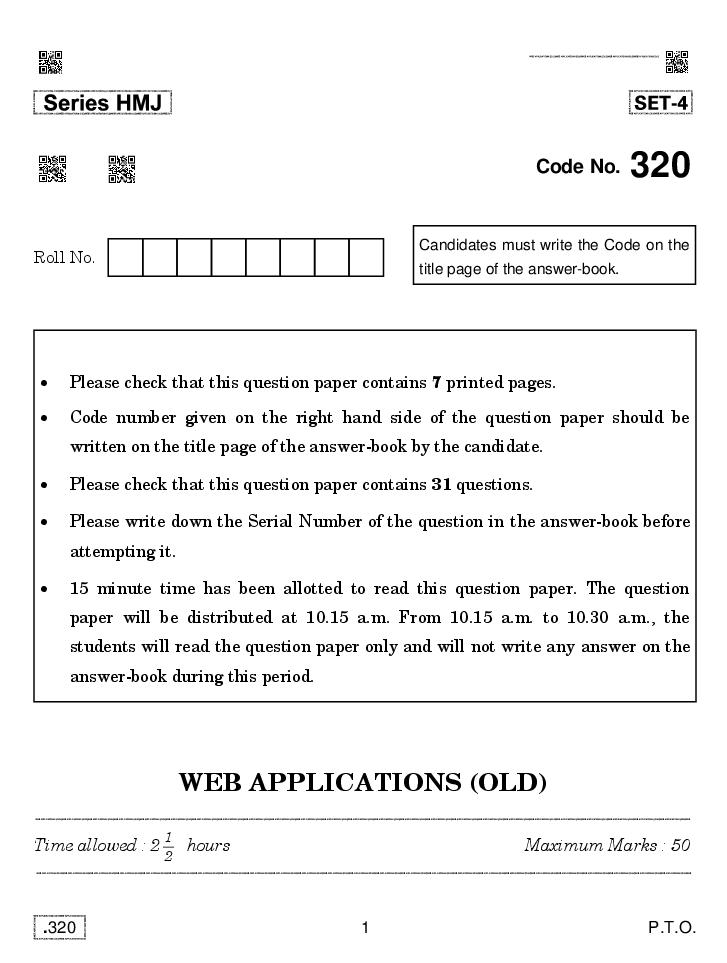
Candidates must write the Code on the
Roll No.
title page of the answer-book.
Please check that this question paper contains 7 printed pages.
Code number given on the right hand side of the question paper should be
written on the title page of the answer-book by the candidate.
Please check that this question paper contains 31 questions.
Please write down the Serial Number of the question in the answer-book before
attempting it.
15 minute time has been allotted to read this question paper. The question
paper will be distributed at 10.15 a.m. From 10.15 a.m. to 10.30 a.m., the
students will read the question paper only and will not write any answer on the
answer-book during this period.
WEB APPLICATIONS (OLD)
1
Time allowed : 2 hours Maximum Marks : 50
2
.320 1 P.T.O.
Page 2
(i) This question paper contains 31 questions out of which the candidate
needs to attempt only 23 questions.
(ii) Question paper is divided into two sections.
SECTION A
Multiple choice questions / Fill in the blanks/Direct questions :
contains total 12 questions of 1 mark each. Answer any
10 questions.
Very short answer type questions : contains total 7 questions of
2 marks each. Answer any 5 questions.
Short answer type questions : contains total 7 questions of 3 marks
each. Answer any 5 questions.
SECTION B
Long answer / Essay type questions : contains total 5 questions of 5 marks
each. Answer any 3 questions.
SECTION A
Multiple Choice Questions (Attempt any ten from the following) : 110=10
1. __________ displays our collection folders, which contain clips. 1
(A) Collection Pane
(B) Task Pane
(C) Storyboard
(D) Timeline
2. AVI stands for __________ . 1
(A) Audio Video Integration
(B) Automatic Video Interrupt
(C) Audio Video Interleaved
(D) Audio Virtual Implement
.320 2
Page 3
where you want to split the clip. 1
(A) Playback
(B) Preview
(C) Trim
(D) Zoom
4. The preview monitor can be made larger or smaller by clicking __________. 1
(A) View
(B) Insert
(C) Edit
(D) File
5. Which extension identifies a video file ? 1
(A) .avi
(B) .png
(C) .mp4
(D) .xml
6. We can upload a file to a web server using a protocol called __________. 1
(A) FPT
(B) IP
(C) TCP
(D) FTP
7. __________ tag conforms to the W3 standard and helps to achieve
standardization across the World Wide Web. 1
(A) param
(B) comment
(C) embed
(D) object
.320 3 P.T.O.
Page 4
(A) %
(B) <
(C) &&
(D) ?:
9. To use random() in JavaScript the syntax is : 1
(A) random()
(B) rand()
(C) Random.random()
(D) Math.random()
10. What will be the output of the following JavaScript code : 1
var name=[‘‘Red’’, ‘‘Blue’’, ‘‘Yellow’’, ‘‘Green’’];
name.pop()
(A) Red
(B) Green
(C) Yellow
(D) Blue
11. In JavaScript if a variable is defined using var in a compound statement
‘‘if’’, it will __________. 1
(A) be visible to the entire compound ‘‘if’’ statement
(B) not be visible to the entire compound ‘‘if’’ statement
(C) be visible to the entire function
(D) not be visible to the entire function
12. To use an object’s methods or properties, we write the object’s name,
__________ and then the method/property name. 1
(A) a dot[.]
(B) an asterisk[*]
(C) an ampersand[&]
(D) a pound[#]
.320 4
Page 5
Attempt any five questions : 25=10
13. Consider a video ‘‘Trial’’ divided into clips namely clip1, clip2, clip3. With
reference to the mentioned video ‘‘TRIAL’’, explain contiguous clips. 2
14. How is Timeline view useful ? 2
15. Write steps to import files into Windows Movie Maker. 2
16. Differentiate between Property and Method with example. 2
17. Explain Fall through with respect to switch statement with the help of an
example. 2
18. What are Snippets ? Write its advantage. 2
19. How can a PSD template be useful for a web designer ? 2
.320 5 P.T.O.
Page 6
Attempt any five questions : 35=15
20. Write steps to trim a clip in timeline view. 3
21. Write steps to edit the existing title in a video in Windows Movie Maker. 3
22. Name the two types of file formats in which an image can be saved.
Differentiate between them. 3
23. Assuming Samar has created an external JavaScript file named ‘‘code.js’’
to include in his webpage. Write a code to link the above file in the HTML
code of the webpage. Also mention where the code should be placed in the
HTML code. 3
24. What will be the final value of A and B on executing the following code : 3
A = 43
A++
B = A+1
25. What parameters need to be set in order to apply page transition on a
webpage ? 3
26. What does ‘‘Recalculate Hyperlink’’ do ? 3
SECTION D
Attempt any three questions : 53=15
27. Write a function that displays a prompt box which accepts a name and
displays a greet message ‘‘hello <name>, Have a good day’’ when the user
enters a name in a <p>(paragraph) which has an id ‘‘demo’’. The function
header is as below : 5
function myfunc()
{
}
.320 6
Page 7
(a) To store date and time in a variable and then display date and time
on the webpage.
(b) (i) To store ‘‘Genius is one percent inspiration, 99% perspiration’’
in a variable.
(ii) To search ‘‘percent’’ in the string ‘‘Genius is one percent
inspiration, 99% perspiration’’ and display it on the webpage.
29. Write any five ways to embed MP3 files into the site. 5
30. Write any five ways to embed Video in a webpage. 5
31. How are multimedia elements stored ? Write and explain any two
advantages of using Multimedia on webpages. 5
.320 7 P.T.O.
Document Details
| Board / Org | CBSE |
| Exam | Class 12 |
| Type | Question Paper |
| Pages | 7 |
| Updated | 22 Jul 2026 |