CBSE Class 10 Marking Scheme 2022 for Computer Application Term 2
Finished viewing? Save it for later —
Download CBSE Class 10 Marking Scheme 2022 for Computer Application Term 2 (PDF · 4 pages)About CBSE Class 10 Marking Scheme 2022 for Computer Application Term 2
CBSE Class 10 Marking Scheme 2022 for Computer Application Term 2 is available here for free download. Published by CBSE for Class 10, this marking scheme can be viewed online or downloaded as a PDF (4 pages). Candidates preparing for Class 10 can use CBSE Class 10 Marking Scheme 2022 for Computer Application Term 2 to understand the exam pattern, the type of questions asked, and the overall difficulty level.
Frequently Asked Questions
How can I download CBSE Class 10 Marking Scheme 2022 for Computer Application Term 2?
Open this page and click the Download button to save CBSE Class 10 Marking Scheme 2022 for Computer Application Term 2 as a PDF. It is completely free on AglaSem Docs.
Is CBSE Class 10 Marking Scheme 2022 for Computer Application Term 2 free to download?
Yes. CBSE Class 10 Marking Scheme 2022 for Computer Application Term 2 can be viewed online and downloaded as a PDF free of cost on AglaSem Docs.
How many pages does CBSE Class 10 Marking Scheme 2022 for Computer Application Term 2 have?
CBSE Class 10 Marking Scheme 2022 for Computer Application Term 2 contains 4 pages, which you can read online or download together as a single PDF.
Where can I find more Class 10 study material?
You can find more Class 10 question papers, sample papers, syllabus, and answer keys on AglaSem Docs.
CBSE Class 10 Marking Scheme 2022 for Computer Application Term 2 – Text
Read the full text of this marking scheme below — useful to quickly search, copy and reference the content online without downloading the PDF.
📄 View text version (4 pages)
Page 1
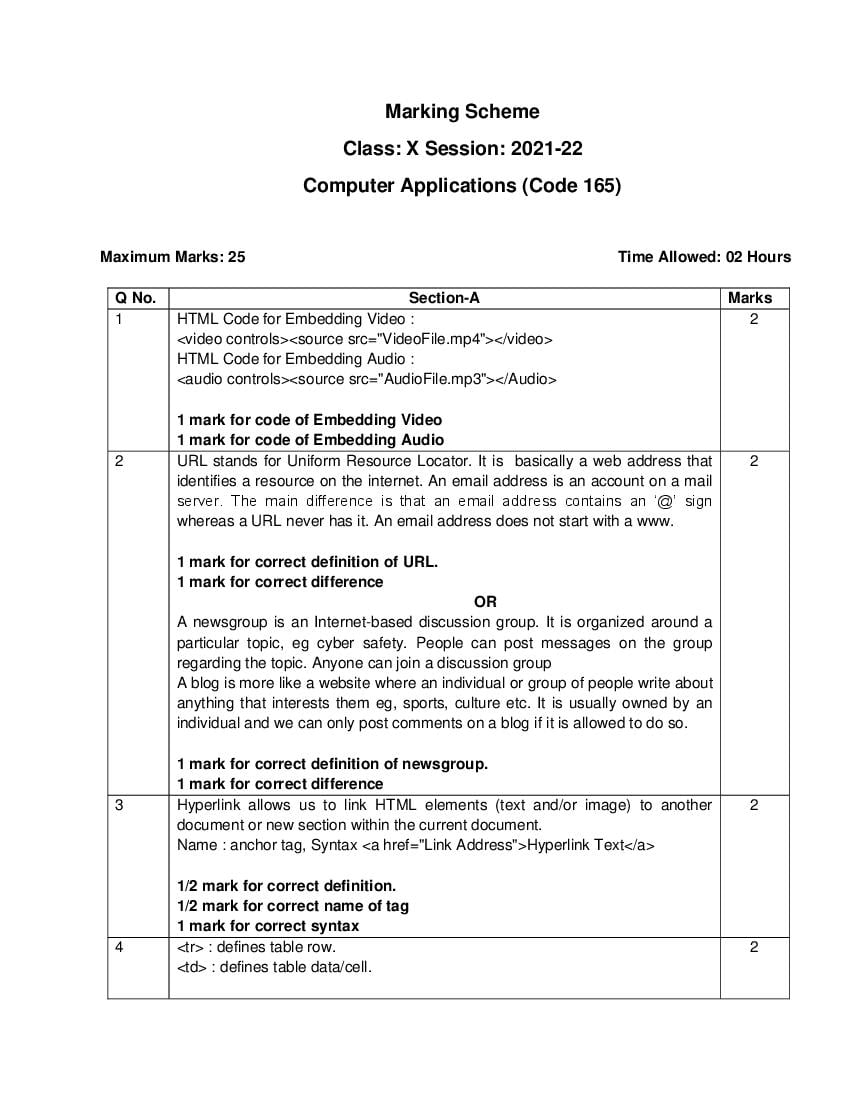
Class: X Session: 2021-22
Computer Applications (Code 165)
Maximum Marks: 25 Time Allowed: 02 Hours
Q No. Section-A Marks
1 HTML Code for Embedding Video : 2
<video controls><source src="VideoFile.mp4"></video>
HTML Code for Embedding Audio :
<audio controls><source src="AudioFile.mp3"></Audio>
1 mark for code of Embedding Video
1 mark for code of Embedding Audio
2 URL stands for Uniform Resource Locator. It is basically a web address that 2
identifies a resource on the internet. An email address is an account on a mail
server. The main difference is that an email address contains an ‘@’ sign
whereas a URL never has it. An email address does not start with a www.
1 mark for correct definition of URL.
1 mark for correct difference
OR
A newsgroup is an Internet-based discussion group. It is organized around a
particular topic, eg cyber safety. People can post messages on the group
regarding the topic. Anyone can join a discussion group
A blog is more like a website where an individual or group of people write about
anything that interests them eg, sports, culture etc. It is usually owned by an
individual and we can only post comments on a blog if it is allowed to do so.
1 mark for correct definition of newsgroup.
1 mark for correct difference
3 Hyperlink allows us to link HTML elements (text and/or image) to another 2
document or new section within the current document.
Name : anchor tag, Syntax <a href="Link Address">Hyperlink Text</a>
1/2 mark for correct definition.
1/2 mark for correct name of tag
1 mark for correct syntax
4 <tr> : defines table row. 2
<td> : defines table data/cell.
Page 2
<table>
<td>Ajay</td>
<td>Arts</td>
<td>Vijay</td>
<td>Commerce</td>
1 mark for the correct role
1 mark each for correct HTML Code
Q No. Section-B Marks
5 Internet is a world-wide network of interconnected computer networks and other 3
devices. It provides us with a very easy, fast and convenient way to access any
type of information. It uses the standard Internet Protocol (TCP/IP).
Two uses:
1. To access any educational site example : khan academy.
2. To send and receive emails using an email service.
The world wide web, or web for short, are the pages you see when you're at a
device and you're online whereas the internet is the network of connected
computers that the web works on.
1 mark for correct definition of Internet
1 mark for uses
1 mark for the difference between www and Internet
6 E learning can be defined as a learning system which makes use of electronic 3
resources mainly computers and the internet. It encompasses everything from
traditional classrooms that incorporate basic technology to online schools and
universities.
Merits
Since in e learning teachers use technology to teach, it is highly engaging.
Students can learn anywhere, anytime according to their convenience thus
saving a lot of time and money.
1 mark for correct definition
1 mark each for two merits
Page 3
available over internet whereas a web server is a software which provides these
documents when requested by web browsers.
A web browser sends request to web servers for web services etc. and a web
server responds to these requests by providing the required documents.
Google chrome is an example of a web browser whereas Apache server is an
example of a web server.
1 mark for each correct difference.
1 mark for correct example of web browser and web server
OR
The main difference between a 3G and 4G mobile technology is the speed
3G, the 3rd generation of 4G is the 4th generation of broadband cellular
wireless mobile network technology, succeeding 3G.
telecommunications tech
A typical 3G phone can 4G phone can download files at speeds of
download files at a upto 1GBps
maximum speed of up to
21Mbps.
1.5 mark for each correct difference
Q No. Section-C Marks
8 (i) Video conferencing such as Skype, Zoom etc 1
1 mark for correct answer
8 (ii) SMTP(Simple Mail Transfer Protocol) and POP(Post Office Protocol) 1
1 mark for correct answer
8 (iii) SSH(Secure Shell) 1
1 mark for correct answer
8 (iv) Search engine / web browser 1
1 mark for correct answer
8 (v) Download the files from the link 1
1 mark for correct answer
9 <html> 4
<head>
</head>
<body bgcolor="LightCyan">
<h1>HTML TABLE</h1>
<table border="1">
Page 4
<th>First Name</th>
<th>Last Name</th>
<th>Class</th>
<td>FN1</td>
<td>LN1</td>
<td>12th</td>
<td>FN2</td>
<td>LN2</td>
<td rowspan="2">11th</td>
<td>3</td>
<td colspan="2">FN3 LN3</td>
</body>
<html>
1 mark for correct <html> structure (i.e
<html><head></head><body></body></html>) and Specification-1
1 mark for correct HTML code for Specification-2
1 mark for correct HTML code for Specification-3
1 mark for correct HTML code for Specification-4
1 mark for correct HTML code for Specification-5
Document Details
| Board / Org | CBSE |
| Exam | Class 10 |
| Type | Solution |
| Pages | 4 |
| Language | english |
| Updated | 30 Apr 2026 |