Karnataka SSLC Answer Key April 2019 Information Technology
Finished viewing? Save it for later —
Download Karnataka SSLC Answer Key April 2019 Information Technology (PDF · 12 pages)About Karnataka SSLC Answer Key April 2019 Information Technology
Karnataka SSLC Answer Key April 2019 Information Technology is available here for free download. Published by Karnataka Board for Class 10, this answer key can be viewed online or downloaded as a PDF (12 pages). Candidates preparing for Class 10 can use Karnataka SSLC Answer Key April 2019 Information Technology to understand the exam pattern, the type of questions asked, and the overall difficulty level.
Frequently Asked Questions
How can I download Karnataka SSLC Answer Key April 2019 Information Technology?
Open this page and click the Download button to save Karnataka SSLC Answer Key April 2019 Information Technology as a PDF. It is completely free on AglaSem Docs.
Is Karnataka SSLC Answer Key April 2019 Information Technology free to download?
Yes. Karnataka SSLC Answer Key April 2019 Information Technology can be viewed online and downloaded as a PDF free of cost on AglaSem Docs.
How many pages does Karnataka SSLC Answer Key April 2019 Information Technology have?
Karnataka SSLC Answer Key April 2019 Information Technology contains 12 pages, which you can read online or download together as a single PDF.
Where can I find more Class 10 study material?
You can find more Class 10 question papers, sample papers, syllabus, and answer keys on AglaSem Docs.
Karnataka SSLC Answer Key April 2019 Information Technology – Text
Read the full text of this answer key below — useful to quickly search, copy and reference the content online without downloading the PDF.
📄 View text version (12 pages)
Page 1
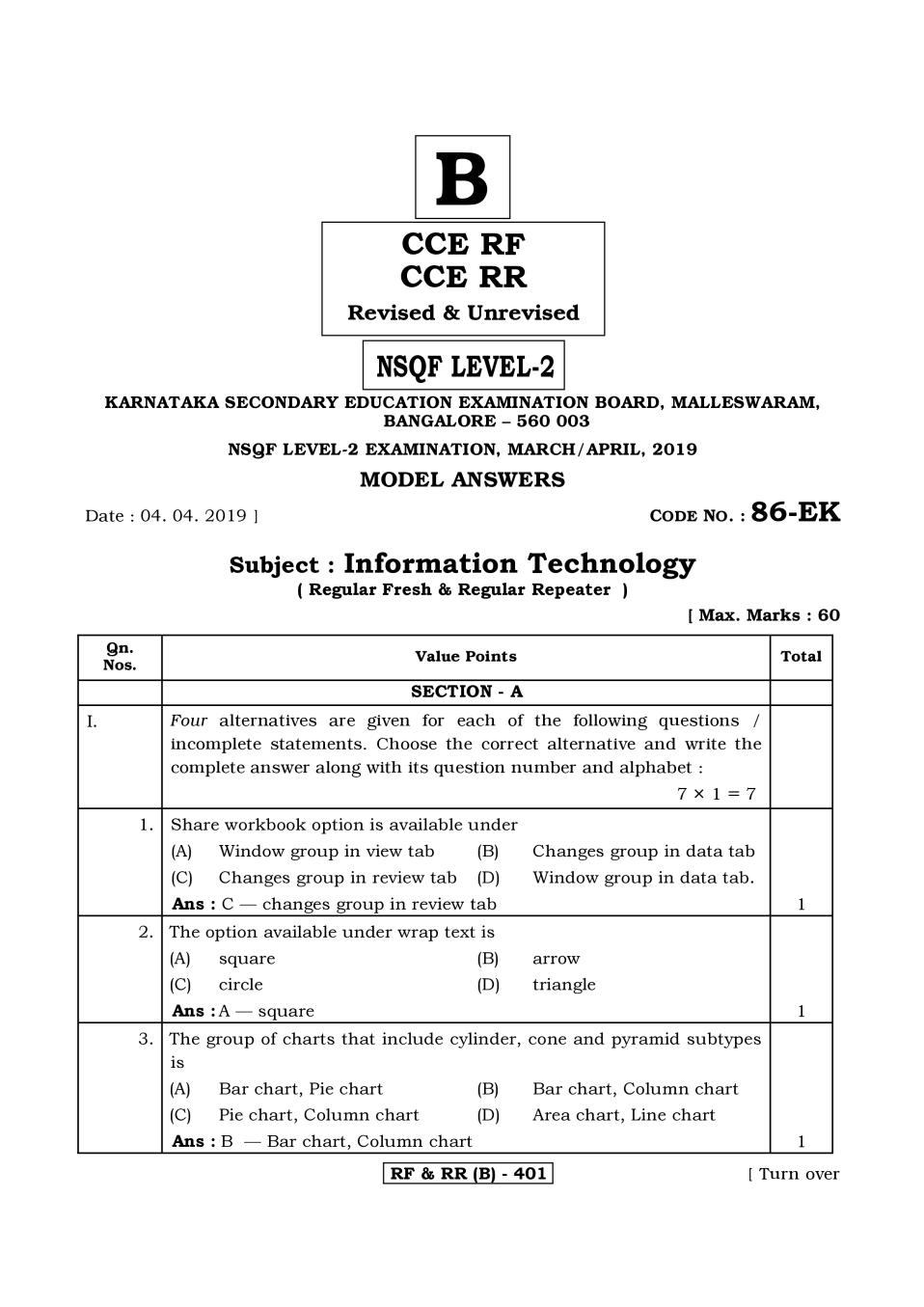
CCE RF
CCE RR
Revised & Unrevised
NSQF LEVEL-2
KARNATAKA SECONDARY EDUCATION EXAMINATION BOARD, MALLESWARAM,
BANGALORE – 560 003
NSQF LEVEL-2 EXAMINATION, MARCH/APRIL, 2019
MODEL ANSWERS
Date : 04. 04. 2019 ] CODE NO. : 86-EK
Subject : Information Technology
( Regular Fresh & Regular Repeater )
[ Max. Marks : 60
Qn.
Value Points Total
SECTION - A
I. Four alternatives are given for each of the following questions /
incomplete statements. Choose the correct alternative and write the
complete answer along with its question number and alphabet :
7×1=7
1. Share workbook option is available under
(A) Window group in view tab (B) Changes group in data tab
(C) Changes group in review tab (D) Window group in data tab.
Ans : C — changes group in review tab 1
2. The option available under wrap text is
(A) square (B) arrow 2z
(C) circle (D) triangle
Ans : A — square 1
3. The group of charts that include cylinder, cone and pyramid subtypes
is 3.
(A) Bar chart, Pie chart (B) Bar chart, Column chart
(C) Pie chart, Column chart (D) Area chart, Line chart
Ans : B — Bar chart, Column chart 1
RF & RR (B) - 401 [ Turn over
Page 2
Qn.
Value Points Total
4. The actions that can be performed by an user are called
(A) notes (B) appointments 4.
(C) journals (D) tasks
Ans : D — tasks 1
5. With reference to database
INSERT statement : Insertion of new information :: SELECT 5.
statement :………
(A) retrieval of information (B) modification of information
(C) deletion of information (D) specifying of information
Ans : A — retrieval of information 1
6. An option available under Editing group of Home tab in a spreadsheet
is
6.
(A) Format (B) Autosum
(C) Freeze panes (D) Page layout
Ans : B — Autosum 1
7. The option to be clicked to get two additional options while accepting a
meeting request is 7.
(A) Accept (B) Decline
(C) Propose New Time (D) Tentative
Ans : C — Propose New Time 1
II. Fill in the blanks with suitable answer : 3×1=3
8. The small letters in the selected text will be converted into capital
letters and capital letters will be converted into small letters by
selecting the option ………………. .
Ans : Toggle case. 1
9. In a spreadsheet, the option that makes all the tabs hidden from the
view is ……………………. .
Ans : Fullscreen. 1
10. In a presentation, Sound option under Media clips is available
in ………………. tab.
Ans : Insert. 1
RF & RR (B) - 401
Page 3
Qn.
Value Points Total
III. The groups available in word processor are given in Column-A and the
options under those groups are given in Column-B. Match them.
4×1=4
11. Match the following :
Column-A Column-B
i) Paragraph a) Change styles
ii) Header & Footer b) Letters
iii) Page set-up c) Alignment
iv) Illustrations d) Breaks
e) Font size
f) Clip art
g) Page number
i) c) Alignment 1
ii) g) Page number 1
iii) d) Breaks 1
iv) f) Clip art 1
IV. Answer the following questions : 6×1=6
12. How can section break of a word document be viewed ?
Click the show/Hide button on the Home tab in the Paragraph
section. 1
13. Write any two items that can be added to the header area of a page.
Company name, Page number, Logo, Name of the author.
(Any two ) ½+½ 1
14. How does assigning names to cells in a worksheet help you ?
Use it for quickly locating specific cells by entering the names. ½
It is helpful when working with large spreadsheets. ½ 1
RF & RR (B) - 401 [ Turn over
Page 4
Qn.
Value Points Total
15. How do you change the colours and effects of the chart in a
presentation ?
Chart styles under Design Tab. Select a style from chart style and
double click on it. 1
16. Write the two ways of scheduling an appointment using the calendar
application.
Using :
* Menu bar ½
* Calendar view ½ 1
17. Name two additional tabs that are available after inserting a chart in a
spreadsheet.
Design, Layout, Format. ( Any two ) ½+½ 1
V. Answer the following questions : 5 × 2 = 10
18. How does soundsentry help the users with auditory impairment ? How
can soundsentry option be enabled ?
Sound sentry generates visual warnings such as blinking title bar or
flashing border whenever computer generates sound. 1
Use sound sentry under sound Tab. Choose the type of visual warning
Apply > OK. 1 2
OR
Explain the method of launching and using Google Talk by an user
having G-mail account.
Instal Google Talk Application from www.google.com /talk click
Start>Programs>Google Talk> Google Talk. ½
( or double click Google Talk icon if available ) 1
Sign into Google Talk, window appears and Google talk is ready for
use. ½ 2
RF & RR (B) - 401
Page 5
Qn.
Value Points Total
19. What is a template ? Explain the method to create certificates for your
school.
Template is a sample fill in the blank document that can help in
saving time. ½
Go to File > New, select the required certificate, ½
customize the contents by replacing school name, student name etc. 1 2
OR
Explain the disadvantages of embedded document.
The embedded objects cannot be printed ½
The person opening your document must have related software to
operate the embedded file ½
The size of the document increase ½
If the object is linked, the person opening the document must
have a direct connection to the original file location. ½ 2
20. Mention the advantage of Sort option. Name the group and tab under
which Sort option is available.
Sort helps to arrange the selected data either in an ascending or
descending order. 1
Sort and Filter under Data tab. ½+½ 2
21. Explain the method to track the usage of Microsoft Word application
using journal entry.
Go to Tools > Options
Click on Journal options button. ½
Check Microsoft word under Also record files from section and click
Ok. ½
Now open word processing software, create a document and save it
and close. ½
Open time management software, Select Go > Journals
We can see the document created is listed. ½ 2
RF & RR (B) - 401 [ Turn over
Page 6
Qn.
Value Points Total
22. What is the advantage of binary data type in a database ? Write three
types of binary data type.
Binary Data Types are used for storing data in binary formats. They
can be used to store photos, music files. ½
LONGVAR BINARY ½
BINARY ½
VARBINARY. ½ 2
VI. Answer the following questions : 4 × 3 = 12
23. Explain the method of creating a blog account in Wordpress and
make it ready for use.
Open webbrowser, type http://signup.wordpress.com/signup/ ½
We get a page with the fields Blog address, Username, Password,
Email address and Language. 1
Fill the details click create Blog, Email is received for activating blog
account. ½
Open Email and click on activation link. ½
Once Activate Blog is clicked, we will be redirected to wordpress Blog
Account.
Now the Blog is ready to use. ½ 3
24. Explain the method of opening and arranging multiple workbook
windows in a spreadsheet.
Click on New window button on the view tab in window group. 1
This helps to open a second instance of a workbook in a separate
window.
To arrange the windows click arrange all button in the window
group. ½
Arrange windows dialog box appears which contains Tiled,
Horizontal, Vertical, Cascade options. 1
Click any of them to include only windows displaying views of the
current workbook, select windows of active workbook check box. ½
Click Ok. 3
OR
RF & RR (B) - 401
Page 7
Qn.
Value Points Total
How does conditional formatting useful in maintaining huge amount
of data in a spreadsheet ? Name the group and the tab under which
this option is available. What is the advantage of the option Highlight
cells rules that comes under this option ?
Conditional formatting allows to change the formatting such as font
colour, border, shading of the cells. ½
We can specify the conditions for the values in the cell, if the
condition is satisfied, then the formatting of the cell changes. This
feature is very useful when working on a profit & loss, temperature
variant worksheets. ½
Conditional formatting is available under ½
styles group in the Home Tab. ½
Highlight cells rules help us to set various conditions for the selected
value like greater than, less than, equal to, between etc. ½
We can format the cells with our own formatting style. ½ 3
25. Suggest any six tips to make the presentation effective.
Know the topic
Use key phrases about the topic
Avoid too much text on each slide
Limit the number of slides
Plan the layout of the slides
Avoid fancy fonts
Use contrasting colours for text and background
Use a slide design template to keep the presentation look
consistent
Use animations and transitions sparingly
Review the presentation. ( Any six ) 6×½ 3
RF & RR (B) - 401 [ Turn over
Page 8
Qn.
Value Points Total
26. Explain the steps to create a database in open office Base Application.
Click start > programs> open office.org 3.4.1>openoffice.org
Base 1
Select the option. Create a new database ½
Click Finish ½
Specify a name for the database in the Save As dialog box;
in the File name field and click save. 1 3
VII. Answer the following questions : 2×4=8
27. Explain the following with reference to database :
i) Numeric data type
ii) Primary key.
i) Numeric data types are used for describing numeric values for the
field used in the table of a database. 1
They can be used for storing information such as roll number,
year of admission etc. ½
The different types of numeric data types are TINYINT, INTEGER,
REAL FLOAT ……( Any one ) ½
ii) A primary key is a unique value that identifies a row in a table. 1
It is a unique field. They are also indexed in the database making
it faster for the database to search for a record. 1 4
RF & RR (B) - 401
Page 9
Qn.
Value Points Total
28. Explain four types of views available in a spreadsheet.
Normal view : The default view of the spreadsheet. It is a
collection of cells arranged in the work area. 1
Page layout : we can quickly fine tune a worksheet that contains
huge amount of data. 1
Page Break Preview : We can set the area that is to be set as a
page after inserting page break 1
Custom view : To view the selected area of a document
Fullscreen : Makes the workbook cover the entire screen. 1
( Any four ) 4
OR
Explain any four page layout options that are helpful while printing a
spreadsheet having huge amount of data.
Margins : We can select the predefined margin or we can define
our own margin settings by clicking custom margins and set
the margin values manually. 1
Orientation : We can select either landscape or portrait page.
Size : We can set the size of the page 1
Print area : We can set up the print area by clicking set print
area to set the selected to get printed 1
Background : Specify background for the sheet using
background option under page set-up in the page Layout Tab. 1
( * Hide or display grid lines ( Any four )
* Page Headers and Footers can also be explained. ) 4
RF & RR (B) - 401 [ Turn over
Page 10
Qn.
Value Points Total
SECTION - B
I. Four alternatives are given for each of the following questions /
incomplete statements. Choose the correct alternative and write the
complete answer along with its question number and alphabet :
3×1=3
29. Identify the future continuous tense of the sentence “I contacted my
broker Vikram”.
(A) I am contacting my broker Vikram
(B) I will be contacting my broker Vikram
(C) I should contact my broker Vikram
(D) I will contact my broker Vikram.
Ans : B — I will be contacting my broker Vikram 1
30. Kiran Lal Grocery is next to the mobile shop. The meaning of the
underlined words is
(A) beside
(B) opposite
(C) across
(D) in front of.
Ans : A — beside 1
31. The point at which a road divides into branches is called
(A) intersection (B) junction
(C) crossroad (D) fork.
Ans : D — fork. 1
II. Fill in the blank with suitable word given in the brackets.
32. It started raining ……………… we went out. ( as early as, as soon as )
as soon as. 1 1
RF & RR (B) - 401
Page 11
Qn.
Value Points Total
III. Answer the following question : 2
33. Mention any four points that should be included under personal
information while writing your resume.
Gender
Date of birth
Place of birth
Nationality
Marital status
Languages known. ( Any four ) 4×½ 2
IV. Answer the following question : 4×1=4
34. Fill in the blanks with the appropriate prepositions given in the
bracket.
i) Stand ………….. that chair and get me the box from the shelf.
( on, in )
ii) Take these vegetables ……………. the kitchen. ( to, into )
iii) Thank you ………………. your co-operation. ( of, for )
iv) My friends wanted to share a drink ………………. me. ( with, from )
i) on 1
ii) into 1
iii) for 1
iv) with 1 4
OR
RF & RR (B) - 401 [ Turn over
Page 12
Qn.
Value Points Total
Fill in the blanks with the appropriate word given in the brackets :
i) Radha …………….. moved to a new city. ( recently, daily )
ii) There is a ………………… monument near our house.
( history, historical )
iii) Jaipur is one of the ……………… planned cities in India.
( best, good )
iv) ‘Sangai’ is an endangered species which cannot be found
………….. else on earth. ( everywhere, anywhere )
i) recently 1
ii) historical 1
iii) best 1
iv) anywhere. 1 4
RF & RR (B) - 401
Document Details
| Board / Org | Karnataka Board |
| Exam | Class 10 |
| Type | Answer Key |
| Pages | 12 |
| Updated | 30 Apr 2026 |