HBSE Class 11 Sample Paper 2026 Answers Computer Science
Finished viewing? Save it for later —
Download HBSE Class 11 Sample Paper 2026 Answers Computer Science (PDF · 16 pages)About HBSE Class 11 Sample Paper 2026 Answers Computer Science
HBSE Class 11 Sample Paper 2026 Answers Computer Science is available here for free download. Published by Haryana Board for Class 11, this answer key can be viewed online or downloaded as a PDF (16 pages). Candidates preparing for Class 11 can use HBSE Class 11 Sample Paper 2026 Answers Computer Science to understand the exam pattern, the type of questions asked, and the overall difficulty level.
Frequently Asked Questions
How can I download HBSE Class 11 Sample Paper 2026 Answers Computer Science?
Open this page and click the Download button to save HBSE Class 11 Sample Paper 2026 Answers Computer Science as a PDF. It is completely free on AglaSem Docs.
Is HBSE Class 11 Sample Paper 2026 Answers Computer Science free to download?
Yes. HBSE Class 11 Sample Paper 2026 Answers Computer Science can be viewed online and downloaded as a PDF free of cost on AglaSem Docs.
How many pages does HBSE Class 11 Sample Paper 2026 Answers Computer Science have?
HBSE Class 11 Sample Paper 2026 Answers Computer Science contains 16 pages, which you can read online or download together as a single PDF.
Where can I find more Class 11 study material?
You can find more Class 11 question papers, sample papers, syllabus, and answer keys on AglaSem Docs.
HBSE Class 11 Sample Paper 2026 Answers Computer Science – Text
Read the full text of this answer key below — useful to quickly search, copy and reference the content online without downloading the PDF.
📄 View text version (16 pages)
Page 1
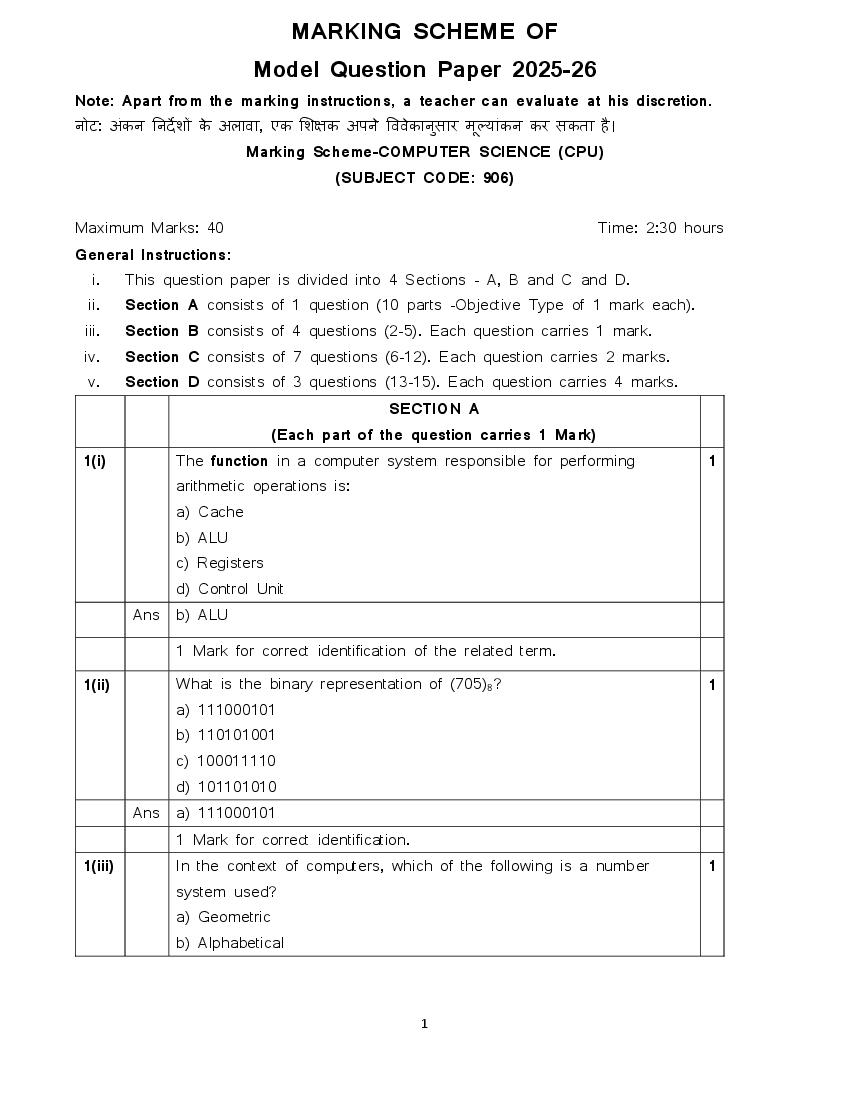
Model Question Paper 2025-26
Note: Apart from the marking instructions, a teacher can evaluate at his discretion.
नोट: अंकन ननर्दे शों के अलावा, एक शशक्षक अपने वववेकानस
ु ार मल
ू ्ांकन कर सकता है ।
Marking Scheme-COMPUTER SCIENCE (CPU)
(SUBJECT CODE: 906)
Maximum Marks: 40 Time: 2:30 hours
General Instructions:
i. This question paper is divided into 4 Sections - A, B and C and D.
ii. Section A consists of 1 question (10 parts -Objective Type of 1 mark each).
iii. Section B consists of 4 questions (2-5). Each question carries 1 mark.
iv. Section C consists of 7 questions (6-12). Each question carries 2 marks.
v. Section D consists of 3 questions (13-15). Each question carries 4 marks.
SECTION A
(Each part of the question carries 1 Mark)
1(i) The function in a computer system responsible for performing 1
arithmetic operations is:
a) Cache
b) ALU
c) Registers
d) Control Unit
Ans b) ALU
1 Mark for correct identification of the related term.
1(ii) What is the binary representation of (705)8? 1
a) 111000101
b) 110101001
c) 100011110
d) 101101010
Ans a) 111000101
1 Mark for correct identification.
1(iii) In the context of computers, which of the following is a number 1
system used?
a) Geometric
b) Alphabetical
1
Page 2
d) Decimal
Ans d) Decimal
1 Mark for correct identification.
1(iv) Nishika found a crumpled paper under her desk. She picked it up 1
and opened it. It contained some text which was struck off thrice.
But she could still figure out easily that the struck off text was the
email ID and password of Naman, her classmate. What is ethically
correct for Nishika to do?
a) Use the email ID and password to access Naman's account.
b) Approach Naman, inform him about finding the paper.
c) Share the information with other classmates.
d) None of these
Ans b) Approach Naman, inform him about finding the paper.
1 Mark for correct identification.
1(v) Criminal activities or offences carried out in a digital environment can 1
be considered as ________________
Ans Cybercrime
1 Mark for writing the correct activity.
Note: Do not deduct mark for any spelling mistake.
1(vi) The speed of a microprocessor is measured in __________. 1
Ans Giga Hertz or GHZ or GHz or ghz or Ghz
1 Mark for writing any correct unit above.
Note: Do not deduct mark for any spelling mistakes.
1(vii Machine Learning is a subsystem of Artificial Intelligence. 1
) (True/ False)
Ans True
1 Mark for correct identification.
1(viii) RAM is a primary memory device. (True/ False) 1
Ans True
1 Mark for correct identification.
2
Page 3
marked as Assertion (A) and Reason (R). Choose the correct
option out of the choices given below in each question:
1(ix) Assertion: Flowcharts help in understanding the logic of an 1
algorithm.
Reason: Flowcharts are only used in math’s problems.
I. Both (A) and (R) are correct and (R) is correct
explanation of (A).
II. Both (A) and (R) are correct and (R) is not the correct
explanation of (A).
III. (A) is true but (R) is false.
IV. (A) is false but (R) is true.
Ans III. (A) is true but (R) is false.
1 Mark for correct identification.
1(x) Assertion (A): Arithmetic operators in Python are used for 1
mathematical calculations.
Reason: These operators, including addition (+), subtraction (-),
multiplication (*), division (/), and modulus (%), perform basic
arithmetic operations on numbers.
I. Both (A) and (R) are correct and (R) is correct
explanation of (A).
II. Both (A) and (R) are correct and (R) is not the correct
explanation of (A).
III. (A) is true but (R) is false.
IV. (A) is false but (R) is true
Ans I. Both (A) and (R) are correct and (R) is correct explanation of (A).
1 Mark for correct identification.
SECTION B
(Each question carries 1 mark)
2. What is a Flowchart? 1
Ans
A flowchart is a visual representation of an algorithm.
1 Mark for any correct definition of Flowchart.
OR
What is an algorithm?
3
Page 4
algorithm.
1 Mark for any correct definition of Alogorithm.
3. What is the full form of IoT? 1
Ans Internet of Things
1 Mark for correct Full Form.
Deduct ½ marks for any spelling mistake.
4. What is Computer? 1
Ans Computer is an electronic device which takes input from the user,
process it and gives output to the user.
1 Mark for any correct definition of Computer.
5. What is string data type in python? 1
Ans A string in Python is a sequence of characters enclosed in single
(' '), double (" "), or triple (''' ''' or """ """) quotes, used to represent
textual data.
1 Mark for any correct definition of String data type.
SECTION C
(Each question carries 2 marks)
6. Explain the purpose of a "while loop" in python programming and 2
provide the basic syntax for its implementation.
Ans A while loop in Python is used to repeatedly execute a block of
code as long as a given condition is true. It is useful when the
number of iterations is not known in advance.
The basic syntax for a "while loop" in Python is as follows:
while condition:
# block of statements
For example,
A simple "while loop" that prints each element of a list could look
like this:
count = 1
while count <= 5:
4
Page 5
count = count+1
Output:
1
2
3
4
5
1 Mark for any correct explanation of the purpose of a "while"
statement in python programming.
1 Mark for correct syntax.
Deduct ½ mark for any syntax error.
Give full 1 mark for an example, even if no syntax is provided, as
long as it uses the 'while' loop in Python programming.
7. How will Python evaluate the following expression? 2
5 + 20 * ((13 * 2) - 9) / 20
Ans Python evaluates expressions following the order of operations, also
known as PEMDAS:
1. Parentheses: Solve expressions within parentheses first.
2. Exponents: Evaluate exponents.
3. Multiplication and Division: Perform multiplication and
division from left to right.
4. Addition and Subtraction: Finally, perform addition and
subtraction from left to right.
So for given expression: 5 + 20 * ((13 * 2) - 9) / 20
1. Solve the expression in innermost parentheses: 13*2=26
2. Substitute the result back into the expression:
5+20*(26−9)/20
3. Solve the expression inside the parentheses: 26−9=17
5
Page 6
5. Multiply: 20*17=340
6. Substitute the result back into the expression: 2+340/20
7. Divide: 340/20=17
8. Substitute the result back into the expression: 2+17
Finally, perform the addition: 2+17 which equals 19
So, the result of the expression is 19
1½ marks for any correct calculations.
½ marks for correct answer.
OR
Write a python program to find sum of three numbers.
Ans #Python Program to find the sum of three numbers
num1 = 10
num2 = 20
num3 = 30
result = num1 + num2 + num3
print(result)
Output:
60
½ marks for declaring the three variables.
½ marks for writing the formulae.
½ marks for using print function.
½ marks for writing the output.
Deduct ½ marks for each syntax error.
8. Do the following conversions: 2
(i) (10101111)2 = (?)16
(ii) (23D)16 = (?)2
Ans (i) (10101111)2 = (?)16
Step 1: Group binary digits in 4s from right to left
10101111= 1010 1111
Step 2: Convert each 4-bit group to hexadecimal
Now we know that 1010=A in hexadecimal
6
Page 7
(10101111)₂ = (AF)₁₆
Hence the result is (AF)16
(ii) (23D)16 = (?)2
Step 1: Convert each hexadecimal digit to its 4-bit binary equivalent
i.e.
2 = 0010
3 = 0011
D = 1011
Step 2: Hence the answer/result after conversion is :
(23D)16 = (00100111011)2 OR (100111011)2
1 mark for the correct answer in hexadecimal number system.
1 mark for the correct answer in binary number system.
Do not deduct any marks if the process is not written.
Give ½ mark for each correct process even if the final answer is
wrong.
9. Explain any two differences between primary and secondary memory. 2
Ans 1. Speed:
Primary memory is very fast.
Secondary memory is slower than primary memory.
2. Storage:
Primary memory stores data temporarily and has less storage
space (like RAM).
Secondary memory stores data permanently and has more
storage space (like hard disk or pen drive).
1 Mark each for any correct difference (1/2 marks each side).
Deduct 1/2 marks if examples are not given.
Do not deduct marks for any spelling mistake.
Priya is passionate about technology and is designing an app to help 2
10. elderly people schedule doctor appointments easily. She is currently
7
Page 8
She plans to use a structured approach to solve the problem.
i. Once Priya completes her algorithm and logic design, what should
be her next step?
a) Deploy the app immediately.
b) Begin coding based on the finalized logic.
c) Change the app’s name before moving ahead.
d) Take a break and start a new project.
Ans b) Begin coding based on the finalized logic.
1 mark for correct identification.
ii. After the coding phase is completed, what should Priya focus on
next?
a) Ignore testing and prepare the launch event.
b) Conduct thorough testing on different devices and scenarios.
c) Add more features before any testing.
d) Submit the app to app stores without testing.
Ans b) Conduct thorough testing on different devices and scenarios.
1 mark for correct identification.
11. Define the following terms: 2
a) Phishing
b) Cyberbullying
Ans a) Phishing:
Phishing is a cybercrime where attackers send fake emails or
messages to trick people into giving their personal or financial
information like passwords, ATM PIN, or credit card numbers.
b) Cyberbullying:
Cyberbullying is the act of bullying or harassing someone using digital
platforms like social media, messages, or emails repeatedly to hurt or
threaten them.
1 Mark for any correct definition of Phishing.
1 Mark for any correct definition of Cyberbullying.
OR
Explain Social Media and its Etiquettes.
Social Media:
Social media is a way to connect with people through apps like
WhatsApp, Facebook, and Instagram. We can share messages,
photos, and videos with friends and family.
8
Page 9
These are good habits we should follow while using social media.
Some common etiquettes are:
Be respectful and polite.
Don’t share fake news.
Think before you post anything.
Don’t use bad language.
Ask before sharing someone’s photo or video.
1 Mark for any correct explanation/definition of social media.
1 Mark for explaining Social Media Etiquettes with example/without
example.
12. Rahul uses his smartphone and computer for long hours every day.
Recently, he has been experiencing eye strain and headaches. He is
worried about how technology use is affecting his health.
i. What health problem is Rahul most likely experiencing due to long
screen time?
a) Toothache
b) Eye strain
c) Stomach ache
d) Hearing loss
Ans b) Eye strain
1 mark for correct identification.
ii. Which of the following is a good way to reduce the negative
health effects of technology use?
a) Taking regular breaks from screen
b) Using the device continuously without breaks
c) Ignoring health symptoms
d) Using only in dark rooms
Ans a) Taking regular breaks from screen
1 mark for correct identification.
SECTION D
(Each question carries 4 Mark)
13. Give the output of the following when 4
num1 = 4, num2 = 3, num3 = 2
i) num1 += num2 + num3
print (num1)
ii) num1 = num1 ** (num2 + num3)
9
Page 10
iii) num1 **= num2 + num3
print(num1)
iv) num1 = '5' + '5'
print(num1)
Ans i) num1 += num2 + num3
num1 = 4, num2 = 3, num3 = 2
num1 += num2 + num3 # Equivalent to num1 = num1 + num2 +
num3
print(num1)
Output: 9
ii) num1 = num1 ** (num2 + num3)
num1 = 4, num2 = 3, num3 = 2
num1 = num1 ** (num2 + num3)
# Equivalent to num1= num1 (num2 + num3) (i.e. 43+2 =45 = 1024)
print(num1)
Output: 1024
iii) num1 **= num2 + num3
num1 = 4, num2 = 3, num3 = 2
num1 **= num2 + num3
# Equivalent to num1 = num1 ** (num2 + num3)
# Equivalent to num1= num1 (num2 + num3) (i.e. 43+2 =45 = 1024)
print(num1)
Output: 1024
iv) num1 = '5' + '5'
num1 = '5' + '5'
print(num1)
Output: '55'
# Because the + operator concatenates the two strings instead of
performing numerical addition.
1 mark each for each correct output of the given codes.
1/2 marks each if process is explained but output is wrong.
10
Page 11
What is an operator? Explain any 3 relational operators with example
in Python Programming language.
Ans Operator:
An operator is used to perform specific mathematical or logical
operation on given values / operands. For Example: +, *, /, > etc.
Relational Operators:
Relational operator compares the values of the operands on its
either side and determines the relationship among them.
Assume the Python variables num1 = 10, num2 = 0, num3 = 10,
str1 = "Good", str2 = "Afternoon" for the following examples:
1 mark for any correct definition of operator.
1 mark each for explaining any three relational operators with
examples.
Deduct 1/2 marks each for not giving example (with or without
programming) of the respective relational operator.
11
Page 12
the functionality of each component.
Ans
The block diagram of a computer system
A computer system includes a central processing unit (CPU), memory,
input/output devices and storage devices. All these components
function together to give output.
Functionality of each component
Central Processing Unit (CPU)
It is the electronic circuitry of a computer that carries out the actual
processing and usually referred as the brain of the computer. It is
commonly called processor also.
Arithmetic Logic Unit (ALU)
ALU performs all the arithmetic and logic operations that need to be
done as per the instruction in a program.
Control Unit (CU)
It controls sequential instruction execution, interprets instructions and
guides data flow through the computer’s memory, ALU and input or
output devices.
Input Unit
The unit through which input is given to a computer is termed as input
unit. The devices in this unit convert the input data into a digital form
that is acceptable by the computer system. For ex. keyboard, mouse,
scanner, touch screen, etc.
12
Page 13
Main Memory: Data entered through input device is temporarily stored
in the main memory (also called RAM) of the computer system.
Secondary memory: For permanent storage and future use, the data
as well as instructions are stored permanently in additional storage
locations called secondary memory.
Output Unit
The unit that displays or physically produce the output from a computer
is called output unit. It converts digital information into human
understandable form. For example, monitor, projector, headphone,
speaker, printer, etc.
2 mark for any correct labelled diagram of a computer system.
2 mark for correct explanation of all components.
Deduct 1/2 marks for each mistake in diagram.
OR
Explain the need for an operating system. Also, list and explain any
three important functions of an operating system.
Ans Need for Operating System:
An Operating System (OS) is needed because it allows users to
interact with the computer hardware easily. It manages hardware
and software resources, so users can run programs, save files, and
use devices like the keyboard, mouse, and printer without any
difficulty.
Important Functions of an Operating System (Any 3 can be
explained):
1. Memory Management:
The OS keeps track of all memory used and free. It gives
memory to different programs when needed and frees it after
use.
2. Process Management:
It manages all running programs (processes). It decides which
process runs first and how long it should run.
3. File Management:
It helps in creating, saving, reading, writing, and deleting files.
It also keeps files organized in folders.
13
Page 14
The OS controls all input/output devices like keyboard, mouse,
printer, etc. It uses drivers to communicate with these devices.
5. Security and Protection:
The OS protects data and resources from unauthorized
access. It uses passwords and permissions to keep data safe.
6. User Interface:
The OS provides a user-friendly interface, like Windows or
Linux screens, so users can easily interact with the computer.
1 mark for explaining need of an Operating System.
1 mark each for any correct function of the operating system. (Max
3 marks)
15. Write a short note on each of the following: 4
i) Sensors
ii) Smart Cities
Ans i) Sensors:
A sensor is a device that takes input from the physical
environment and uses built-in computing resources to perform
predefined functions upon detection of specific input and then process
data before passing it on. For example accelerometer and gyroscope
which are used in our mobile phones. The display of our mobile
changes to vertical or horizontal with respect to the way we hold our
mobile. The accelerometer sensor in the mobile phones detects the
orientation of the phone. The Gyroscope sensors, tracks rotation or
twist of your hand and add to the information supplied by the
accelerometer.
Sensors are very commonly used as monitoring and observing
elements in real world applications.
The evolution of smart electronic sensors is contributing in a
large way to the evolution of IoT.
It will lead to creation of new sensor-based, intelligent systems.
ii) Smart Cities:
Smart cities makes use of computer and communication
technology along with Internet of Things (IoT) to manage and distribute
resources of a city efficiently.
There are many challenges due to rapid urbanisation in
management of resources like land water, waste, air pollution,
traffic congestions etc.
14
Page 15
manage them and make cities sustainable and liveable.
It can be achieved with smart building which uses sensors to
detect earthquake tremors and then warn nearby buildings so
that they can prepare themselves accordingly, smart bridge uses
wireless sensors to detect any loose bolt, cable or crack. Then
this information can be sent across a network of sensor nodes
to a centralised computer for further analysis so that further
action can be taken by the city authorities.
2 marks for any correct explanation of Sensors
2 mark for any correct explanation of Smart Cities
OR
Explain the following along with their applications.
i) Big Data
ii) Robotics
Ans i) Big Data: Big data is a term for handling massive and varied
datasets, requiring advanced tools to analyze and derive meaningful
insights. It is the data sets of enormous volume and complexity.
There is around 2.5 quintillion bytes of data created each day
There are over a billion Internet users, and a majority of the
world’s web traffic is coming from smartphones.
The data includes our chats, instant messages, photographs,
tweets, blog articles etc.
Such data cannot be processed and analysed using traditional
data processing tools.
Various challenges are integration, storage, analysis, searching,
processing, transfer, querying and visualisation of such data.
Characteristics of Big Data
Volume: The most prominent characteristic of big data is its enormous
size.
Velocity: The rate at which the data under consideration are being
generated and stored.
Variety: A dataset has varied data, such as structured, semi-structured
and unstructured data. For eg. Text, images, videos, web-pages etc.
Veracity: It refers to the trustworthiness of the data because processing
incorrect data can give wrong results or mislead the interpretations.
15
Page 16
can be of high business value.
ii) Robotics: Robot is basically a machine capable of carrying out one
or more tasks automatically with accuracy. It is programmable by a
computer, and follow the instructions given through computer programs.
Robots were initially used and made for doing industrial tasks.
Robot are of many types, such as wheeled robots, legged
robots, manipulators and which resemble humans are known as
humanoids.
Robots are used in industries, medical science, bionics, scientific
research, military, etc.
Some examples of Robots are:
NASA’s Mars Exploration Rover (MER) mission is a robotic
space mission to study about the planet Mars.
Sophia is a humanoid that uses artificial intelligence.
Drone is an unmanned aircraft which can be remotely controlled
or can fly autonomously through software-controlled flight plans
used in many fields, such as journalism, filming and aerial
photography etc.
2 marks for any correct explanation of Big Data
2 mark for any correct explanation of Robotics
16
Document Details
| Board / Org | Haryana Board |
| Exam | Class 11 |
| Type | Sample Paper |
| Pages | 16 |
| Updated | 24 Sep 2026 |